Navigation & Audio Audio upgrades, bluetooth, and navigation discussions surrounding the Clubman (R55), Cooper and Cooper S (R56), and Cabrio (R57) MINIs.

Navigation & Audio OEM navigation upgrade-Hopefully a how-to guide.

Old Jun 28, 2016 | 06:46 AM
  #201  
sandroatg's Avatar
sandroatg
1st Gear
Joined: Jun 2016
Posts: 16
Likes: 8
Hello!
My name is Sandro, from Rome.
First of all, I would like to thank you guys for the big work you shared. You encouraged me to try to install a sat nav (and combox) by myself on my 2008 Mini Cooper.


I looked for some schematics on the web...uselessy.

This is my problems: I have a "quadlock (?)" connector for the radio and an AV in connector, with cutted wires (see pictures).
I would like to identify every wire before removing my OEM boost cd.

Anyone knows where I could find schematics?
Tank you very much.

Sandro


Reply
Old Jun 28, 2016 | 07:35 AM
  #202  
ahorvath's Avatar
ahorvath
2nd Gear
Joined: Sep 2015
Posts: 57
Likes: 18
From: Orlando, FL
I used the diagram on page four on this tread. My Mini did not have a AV plug so I don't know what all the wires are. Did you try to go to the dealer and ask them for a printout.
 
Reply
Old Jul 28, 2016 | 02:14 PM
  #203  
jigo's Avatar
jigo
Neutral
Joined: Apr 2016
Posts: 2
Likes: 0
From: FL
Another success. Just got everything back together today.

Big thanks to ahorvath, he was quick to answer my many pm's.

OEM navigation upgrade-Hopefully a how-to guide.-ezaeibrl.jpg
 
Reply
Old Jul 28, 2016 | 02:17 PM
  #204  
bratling's Avatar
bratling
Super Moderator
iTrader: (2)
Joined: May 2009
Posts: 1,674
Likes: 218
From: North of Boston, MA
Originally Posted by jigo
Another success. Just got everything back together today.

Big thanks to ahorvath, he was quick to answer my many pm's.
Awesome! There's nothing like the feeling when you get it all back together and turn it on and it freaking works. Congrats! :-)
 
Reply
Old Jul 28, 2016 | 02:57 PM
  #205  
MCS4FUN's Avatar
MCS4FUN
6th Gear
Joined: May 2016
Posts: 1,409
Likes: 577
From: "The Other Arizona"
^^^ Yeah, looking at that bundle of loose wiring a few posts above, what're the odds of that happening for most DIY folks?
 
Reply
Old Jul 28, 2016 | 06:30 PM
  #206  
Requiemm's Avatar
Requiemm
Neutral
Joined: Jul 2016
Posts: 6
Likes: 0
From: Danbury, CT
Dumb question. I have a 2013 R56 that has mini connected, bluetooth and sat radio. As a result, I already have a screen, cut out, and joystick.


I would love to add Nav to it. Can any of the awesome folk here tell me what parts I need to get in order to do this?
 
Reply
Old Jul 31, 2016 | 12:13 PM
  #207  
ahorvath's Avatar
ahorvath
2nd Gear
Joined: Sep 2015
Posts: 57
Likes: 18
From: Orlando, FL
You will need a new Navigation radio and emulator. Or you can purchase the FSC codes from the dealer but it is super expensive and most will tell you that it cannot be done.
 
Reply
Old Jul 31, 2016 | 07:16 PM
  #208  
Requiemm's Avatar
Requiemm
Neutral
Joined: Jul 2016
Posts: 6
Likes: 0
From: Danbury, CT
Originally Posted by ahorvath
You will need a new Navigation radio and emulator. Or you can purchase the FSC codes from the dealer but it is super expensive and most will tell you that it cannot be done.
So my current screen will work? Just trying to decide if I'm going to go for it.
 
Reply
Old Aug 1, 2016 | 06:11 AM
  #209  
ahorvath's Avatar
ahorvath
2nd Gear
Joined: Sep 2015
Posts: 57
Likes: 18
From: Orlando, FL
Yes your screen should work.
 
Reply
Old Aug 1, 2016 | 07:33 AM
  #210  
Requiemm's Avatar
Requiemm
Neutral
Joined: Jul 2016
Posts: 6
Likes: 0
From: Danbury, CT
Originally Posted by ahorvath
Yes your screen should work.
Thanks! Last question, (for now), what about adding a reverse camera?
 
Reply
Old Aug 2, 2016 | 11:47 AM
  #211  
ahorvath's Avatar
ahorvath
2nd Gear
Joined: Sep 2015
Posts: 57
Likes: 18
From: Orlando, FL
I am not sure never looked into reverse camera.
 
Reply
Old Aug 14, 2016 | 10:24 AM
  #212  
Dimitris Sofianopoulos's Avatar
Dimitris Sofianopoulos
1st Gear
Joined: Sep 2014
Posts: 15
Likes: 1
From: Kiato, Korinthias
http://www.aliexpress.com/store/prod...323091235.html

will it work? Can someone confirm?
 
Reply
Old Oct 30, 2016 | 04:29 PM
  #213  
Seb530DA's Avatar
Seb530DA
Neutral
Joined: Oct 2016
Posts: 9
Likes: 0
From: Paris France
Originally Posted by ahorvath
Hi the blue connector is not for the USB hub as it is no more used with the combox. The blue connector is for the baseplate in the armrest.


Retrofit on my wife's MCS 2008
 
Reply
Old Oct 31, 2016 | 11:14 AM
  #214  
bratling's Avatar
bratling
Super Moderator
iTrader: (2)
Joined: May 2009
Posts: 1,674
Likes: 218
From: North of Boston, MA
Originally Posted by Seb530DA
Retrofit on my wife's MCS 2008
Nice! Did you need to install an emulator box or anything to get it to work with the pre-LCI car?
 
Reply
Old Oct 31, 2016 | 12:18 PM
  #215  
Seb530DA's Avatar
Seb530DA
Neutral
Joined: Oct 2016
Posts: 9
Likes: 0
From: Paris France
It doesn't matter if it's a pre lci car or not you will always need to use an emulator.
That's the only way !
 
Reply
Old Oct 31, 2016 | 05:39 PM
  #216  
ChiefSpoonS's Avatar
ChiefSpoonS
Neutral
Joined: Sep 2016
Posts: 5
Likes: 0
From: Charlotte, NC
Okay, I have a 2008 Mini Cooper Clubman S. So my factory upgrade is the CCC unit. I have someone who can code all the codes. Do I need the emulator? Or is that just for the CIC model?

I have factory BT and and voice

I see in thr post above me you guys say it's needed, but what does it do, that the coding can't do?
 

Last edited by ChiefSpoonS; Oct 31, 2016 at 06:24 PM.
Reply
Old Nov 1, 2016 | 02:26 AM
  #217  
Seb530DA's Avatar
Seb530DA
Neutral
Joined: Oct 2016
Posts: 9
Likes: 0
From: Paris France
Hi, why upgrade to the slow CCC when you can upgrade to the champ2 unit ?
Price are the same but not for the same result !
With the CCC you don't need the emulator as it's only for FSC based system.
 
Reply
Old Nov 1, 2016 | 02:56 AM
  #218  
ChiefSpoonS's Avatar
ChiefSpoonS
Neutral
Joined: Sep 2016
Posts: 5
Likes: 0
From: Charlotte, NC
Whats the actual advantage of the newer one? Where specifically did the emulator go?

I figure it should be cheaper to go CCC as I just need the Speedo and the DVD/brains as I already have the combo box. I haven't been able to find a good comparison of the 2 Nav units, and both are up-to-date maps.
 

Last edited by ChiefSpoonS; Nov 1, 2016 at 04:47 AM.
Reply
Old Nov 1, 2016 | 02:24 PM
  #219  
Seb530DA's Avatar
Seb530DA
Neutral
Joined: Oct 2016
Posts: 9
Likes: 0
From: Paris France


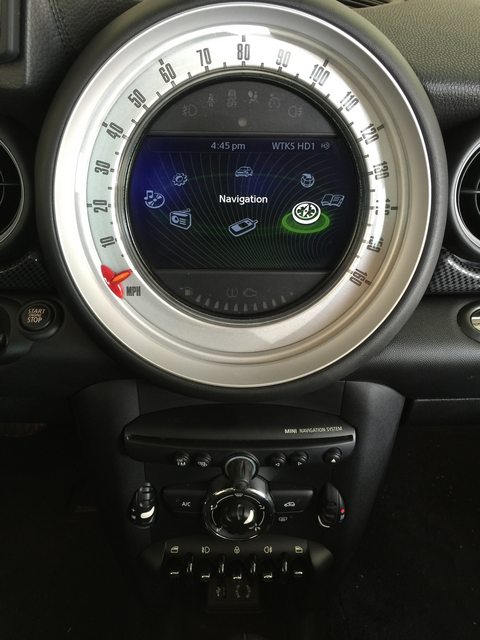
New handbrake console with navigation


Navigation controller


Controller fitted


Handbrake console fitted


Time to change VO I'm using an original ICOM Next.


IHKA from an MCS LCI. I've retrofitted the heated seats and the sport button.


Deutronic 1600DB charger


Using winkfp to flash the gateway right order is 62, 63, A0


All working !


Time to update the combox software


Bluetooth streaming from my iPhone


iPhone connected by Aplle's with wire to have the album artworks
 
Reply
Old Nov 2, 2016 | 07:41 AM
  #220  
ChiefSpoonS's Avatar
ChiefSpoonS
Neutral
Joined: Sep 2016
Posts: 5
Likes: 0
From: Charlotte, NC
What are the major differences? I can't seem to find anything solid

Will my current combo box work or will I need to get a different one?
 

Last edited by ChiefSpoonS; Nov 2, 2016 at 07:58 AM.
Reply
Old Nov 15, 2016 | 11:23 AM
  #221  
ECSTuning's Avatar
ECSTuning
Platinum Sponsor
10 Year Member
Liked
Loved
Community Favorite
Joined: Jan 2013
Posts: 36,762
Likes: 2,551
From: Wadsworth, Ohio
Congrats I like the newer 2011+ Nav interface than the older pre 2011.
 
__________________

MINI Guru/ MINI Owner Since 2004 | NEW Lifetime Part Replacement | Local Pickup
Milltek | Genuine MINI | Forge Motorsport | NM Engineering | ECS Performance | M7 Speed
Customer Service Hours: 8am-8pm EST|Sales Team Hours: 8am-11pm | SAT 10am-7pm 800.924.5172
Reply
Old Nov 23, 2016 | 08:19 AM
  #222  
ThomasvdB's Avatar
ThomasvdB
Neutral
Joined: Nov 2016
Posts: 6
Likes: 0
Dear all,
My name is Thomas and I am from the Netherlands. I would like to thank you all for this superb guideline for the refit of the CIC/ CCC.


I have also decided to go on the adventure. However I have come to some difficulties.


I hope you guys can help.


The system I am building in is a 02-2007 CCC. My basis was the standart big speedo.


1. Does anybody have the wiring diagram for the CCC? (So not the one on page 4/ I dont have a combox)

2. Does anybody have the part number for the 12 pin connector that goes in the back of the screen?

3. Does anybody know how I can get my navi and parking sensors to work together? (instead of getting a fealure every time I reverse)


That would be about it for now. Sorry if my English sucks but it's not my native language.


Any help is highly appreciated.

Best regards,


Thomas
 

Last edited by ThomasvdB; Nov 23, 2016 at 11:37 PM.
Reply
Old Nov 25, 2016 | 09:39 AM
  #223  
bratling's Avatar
bratling
Super Moderator
iTrader: (2)
Joined: May 2009
Posts: 1,674
Likes: 218
From: North of Boston, MA
Originally Posted by ThomasvdB
1. Does anybody have the wiring diagram for the CCC? (So not the one on page 4/ I dont have a combox)

2. Does anybody have the part number for the 12 pin connector that goes in the back of the screen?

3. Does anybody know how I can get my navi and parking sensors to work together? (instead of getting a fealure every time I reverse)
I think I can help with two of th4ese:

1. wiring diagrams. I was going to post a link to the wiring diagrams at bmw-planet.com, but it appears the site is down. I do, however, have PDFs/images I saved from the diagrams I used when retrofitting my 2009 CCC system, attached below.

In particular, here's the wiring diagram for the back of the radio/CCC head unit:


2. 12-pin connector. I don't have a part number but I did find one courtesy of eBay and a salvage yard in Lithuania. The seller I used appears to have a current listing for it:
http://www.ebay.com/itm/BMW-CCC-Navi...kAAOSwpDdVKIX6

It says BMW but it's the same part.

(It is not possible, as far as I can tell, to order the connector itself from MINI/BMW.)

On #3 I'm not sure; in theory if the car has been coded with the sensors they *ought* to simply work.

Originally Posted by ThomasvdB
That would be about it for now. Sorry if my English sucks but it's not my native language.
Your English is better than a lot of people who grew up allegedly speaking and writing it.


Good luck!
 
Attached Thumbnails OEM navigation upgrade-Hopefully a how-to guide.-x15-wiring-diagram.png  
Attached Files
File Type: pdf
WDS CID Diagram.pdf (48.7 KB, 533 views)
File Type: pdf
WDS CID and MJOY Docs.pdf (168.9 KB, 454 views)
File Type: pdf
WDS MJOY Diagram.pdf (38.8 KB, 474 views)
File Type: pdf
WDS CID Power supply docs.pdf (47.5 KB, 441 views)
File Type: pdf
WDS - Wire colors.pdf (14.5 KB, 559 views)
Reply
Old Dec 1, 2016 | 01:21 AM
  #224  
ThomasvdB's Avatar
ThomasvdB
Neutral
Joined: Nov 2016
Posts: 6
Likes: 0
You earned yourself some very positive karma points


Thanks a lot!


Originally Posted by bratling
I think I can help with two of th4ese:

1. wiring diagrams. I was going to post a link to the wiring diagrams at bmw-planet.com, but it appears the site is down. I do, however, have PDFs/images I saved from the diagrams I used when retrofitting my 2009 CCC system, attached below.

In particular, here's the wiring diagram for the back of the radio/CCC head unit:


2. 12-pin connector. I don't have a part number but I did find one courtesy of eBay and a salvage yard in Lithuania. The seller I used appears to have a current listing for it:
http://www.ebay.com/itm/BMW-CCC-Navi...kAAOSwpDdVKIX6

It says BMW but it's the same part.

(It is not possible, as far as I can tell, to order the connector itself from MINI/BMW.)

On #3 I'm not sure; in theory if the car has been coded with the sensors they *ought* to simply work.


Your English is better than a lot of people who grew up allegedly speaking and writing it.


Good luck!
 
Reply
Old Dec 5, 2016 | 03:27 PM
  #225  
Scooter24's Avatar
Scooter24
4th Gear
Joined: Aug 2016
Posts: 490
Likes: 11
From: Durand, Michigan
Hi everyone. Im interested in doing this retrofit also. I have a 2011 mcs, I've been reading and reading this thread and I am still a little confused on a few things. First I keep hearing ccc and cic I'm guessing that the different models of radio? When I do this the spedo with the screen does it have to match ccc or cic or is that I guess a universal part? Sorry if this is a dumb question. Just trying to understand as much as I can before tackling this project.

 
Reply

Thread Tools
Search this Thread

All times are GMT -7. The time now is 02:09 AM.