


Navigation & Audio Show Your iPod Installation

Reverse Gear
Joined: Sep 2006
Posts: 5,472
Likes: 0
After reading this entire post multiple times, I decided on a mounting 'system' for my MINI....
First off I wanted decent sound, so the AUX input, ICE-Link and the MINI official interface where considered. My wife has the BMW iPod integrated kit in her 325i, and an hour of realizing that the navigation was horrific kit me off that, The XM-Direct instalation led me away from the ICE-Link, so the AUX cable it was.....
As I wanted Phone/PDA navigation in the spot where an iPod would ideally live (bye-bye cup-holder) I needed a decent solution that would at least hold the device...
The mount is a Belkin cup-holder mount that I trimmed to size with a sharp blade.
Here are the pics

As you can see the holder is flush with the bottom of the cup-holder retaining rings


When I need to charge it the power cigar lighter has a USB chrager device that allows me to swap between my phone and the iPod easily.
The next upgrade is to tap power 'elsewhere' for both devices and run the wires a little neater
Sounds great, has not fallen out (yet) despite some enthusiatic on/off ramps......

PDA mount detail


First off I wanted decent sound, so the AUX input, ICE-Link and the MINI official interface where considered. My wife has the BMW iPod integrated kit in her 325i, and an hour of realizing that the navigation was horrific kit me off that, The XM-Direct instalation led me away from the ICE-Link, so the AUX cable it was.....
As I wanted Phone/PDA navigation in the spot where an iPod would ideally live (bye-bye cup-holder) I needed a decent solution that would at least hold the device...
The mount is a Belkin cup-holder mount that I trimmed to size with a sharp blade.
Here are the pics
As you can see the holder is flush with the bottom of the cup-holder retaining rings
When I need to charge it the power cigar lighter has a USB chrager device that allows me to swap between my phone and the iPod easily.
The next upgrade is to tap power 'elsewhere' for both devices and run the wires a little neater
Sounds great, has not fallen out (yet) despite some enthusiatic on/off ramps......
PDA mount detail

Thread Starter
|
3rd Gear
Joined: Oct 2005
Posts: 187
Likes: 0
From: Glendale, CA
it's a good solution, MaxN. I didn't like the BMW/MINI interface too. It's functionally very limited.
I started this thread and think it will be interesting to everyone if I share my new set-up. I got my '06 JCW about a month ago and decided to try the HK Drive+Play. I don't have any pictures yet; I am doing some final interior and exterior touches and will post images as soon as I finish.
In two words: I think the HK's system is the best. I mounted the display right above the tach. There is a spot when it's fully visible and doesn't stick out of the horizon line of windshield. I fabricated an aluminum plate for the controller and mounted on the armrest. It works almost the same way as iPod's controller. There is no lag when navigating. The iPod responds instantaneously when connected and continues to play where it was left off. I really love this setup and it only cost $100 (bought 3 months ago at Circuit City) plus AUX input. I had it installed for me, but the installation is very easy and it can be done in your parking lot or garage.
I'll let you know when the pictures ready.
I started this thread and think it will be interesting to everyone if I share my new set-up. I got my '06 JCW about a month ago and decided to try the HK Drive+Play. I don't have any pictures yet; I am doing some final interior and exterior touches and will post images as soon as I finish.
In two words: I think the HK's system is the best. I mounted the display right above the tach. There is a spot when it's fully visible and doesn't stick out of the horizon line of windshield. I fabricated an aluminum plate for the controller and mounted on the armrest. It works almost the same way as iPod's controller. There is no lag when navigating. The iPod responds instantaneously when connected and continues to play where it was left off. I really love this setup and it only cost $100 (bought 3 months ago at Circuit City) plus AUX input. I had it installed for me, but the installation is very easy and it can be done in your parking lot or garage.
I'll let you know when the pictures ready.


2nd Gear
Joined: Oct 2006
Posts: 120
Likes: 2
From: HBG, PA outskirts
...... decided to try the HK Drive+Play. I don't have any pictures yet; I am doing some final interior and exterior touches and will post images as soon as I finish.
In two words: I think the HK's system is the best. I mounted the display right above the tach. There is a spot when it's fully visible and doesn't stick out of the horizon line of windshield. I fabricated an aluminum plate for the controller and mounted on the armrest.
I'll let you know when the pictures ready.
In two words: I think the HK's system is the best. I mounted the display right above the tach. There is a spot when it's fully visible and doesn't stick out of the horizon line of windshield. I fabricated an aluminum plate for the controller and mounted on the armrest.
I'll let you know when the pictures ready.

Neutral
Joined: Jun 2005
Posts: 10
Likes: 0
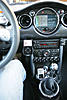
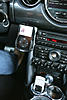
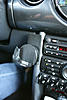
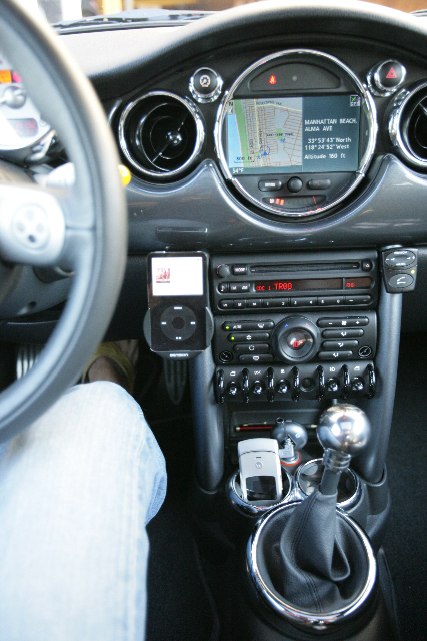
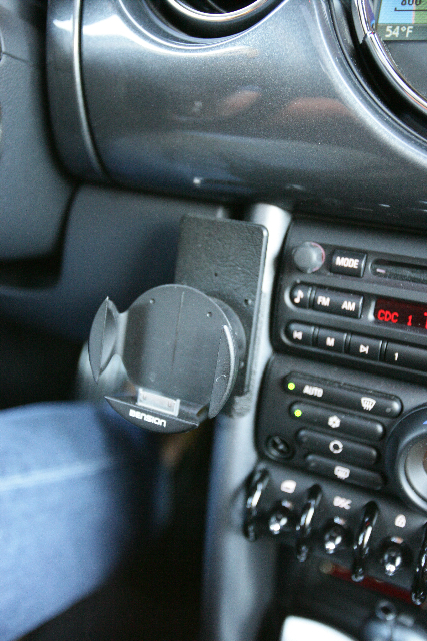
I've been using the Dension ICE connection for over a year. Looks clean and works great. It's controllable from the steering wheel or the I-pod. I placed it on the left post so that at night my right hand blocks the display while driving, keeps the light out of my eyes.

2nd Gear
Joined: Oct 2006
Posts: 120
Likes: 2
From: HBG, PA outskirts
Wonder if there is a new version of the Harman Kardan Drive and Play coming out soon. A Harman Kardan factory outlet dealer is selling about 4 a day on ebay. They start at 99 cents, and frequently finish between $40 and $70. That's quite a price break!
No, no, no!!! Do not go look until after I win *mine* at a nice low price!
Ah. Closer look says they are Factory Remanufactured. Still, it might be worth the while!
No, no, no!!! Do not go look until after I win *mine* at a nice low price!
Ah. Closer look says they are Factory Remanufactured. Still, it might be worth the while!
Last edited by godskid; Oct 27, 2006 at 11:27 AM. Reason: new info

5th Gear
Joined: Mar 2006
Posts: 1,016
Likes: 0
From: nyc
i installed mine in the glovebox...lol.
it runs thru the touch screen head unit as well as the steering wheel controls. so, i dont need it at hands reach.
sorry no pic though...just think of a 60g in the glovebox and there you go! lol
it runs thru the touch screen head unit as well as the steering wheel controls. so, i dont need it at hands reach.
sorry no pic though...just think of a 60g in the glovebox and there you go! lol

5th Gear
Joined: May 2006
Posts: 847
Likes: 0
From: Kennewick, WA
We just bought a GoMiniGo glove box organizer and an iRide. The only problem with this setup is, the GoMiniGo glove box organizer lacks a support under the left side of the unit. The left side is also where you want to mount your iRide (so it's closest to the driver). So our iRide bounces a bit over bumps, but so far it hasn't been a problem. (no skipping or anything like that)
I just wonder if we would have went with one of the other glove box organizers, if they would have had a left side support. NOTE: A left side support might interfere with the glove box heat/air vent.......dunno.
I do like the iRide. Makes things pretty slick!
I just wonder if we would have went with one of the other glove box organizers, if they would have had a left side support. NOTE: A left side support might interfere with the glove box heat/air vent.......dunno.
I do like the iRide. Makes things pretty slick!
Thread Starter
|
3rd Gear
Joined: Oct 2005
Posts: 187
Likes: 0
From: Glendale, CA
Check Out My New Setup
Hey everyone!
I recently bought HK Drive+Play and would like to share with you. I have been using it in my car for about 2 months. I think this is a great product, however leaving several aspects to be improved.
What I like:
The installation is very easy and I was surprised several reviewers on the Circuit City website found it extremely difficult. I like the way the controller works. It nicely imitates the iPod's controller. I like the sound quality using AUX input, and instantaneous iPod respond, multiple installation options and overall build quality. I like browsing features, quick respond and ergonomics. Now I connect my iPod inside the glove-box and have almost full control. After I disconnect the iPod turns itself off (I had to turn my iPod off after disconnecting from BMW/MINI interface) and when I connect it back it continues playing from the same place where it was paused from.
Bits that will make it the best:
LED color options for display (maybe just color display?) and controller to match various car interior illuminations. The controller buttons become noisy after a period of usage, so it must be a little more durable. Turning On and Off the backlight using the Menu button will be great option as well as having customizable menu shortcuts. Maybe screen backlight auto reverse? I couldn't find a way putting the system to sleep when it's not in use (paused). The system automatically turns on with car's ignition key. I'd like it to be off as default and to turn it on manually by clicking any of the controller's buttons.
I made an aluminum bracket for the controller, polished it, painted matt black, made a channel for the wire, then mounted under my center armrest. Its position is great for everyday driving and I just bring it up when having track sessions. I modified the display using aluminum to match my car's interior and going to apply the same styling to the controller too. The only thing I wasn't able to do so far is replacing the blue LEDs inside the controller to match MINI's interior illumination.
Overall, I think this is worth of money and one of the best third party in-car iPod solutions you can find. I highly recommended and would definitely buy a newer model if HK decides to develop farther.
I took several sloppy images of my installation. Better photos are coming soon.
Hope you'll like it!
I recently bought HK Drive+Play and would like to share with you. I have been using it in my car for about 2 months. I think this is a great product, however leaving several aspects to be improved.
What I like:
The installation is very easy and I was surprised several reviewers on the Circuit City website found it extremely difficult. I like the way the controller works. It nicely imitates the iPod's controller. I like the sound quality using AUX input, and instantaneous iPod respond, multiple installation options and overall build quality. I like browsing features, quick respond and ergonomics. Now I connect my iPod inside the glove-box and have almost full control. After I disconnect the iPod turns itself off (I had to turn my iPod off after disconnecting from BMW/MINI interface) and when I connect it back it continues playing from the same place where it was paused from.
Bits that will make it the best:
LED color options for display (maybe just color display?) and controller to match various car interior illuminations. The controller buttons become noisy after a period of usage, so it must be a little more durable. Turning On and Off the backlight using the Menu button will be great option as well as having customizable menu shortcuts. Maybe screen backlight auto reverse? I couldn't find a way putting the system to sleep when it's not in use (paused). The system automatically turns on with car's ignition key. I'd like it to be off as default and to turn it on manually by clicking any of the controller's buttons.
I made an aluminum bracket for the controller, polished it, painted matt black, made a channel for the wire, then mounted under my center armrest. Its position is great for everyday driving and I just bring it up when having track sessions. I modified the display using aluminum to match my car's interior and going to apply the same styling to the controller too. The only thing I wasn't able to do so far is replacing the blue LEDs inside the controller to match MINI's interior illumination.
Overall, I think this is worth of money and one of the best third party in-car iPod solutions you can find. I highly recommended and would definitely buy a newer model if HK decides to develop farther.
I took several sloppy images of my installation. Better photos are coming soon.
Hope you'll like it!

4th Gear
Joined: Oct 2003
Posts: 461
Likes: 1
From: Magnolia, Texas
MINIyegor, you did a beautiful job on the installation.  The bracket that you made for the controller is exceptional! The design of the H/K controller also fits in very nicely with the style of the MINI interior.
Tell us more about the interior in your car. It's beautifully done, all the way down to the custom covers for the aux. gauges.
Thanks for posting the photos.
John
The bracket that you made for the controller is exceptional! The design of the H/K controller also fits in very nicely with the style of the MINI interior.Tell us more about the interior in your car. It's beautifully done, all the way down to the custom covers for the aux. gauges.
Thanks for posting the photos.
John
Thread Starter
|
3rd Gear
Joined: Oct 2005
Posts: 187
Likes: 0
From: Glendale, CA
MINIyegor, you did a beautiful job on the installation. The bracket that you made for the controller is exceptional! The design of the H/K controller also fits in very nicely with the style of the MINI interior.
Tell us more about the interior in your car. It's beautifully done, all the way down to the custom covers for the aux. gauges.
Thanks for posting the photos.
John
The bracket that you made for the controller is exceptional! The design of the H/K controller also fits in very nicely with the style of the MINI interior.Tell us more about the interior in your car. It's beautifully done, all the way down to the custom covers for the aux. gauges.
Thanks for posting the photos.
John
Thanks!
5th Gear
Joined: May 2006
Posts: 847
Likes: 0
From: Kennewick, WA
UPDATE: I just got an email from the owner of GoMiniGo. I guess he makes a left side support that will prevent the iRide/iPod from bouncing (although we haven't had any problems with it).
What great service! I'm really impressed with GoMiniGo!
Just thought I'd share.
What great service! I'm really impressed with GoMiniGo!
Just thought I'd share.
2nd Gear
Joined: Sep 2006
Posts: 125
Likes: 0
After much deliberation I opted for the Harmon Kardon Drive & Play. It consists of 3 components; controls box, display & click wheel.
I hid the controller in the left end of the dashboard. It fits nicely in there and all the wires are neatly out of sight.
I put the display in the left cupholder. I did this by cutting the bottom off one of the MINI aluminum travel mugs, flipped it upside down and attached the display to the top.
I put the click wheel in the front of the center armrest. I also ran the Ipod cable into the center armrest so it is easy to connect/disconnect and it fits nicely behind the click wheel.
I hid the controller in the left end of the dashboard. It fits nicely in there and all the wires are neatly out of sight.
I put the display in the left cupholder. I did this by cutting the bottom off one of the MINI aluminum travel mugs, flipped it upside down and attached the display to the top.
I put the click wheel in the front of the center armrest. I also ran the Ipod cable into the center armrest so it is easy to connect/disconnect and it fits nicely behind the click wheel.

1st Gear
Joined: Dec 2006
Posts: 25
Likes: 0
From: Minnesota
Hey everyone!
I recently bought HK Drive+Play and would like to share with you. I have been using it in my car for about 2 months. I think this is a great product, however leaving several aspects to be improved.
What I like:
The installation is very easy and I was surprised several reviewers on the Circuit City website found it extremely difficult. I like the way the controller works. It nicely imitates the iPod's controller. I like the sound quality using AUX input, and instantaneous iPod respond, multiple installation options and overall build quality. I like browsing features, quick respond and ergonomics. Now I connect my iPod inside the glove-box and have almost full control. After I disconnect the iPod turns itself off (I had to turn my iPod off after disconnecting from BMW/MINI interface) and when I connect it back it continues playing from the same place where it was paused from.
Bits that will make it the best:
LED color options for display (maybe just color display?) and controller to match various car interior illuminations. The controller buttons become noisy after a period of usage, so it must be a little more durable. Turning On and Off the backlight using the Menu button will be great option as well as having customizable menu shortcuts. Maybe screen backlight auto reverse? I couldn't find a way putting the system to sleep when it's not in use (paused). The system automatically turns on with car's ignition key. I'd like it to be off as default and to turn it on manually by clicking any of the controller's buttons.
I made an aluminum bracket for the controller, polished it, painted matt black, made a channel for the wire, then mounted under my center armrest. Its position is great for everyday driving and I just bring it up when having track sessions. I modified the display using aluminum to match my car's interior and going to apply the same styling to the controller too. The only thing I wasn't able to do so far is replacing the blue LEDs inside the controller to match MINI's interior illumination.
Overall, I think this is worth of money and one of the best third party in-car iPod solutions you can find. I highly recommended and would definitely buy a newer model if HK decides to develop farther.
I took several sloppy images of my installation. Better photos are coming soon.
Hope you'll like it!
I recently bought HK Drive+Play and would like to share with you. I have been using it in my car for about 2 months. I think this is a great product, however leaving several aspects to be improved.
What I like:
The installation is very easy and I was surprised several reviewers on the Circuit City website found it extremely difficult. I like the way the controller works. It nicely imitates the iPod's controller. I like the sound quality using AUX input, and instantaneous iPod respond, multiple installation options and overall build quality. I like browsing features, quick respond and ergonomics. Now I connect my iPod inside the glove-box and have almost full control. After I disconnect the iPod turns itself off (I had to turn my iPod off after disconnecting from BMW/MINI interface) and when I connect it back it continues playing from the same place where it was paused from.
Bits that will make it the best:
LED color options for display (maybe just color display?) and controller to match various car interior illuminations. The controller buttons become noisy after a period of usage, so it must be a little more durable. Turning On and Off the backlight using the Menu button will be great option as well as having customizable menu shortcuts. Maybe screen backlight auto reverse? I couldn't find a way putting the system to sleep when it's not in use (paused). The system automatically turns on with car's ignition key. I'd like it to be off as default and to turn it on manually by clicking any of the controller's buttons.
I made an aluminum bracket for the controller, polished it, painted matt black, made a channel for the wire, then mounted under my center armrest. Its position is great for everyday driving and I just bring it up when having track sessions. I modified the display using aluminum to match my car's interior and going to apply the same styling to the controller too. The only thing I wasn't able to do so far is replacing the blue LEDs inside the controller to match MINI's interior illumination.
Overall, I think this is worth of money and one of the best third party in-car iPod solutions you can find. I highly recommended and would definitely buy a newer model if HK decides to develop farther.
I took several sloppy images of my installation. Better photos are coming soon.
Hope you'll like it!
2nd Gear
Joined: Sep 2006
Posts: 125
Likes: 0
Bits that will make it the best:
LED color options for display (maybe just color display?) and controller to match various car interior illuminations. The controller buttons become noisy after a period of usage, so it must be a little more durable. Turning On and Off the backlight using the Menu button will be great option as well as having customizable menu shortcuts. Maybe screen backlight auto reverse? I couldn't find a way putting the system to sleep when it's not in use (paused). The system automatically turns on with car's ignition key. I'd like it to be off as default and to turn it on manually by clicking any of the controller's buttons.
LED color options for display (maybe just color display?) and controller to match various car interior illuminations. The controller buttons become noisy after a period of usage, so it must be a little more durable. Turning On and Off the backlight using the Menu button will be great option as well as having customizable menu shortcuts. Maybe screen backlight auto reverse? I couldn't find a way putting the system to sleep when it's not in use (paused). The system automatically turns on with car's ignition key. I'd like it to be off as default and to turn it on manually by clicking any of the controller's buttons.
I've had my system for a couple of months and can't say that I have noticed any increase in noise from the controller buttons. I'll keep an eye on it to see if it changes. You may want to consider getting yours changed under warranty as it could mean that yours is faulty.
You can set the screen backlight to stay on permanently or to automatically turn off after a period of time when the control wheel hasn't been used (5, 10, 15 seconds etc...). When the backlight turns off you can still see the information on the screen, it just insn't illuminated. I'm sure you know this, but I just wanted to clarify this point for other readers so they don't get the wrong impression from your comment.

3rd Gear
Joined: Jul 2006
Posts: 287
Likes: 0
From: Petaluma, California
I need this same question answered... please
 First it didn't recharge when used (all directions were followed perfectly), now it doesn't work at all.:impatient Bottom line is, I don't even want it now that I realize I don't have any visual or physical operation similarity to the iPod's native functions. I'm exploring all the options, but is it a good thing that I have the interface there? What's my next best step? Thanks for any input...
Thread Starter
|
3rd Gear
Joined: Oct 2005
Posts: 187
Likes: 0
From: Glendale, CA
I had it installed at the dealer, right after they received my brand new car, so no I didn't have anything installed before the HK.
Thread Starter
|
3rd Gear
Joined: Oct 2005
Posts: 187
Likes: 0
From: Glendale, CA
Hey guys!
Harman Kardon announced an update to its Drive+Play. It is now with color display and wireless controller. There are no detailes yet, but you can check it out HERE.
Alpine also came up with a cool looking in-car iPod solution. They don't mention though, if it is possible to change the illumination color. Everything else looks very good. You can find general info HERE.
Harman Kardon announced an update to its Drive+Play. It is now with color display and wireless controller. There are no detailes yet, but you can check it out HERE.
Alpine also came up with a cool looking in-car iPod solution. They don't mention though, if it is possible to change the illumination color. Everything else looks very good. You can find general info HERE.

