


F55/F56 2020 Digital Speedo?


1st Gear

Joined: Feb 2020
Posts: 42
Likes: 5
From: Netherlands
So, I was starting to install my new digital KOMBI. I can get the middle connector off very easily. The other two - not so much. I don't want to break them, so I thought I check and see what the trick is to get the blue one and the one with many different colors wires in it out. The middle one is green and just unplugs like a phone jack.
Thanks
Thanks

4th Gear

Joined: Jul 2002
Posts: 495
Likes: 47
From: Dallas, TX
Any of the folks that have already installed - how do you unclip the 2 end connectors from the analog display? I can remove the middle one - but, I don't know how the other 2 clip in. I don't want to just pull on them and break something. Thanks

Neutral
Joined: Oct 2006
Posts: 4
Likes: 2
Hi how to have minimap on kombi without HUD? i've installed mine on my fall 2017 F60 and flagged navigation on HU settings (EVO with 8.8" without hud) but the map on kombi will not work, have you the string? Many thanks if you can help me! 


4th Gear
Joined: Jul 2002
Posts: 495
Likes: 47
From: Dallas, TX

Neutral
Joined: Oct 2006
Posts: 4
Likes: 2
Hi, it's quite simple, in ESYS (after you have fully coded the car for 6WB) go to HU_NBT red coding data and search/code the string "NAVI_HUD_AVAIABLE" to "aktiv", if you don't have HUD the system will show the micromap on KOMBI, if you have HUD the string is allready active so you have to disable navigation on HUD to show it on KOMBI.
The map will work ONLY when you set a destination on NAVI, i'm looking if is possibile to have the Compass when the navigation is off, i'll update when i find the string
The map will work ONLY when you set a destination on NAVI, i'm looking if is possibile to have the Compass when the navigation is off, i'll update when i find the string
Neutral
Joined: Oct 2006
Posts: 4
Likes: 2
but BMW Connector have a push to release clip, so you have to push and unplug with a bit of strong... my connector was so hard to be removed...
4th Gear
Joined: Jul 2002
Posts: 495
Likes: 47
From: Dallas, TX
So, I was starting to install my new digital KOMBI. I can get the middle connector off very easily. The other two - not so much. I don't want to break them, so I thought I check and see what the trick is to get the blue one and the one with many different colors wires in it out. The middle one is green and just unplugs like a phone jack.
Thanks
Thanks

LOGOs in 6WB Cluster as well as JCW HUD Coding:
With the help of forum member @ndal .... I think I have the complete setting changes (will test tonight when i have the car) you can make in ESYS (Still no support for the new KOMBI with Bimmercode as ECU doesn't even appear in list) to achieve the following LOGO changes and restore JCW HUD theme despite there being no CAFD Translation (Trimmed Function) when using ESYS Launcher for your EST Token Solution:
*** ALL BELOW TESTED and CONFIRMED ACCURATE 09-11-20 8:45am EST ***
JCW HUD Coding:
3003:
3003_30_30_1 ...... werte = 01
3003_30_30_2 ...... werte = 01
3003_30_30_4 ...... werte = 01
Be sure to code the following in your HU as well:
HUD_SPORTANZEIGE_ENABLE ............................ werte=01
HUD_SPORTANZEIGE_FES_ENABLE ................... werte=01
HUD_SPORTANZEIGE_MS_GASSE_ENABLE ...... werte=01
------------------------------------------------------
JCW Logo on 6WB Screen Coding:
3000:
3000_87_87_2 ......... werte = 01
3000_90_90_31 ....... werte = 11
---------------------------------------------------
Other valid werte's for 3000_90_90_31:
00 = No Logo @ Top of Screen
0B = eDrive Logo
12 = GP Logo
With the help of forum member @ndal .... I think I have the complete setting changes (will test tonight when i have the car) you can make in ESYS (Still no support for the new KOMBI with Bimmercode as ECU doesn't even appear in list) to achieve the following LOGO changes and restore JCW HUD theme despite there being no CAFD Translation (Trimmed Function) when using ESYS Launcher for your EST Token Solution:
*** ALL BELOW TESTED and CONFIRMED ACCURATE 09-11-20 8:45am EST ***
JCW HUD Coding:
3003:
3003_30_30_1 ...... werte = 01
3003_30_30_2 ...... werte = 01
3003_30_30_4 ...... werte = 01
Be sure to code the following in your HU as well:
HUD_SPORTANZEIGE_ENABLE ............................ werte=01
HUD_SPORTANZEIGE_FES_ENABLE ................... werte=01
HUD_SPORTANZEIGE_MS_GASSE_ENABLE ...... werte=01
------------------------------------------------------
JCW Logo on 6WB Screen Coding:
3000:
3000_87_87_2 ......... werte = 01
3000_90_90_31 ....... werte = 11
---------------------------------------------------
Other valid werte's for 3000_90_90_31:
00 = No Logo @ Top of Screen
0B = eDrive Logo
12 = GP Logo
Last edited by pillpusher84; Sep 11, 2020 at 05:58 AM. Reason: update correct coding info for JCW HUD and additional logo wertes


So I installed my new cluster tonight and it seems to work, a ton of codes are being thrown now on the cluster. Parking break malfunction, sunroof not closed, etc. I also noticed that it has km and Celsius, do now do I have to do the whole ESYS thing to convert to Fahrenheit and miles?
I have no idea on how to code so if someone could steer me in the right direction I would be very grateful. Seems like no one here in the states is really converting to the digital yet.
I have no idea on how to code so if someone could steer me in the right direction I would be very grateful. Seems like no one here in the states is really converting to the digital yet.

2nd Gear
Joined: Mar 2019
Posts: 129
Likes: 41
Hello sir
You have to follow this steps to code your kombi
https://www.northamericanmotoring.co...ml#post4550660
You have to follow this steps to code your kombi
https://www.northamericanmotoring.co...ml#post4550660
4th Gear
Joined: Jul 2002
Posts: 495
Likes: 47
From: Dallas, TX
Thanks to sb2002 and ndal for all their help with the install - and ndal for the amazing job coding. Mine looks just like this. 2016 JCW with Nav and HUD - July 2015 build. Everything works perfectly. Coded using my desktop PC with the Ethernet plugged into the car and WIFI. I could not be any happier with the result. Really great group of folks on NAM helping each other out.


1st Gear
Joined: May 2020
Posts: 24
Likes: 1
From: Netherlands
Problem after installing 6WB cluster
Hi there,Today I have been installing a 6WB cluster in an F56.
It does not have a HUD, but it does and HU_NBT with MOST capability.
After connecting the MOST cable, I started coding.
After coding (everything done as it should) I found out that I can change the time and date, but it is not displayed in the HU and also not in the 6WB. The trip information is also not included in the 6WB.
What I also cannot manage is the navi screen in the cluster or the radio information.
Who can help me?
It does not have a HUD, but it does and HU_NBT with MOST capability.
After connecting the MOST cable, I started coding.
After coding (everything done as it should) I found out that I can change the time and date, but it is not displayed in the HU and also not in the 6WB. The trip information is also not included in the 6WB.
What I also cannot manage is the navi screen in the cluster or the radio information.
Who can help me?
1st Gear
Joined: May 2020
Posts: 24
Likes: 1
From: Netherlands
yes i did, any even more options but they do not seem to work.
i also notice that his old cluster only had 1 cable.
So a block, with a lot of wires. And nothing more.
My own mini had 3, the block, a black cable with a blue connector and the MOST cable.
Now he has 2, because I added the MOST. But i’am not sure if i/he needs the cable with the blue connector.
i also notice that his old cluster only had 1 cable.
So a block, with a lot of wires. And nothing more.
My own mini had 3, the block, a black cable with a blue connector and the MOST cable.
Now he has 2, because I added the MOST. But i’am not sure if i/he needs the cable with the blue connector.
Hi there,Today I have been installing a 6WB cluster in an F56.
It does not have a HUD, but it does and HU_NBT with MOST capability.
After connecting the MOST cable, I started coding.
After coding (everything done as it should) I found out that I can change the time and date, but it is not displayed in the HU and also not in the 6WB. The trip information is also not included in the 6WB.
What I also cannot manage is the navi screen in the cluster or the radio information.
Who can help me?
It does not have a HUD, but it does and HU_NBT with MOST capability.
After connecting the MOST cable, I started coding.
After coding (everything done as it should) I found out that I can change the time and date, but it is not displayed in the HU and also not in the 6WB. The trip information is also not included in the 6WB.
What I also cannot manage is the navi screen in the cluster or the radio information.
Who can help me?

1st Gear
Joined: May 2020
Posts: 24
Likes: 1
From: Netherlands
i have done 4 displays already but this is the first one without hud. And these problems are new, I nave had them befor.
the steps you talk about aren’t different then mine. They all the same so, answer to you’re question is yes.
the steps you talk about aren’t different then mine. They all the same so, answer to you’re question is yes.


1st Gear
Joined: May 2020
Posts: 24
Likes: 1
From: Netherlands
LOGOs in 6WB Cluster as well as JCW HUD Coding:
With the help of forum member @ndal .... I think I have the complete setting changes (will test tonight when i have the car) you can make in ESYS (Still no support for the new KOMBI with Bimmercode as ECU doesn't even appear in list) to achieve the following LOGO changes and restore JCW HUD theme despite there being no CAFD Translation (Trimmed Function) when using ESYS Launcher for your EST Token Solution:
*** ALL BELOW TESTED and CONFIRMED ACCURATE 09-11-20 8:45am EST ***
JCW HUD Coding:
3003:
3003_30_30_1 ...... werte = 01
3003_30_30_2 ...... werte = 01
3003_30_30_4 ...... werte = 01
Be sure to code the following in your HU as well:
HUD_SPORTANZEIGE_ENABLE ............................ werte=01
HUD_SPORTANZEIGE_FES_ENABLE ................... werte=01
HUD_SPORTANZEIGE_MS_GASSE_ENABLE ...... werte=01
------------------------------------------------------
JCW Logo on 6WB Screen Coding:
3000:
3000_87_87_2 ......... werte = 01
3000_90_90_31 ....... werte = 11
---------------------------------------------------
Other valid werte's for 3000_90_90_31:
00 = No Logo @ Top of Screen
0B = eDrive Logo
12 = GP Logo
With the help of forum member @ndal .... I think I have the complete setting changes (will test tonight when i have the car) you can make in ESYS (Still no support for the new KOMBI with Bimmercode as ECU doesn't even appear in list) to achieve the following LOGO changes and restore JCW HUD theme despite there being no CAFD Translation (Trimmed Function) when using ESYS Launcher for your EST Token Solution:
*** ALL BELOW TESTED and CONFIRMED ACCURATE 09-11-20 8:45am EST ***
JCW HUD Coding:
3003:
3003_30_30_1 ...... werte = 01
3003_30_30_2 ...... werte = 01
3003_30_30_4 ...... werte = 01
Be sure to code the following in your HU as well:
HUD_SPORTANZEIGE_ENABLE ............................ werte=01
HUD_SPORTANZEIGE_FES_ENABLE ................... werte=01
HUD_SPORTANZEIGE_MS_GASSE_ENABLE ...... werte=01
------------------------------------------------------
JCW Logo on 6WB Screen Coding:
3000:
3000_87_87_2 ......... werte = 01
3000_90_90_31 ....... werte = 11
---------------------------------------------------
Other valid werte's for 3000_90_90_31:
00 = No Logo @ Top of Screen
0B = eDrive Logo
12 = GP Logo
thanks for this input!
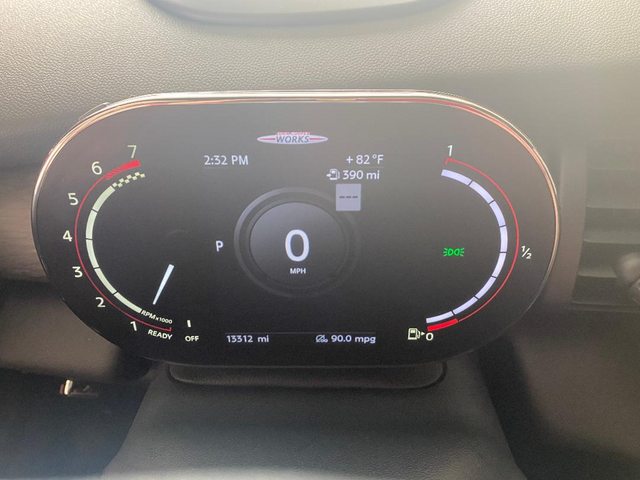
Thank you everyone for helping me figure this out. A little intimidating once you see all those lines of code pop up but I used to code my Audi, it's just been long time since I've done stuff like this. Kind of makes my HUD and Cravenspeed phone mount useless now. Logos popped up automatically for me.

I didn't do these steps:
23. Fire-Up ESYS (with ESYS launcher if you haven't used this originally to start ESYS)
24. Perform FDL coding as necessary on your HU to ensure that the following are set as below:
KOMBI_CIC: set to kombi high
EXTERNER_MOST: set to aktiv
Are they necessary? What does that coding do? I never use the factory nav only CarPlay
I didn't do these steps:
23. Fire-Up ESYS (with ESYS launcher if you haven't used this originally to start ESYS)
24. Perform FDL coding as necessary on your HU to ensure that the following are set as below:
KOMBI_CIC: set to kombi high
EXTERNER_MOST: set to aktiv
Are they necessary? What does that coding do? I never use the factory nav only CarPlay
Last edited by bluonyx; Sep 12, 2020 at 03:07 PM.

