


Electrical Countryman-Specific Coding - R60 Guide



2nd Gear
Joined: Apr 2011
Posts: 62
Likes: 1
From: Orange County, CA
Well, I brought mine into Crevier BMW / Mini because I had a brake service light come on (was faulty) at 11k miles. Even on the paperwork it said the car was coded and to not overwrite the coding (or lose my radio presets). Well, they lost all the coding and the presets. I was not happy. On the bright side, I now remember how to code my car. Now if I could only figure out an electronic way to backup the radio presets in the future.
That's pretty standard when they have to use DIS to look-up / clear codes.
Sorry, but that's the way it goes when the GT1 gets involved to help you out. It's those frustrating times that they change the oil and clear the coding that it gets annoying!
Sorry, but that's the way it goes when the GT1 gets involved to help you out. It's those frustrating times that they change the oil and clear the coding that it gets annoying!

4th Gear
Joined: Jul 2010
Posts: 379
Likes: 1
From: Boulder, CO
I swapped my parking lights with LEDs and looked at coding them out. Like Koopah, I also had bulb checks while just attempting to setting just the SL's (KALTUE_SL_1_M1_14_M2_41, WARMUE_SL_1_M1_14_M2_41, KALTUE_SL_2_M1_16_M1_18, WARMUE_SL_2_M1_16_M1_18). I was able to only code these to get the check to go away:
KALTUE/WARMUE_KZL_M2_49
KALTUE/WARMUE_NSW_M2_37_M1_3_C33
KALTUE/WARMUE_POL_M2_50_M1_8
I started getting frustrated, so that's as much as I could narrow it down.
KALTUE/WARMUE_KZL_M2_49
KALTUE/WARMUE_NSW_M2_37_M1_3_C33
KALTUE/WARMUE_POL_M2_50_M1_8
I started getting frustrated, so that's as much as I could narrow it down.
KALTUE_POL_M2_50_M1_8
WARMUE_POL_M2_50_M1_8
Reverting the other bulb checks I'd set, the errors stayed away.

2nd Gear
Joined: Sep 2011
Posts: 84
Likes: 1
From: Cincinnati, Ohio
 App send to video
Great thread keep up the good work. I was curious to see if anyone has tried this. I was thinking about hacking the connected so I would be able to play video from my iphone. Obviously you can disable the e-brake check and a movie on your iphone plays while in motion. Will it work for anything else. If airplay is available for certain apps will it trigger the connected screen to display that video.
I have the Garmin iPhone app and for $40 more you can add send to screen option to compatible in car display. Has anyone tried or does anyone know if disabling the e-brake check would send the signal to the display? Has anyone gotten an app to send to the screen other than itunes movie?
Im not so interested in watching a movie on a drive but man it would be great to send a nav app to the screen.
I have the Garmin iPhone app and for $40 more you can add send to screen option to compatible in car display. Has anyone tried or does anyone know if disabling the e-brake check would send the signal to the display? Has anyone gotten an app to send to the screen other than itunes movie?
Im not so interested in watching a movie on a drive but man it would be great to send a nav app to the screen.
This isn't really something within the scope of the normal coding process. What you're talking about is actually re-writing the software of the Mini Connected OS. No idea what it's based on, and I'm 100% sure it's closed-source.
If you can find a way to make the current system believe it's displaying normal iOS video in the scope of the desired apps, perhaps you'll have something to work with.
As it stands, as far as the software is coded, it will only interface with the Music/Videos portions of the iOS partition on the iDevice - that's why we're limited to movies or music.
If you can find a way to make the current system believe it's displaying normal iOS video in the scope of the desired apps, perhaps you'll have something to work with.
As it stands, as far as the software is coded, it will only interface with the Music/Videos portions of the iOS partition on the iDevice - that's why we're limited to movies or music.

2nd Gear
Joined: Jan 2012
Posts: 109
Likes: 0
From: Mid-Atlantic
Install Questions.
First I want to say you guys are doing a great joband thanks for all the work and effort you've put into this
I just got my cable and had a few questions.
1. When I do the initial install of NCSexpert can I use the new v45 Datens file?
2. or do I need to install the v41 from the original file then upgrade to v45? If i do need to upgrade,
3. I did noctice in the upgrade do you copy the v45 datens files over also or just the SGAT and ECU folder contents and run the LADEN.BAT file form the original v41 install?
Thanks in advance for your help.
I just got my cable and had a few questions.
1. When I do the initial install of NCSexpert can I use the new v45 Datens file?
2. or do I need to install the v41 from the original file then upgrade to v45? If i do need to upgrade,
3. I did noctice in the upgrade do you copy the v45 datens files over also or just the SGAT and ECU folder contents and run the LADEN.BAT file form the original v41 install?
Thanks in advance for your help.
It's best to do it the old tried-and-true method of installing the NCSe/EDIABAS package, then updating the datens to the latest version.
Go ahead and install the main core, then follow the instructions in the v45 post regarding where to put the files before running LADEN.BAT.
The batch file takes care of moving and overwriting the old datens with the new datens.
I will re-post this data that was in my post #43. That way, newer thread visitors will be able to find it in both places.
v45 R56/R60 Datens -- Click 'Download Original' at the top right to download the entire RAR file.
To update your EDIABAS / NCS-EXPERT installs to the latest v45 datens, follow these steps (after you extract the file):
1) Copy all files in the /ECU directory to C:\EDIABAS\ECU
2) Copy all files in the /SGDAT directory to C:\NCSEXPER\SGDAT
3) Open the DATEN folder, and run LADEN.BAT
Go ahead and install the main core, then follow the instructions in the v45 post regarding where to put the files before running LADEN.BAT.
The batch file takes care of moving and overwriting the old datens with the new datens.
I will re-post this data that was in my post #43. That way, newer thread visitors will be able to find it in both places.
v45 R56/R60 Datens -- Click 'Download Original' at the top right to download the entire RAR file.
To update your EDIABAS / NCS-EXPERT installs to the latest v45 datens, follow these steps (after you extract the file):
1) Copy all files in the /ECU directory to C:\EDIABAS\ECU
2) Copy all files in the /SGDAT directory to C:\NCSEXPER\SGDAT
3) Open the DATEN folder, and run LADEN.BAT

Neutral
Joined: Mar 2012
Posts: 2
Likes: 0
Hi all I am in the process of buying a mini countryman s 2011 it has xenon lights and I figured since its only a $100 option to ad the adaptive feature, that it's just coding. does anyone know if the actual mechanics come with all the xenon head lights to allow them to fallow the road & if so what the folder is called?
I'm almost positive that's hardware - not something we can do in software coding.
Regarding the low cost - you have to look at how cheap it is to add certain features when ordering versus how much it costs later. In the history of ordering Mini Coopers, things like LSD, Comfort Access, Alarm (in 2011+), it's been WELL worth paying the small extra when ordering. Most of these can not be retrofitted, and those that can cost serious money to do so.
I will look into this further for you, but from what I've run across, this isn't code-able. I, too, wish mine had this, but I took the very first one they had allocated from the factory...
I don't want to de-rail us here, but here's the hardware you're looking at needing - A minimum of $260 for the control boxes, plus whatever it will take to activate them (probably ISIS):
(Possibly) 04 CONTROL UNIT XENON LIGHT 2 63127255724
For vehicles with Adaptive Headlights 524A=Yes
05 Control unit, cornering light, left 1 63127199361 $130.78
05 Control unit, cornering light, right 1 63127199362 $130.78

Regarding the low cost - you have to look at how cheap it is to add certain features when ordering versus how much it costs later. In the history of ordering Mini Coopers, things like LSD, Comfort Access, Alarm (in 2011+), it's been WELL worth paying the small extra when ordering. Most of these can not be retrofitted, and those that can cost serious money to do so.
I will look into this further for you, but from what I've run across, this isn't code-able. I, too, wish mine had this, but I took the very first one they had allocated from the factory...
I don't want to de-rail us here, but here's the hardware you're looking at needing - A minimum of $260 for the control boxes, plus whatever it will take to activate them (probably ISIS):
(Possibly) 04 CONTROL UNIT XENON LIGHT 2 63127255724
For vehicles with Adaptive Headlights 524A=Yes
05 Control unit, cornering light, left 1 63127199361 $130.78
05 Control unit, cornering light, right 1 63127199362 $130.78
Last edited by Theta; Mar 23, 2012 at 07:11 PM.
Neutral
Joined: Mar 2012
Posts: 2
Likes: 0
Wow thank you so much for the info & fast response, yes I am really wanting this feature along with heated seats and folding mirrors but other than that the car has all other options, I guess I'll just wait till one comes along or just odrer a 2012!
2nd Gear
Joined: Jan 2012
Posts: 109
Likes: 0
From: Mid-Atlantic
Do you think if you already have the factory Xenons the it may have the adaptive modules?
I have the xenons and they do auto level, which means they do move up and down but not sure about side to side. Or are the modules something totally different?
I have the xenons and they do auto level, which means they do move up and down but not sure about side to side. Or are the modules something totally different?
Simple answer: look (visually on the car) for the adaptive modules. Not sure if these are included on all Xenons for 2012.
I do know that they are not installed on my 2011 be default, and mine are also auto-level.
I do know that they are not installed on my 2011 be default, and mine are also auto-level.

6th Gear
Joined: Aug 2003
Posts: 1,474
Likes: 3
From: Over there -->
1) removing a front wheel, opening the upper circular port, and peering in with a flashlight comparing what you see with the diagram that was posted for you (you may only need to look under the bonnet);
2) calling your local MINI parts department and get their input on this.
It seems clear that no one here has researched this to date in a definitive manner. You may be the one to advise US after your research!
Let us know...
Regarding that, you can also unbolt the headlights from the top of the bay with only 4 bolts - saves you from taking the wheel and wheel well off!
Be careful with the washer hose when you lift them up (it's clipped in).
Be careful with the washer hose when you lift them up (it's clipped in).

You may want to pop over to the thread that was created for your issue:
https://www.northamericanmotoring.co...ll-assist.html
It's specifically related to R60 Countryman Hill Assist discussion. There is no way to remove it or disable it according to Mini, themselves. Here's the 'answer' as it were:
https://www.northamericanmotoring.co...ll-assist.html
It's specifically related to R60 Countryman Hill Assist discussion. There is no way to remove it or disable it according to Mini, themselves. Here's the 'answer' as it were:
Originally Posted by delusns
Yah it's annoying. I asked my MA and he said it 'might' be disabled if you disable the DSC which doesn't sound like much of a solution.
After driving my CM for a few days, I've found a work around which is to never use your brake since hill assist is only engaged when you're using the brake. Go uphill as you normally would and when you want to coast backwards, just push in the clutch and ride it with the gas pedal as you normally would and let it roll back as fast or as slow you want in neutral. I know this might not be exactly what you're looking for since you're trying to park which probably requires braking but it's second nature to me now and I don't even realize I'm doing it anymore.
After driving my CM for a few days, I've found a work around which is to never use your brake since hill assist is only engaged when you're using the brake. Go uphill as you normally would and when you want to coast backwards, just push in the clutch and ride it with the gas pedal as you normally would and let it roll back as fast or as slow you want in neutral. I know this might not be exactly what you're looking for since you're trying to park which probably requires braking but it's second nature to me now and I don't even realize I'm doing it anymore.
Last edited by Theta; Apr 4, 2012 at 10:22 AM.
4th Gear

Joined: Jan 2012
Posts: 486
Likes: 18
From: DC Metro
here's a crazy one:
the fuel reserve warning pops up when you get below about 35 miles to empty. it remains in the center-tach speedo area until you hit the stalk-end button to cycle through the info screens. it pops back up shortly after and remains until cleared. and it keeps doing it until you fill up.
how about a nice way to keep the little warning triangle up next to the odometer and keep the fuel pips red but retain the digital speedometer instead of a big gas can?
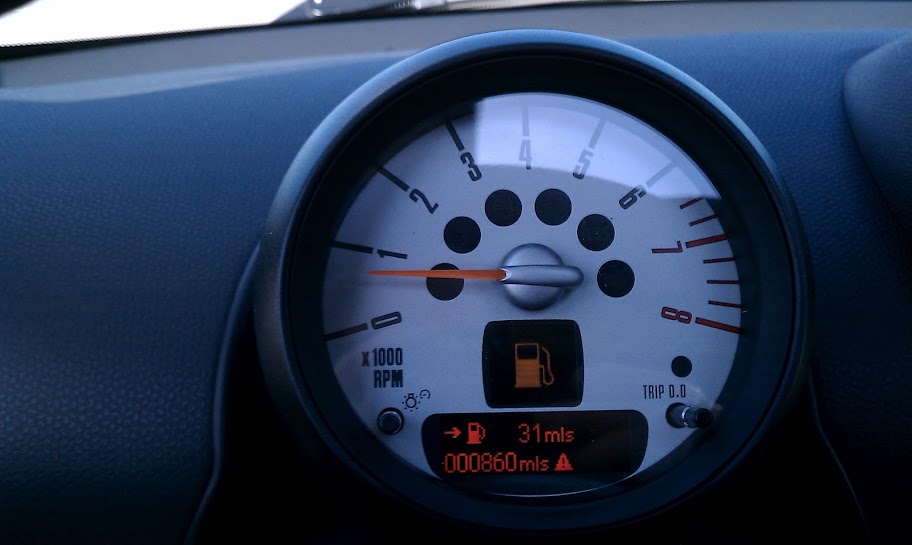
I dont mind the other warnings or a short timeout on the gas can icon.
the fuel reserve warning pops up when you get below about 35 miles to empty. it remains in the center-tach speedo area until you hit the stalk-end button to cycle through the info screens. it pops back up shortly after and remains until cleared. and it keeps doing it until you fill up.
how about a nice way to keep the little warning triangle up next to the odometer and keep the fuel pips red but retain the digital speedometer instead of a big gas can?
I dont mind the other warnings or a short timeout on the gas can icon.
Good question - I've had this happen a few times and it is quite annoying.
On the flip side, it really is a legitimate warning so you don't strand yourself.
Let me take a look here....
On the flip side, it really is a legitimate warning so you don't strand yourself.
Let me take a look here....