


Electrical Countryman-Specific Coding - R60 Guide


2nd Gear
Joined: Jun 2012
Posts: 112
Likes: 0
From: NY/NJ
Code out all of the KZL bulb checks, there should be 3.

Gentlemen,
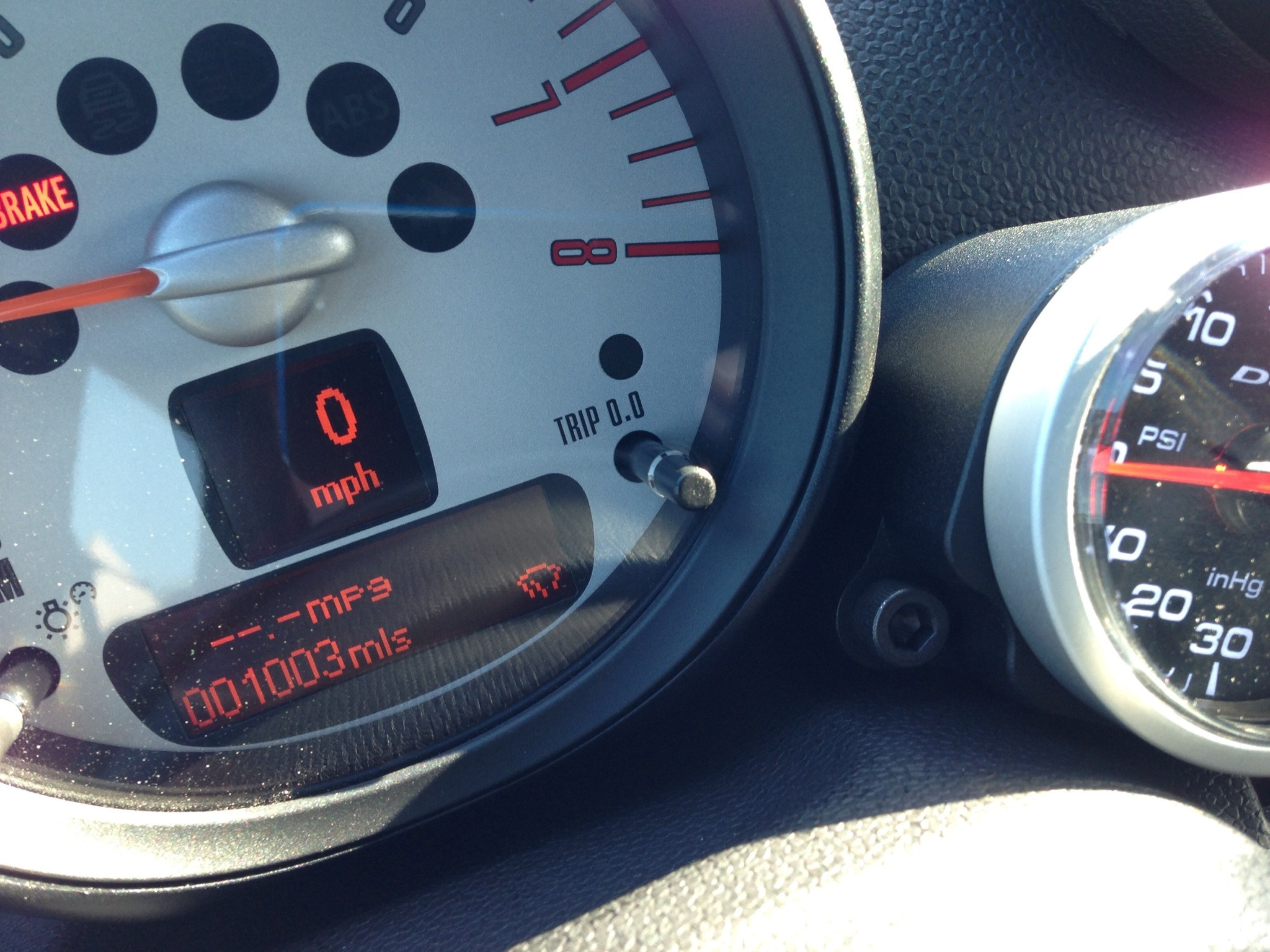
if you have a 2011 or 2012 cms and got the ecu update you probably lost the display of the trip odometer next to the odometer, having to cycle through the BC to get to it.
I found how to get it back by messing with the KOMBI.. first of all MAKE SURE YOU UPDATE TO THE V48.2 DATENS, then change the following:
WIPER_STAT_DISP
wert_02
to wert_01
code that sucker in and viola, the trip odo is back where it belongs.
if you have a 2011 or 2012 cms and got the ecu update you probably lost the display of the trip odometer next to the odometer, having to cycle through the BC to get to it.
I found how to get it back by messing with the KOMBI.. first of all MAKE SURE YOU UPDATE TO THE V48.2 DATENS, then change the following:
WIPER_STAT_DISP
wert_02
to wert_01
code that sucker in and viola, the trip odo is back where it belongs.

not sure if anyone's asked on here yet, but is there any way to access the RAD2 module? When I try to connect to it with NCS it says it cant talk to it. I have a feeling you need to use the MOST gateway which resides on ethernet?
My buddy's autologic can talk to it but obviously cant code like NCS does
My buddy's autologic can talk to it but obviously cant code like NCS does
So got an issue I'm hoping you guys might be able to help with. I was trying to enable the MOST/CAN gateway to talk to the radio. I went into INPA and set a ProTra Mode and a reset and lost my bluetooth module. I went back and disabled the ProTra mode and did a reset and still dont have bluetooth/usb. :(
the VO shows $6ND in both CAS and FRM. What could I have done?
One thing I know is that the INPA version I used was older than the software in the car. Could this have caused the issue? It was just a simple reset.... Hmmmm
the VO shows $6ND in both CAS and FRM. What could I have done?
One thing I know is that the INPA version I used was older than the software in the car. Could this have caused the issue? It was just a simple reset.... Hmmmm

2nd Gear
Joined: Apr 2011
Posts: 62
Likes: 1
From: Orange County, CA

OK, so that worked beautifully on both my 2011 Countryman S and my wife's 2012 Convertible. The only thing I did not expect is that I had to reset the date and time in each car after coding, and all the statistics that had been gathered in the KOMBI module were wiped out, meaning all the MPG and DTE settings were gone. NBD. Thanks for finding this!
Gentlemen,
if you have a 2011 or 2012 cms and got the ecu update you probably lost the display of the trip odometer next to the odometer, having to cycle through the BC to get to it.
I found how to get it back by messing with the KOMBI.. first of all MAKE SURE YOU UPDATE TO THE V48.2 DATENS, then change the following:
WIPER_STAT_DISP
wert_02
to wert_01
code that sucker in and viola, the trip odo is back where it belongs.
if you have a 2011 or 2012 cms and got the ecu update you probably lost the display of the trip odometer next to the odometer, having to cycle through the BC to get to it.
I found how to get it back by messing with the KOMBI.. first of all MAKE SURE YOU UPDATE TO THE V48.2 DATENS, then change the following:
WIPER_STAT_DISP
wert_02
to wert_01
code that sucker in and viola, the trip odo is back where it belongs.

2nd Gear
Joined: Feb 2013
Posts: 61
Likes: 0
From: South Louisiana
OK, so that worked beautifully on both my 2011 Countryman S and my wife's 2012 Convertible. The only thing I did not expect is that I had to reset the date and time in each car after coding, and all the statistics that had been gathered in the KOMBI module were wiped out, meaning all the MPG and DTE settings were gone. NBD. Thanks for finding this!
Waiting impatiently.

We are on the same software level as you and we had the option so im almost positive you do too.
Coincidentally when the odometer is missing, do you guys see a status for the wipers being on or off? I didnt.

Only when it's intermittent. Not when it's on low or high.
2nd Gear
Joined: Feb 2013
Posts: 61
Likes: 0
From: South Louisiana
Same here. When i turn on intermittent the icons pops up and it goes away when i hit the button to turn it back off.
If you have the rain sensing auto wiper option and it's not raining it's possible you have those turned on (which is technically intermittent with triggered wipes) and you would see it all the time....
If you have the rain sensing auto wiper option and it's not raining it's possible you have those turned on (which is technically intermittent with triggered wipes) and you would see it all the time....
Same here. When i turn on intermittent the icons pops up and it goes away when i hit the button to turn it back off.
If you have the rain sensing auto wiper option and it's not raining it's possible you have those turned on (which is technically intermittent with triggered wipes) and you would see it all the time....
If you have the rain sensing auto wiper option and it's not raining it's possible you have those turned on (which is technically intermittent with triggered wipes) and you would see it all the time....
2nd Gear
Joined: Apr 2011
Posts: 62
Likes: 1
From: Orange County, CA
Now that I've gone back to the Kombi the way it came from the factory I tested to see about the rain sensing wipers and what I would see on the Kombi. The answer is ... nada, just the odometer. I cycled through the BC and did not see the little wiper like I used to see and is in the photo just above. I suppose I'll have to wait until it rains to see if it works without the little icon but as the wipers went on when i pressed the button, I'm going to assume it will work as it always did, without the icon.
Having said all this, for the first six months of owning the car, I did not know I had rain sensing wipers. one day I decided to RTFM and wouldn't you know it, there it was.
Having said all this, for the first six months of owning the car, I did not know I had rain sensing wipers. one day I decided to RTFM and wouldn't you know it, there it was.
Last edited by hyde76; Mar 15, 2013 at 09:37 PM.
2nd Gear
Joined: Feb 2013
Posts: 61
Likes: 0
From: South Louisiana
when pressing the button on the end of the lever that turns on the intermittant/rain sense i did notice the other night a pattern along with the icon.
Press once, wipers swipe once, Icon On.
Press again, wipers do not swipe, Icon Off.
So with or without the presence of an icon. You are only 1 or 2 button presses away from knowing if it is on or off. Once i get my cable in i will be putting the odometer there i think.......
Press once, wipers swipe once, Icon On.
Press again, wipers do not swipe, Icon Off.
So with or without the presence of an icon. You are only 1 or 2 button presses away from knowing if it is on or off. Once i get my cable in i will be putting the odometer there i think.......

Write Permissions?
Alright guys, I ran into a problem trying to code my car:
I'm on Step #5 of Part II in Section I of the coding guide Theta provided in his initial post. It's the step where you attempt to change the setting for "Latency Time" on the D-Can device after having installed the drivers. When I click on the "Advanced" option under the "Properties" menu, I'm denied access and the following message appears:
I searched this thread, but could not find anything related to this issue.
A Google search yielded some discussion of the issue generally. The most on-point discussion I found was here:
http://forums.techguy.org/windows-xp...com1-port.html
Unfortunately, it appears that was relative to Windows XP and I am using a machine with Windows 7. Perhaps for that reason, I do not have a folder entitled "pnp0501" in the folder found at HKEY_LOCAL_MACHINE\system\currentcontrolset\enum\a cpi\
It seems a lot of people complain about this issue online but no one has a solution. Any ideas?
P.S.: I don't know how you PC guys go through this kind of s*** everyday. Every time I use a PC, I come away feeling like they were engineered to not work right in order to keep IT people employed. Mac for life, baby.
I'm on Step #5 of Part II in Section I of the coding guide Theta provided in his initial post. It's the step where you attempt to change the setting for "Latency Time" on the D-Can device after having installed the drivers. When I click on the "Advanced" option under the "Properties" menu, I'm denied access and the following message appears:
You must have write privileges in the registry for this device in order to modify the device's advanced setting.
I searched this thread, but could not find anything related to this issue.
A Google search yielded some discussion of the issue generally. The most on-point discussion I found was here:
http://forums.techguy.org/windows-xp...com1-port.html
Unfortunately, it appears that was relative to Windows XP and I am using a machine with Windows 7. Perhaps for that reason, I do not have a folder entitled "pnp0501" in the folder found at HKEY_LOCAL_MACHINE\system\currentcontrolset\enum\a cpi\
It seems a lot of people complain about this issue online but no one has a solution. Any ideas?
P.S.: I don't know how you PC guys go through this kind of s*** everyday. Every time I use a PC, I come away feeling like they were engineered to not work right in order to keep IT people employed. Mac for life, baby.
Hey Theta, or anyone that is in the know. I just got my car back from the dealer and they updated to 2.49.0. Does this mean now I wont be able to code with the v48 datens? I want to fix the trip odo in KOMBI again but Im afraid I'll try to code it and have it wig out.
Since we dont have the v49 datens on here, Im a bit leary on trying that.
Any idea if it would work? Any idea if we can get our hands on v49 of the datens?
Since we dont have the v49 datens on here, Im a bit leary on trying that.
Any idea if it would work? Any idea if we can get our hands on v49 of the datens?

Are you positive that you're at 2.49.0 now? I haven't even seen that in the ISIS system yet as being loaded (doesn't mean it's not in there, just haven't seen dealer flashes include it yet).
I will see what I can do...
I will see what I can do...
I had them reflash from 2.48.0 to 2.49.0 because the older version took out my bluetooth voice activation. 2.49.0 fixes this (and other stuff I presume)

no worries. You are super awesome for helping out! MUCH appreciated!