


Electrical Countryman-Specific Coding - R60 Guide


2nd Gear
Joined: Apr 2011
Posts: 62
Likes: 1
From: Orange County, CA
Theta, I had to wipe my old computer and start over from scratch and now I'm having trouble with loading the software and not having the COM port listed for INPA to use. Will try making the USB COM port to COM 1 and try again but it was no fun. Also, will be trying to code my wife's new 2012 R57 but I'm still looking for codes specific to an R57. Does anyone with experience with these know of a list of codes specific to that model? I've looked but not found anything.


Hyde,
That's going to happen outside (and before) the coding install. Once you install the serial to USB adapter drivers, it should assign a COM port. Select that port during the coding program setup.
Also, the R57 will use the R56 tree just like the R60 does.
That's going to happen outside (and before) the coding install. Once you install the serial to USB adapter drivers, it should assign a COM port. Select that port during the coding program setup.
Also, the R57 will use the R56 tree just like the R60 does.
Mark,
Open INPA - is Battery a black circle, or just white?
If even your Battery circle isn't black, it means you have no connection at all, so try this:
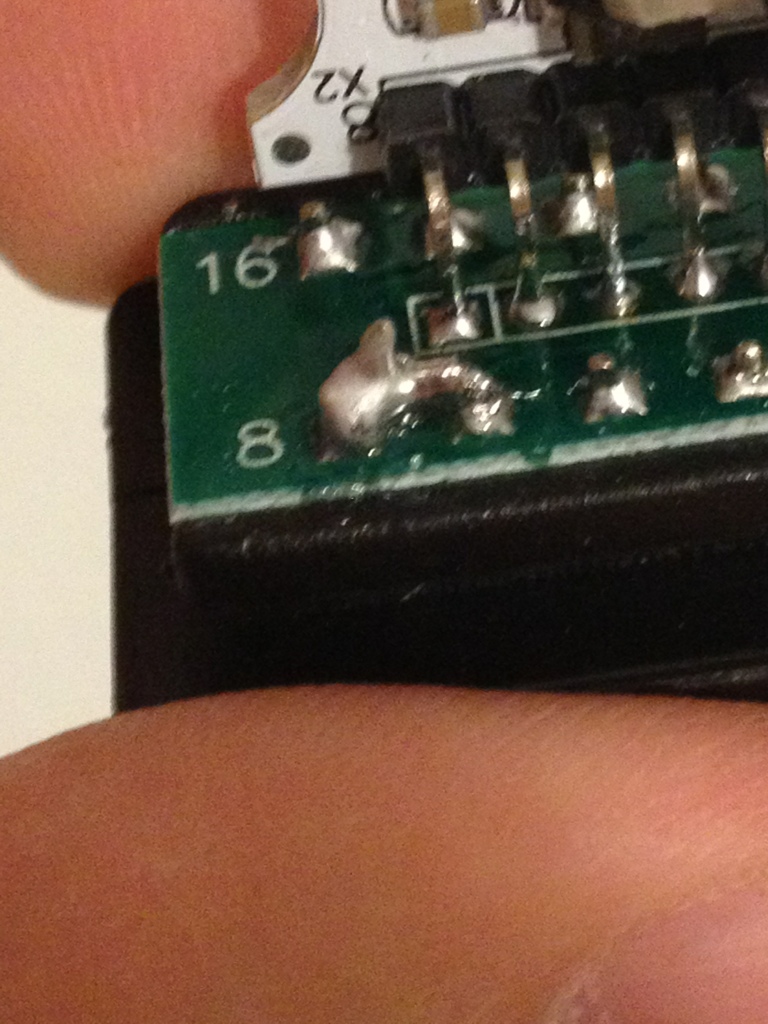
- Make sure that the Pin 8 debacle doesn't apply to you or that you have the right cable if it does.
- Try installing/updating your drivers and then set your Latency to 1. If you still see the FIFO buffer option you're not using the latest ones. Also make sure your cable is set to COM1.
- Make sure you're on a 32-bit version of Windows. 64-bit does not work.
- Make sure you're in Ignition On mode, not radio readiness or engine on. If you have Comfort Access, this means pushing the Start button twice. If you don't, it means keyfob in the slot and pushing the Start button once.
- Make sure you have sufficiently new daten files. V46.3 is the current revision.
- Make sure you first connect the cable to the car, then to your laptop, then switch the car to ignition, then open INPA.
Open INPA - is Battery a black circle, or just white?
If even your Battery circle isn't black, it means you have no connection at all, so try this:
- Make sure that the Pin 8 debacle doesn't apply to you or that you have the right cable if it does.
- Try installing/updating your drivers and then set your Latency to 1. If you still see the FIFO buffer option you're not using the latest ones. Also make sure your cable is set to COM1.
- Make sure you're on a 32-bit version of Windows. 64-bit does not work.
- Make sure you're in Ignition On mode, not radio readiness or engine on. If you have Comfort Access, this means pushing the Start button twice. If you don't, it means keyfob in the slot and pushing the Start button once.
- Make sure you have sufficiently new daten files. V46.3 is the current revision.
- Make sure you first connect the cable to the car, then to your laptop, then switch the car to ignition, then open INPA.

2nd Gear
Joined: Nov 2012
Posts: 95
Likes: 1
From: South Florida
Mark,
Open INPA - is Battery a black circle, or just white?
If even your Battery circle isn't black, it means you have no connection at all, so try this:
- Make sure that the Pin 8 debacle doesn't apply to you or that you have the right cable if it does.
- Try installing/updating your drivers and then set your Latency to 1. If you still see the FIFO buffer option you're not using the latest ones. Also make sure your cable is set to COM1.
- Make sure you're on a 32-bit version of Windows. 64-bit does not work.
- Make sure you're in Ignition On mode, not radio readiness or engine on. If you have Comfort Access, this means pushing the Start button twice. If you don't, it means keyfob in the slot and pushing the Start button once.
- Make sure you have sufficiently new daten files. V46.3 is the current revision.
- Make sure you first connect the cable to the car, then to your laptop, then switch the car to ignition, then open INPA.
Open INPA - is Battery a black circle, or just white?
If even your Battery circle isn't black, it means you have no connection at all, so try this:
- Make sure that the Pin 8 debacle doesn't apply to you or that you have the right cable if it does.
- Try installing/updating your drivers and then set your Latency to 1. If you still see the FIFO buffer option you're not using the latest ones. Also make sure your cable is set to COM1.
- Make sure you're on a 32-bit version of Windows. 64-bit does not work.
- Make sure you're in Ignition On mode, not radio readiness or engine on. If you have Comfort Access, this means pushing the Start button twice. If you don't, it means keyfob in the slot and pushing the Start button once.
- Make sure you have sufficiently new daten files. V46.3 is the current revision.
- Make sure you first connect the cable to the car, then to your laptop, then switch the car to ignition, then open INPA.
- Not sure what the pin 8 debacle is
- Updated drivers, set latency to 1, port is COM1
- 32-bit Windows version
- Ignition is in the "ON" position
- Daten files are current
- Follow proper connection steps
I'm really at a loss here. This is super frustrating.




2nd Gear
Joined: Jun 2012
Posts: 112
Likes: 0
From: NY/NJ
That error is indicating a connection problem. Since you have the 7-8 pin issue resolved (although I'm not a fan of ebay cables because most do not work out of the box properly), it may be a file issue or an issue on how you're connecting to your vehicle via NCS Expert. Outline the steps you're taking please.

1st Gear
Joined: May 2012
Posts: 17
Likes: 0
Mark,
I had the same trouble. I've not solve it yet! (see my previous replies in this thread). I would be great to have your feedback if you will be able to solve the issue.
Silvio.

I had the same trouble. I've not solve it yet! (see my previous replies in this thread). I would be great to have your feedback if you will be able to solve the issue.
Silvio.
To both Mark and esse.erre:
It (most likely) has to be cable-related. There's only a few ways to skin a cat with the setup.
Making sure the cable and drivers are installed, check the COM port the cable's serial-to-USB chooses (COM1-COM12). Run the BMW Setup and select STD:OBD and then the COM port from before.
Go through all that, fire up INPA. Should show a black circle for battery. Shut down INPA. Connect cable to car's OBD2 port. Turn ignition to ON. Fire up INPA again, should have two black circles.
After that, you can rule out the cable as being the issue.
It (most likely) has to be cable-related. There's only a few ways to skin a cat with the setup.
Making sure the cable and drivers are installed, check the COM port the cable's serial-to-USB chooses (COM1-COM12). Run the BMW Setup and select STD:OBD and then the COM port from before.
Go through all that, fire up INPA. Should show a black circle for battery. Shut down INPA. Connect cable to car's OBD2 port. Turn ignition to ON. Fire up INPA again, should have two black circles.
After that, you can rule out the cable as being the issue.
Good! It's easy from there, then!
1) Start over from scratch. Uninstall everything.
2) Plug in cable, install drivers (32-bit OS ONLY).
3) Check Device Manager for COM port cable uses (serial-to-USB bridge).
4) Run Coding Setup - Install tools & select STD:OBD then the COM port from before.
5) Finish install, re-confirm black circles with INPA.
6) Follow remainder of guide to the letter.
You should have no issues from here on out. If this persists, try the same process on a different laptop or PC running an 32-bit OS.
1) Start over from scratch. Uninstall everything.
2) Plug in cable, install drivers (32-bit OS ONLY).
3) Check Device Manager for COM port cable uses (serial-to-USB bridge).
4) Run Coding Setup - Install tools & select STD:OBD then the COM port from before.
5) Finish install, re-confirm black circles with INPA.
6) Follow remainder of guide to the letter.
You should have no issues from here on out. If this persists, try the same process on a different laptop or PC running an 32-bit OS.
1st Gear
Joined: May 2012
Posts: 17
Likes: 0
Battery circle becomes "clear" when car ingnition button is pressed and ignition key is removed from caddy. Should I assume that that cable is good?
Thousand thanks to Theta for his lead.
Silvio.
2nd Gear
Joined: Apr 2011
Posts: 62
Likes: 1
From: Orange County, CA
Now that I'm back up and running with a known good cable, can anyone tell me the last good working version of the FRM module and if I have to replace all the daten files or just a given set of files to use the FRM module?

Hey guys,
I got my INPA finally up and running with the v45 datens, while all the menus are in english, when i read the error faults, the entire message is in german, is this normal? Can I switch it so it's in english?
I got my INPA finally up and running with the v45 datens, while all the menus are in english, when i read the error faults, the entire message is in german, is this normal? Can I switch it so it's in english?

I have only seen the error codes and other user interface messages in German. I think there is a list (somewhere) of the english conversions.
Also, has anyone coded a 2012 with a in-sevice date of October 2012 or later?
Also, has anyone coded a 2012 with a in-sevice date of October 2012 or later?

6th Gear
Joined: Aug 2003
Posts: 1,474
Likes: 3
From: Over there -->
2012 CMS 2WD/Auto/Connected/Nav
Prod Date: 11/7/2011
In Service Date: 12/17/2011
HTH,

Thanks. I tried to have my "bulb out" coded off but we kept getting an error. We assumed it was the Daten files too new for that module.
We coded the unlock with key removal just fine..Different module
Do you know which Daten files you all used? and do you remember what modules you coded in?
Thanks again
We coded the unlock with key removal just fine..Different module
Do you know which Daten files you all used? and do you remember what modules you coded in?
Thanks again