


Electrical ScanGauge II - Anyone ever tried one of these?





1st Gear
Joined: Nov 2009
Posts: 47
Likes: 0
From: Denver, NC
Here is mine. It is using the Cravenspeed cradle. I like the setup, it doesn't block the windshield and I can still reach the scangauge pretty well + I can see all the gauges. Currently I am showing Water Temp(FWT), Air/Fuel ratio, Boost and Horsepower.
For the backlight(not visible in picture) I have set the custom color to Red 2, all the other colors to 0 and set the display on LOW.
I bought my scangauge at autozone. They had one lying on the shelf and I picked it up for $150.
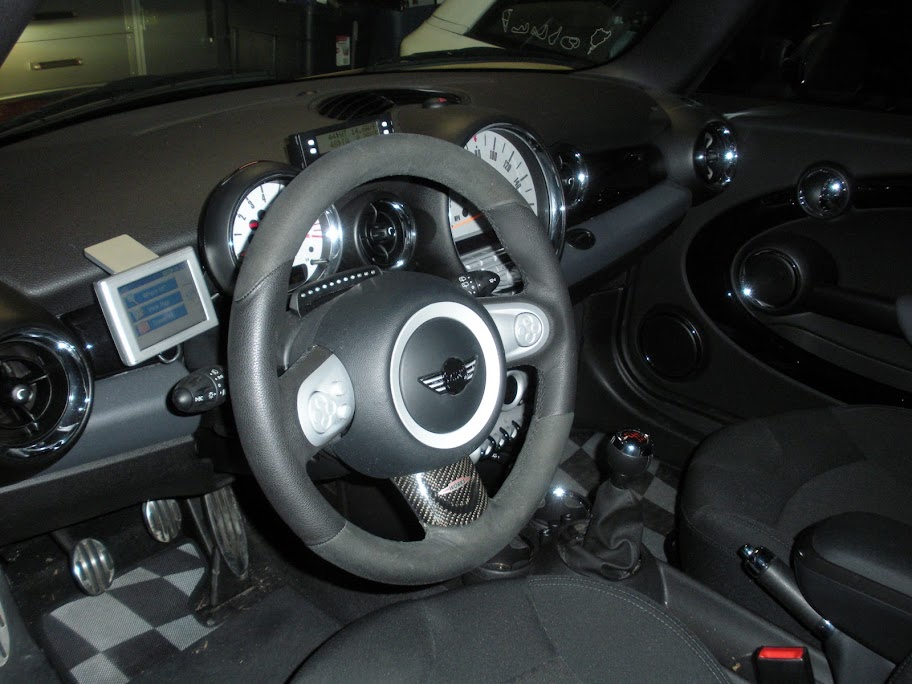
For the backlight(not visible in picture) I have set the custom color to Red 2, all the other colors to 0 and set the display on LOW.
I bought my scangauge at autozone. They had one lying on the shelf and I picked it up for $150.
Well someone mustn't have liked my comment about the Scangauge being held hostage so it arrived 3 days early!
I plan on displaying my true speed so I'm trying to be very conscious about where I mount it, and I've got the same shift light as Stimpy, on my R53, so stacking there blocks the majority of the tach, at the moment I'm looking into modifying the bracket for a boost gauge I ended up removing, other wise I have a feeling I'll be fabricating something to follow Blimey's install, but at the headliner level and angled inward more. I had some gift cards from the holiday's so I ended up getting the SGII for less than $20 our of pocket shipped; and while I like the dash dyno, I think I'm going to be more interested in the new Garmin coming out later this spring, and my current Garmin is starting to become horribly outdated.
I plan on displaying my true speed so I'm trying to be very conscious about where I mount it, and I've got the same shift light as Stimpy, on my R53, so stacking there blocks the majority of the tach, at the moment I'm looking into modifying the bracket for a boost gauge I ended up removing, other wise I have a feeling I'll be fabricating something to follow Blimey's install, but at the headliner level and angled inward more. I had some gift cards from the holiday's so I ended up getting the SGII for less than $20 our of pocket shipped; and while I like the dash dyno, I think I'm going to be more interested in the new Garmin coming out later this spring, and my current Garmin is starting to become horribly outdated.

Banned
Joined: Nov 2006
Posts: 4,862
Likes: 3
From: Fresno Ca.
Here's mine:
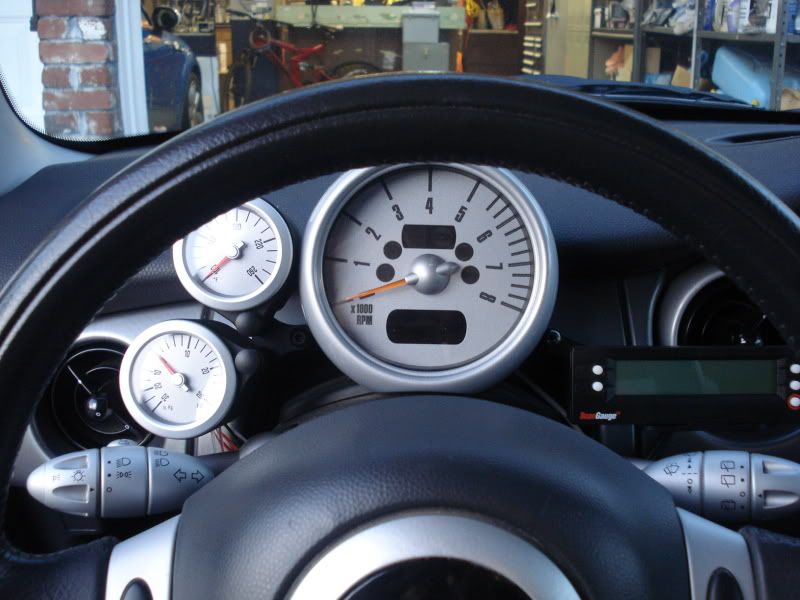
Just changed up my setup. Went to a dual gauge setup on the left side, used two single pod's and a "y" connector, I like it better than the dual pod setup. On the right side I installed my Scangauge with Cravens new Scangauge bracket. I think it came out nice?
__________________
Just changed up my setup. Went to a dual gauge setup on the left side, used two single pod's and a "y" connector, I like it better than the dual pod setup. On the right side I installed my Scangauge with Cravens new Scangauge bracket. I think it came out nice?
__________________
Banned
Joined: Nov 2006
Posts: 4,862
Likes: 3
From: Fresno Ca.
Also, this is a post from Mini Torque a year and a half ago. Has anyone on NAM tried this? Does it work on a R53?
Scangauge 2 BHP setting.
Heres a little something we've been playing with on the scangauge 2. Some of you geeks out there might already know this one but for those who dont heres how to program the scangauge 2 to read real time BHP produced from the engine in any given gear of a Cooper S or any of the mini range inc R56.
Diesel owners change the MTH value to 000A00240000 but remember you'll have to tell the scan gauge the size of the engine and what diesel type it is, either a or b.
Goto gauge and press edit
Change the TXD value to 00 then press the forward arrow
Change the RXF value to 400080000000 press the forward arrow
Change the RXD value to 0000 press the forward arrow
Change the MTH value to 000A00170000 press the forward arrow
Change the NAM to BHP and press save. Clear out start the mini and away you go!
Remember though there is a delay in response so its best to clock the reading just before you change gear as a few values jump around until things settle again and its only a rough guide remember so dont take it as gospel and start complaining to us tuning companies your car isnt making the grade!!!! Its the BHP reading worked out in that gear.
There is a certain criteria that has to be met but for a general rule of thumb as long as TPS, (Throttle position sensor), reads between 1 to 3 at idle it should give you a realtime accurate reading give or take. Also we have noted that some Cooper S's made in 2002 and or a Cooper S that hasnt got a multi function computer fitted then you'll need a software patch to update your ecu. Again if it doesnt work for you then your ECU isnt up to date and may need a few patchs applied before it'll start working.
And remember dont get carried away watching the figure you achieve and not looking at the road ahead!

Scangauge 2 BHP setting.
Heres a little something we've been playing with on the scangauge 2. Some of you geeks out there might already know this one but for those who dont heres how to program the scangauge 2 to read real time BHP produced from the engine in any given gear of a Cooper S or any of the mini range inc R56.
Diesel owners change the MTH value to 000A00240000 but remember you'll have to tell the scan gauge the size of the engine and what diesel type it is, either a or b.
Goto gauge and press edit
Change the TXD value to 00 then press the forward arrow
Change the RXF value to 400080000000 press the forward arrow
Change the RXD value to 0000 press the forward arrow
Change the MTH value to 000A00170000 press the forward arrow
Change the NAM to BHP and press save. Clear out start the mini and away you go!
Remember though there is a delay in response so its best to clock the reading just before you change gear as a few values jump around until things settle again and its only a rough guide remember so dont take it as gospel and start complaining to us tuning companies your car isnt making the grade!!!! Its the BHP reading worked out in that gear.
There is a certain criteria that has to be met but for a general rule of thumb as long as TPS, (Throttle position sensor), reads between 1 to 3 at idle it should give you a realtime accurate reading give or take. Also we have noted that some Cooper S's made in 2002 and or a Cooper S that hasnt got a multi function computer fitted then you'll need a software patch to update your ecu. Again if it doesnt work for you then your ECU isnt up to date and may need a few patchs applied before it'll start working.
And remember dont get carried away watching the figure you achieve and not looking at the road ahead!

1st Gear
Joined: Nov 2009
Posts: 47
Likes: 0
From: Denver, NC
Also, this is a post from Mini Torque a year and a half ago. Has anyone on NAM tried this? Does it work on a R53?
Scangauge 2 BHP setting.
Heres a little something we've been playing with on the scangauge 2. Some of you geeks out there might already know this one but for those who dont heres how to program the scangauge 2 to read real time BHP produced from the engine in any given gear of a Cooper S or any of the mini range inc R56.
Diesel owners change the MTH value to 000A00240000 but remember you'll have to tell the scan gauge the size of the engine and what diesel type it is, either a or b.
Goto gauge and press edit
Change the TXD value to 00 then press the forward arrow
Change the RXF value to 400080000000 press the forward arrow
Change the RXD value to 0000 press the forward arrow
Change the MTH value to 000A00170000 press the forward arrow
Change the NAM to BHP and press save. Clear out start the mini and away you go!
Remember though there is a delay in response so its best to clock the reading just before you change gear as a few values jump around until things settle again and its only a rough guide remember so dont take it as gospel and start complaining to us tuning companies your car isnt making the grade!!!! Its the BHP reading worked out in that gear.
There is a certain criteria that has to be met but for a general rule of thumb as long as TPS, (Throttle position sensor), reads between 1 to 3 at idle it should give you a realtime accurate reading give or take. Also we have noted that some Cooper S's made in 2002 and or a Cooper S that hasnt got a multi function computer fitted then you'll need a software patch to update your ecu. Again if it doesnt work for you then your ECU isnt up to date and may need a few patchs applied before it'll start working.
And remember dont get carried away watching the figure you achieve and not looking at the road ahead!
Scangauge 2 BHP setting.
Heres a little something we've been playing with on the scangauge 2. Some of you geeks out there might already know this one but for those who dont heres how to program the scangauge 2 to read real time BHP produced from the engine in any given gear of a Cooper S or any of the mini range inc R56.
Diesel owners change the MTH value to 000A00240000 but remember you'll have to tell the scan gauge the size of the engine and what diesel type it is, either a or b.
Goto gauge and press edit
Change the TXD value to 00 then press the forward arrow
Change the RXF value to 400080000000 press the forward arrow
Change the RXD value to 0000 press the forward arrow
Change the MTH value to 000A00170000 press the forward arrow
Change the NAM to BHP and press save. Clear out start the mini and away you go!
Remember though there is a delay in response so its best to clock the reading just before you change gear as a few values jump around until things settle again and its only a rough guide remember so dont take it as gospel and start complaining to us tuning companies your car isnt making the grade!!!! Its the BHP reading worked out in that gear.
There is a certain criteria that has to be met but for a general rule of thumb as long as TPS, (Throttle position sensor), reads between 1 to 3 at idle it should give you a realtime accurate reading give or take. Also we have noted that some Cooper S's made in 2002 and or a Cooper S that hasnt got a multi function computer fitted then you'll need a software patch to update your ecu. Again if it doesnt work for you then your ECU isnt up to date and may need a few patchs applied before it'll start working.
And remember dont get carried away watching the figure you achieve and not looking at the road ahead!
Banned
Joined: Nov 2006
Posts: 4,862
Likes: 3
From: Fresno Ca.
My TPS is at 4 with no throttle. I believe there is a way to calibrate it?
This is bad, I've got an MPG gauge to stare at now, and I'm getting 37mpg; while good for my wallet how much fun can one have at 37mpg?!?!?
The BHP seems skewed but close, almost to high on the low readings and too low on the high readings. I think some cars have the sensor's position zero'ed and the range of motion % vs the MINIs having the % of TB potential as their number, the manual says it varies car to car on what you will see.
The BHP seems skewed but close, almost to high on the low readings and too low on the high readings. I think some cars have the sensor's position zero'ed and the range of motion % vs the MINIs having the % of TB potential as their number, the manual says it varies car to car on what you will see.
BHP on the scangauge is just a calculated number... and definitely isn't what an engine dyno would show... I never have figured out what voodoo math they do to calculate it, that could possibly take EVERYTHING into account (fuel, air, temps, RPM, load, boost, etc).
I think it's a mix of several sensors, but yeah as it's not actually reading it it's a guesstimate (but almost any dyno number is as different manufacturers read different, people interpret different atmospheric conditions etc.) however that said I do think that much like the G-timers, that if you take the time to set the details of your car up correctly, that you can take an RPM, on a local stretch of road at a given temp, then go make your modification, go back repeat and have a guess as to whether or not that modification helped, in the sense that it's going to be more accurate than the average joe's butt dyno.
I mostly agree. I've used the G-Timer and Dynolicious to evaluate mod effectiveness. This works because these tools actually log a little data - so after a run, I can see exactly what my times were at various points, as well as max calculated HP. In the case of those devices, as long as you get the car weight, rolling resistance, and coefficient of drag close, you're going to get very close to true HP / TQ results - because these numbers can be directly derived as a function of those variables, distance, gearing, and time.
In the case of the ScanGauge, the HP number is "just a guess"... but it's also not logged, and it's periodically refreshed - so you're seeing some "instantaneous" number on the display, that happens to be whatever was reported at the refresh frequency of the device (approx 1 Hz on the 1st gen MINI with a ScanGauge), but no way to know what the actual "peak" number was during a run.
In the case of the ScanGauge, the HP number is "just a guess"... but it's also not logged, and it's periodically refreshed - so you're seeing some "instantaneous" number on the display, that happens to be whatever was reported at the refresh frequency of the device (approx 1 Hz on the 1st gen MINI with a ScanGauge), but no way to know what the actual "peak" number was during a run.

4th Gear
Joined: Jul 2010
Posts: 324
Likes: 0
From: Illinois
Sorry to resurrect this older thread, but I was wondering if I could reset my airbag light?
I just had the warranty work done on my 03 MCS at Mini of Madison. They fixed the passenger side and said everything was good to go. We arrived after service had already left for the night and even though the service was performed, the light is still on.
It is a 75 mile drive for us or I would have just taken it back to have them fix it.
I think one of these is in my near future.
I just had the warranty work done on my 03 MCS at Mini of Madison. They fixed the passenger side and said everything was good to go. We arrived after service had already left for the night and even though the service was performed, the light is still on.
It is a 75 mile drive for us or I would have just taken it back to have them fix it.
I think one of these is in my near future.

5th Gear
Joined: Nov 2003
Posts: 628
Likes: 0
From: Indianapolis
While the Scangage is handy, it only resets OBD codes (ie emissions related, which does cover much of the engine systems). The airbag light is controlled by the body computer. If you want the light to go out, you'll either need to visit the dealer or invest in a little tape.
Scott
90SM
Scott
90SM
4th Gear
Joined: Jul 2010
Posts: 324
Likes: 0
From: Illinois
Grrr...That annoys me that they didn't fix the light while we were there. It took them 3 hours to do it. We were test driving a Clubman S and got back late and the light is still on. Oh well, I guess I'll call them and let them know the next time I am in the area, I will be stopping in for them to turn off the light. Thanks for the help!

Thread
Thread Starter
Forum
Replies
Last Post