


Electrical NCSExpert DIY(do it yourself)


1st Gear
Joined: Sep 2011
Posts: 27
Likes: 1
From: Markham, Ontario
Hi all programmers,
I have an issue with trying to program my 2011 SU33 03/2011 build date Mini Cooper.
I can read all the modules with NCS Expert, however after I write it, nothing change in the script after re-starting.
What do you all think is the problem?
Thanks!
I have an issue with trying to program my 2011 SU33 03/2011 build date Mini Cooper.
I can read all the modules with NCS Expert, however after I write it, nothing change in the script after re-starting.
What do you all think is the problem?
Thanks!

4th Gear
Joined: Dec 2010
Posts: 502
Likes: 3
From: NOLA
It sounds like you are either not using the Revtor profile or you are not following the steps correctly. Are you 1> Loading the Revtor profile when you start 2>Are you switching the job to SG_Coderein when you flash the car?

Thread Starter
|
3rd Gear
Joined: Feb 2011
Posts: 266
Likes: 10
From: Halifax - Canada
New datens link
Thanks to GeoffreyM I've updated the other thread with the "newer dates". Here is a quick link to the download server. SP - R56 - V45
You just need to update the datens folder with the one you have.
Again, use this at your own risk ...
You just need to update the datens folder with the one you have.
Again, use this at your own risk ...

1st Gear
Joined: Jan 2012
Posts: 11
Likes: 0
Bulb Settings -- Results
Software: NCS Expert.
Datens: V45 for R56
Ediabas: 7.2.
I saved my initial TRC file in a safe place.
Ran NCS and had it generate a new TRC file to work with (working copy). This file was the same size as the original (i.e. no issues).
Edit: From the following list, I only disabled the following in BLUE.
KALTUE_AL_M1_6_M2_38
KALTUE_FL_M2_6_M1_04
KALTUE_KZL_M2_49
WARMUE_AL_M1_6_M2_38
WARMUE_FL_M2_6_M1_4
WARMUE_KZL_M2_49
Trial 1: Coded the first time and set the Warm Bulb checks to nicht_aktiv and then went back to recode the Cold Bulb checks and couldn't code again (got error).
Reason?: Evidently, when NCS Expert creates a TRC file based off of a code, the file size of the TRC file is larger than the original one. I don't know why. This second TRC file, when used for recoding has issues, and you get the error as seen in this attachment.
Trial 1: Based off of the first trial, where I had a successful code on the Warm Bulb Checks, I was still getting the errors when the car started. This is when I went back to recode and got the errors.
Trial 2: I saw a pattern developing with the new TRC file that was 127kb vs the OEM 24 kb. The OEM TRC files had no issues coding.
Solution: I replaced the TRC file with the OEM TRC and ran NCS Expert. I went ahead and recoded off of this TRC (setting Warm and Cold bulb checks to nicht_aktiv) and then Executed. The code finally went through with no errors.
Result: I have no bulb out errors whatsoever, however, after a few seconds of not turning on the lights, they cannot be turned on.
Basically, I'm having the same problem as earlier, except without the annoying Bulb Out Checks.
If anyone knows of some other work around where the ECU won't disable the lights, please let me know.
The mod I did is adding HID retrofits. They currently have no added plug-ins to "trick" the ECU. Perhaps that's the route I need to take. Currently, the lights can turn on within 5-10 seconds of starting the car. In the past, if I waited greater than that, the Bulb Out Error checks would turn-on and you could not turn on the headlights (parking lights worked). Also, once the lights were turned-on (i.e. before the Bulb Out Error would kick-in), if they were turned off, they could not be turned back on.
Datens: V45 for R56
Ediabas: 7.2.
I saved my initial TRC file in a safe place.
Ran NCS and had it generate a new TRC file to work with (working copy). This file was the same size as the original (i.e. no issues).
Edit: From the following list, I only disabled the following in BLUE.
KALTUE_AL_M1_6_M2_38
KALTUE_FL_M2_6_M1_04
KALTUE_KZL_M2_49
WARMUE_AL_M1_6_M2_38
WARMUE_FL_M2_6_M1_4
WARMUE_KZL_M2_49
Trial 1: Coded the first time and set the Warm Bulb checks to nicht_aktiv and then went back to recode the Cold Bulb checks and couldn't code again (got error).
Reason?: Evidently, when NCS Expert creates a TRC file based off of a code, the file size of the TRC file is larger than the original one. I don't know why. This second TRC file, when used for recoding has issues, and you get the error as seen in this attachment.
Trial 1: Based off of the first trial, where I had a successful code on the Warm Bulb Checks, I was still getting the errors when the car started. This is when I went back to recode and got the errors.
Trial 2: I saw a pattern developing with the new TRC file that was 127kb vs the OEM 24 kb. The OEM TRC files had no issues coding.
Solution: I replaced the TRC file with the OEM TRC and ran NCS Expert. I went ahead and recoded off of this TRC (setting Warm and Cold bulb checks to nicht_aktiv) and then Executed. The code finally went through with no errors.
Result: I have no bulb out errors whatsoever, however, after a few seconds of not turning on the lights, they cannot be turned on.
Basically, I'm having the same problem as earlier, except without the annoying Bulb Out Checks.
If anyone knows of some other work around where the ECU won't disable the lights, please let me know.
The mod I did is adding HID retrofits. They currently have no added plug-ins to "trick" the ECU. Perhaps that's the route I need to take. Currently, the lights can turn on within 5-10 seconds of starting the car. In the past, if I waited greater than that, the Bulb Out Error checks would turn-on and you could not turn on the headlights (parking lights worked). Also, once the lights were turned-on (i.e. before the Bulb Out Error would kick-in), if they were turned off, they could not be turned back on.
Last edited by oreo_guy; Apr 16, 2012 at 09:23 PM. Reason: adding picture and codes that were changed

2nd Gear
Joined: Jun 2011
Posts: 136
Likes: 8
From: Frankfort, KY
The TRC file size thing is in the instructions. The larger one is a read of all the modules, and yes, it happens after every write. The rest sounds more like your hid kit/ballasts are bad. Regardless of bulb out warnings, they should turn on. The bulb out warning doesn't cut power to the headlight, it just senses the lack of resistence and tells you the bulb may be out.
1st Gear
Joined: Jan 2012
Posts: 11
Likes: 0
The TRC file size thing is in the instructions. The larger one is a read of all the modules, and yes, it happens after every write. The rest sounds more like your hid kit/ballasts are bad. Regardless of bulb out warnings, they should turn on. The bulb out warning doesn't cut power to the headlight, it just senses the lack of resistence and tells you the bulb may be out.
I don't want to get off-topic, but I had a retrofit done with an installer, and will never go back to him. I had a feeling it's something else (i.e. product problem) was wrong, because we tested it using load resistors and the issue kept coming up.
Black Flame Customs is doing a complete overhaul, and their sets have CANBUS cancellers, so I'm a lot more optimistic.
Does anyone know if the DWA "heartbeat" light on the tach is a changing variable on a 2012 MCS? It's listed in the SPEG module as DWA_VERBAUT.
As for NCS Expert stuff, I'd like to thank the mods and other active users for sharing info that is really helpful for others.
Thanks again!!!
Thread Starter
|
3rd Gear
Joined: Feb 2011
Posts: 266
Likes: 10
From: Halifax - Canada
Thanks Juppers ! Been super busy these days and can't answer questions on time
Not sure for the 2012 model ...Iam not sure if we had someone tested it out.
There is no really worst case scenario, if its there, then its changeable, if its there and changeable however it doesn't do anything, then it should affect ur car negatively
We need ppl to test 1st, volunteers ?
Ive tried on a manual to add the command to push start only the car (without the clutch) as it would be a an automatic. Obviously it didn't work didn't do anything bad to the car, just didn't start at all (good anti thief method if I was to go away for a while
 )
)
Not sure for the 2012 model ...Iam not sure if we had someone tested it out.
There is no really worst case scenario, if its there, then its changeable, if its there and changeable however it doesn't do anything, then it should affect ur car negatively
We need ppl to test 1st, volunteers ?
Ive tried on a manual to add the command to push start only the car (without the clutch) as it would be a an automatic. Obviously it didn't work
didn't do anything bad to the car, just didn't start at all (good anti thief method if I was to go away for a while)

1st Gear
Joined: Nov 2009
Posts: 20
Likes: 0
hi all, i am wondering what is the necessary codings required to activate PDC with visual boost's visual feedback? thank you! my car is 2012 R56 Cooper S and i am trying to retrofit PDC to my car! thank you very much in advance!

1st Gear
Joined: Apr 2012
Posts: 12
Likes: 0
From: Eagle Pass, TX
HELP with automatic windows!!
Hi can someone help me?? i downloaded everything GTECKO provided for coding my 07 MCS! I tried several codes that were in the spreadsheet and worked great! but I can't get to work the auto up passenger window! when I try to write the FRM Module it shows an error! Something EDIABAS faulty best and BIP-0009! I am using the V38 datens provided by GTECKO, I read another post about updating EDIABAS to 7.2, i did it and no more error message! it says coding ended but nothing happens! it doesn't overwrite mi FRM module! any help appreciated!
Thanks
Thanks

My car is being coded right now and we're trying to turn off the TPMS... we have done everything the spreadsheet says to do, including pulling the fuse, yet we still cannot get the light to shut off... can anyone help?? Please PM me if possible.

4th Gear
Joined: Dec 2008
Posts: 333
Likes: 1
From: Chesterfield, VA
Mods I have made on 2009 Cooper, V38 Datens
Close Windows/Roof from Fob
Disable speed overestimation
Key Gong Reminder -door open
Sunroof Auto Open/Close
Enable one-touch windows on R56 models (driver and Co-driver)
Change Standard (Boost) Radio Filter Settings
Followed Gtecko's write up - very easy - All have worked perfectly. Thanks Gtecko!
Question - Once I am done with all mods - is there a way to back up all modules in a single file?
Close Windows/Roof from Fob
Disable speed overestimation
Key Gong Reminder -door open
Sunroof Auto Open/Close
Enable one-touch windows on R56 models (driver and Co-driver)
Change Standard (Boost) Radio Filter Settings
Followed Gtecko's write up - very easy - All have worked perfectly. Thanks Gtecko!
Question - Once I am done with all mods - is there a way to back up all modules in a single file?
Last edited by euells; May 15, 2012 at 06:32 PM.
We figured it out. Works exactly like BMWs. You have to disable RDC_Alive in KOMBI. After you do that and drive 1 mile, TPMS is gone forever!


Neutral
Joined: Jun 2012
Posts: 2
Likes: 0
Hi all,
I've been able to program close windows/roof with the FOB, but I get an error when trying to read the ABG module. The error is COAPI-2021.
I am using Datens v45.
Does anybody know what needs to be done in order to read & write to the ABG module?
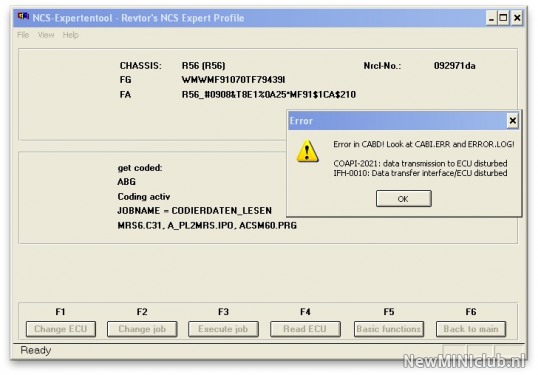
My car is a R56 factory Works 2008.
I've been able to program close windows/roof with the FOB, but I get an error when trying to read the ABG module. The error is COAPI-2021.
I am using Datens v45.
Does anybody know what needs to be done in order to read & write to the ABG module?
My car is a R56 factory Works 2008.

6th Gear
Joined: Apr 2008
Posts: 1,303
Likes: 12
From: Twin Cities, Minnesota
I have had no trouble reading the ABG module, to disable the seat belt chime.
6th Gear
Joined: Apr 2008
Posts: 1,303
Likes: 12
From: Twin Cities, Minnesota
Great information! I was curious about this change thanks for posting!
6th Gear
Joined: Apr 2008
Posts: 1,303
Likes: 12
From: Twin Cities, Minnesota
Best thing to do is to put all the module trace files in a dated zip archive to keep them together.
Neutral
Joined: Jun 2012
Posts: 2
Likes: 0
Now NCSExpert is telling me EDIABAS has an error.
I also tried the EDIABAS.INI file of the previous version...
Question: What is the procedure to follow to upgrade EDIABAS to 7.2.0 ?

4th Gear
Joined: Mar 2008
Posts: 358
Likes: 0
From: Rivervale , New Jersey
Hi , just installed rear fog lights on a 2007 MCS . Looking at spread sheet no one has confirmed working code and modules for a 2007 . Does anyone know how to get the rear fogs to work on a 2007 ? Any help would be appreciated.
Thread Starter
|
3rd Gear
Joined: Feb 2011
Posts: 266
Likes: 10
From: Halifax - Canada
I would appreciate anyone who have access to the spreadsheet to limit themselves with the editing. Basically there is on the year column you should be touching (if its there already, it means it have already tried and it works)
If you have find a new mod and it works, great, feel free to add it.
Please stop deleting my work and the work ppl put in the this spreadsheet, stop edition the wording, the size of the column and all ... it is meant to be that way. I would hate to lock all the cells and have this file only read.
If you want to edit it YOUR way, download it and do what you want on it.
Respect others work.
Thanks
If you have find a new mod and it works, great, feel free to add it.
Please stop deleting my work and the work ppl put in the this spreadsheet, stop edition the wording, the size of the column and all ... it is meant to be that way. I would hate to lock all the cells and have this file only read.
If you want to edit it YOUR way, download it and do what you want on it.
Respect others work.
Thanks