


Bimmercode App


Basic mode are macros or shortcuts to expert mode
that he wrote.
You’re basically turning off voltage monitoring that was
intended for Edison bulbs. That would give you a blown bulb
error if they were to burn out.
Not meant for LEDs
that he wrote.
You’re basically turning off voltage monitoring that was
intended for Edison bulbs. That would give you a blown bulb
error if they were to burn out.
Not meant for LEDs

6th Gear
Joined: Jul 2008
Posts: 1,174
Likes: 13
From: Ohio
What I'm trying to figure out is if "coded the indicators in the basic mode - to not monitor and set to LED" does something different than the steps listed for expert mode... and what those different toggles are.
I suspect the basic mode steps are at minimum hitting FRA_H_L_IS_LED and FRA_H_R_IS_LED (left and right rear turn signals), but I don't know what else is being done, as it's not a very specific list.
Mini has been known to rearrange the menus, ( what you see in expert mode). During dealer recodes .
So Stephens shortcuts tend to fail.
Thus I do expert mode only. I then have complete control of parameters.
So Stephens shortcuts tend to fail.
Thus I do expert mode only. I then have complete control of parameters.
6th Gear
Joined: Jul 2008
Posts: 1,174
Likes: 13
From: Ohio
That's why I need whole thing in terms of expert mode toggles.
Well, that's what I'm trying to find out – the specific parameters that "Coded the indicators in the basic mode - to not monitor and set to LED" translates to.
I don't even have basic mode. I have ESYS (the original "expert mode").
That's why I need whole thing in terms of expert mode toggles.
I don't even have basic mode. I have ESYS (the original "expert mode").
That's why I need whole thing in terms of expert mode toggles.
They equate to e-sys commands.
Do not change short circuit.
these will be found in esys.
Do the rear turn signals too
FRA_H
BL_R_IS_LED => aktiv
BL_R_WARMUEBERWACHUNG => nicht_aktiv
BL_R_KALTUEBERWACHUNG => nicht_aktiv
BL_L_IS_LED => aktiv
BL_L_WARMUEBERWACHUNG => nicht_aktiv
BL_L_KALTUEBERWACHUN => nicht_aktiv
Do the rear turn signals too
FRA_H
BL_R_IS_LED => aktiv
BL_R_WARMUEBERWACHUNG => nicht_aktiv
BL_R_KALTUEBERWACHUNG => nicht_aktiv
BL_L_IS_LED => aktiv
BL_L_WARMUEBERWACHUNG => nicht_aktiv
BL_L_KALTUEBERWACHUN => nicht_aktiv
6th Gear
Joined: Jul 2008
Posts: 1,174
Likes: 13
From: Ohio
FRA_H_L[R]_IS_LED => aktiv
FRA_H_L[R]_WARMUEBERWACHUNG => nicht_aktiv
FRA_H_L[R]_KALTUEBERWACHUNG => nicht_aktiv
Right? Nothing else from the 'basic mode' step?
-------
What about BFD_L[R]_IS_LED (et. al.)?
Right now that's set as 'nicht_aktiv' with my stock tail lights ... shouldn't that be modified to LED as well with the new ones?
Ok, so "Coded the indicators in the basic mode - to not monitor and set to LED" means:
FRA_H_L[R]_IS_LED => aktiv
FRA_H_L[R]_WARMUEBERWACHUNG => nicht_aktiv
FRA_H_L[R]_KALTUEBERWACHUNG => nicht_aktiv
Right? Nothing else from the 'basic mode' step?
-------
What about BFD_L[R]_IS_LED (et. al.)?
Right now that's set as 'nicht_aktiv' with my stock tail lights ... shouldn't that be modified to LED as well with the new ones?
FRA_H_L[R]_IS_LED => aktiv
FRA_H_L[R]_WARMUEBERWACHUNG => nicht_aktiv
FRA_H_L[R]_KALTUEBERWACHUNG => nicht_aktiv
Right? Nothing else from the 'basic mode' step?
-------
What about BFD_L[R]_IS_LED (et. al.)?
Right now that's set as 'nicht_aktiv' with my stock tail lights ... shouldn't that be modified to LED as well with the new ones?
Funny you mentioned BFD.
No one has brought that up, not even me!!
I failed to mention that I went ahead and coded the BFD
to LED when I swapped my bulbs to LED. Long before I
Started coding for BFD.
SoI can’t tell you it needs to be done, but it didn’t hurt to do it.
FIY I’m not using UJ lights. I’m using LED Euro tai lights ( amber turn signals)
Did a swap for LED brake and turn signal bulbs months ago. As only the running lights were LED rung.
Last edited by TVPostSound; May 15, 2018 at 05:52 AM.

1st Gear
Joined: May 2011
Posts: 12
Likes: 0
Rear Fog coding
I was able to code my rear fogs to work as brake lights. But somehow I messed something up and now the main brake light o my lights up the lower part and not the full circle. I have factory led.

2nd Gear
Joined: Apr 2018
Posts: 54
Likes: 29
Help, anyone?
Last edited by JosephM635; May 17, 2018 at 06:18 PM.
When you say circle, I think the LED which is the running light, not brake light.
Brake lights have upper and lower bulbs.
2nd Gear
Joined: Apr 2018
Posts: 54
Likes: 29

Use a backup that BimmerCode stores.

1st Gear
Joined: May 2018
Posts: 12
Likes: 1
Newbie here when it comes to Bimmercode, please be patient with me.
i just got my Vgate Bluetooth and tried Bimmercode code just the basic function, did not even tried the “Expert” yet.
My question is when I tried to code my changes, it ask for $26.99 for unlocking code. My understanding is, this is just for my changes to take effect on my Mini F60. is this correct ? And do I need to pay additional if I go play around in “Expert Mode”.
Feedback will be appreciated. Thanks in advance.
i just got my Vgate Bluetooth and tried Bimmercode code just the basic function, did not even tried the “Expert” yet.
My question is when I tried to code my changes, it ask for $26.99 for unlocking code. My understanding is, this is just for my changes to take effect on my Mini F60. is this correct ? And do I need to pay additional if I go play around in “Expert Mode”.
Feedback will be appreciated. Thanks in advance.


You can code your friends cars too!!

1st Gear
Joined: Jan 2018
Posts: 25
Likes: 5
From: North Ga Mtns
Has anybody tried to have rear fogs come on with front fogs? I don't have the switch for the rear fogs and only use the fronts when it's foggy (what a concept) and would like the rears to come on at the same time.
Joe
Joe
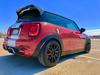
Interesting thought. Im not sure if thats an option.
I coded mine as a 3rd set of brake lights. I figured I'd get more use out of them that way. I rarely turn my fogs on


The shortcuts to those functions are no longer viable.
They are shortcuts to expert mode, you can always go in expert mode,
and reset your preferences.
There should be instructions at the beginning of this thread.

1st Gear
Joined: Aug 2017
Posts: 22
Likes: 0
the problem is the areas are grayed out and you cant even click them to go into expert mode...