


Navigation & Audio Is it possible to mirror iPhone display to mini connected?


Thread Starter
|
5th Gear
Joined: Apr 2006
Posts: 722
Likes: 6
Is it possible to mirror iPhone display to mini connected?
Is there an official or unofficial way to display your iPhone screen on the mini connected display? Would like to push my garmin app to the mini connected display....
Thread Starter
|
5th Gear
Joined: Apr 2006
Posts: 722
Likes: 6
Well the Garmin app is not a video out based app, but was just hoping to mirror the iphone interface to the monitor, using it as an external display - kinda like what I am able to do with airplay mirroring.


OVERDRIVE
Joined: May 2005
Posts: 8,233
Likes: 128
From: San Francisco
To use that, you'll also need an aux video input for the MINI Connected screen.There are some aftermarket adapters available.

4th Gear
Joined: Jul 2010
Posts: 379
Likes: 1
From: Boulder, CO
Actually, from what's been found in the other thread, if you use the MINI Connected cable, some are able to show other apps via the video screen (pretend to play a video, switch to some other app). Seems that it's a form of video output cable.

4th Gear
Joined: Jun 2006
Posts: 526
Likes: 0
From: Keller, TX
Works great including the mirroring apps on jailbroken iOS5. I'll post some pics as soon as I jailbreak iOS6. My only gripe is not being able to run the video (GPS in this case) and the radio/satellite etc at the same time. The "hack" keeps the video you selected playing in the background for audio.
Trending Topics
Thread Starter
|
5th Gear
Joined: Apr 2006
Posts: 722
Likes: 6
Works great including the mirroring apps on jailbroken iOS5. I'll post some pics as soon as I jailbreak iOS6. My only gripe is not being able to run the video (GPS in this case) and the radio/satellite etc at the same time. The "hack" keeps the video you selected playing in the background for audio.
So to summarize, you have to jailbreak your phone to install one of the display mirroring apps from Cydia (or other repository), you also need to hack your MINI Connected in some way to display the "video output", and you can use the MINI Connected cable to provide this output - correct?
As for your display not letting you play the radio, etc. - what if you launched Pandora from the iphone itself and then switched to the Garmin GPS iphone app - in theory - would not the audio from Pandora continue to play while the GPS app is displayed on the screen? I know it would be cooler to play the Pandora from the MINI Connected interface natively, but just wondering if this would work?

2nd Gear
Joined: Sep 2011
Posts: 84
Likes: 1
From: Cincinnati, Ohio
I thought displaying apps was limited to the music and video folder in iOS?
Much interested if someone cracks this. I would love to get rid of the craven mount and use garmin or maps from my iphone on the screen.
Much interested if someone cracks this. I would love to get rid of the craven mount and use garmin or maps from my iphone on the screen.
4th Gear
Joined: Jul 2010
Posts: 379
Likes: 1
From: Boulder, CO
DEFINITELY interested in seeing this - please do post when you can.
So to summarize, you have to jailbreak your phone to install one of the display mirroring apps from Cydia (or other repository), you also need to hack your MINI Connected in some way to display the "video output", and you can use the MINI Connected cable to provide this output - correct?
As for your display not letting you play the radio, etc. - what if you launched Pandora from the iphone itself and then switched to the Garmin GPS iphone app - in theory - would not the audio from Pandora continue to play while the GPS app is displayed on the screen? I know it would be cooler to play the Pandora from the MINI Connected interface natively, but just wondering if this would work?
So to summarize, you have to jailbreak your phone to install one of the display mirroring apps from Cydia (or other repository), you also need to hack your MINI Connected in some way to display the "video output", and you can use the MINI Connected cable to provide this output - correct?
As for your display not letting you play the radio, etc. - what if you launched Pandora from the iphone itself and then switched to the Garmin GPS iphone app - in theory - would not the audio from Pandora continue to play while the GPS app is displayed on the screen? I know it would be cooler to play the Pandora from the MINI Connected interface natively, but just wondering if this would work?

2nd Gear
Joined: Nov 2009
Posts: 94
Likes: 0
From: Miami, Fl
I have a jailbroken iPhone 4S running on IOS 5.1.1 and I am able to mirror my iPhone's screen to my Connected display. I have not made any modification to the MINI Connected system (no NCS Expert or video in motion). I just downloaded "Display out" from Cydia, enable it from the setting menu on the iPhone (you can also set the screen size and orientation and other behaviors) and then plug the iPhone to the Connected cable and select the plug-in option from the Connected menu and it works. I use it for my Tom-Tom app and I'm also able to listen to music while using the nav app. It works just as in the iPhone, you have the music playing and it lowers the volume for directions and the returns to the music. The only gripe I have with this set up is that you can only use the music on your iPod, Pandora or MOG while mirroring, no radio, cd or satellite. To use Pandora or MOG you have to launch the app and then go to the home screen (playing on background) and then connect it to the car or it will default to playing the music on the iPod.
I know this is kinda long and sounds confusing but its actually pretty fast to set up once you get the hang of it. Let me know if you guys have some other questions, I'll try to explain everything the best I can.
I know this is kinda long and sounds confusing but its actually pretty fast to set up once you get the hang of it. Let me know if you guys have some other questions, I'll try to explain everything the best I can.
2nd Gear
Joined: Sep 2011
Posts: 84
Likes: 1
From: Cincinnati, Ohio
I have a jailbroken iPhone 4S running on IOS 5.1.1 and I am able to mirror my iPhone's screen to my Connected display. I have not made any modification to the MINI Connected system (no NCS Expert or video in motion). I just downloaded "Display out" from Cydia, enable it from the setting menu on the iPhone (you can also set the screen size and orientation and other behaviors) and then plug the iPhone to the Connected cable and select the plug-in option from the Connected menu and it works. I use it for my Tom-Tom app and I'm also able to listen to music while using the nav app. It works just as in the iPhone, you have the music playing and it lowers the volume for directions and the returns to the music. The only gripe I have with this set up is that you can only use the music on your iPod, Pandora or MOG while mirroring, no radio, cd or satellite. To use Pandora or MOG you have to launch the app and then go to the home screen (playing on background) and then connect it to the car or it will default to playing the music on the iPod.
I know this is kinda long and sounds confusing but its actually pretty fast to set up once you get the hang of it. Let me know if you guys have some other questions, I'll try to explain everything the best I can.
I know this is kinda long and sounds confusing but its actually pretty fast to set up once you get the hang of it. Let me know if you guys have some other questions, I'll try to explain everything the best I can.
So does it work while driving or just parked?
2nd Gear
Joined: Sep 2011
Posts: 84
Likes: 1
From: Cincinnati, Ohio
Well I am on iOS 6 beta 4 so I will have to wait for a untethered jailbreak but extremely excited to be able to send video without having to hack the mini.
Thread Starter
|
5th Gear
Joined: Apr 2006
Posts: 722
Likes: 6
This may be enough to bring me back into the jailbreak community!!

Thread Starter
|
5th Gear
Joined: Apr 2006
Posts: 722
Likes: 6
On a side note - I think my wife will be driving on trips from now on when there is a race on TV that I can watch from Slingbox on the MINI Connected! Oh the possibilities!! Now I am glad I didn't pay the $750 for nav!!
Oh the possibilities!! Now I am glad I didn't pay the $750 for nav!!
2nd Gear
Joined: Nov 2009
Posts: 94
Likes: 0
From: Miami, Fl
WOW! Interesting. Wonder how you are getting around the built-in safety feature of MINI Connected that blocks video while in motion? Are you using the MINI cable that came with your car's Connected system? Or are you possibly using an aftermarket one?
This may be enough to bring me back into the jailbreak community!!
This may be enough to bring me back into the jailbreak community!!
2nd Gear
Joined: Nov 2009
Posts: 94
Likes: 0
From: Miami, Fl
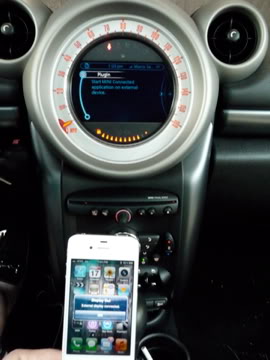
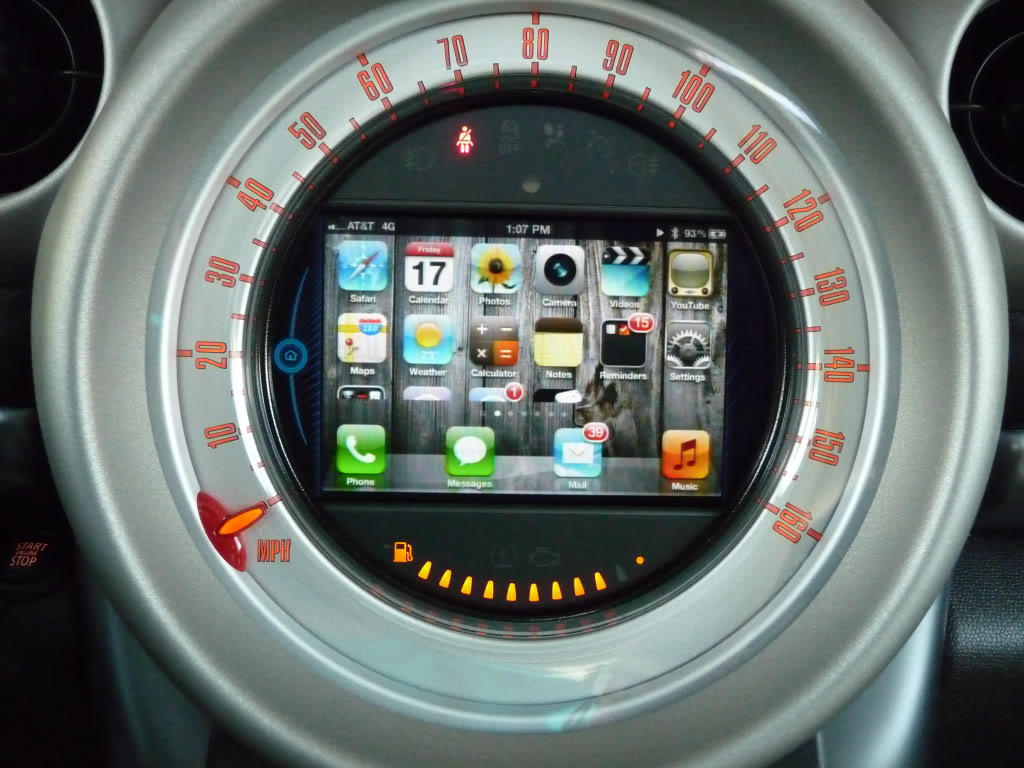
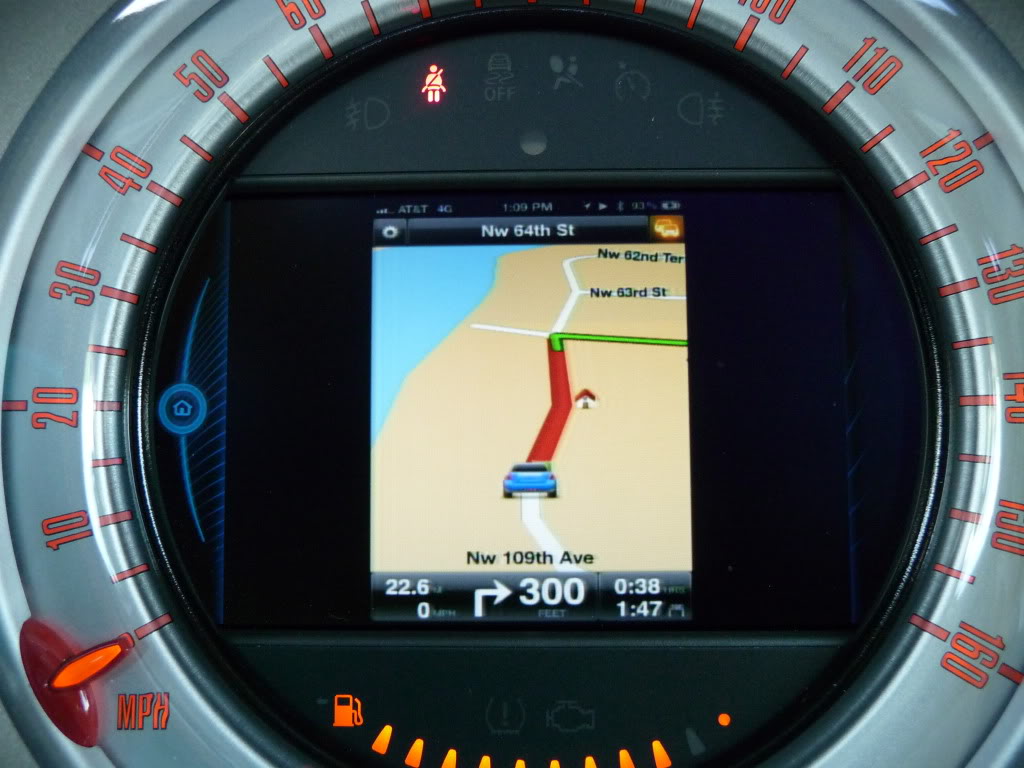
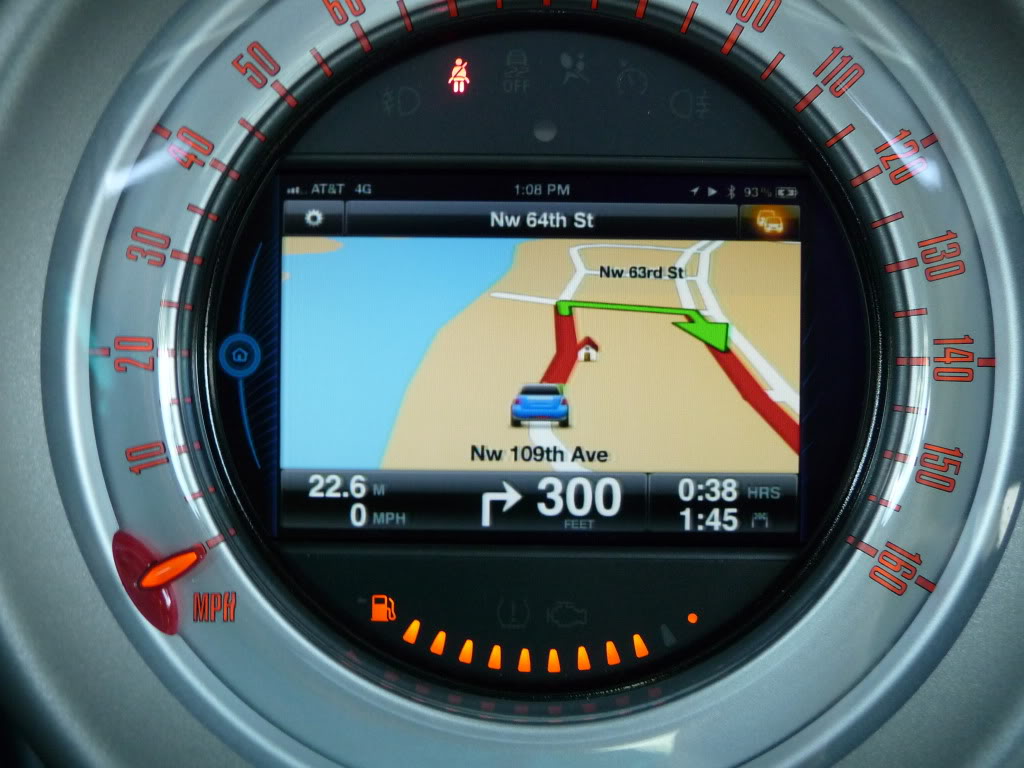
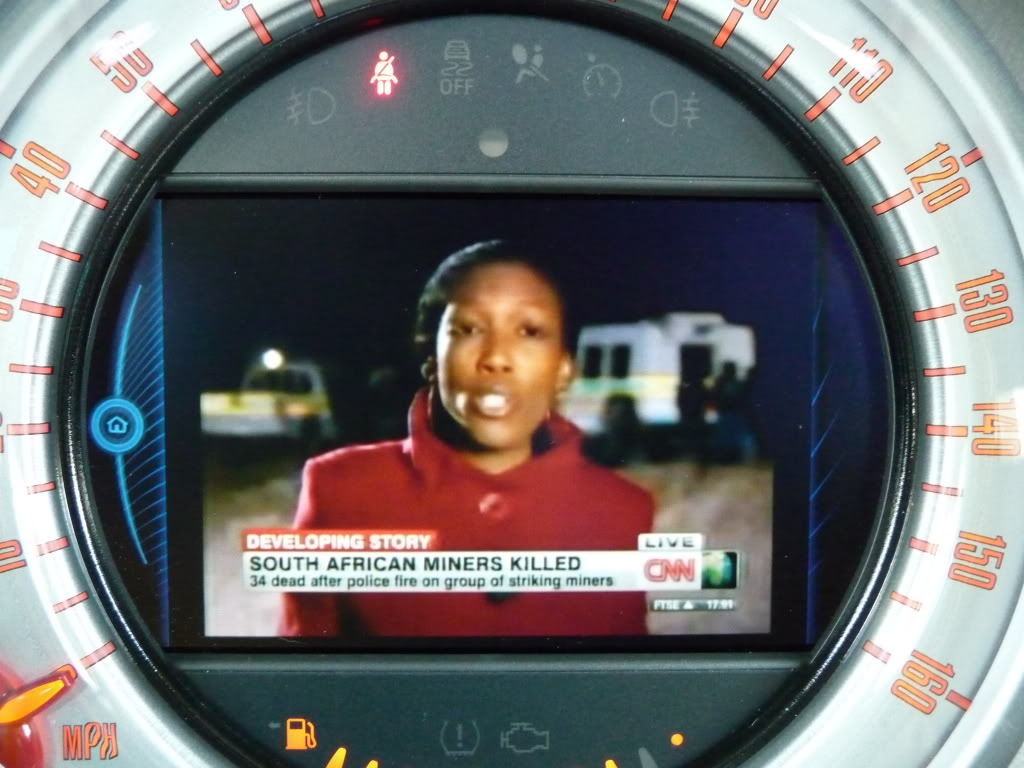
Ok guys, I took some photos of how the mirroring looks on the Connected screen.
When you first plug it in it shows that an external display has been connected
These show the iPhone's home screen horizontally. You need another Cydia tweak called sbRotator.
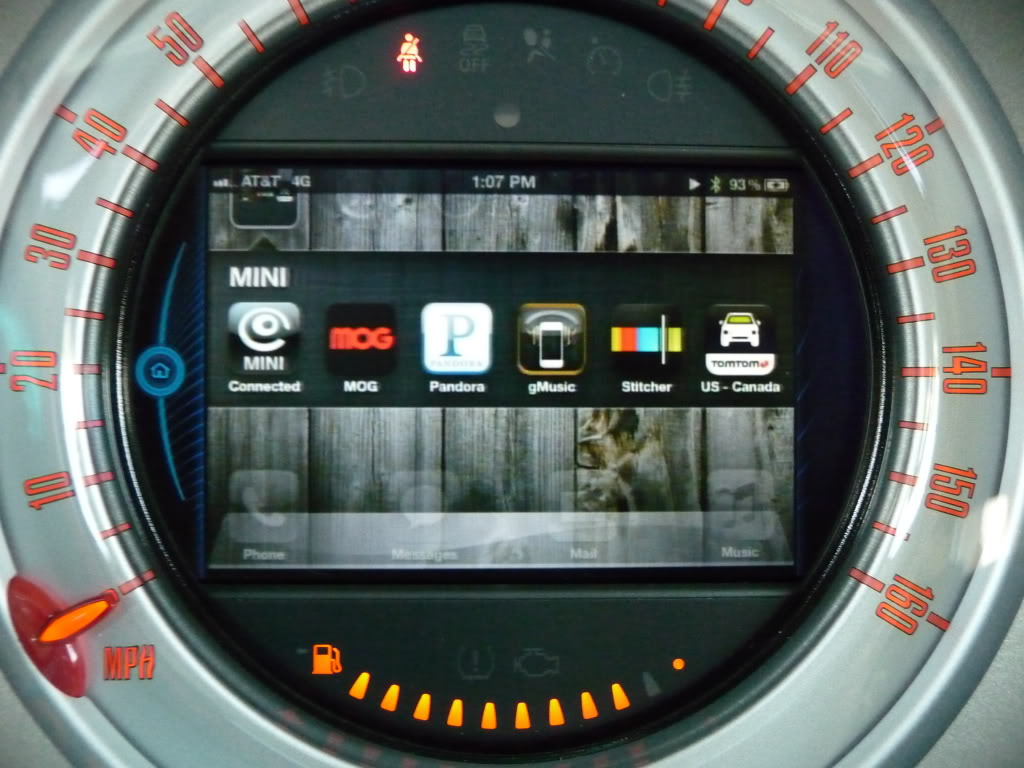
These are from the Tom Tom app. The screen follows the iPhone's orientation so you have to keep the iPhone horizontal.
This is the CNN app showing live tv.
And the I shot a little video of the MINI tv app playing. In the middle of the video the Tom Tom app starts giving directions to my destination. It wasn't supposed to happen but it shows that the sound of the video lowers, the nav gives the directions and then the video sound resumes.
When you first plug it in it shows that an external display has been connected
These show the iPhone's home screen horizontally. You need another Cydia tweak called sbRotator.
These are from the Tom Tom app. The screen follows the iPhone's orientation so you have to keep the iPhone horizontal.
This is the CNN app showing live tv.
And the I shot a little video of the MINI tv app playing. In the middle of the video the Tom Tom app starts giving directions to my destination. It wasn't supposed to happen but it shows that the sound of the video lowers, the nav gives the directions and then the video sound resumes.

2nd Gear
Joined: Nov 2009
Posts: 94
Likes: 0
From: Miami, Fl
I'll try to explain it the best way I can...
1- Jailbreak iPhone (friend did it so I don't know how to)
Next, install the following things from the Cydia repository.
2- Install SBSettings
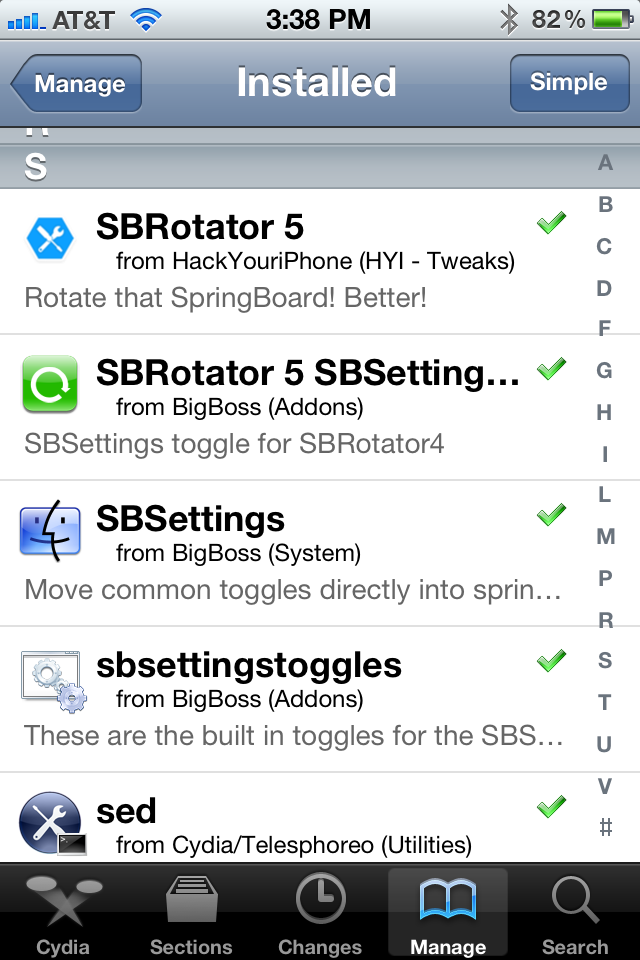
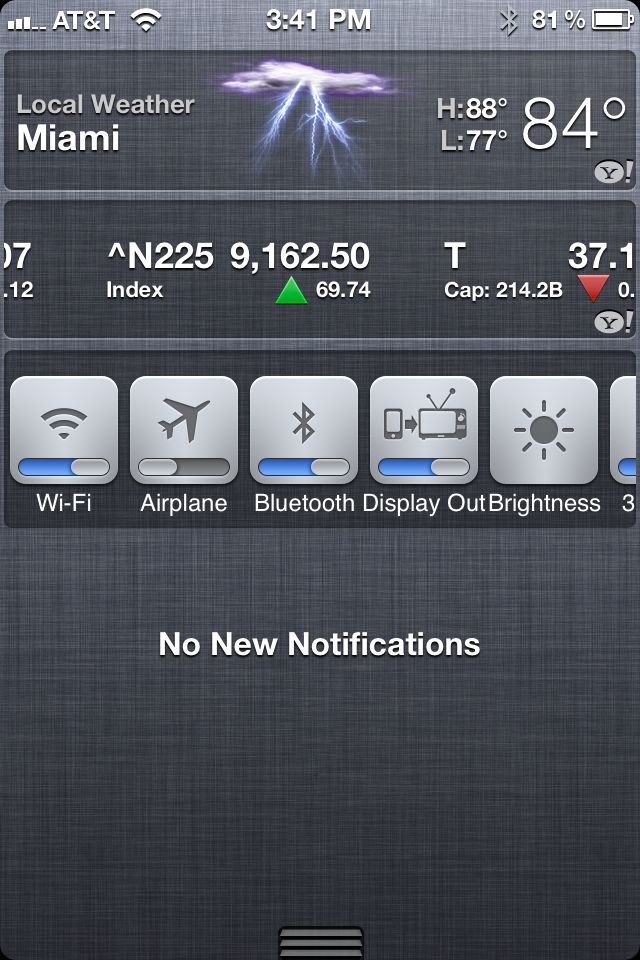
2.1- Install sbsettingtoggles. This enables toggles on the notification pull-down menu or as a separate menu.
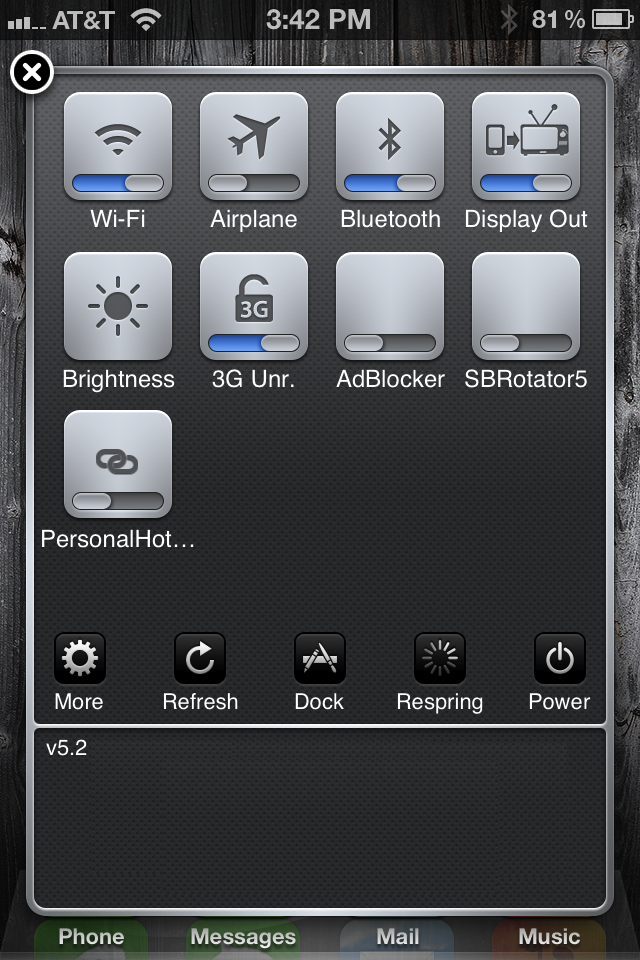
3- Intall SBRotator 5. This enables the home screen rotation to horizontal
3.1- Install SBRotator 5 SBSettings toggle. Its makes it easier to enable or disable this function.
4.- Install DisplayOut. This enables the mirroring.
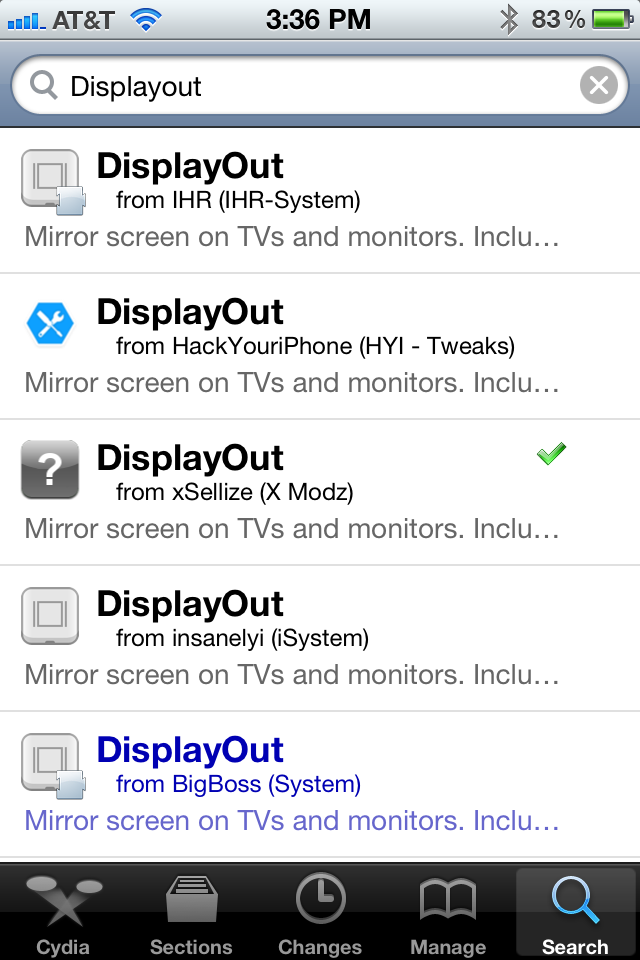
This way it should work. There are 2 more things that I recommend that you install.
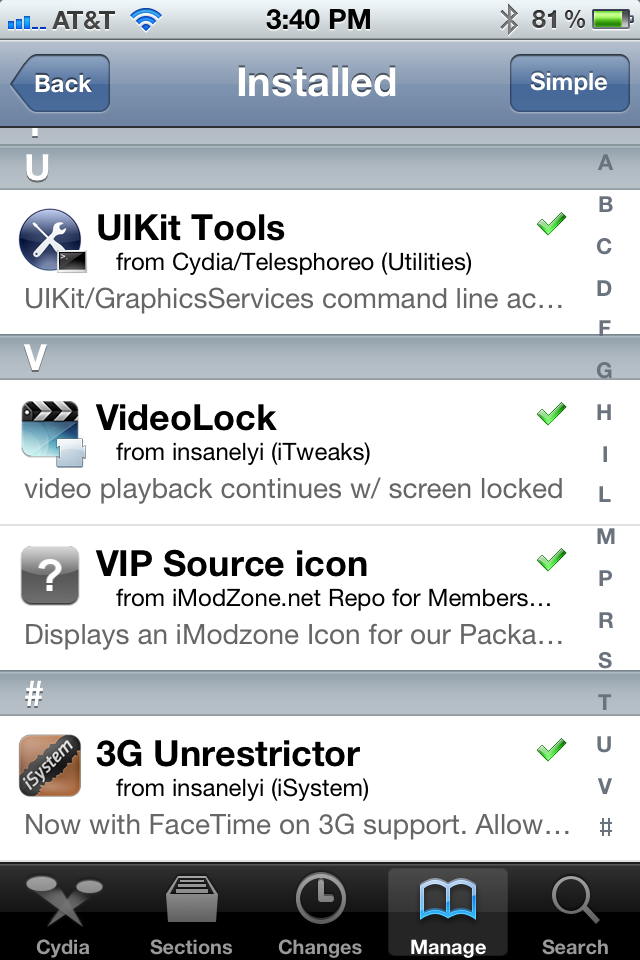
5- 3G Unrestrictor. This enables you to fool the phone into thinking that it is connected to a wifi network, this is usefull with certain apps that require a wifi connection to stream video.
6- VideoLock. This enables you to lock your iPhone's scree while playing a video but it keeps playing on the car's screen. I haven't got this to work everytime but when it does its pretty cool.
1- Jailbreak iPhone (friend did it so I don't know how to)
Next, install the following things from the Cydia repository.
2- Install SBSettings
2.1- Install sbsettingtoggles. This enables toggles on the notification pull-down menu or as a separate menu.
3- Intall SBRotator 5. This enables the home screen rotation to horizontal
3.1- Install SBRotator 5 SBSettings toggle. Its makes it easier to enable or disable this function.
4.- Install DisplayOut. This enables the mirroring.
This way it should work. There are 2 more things that I recommend that you install.
5- 3G Unrestrictor. This enables you to fool the phone into thinking that it is connected to a wifi network, this is usefull with certain apps that require a wifi connection to stream video.
6- VideoLock. This enables you to lock your iPhone's scree while playing a video but it keeps playing on the car's screen. I haven't got this to work everytime but when it does its pretty cool.
Thread Starter
|
5th Gear
Joined: Apr 2006
Posts: 722
Likes: 6
AWESOME! Thanks so much for posting this!!
I just finished jailbreaking my 4S using the instructions here:
http://greenpois0n.com/2012/05/absin...0-has-arrived/
Can't wait for our Countryman to get off the boat and get to my dealer now so I can pick it up and start playing!!!
PS: How are you mounting your iphone? I just ordered a ProClip USA mount because they just sent me a 48 hour coupon code good for 20% off entire order. In case anyone is interested - coupon code is Summer2012.
I just finished jailbreaking my 4S using the instructions here:
http://greenpois0n.com/2012/05/absin...0-has-arrived/
Can't wait for our Countryman to get off the boat and get to my dealer now so I can pick it up and start playing!!!
PS: How are you mounting your iphone? I just ordered a ProClip USA mount because they just sent me a 48 hour coupon code good for 20% off entire order. In case anyone is interested - coupon code is Summer2012.
2nd Gear
Joined: Nov 2009
Posts: 94
Likes: 0
From: Miami, Fl
AWESOME! Thanks so much for posting this!!
I just finished jailbreaking my 4S using the instructions here:
http://greenpois0n.com/2012/05/absin...0-has-arrived/
Can't wait for our Countryman to get off the boat and get to my dealer now so I can pick it up and start playing!!!
PS: How are you mounting your iphone? I just ordered a ProClip USA mount because they just sent me a 48 hour coupon code good for 20% off entire order. In case anyone is interested - coupon code is Summer2012.
I just finished jailbreaking my 4S using the instructions here:
http://greenpois0n.com/2012/05/absin...0-has-arrived/
Can't wait for our Countryman to get off the boat and get to my dealer now so I can pick it up and start playing!!!
PS: How are you mounting your iphone? I just ordered a ProClip USA mount because they just sent me a 48 hour coupon code good for 20% off entire order. In case anyone is interested - coupon code is Summer2012.
On the mounting, I just plug my iPhone to the cable and then rest it horizontally on the center rail. I have to find a more elegant solution but it has been working just fine.

