


Navigation & Audio [eas] Official DICE iPod integration kit Q/A thread


2nd Gear
Joined: Sep 2005
Posts: 90
Likes: 0
From: Mt. Prospect, Il
Hi Tom,
The Dice w/HD looks very interesting. I'm curious about the size of the unit. I read its 3x3x9. Could this be mounted or stashed in the side panel in the boot? Does anyone have picts of how the product is installed? I currently have very little trunk space and would much prefer to have the unit hidden anyways. I do not have the HK amp that I think would be located there.
Thanks
The Dice w/HD looks very interesting. I'm curious about the size of the unit. I read its 3x3x9. Could this be mounted or stashed in the side panel in the boot? Does anyone have picts of how the product is installed? I currently have very little trunk space and would much prefer to have the unit hidden anyways. I do not have the HK amp that I think would be located there.
Thanks
Last edited by DanC; Apr 30, 2007 at 01:02 PM.

Thread Starter
|
Banned
Joined: Nov 2006
Posts: 1,024
Likes: 0
Hi Tom,
The Dice w/HD looks very interesting. I'm curious about the size of the unit. I read its 3x3x9. Could this be mounted or stashed in the side panel in the boot? Does anyone have picts of how the product is installed? I currently have very little trunk space and would much prefer to have the unit hidden anyways. I do not have the HK amp that I think would be located there.
Thanks
The Dice w/HD looks very interesting. I'm curious about the size of the unit. I read its 3x3x9. Could this be mounted or stashed in the side panel in the boot? Does anyone have picts of how the product is installed? I currently have very little trunk space and would much prefer to have the unit hidden anyways. I do not have the HK amp that I think would be located there.
Thanks

6th Gear
Joined: Aug 2005
Posts: 3,902
Likes: 2
From: SoCaL (Agoura Hills)
Hi Tom,
The Dice w/HD looks very interesting. I'm curious about the size of the unit. I read its 3x3x9. Could this be mounted or stashed in the side panel in the boot? Does anyone have picts of how the product is installed? I currently have very little trunk space and would much prefer to have the unit hidden anyways. I do not have the HK amp that I think would be located there.
Thanks
The Dice w/HD looks very interesting. I'm curious about the size of the unit. I read its 3x3x9. Could this be mounted or stashed in the side panel in the boot? Does anyone have picts of how the product is installed? I currently have very little trunk space and would much prefer to have the unit hidden anyways. I do not have the HK amp that I think would be located there.
Thanks
It definitely wouldn't fit behind the storage compartment on the passenger side of the vehicle, even without HK. I'm not sure logistically if it did fit, how you would be able to route the wiring to the front, unless you kept your iPod in the back of the car, the wire from the DICE unit to the iPod is only 3 feet long.
Last edited by Guest; Apr 30, 2007 at 01:31 PM.
Thread Starter
|
Banned
Joined: Nov 2006
Posts: 1,024
Likes: 0
We installed mine behind the glovebox on the far right hand side right under a bundle of wires. Antenna went up the A Pillar , grounded into the sun visor, and the strip went along the top edge of the windshield.
It definitely wouldn't fit behind the storage compartment on the passenger side of the vehicle, even without HK. I'm not sure logistically if it did fit, how you would be able to route the wiring to the front, unless you kept your iPod in the back of the car, the wire from the DICE unit to the iPod is only 3 feet long.
It definitely wouldn't fit behind the storage compartment on the passenger side of the vehicle, even without HK. I'm not sure logistically if it did fit, how you would be able to route the wiring to the front, unless you kept your iPod in the back of the car, the wire from the DICE unit to the iPod is only 3 feet long.
We do have a 10-foot extension for the iPod docking cable if a trunk-install is preferred.

1st Gear
Joined: Mar 2006
Posts: 22
Likes: 0
Here's how I did my installation. I'm very happy with it, and it was pretty easy. My car is a 2006 MCS with NAV & HK.
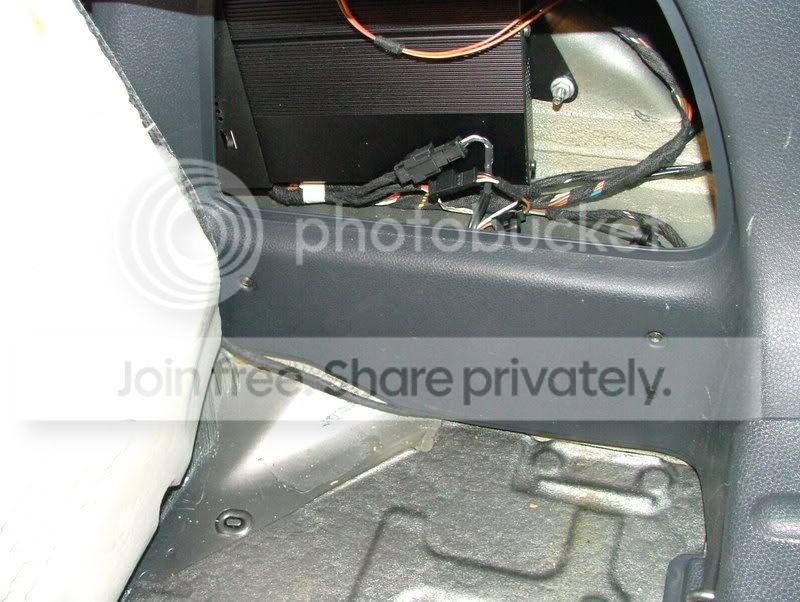
First, plug in the supplied cable to the CD changer plugs in the passenger side of the boot, then hide the cable behind the trim panels and tuck it under the back seat.
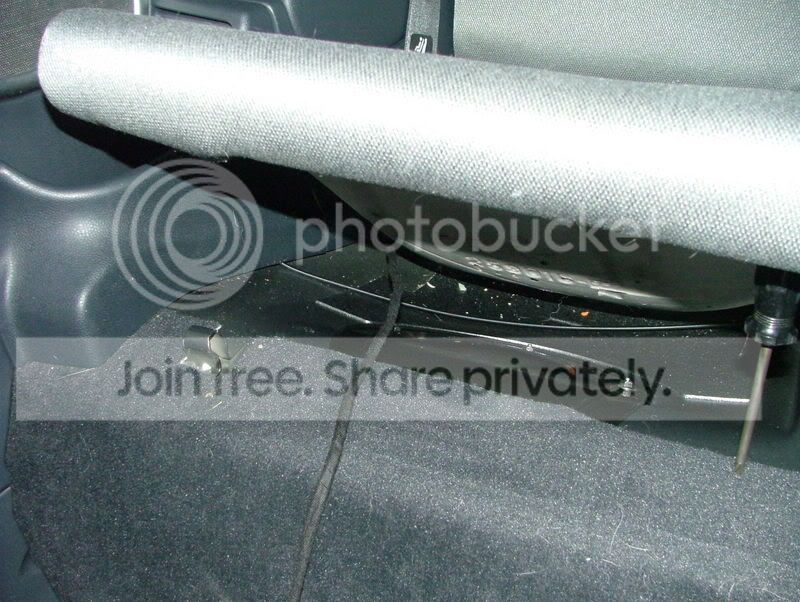
Next, pull the back seat bottom up and bring the cable forward.
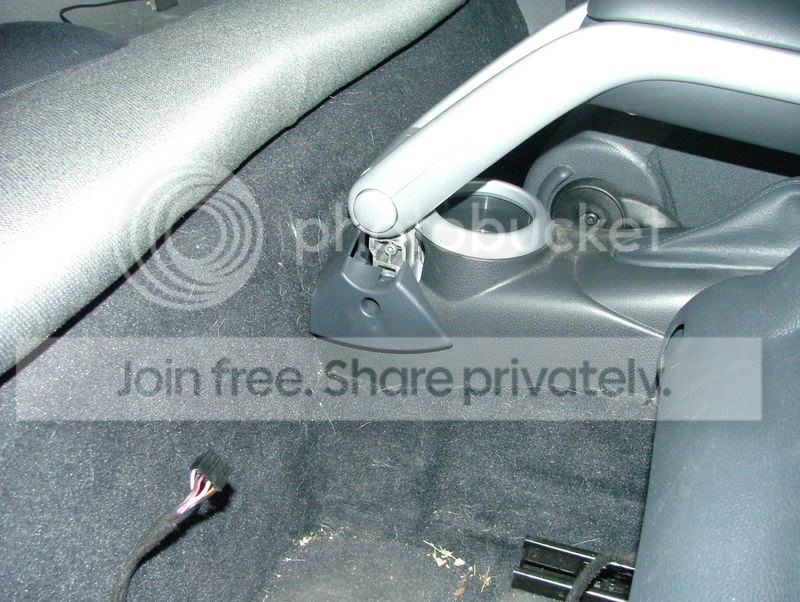
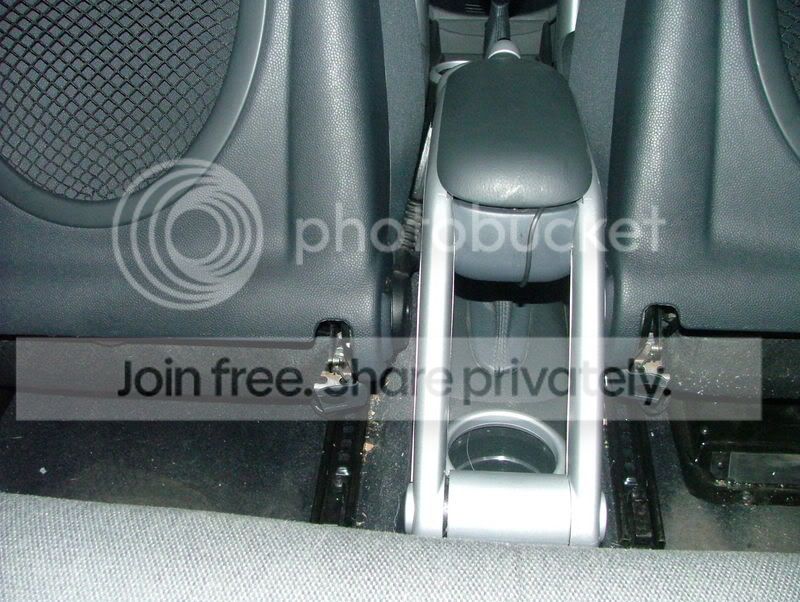
From here, I removed this trim piece and cut a small hole in the carpet behind the trim piece. The cable stays under the carpet and out of view.
This allowed me to route the cables up along the support arms of the factory armrest to the DICE control unit that I had attached to the bottom of the armrest. The 2nd wire is an extension wire for the AUX, which I've run under the shifter console up under the radio, where I have an XM unit connected.
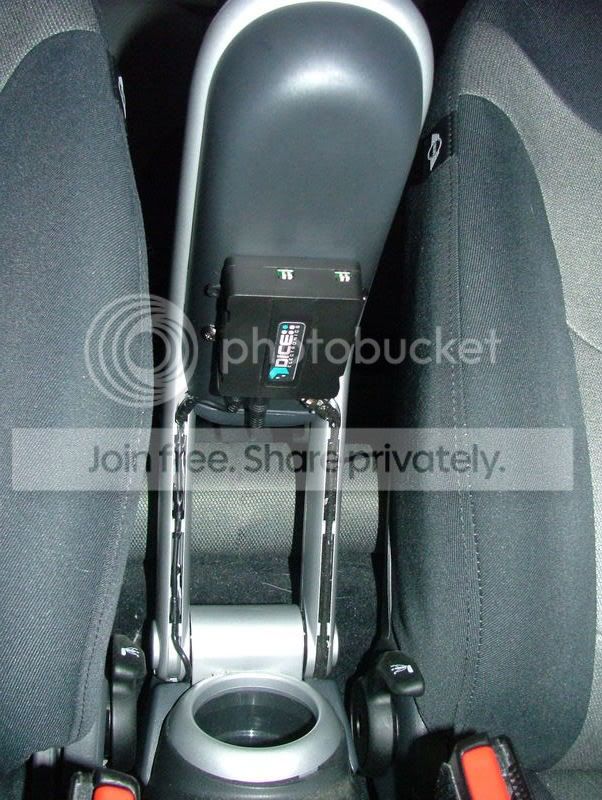
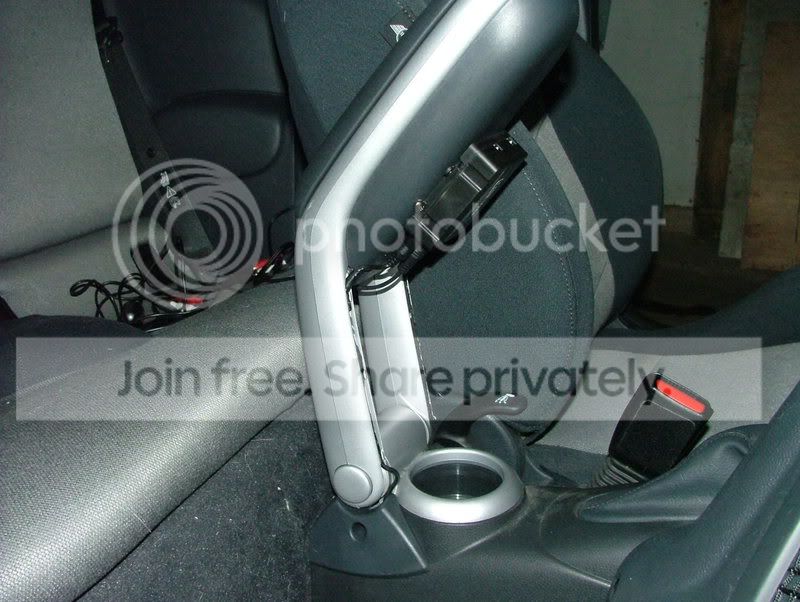
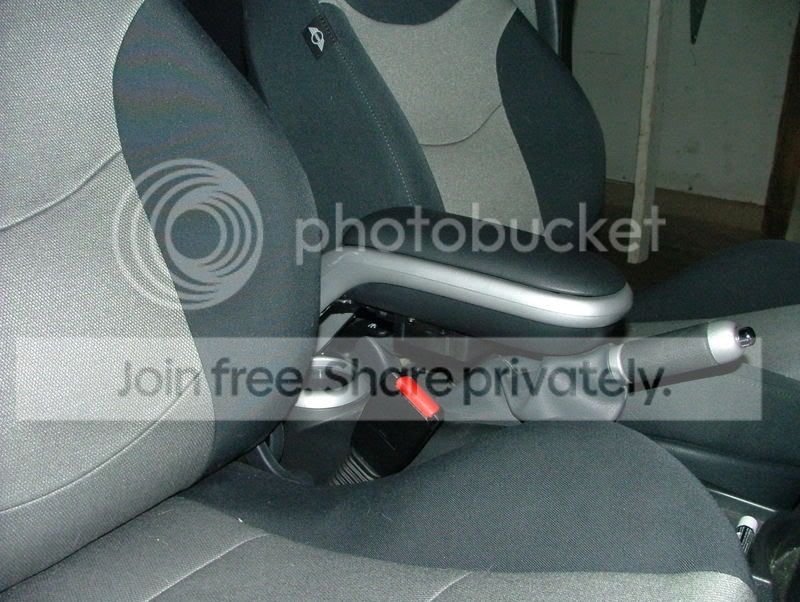
The DICE unit includes a connection cable for the iPod, which I ran into the armrest. The iPod is always within reach, but always out of view, and the DICE control box is neatly tucked away under the armrest. I barely even notice it's there!
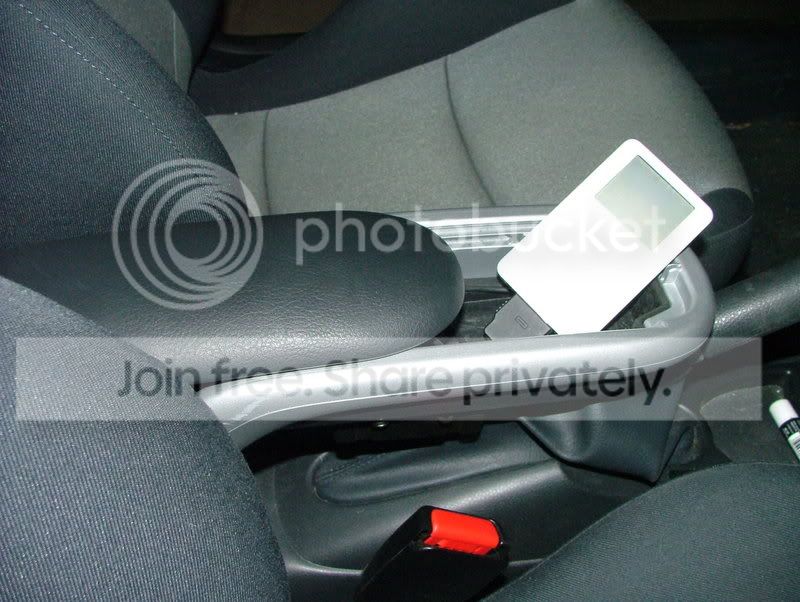
And now, it's time for...
First, plug in the supplied cable to the CD changer plugs in the passenger side of the boot, then hide the cable behind the trim panels and tuck it under the back seat.
Next, pull the back seat bottom up and bring the cable forward.
From here, I removed this trim piece and cut a small hole in the carpet behind the trim piece. The cable stays under the carpet and out of view.
This allowed me to route the cables up along the support arms of the factory armrest to the DICE control unit that I had attached to the bottom of the armrest. The 2nd wire is an extension wire for the AUX, which I've run under the shifter console up under the radio, where I have an XM unit connected.
The DICE unit includes a connection cable for the iPod, which I ran into the armrest. The iPod is always within reach, but always out of view, and the DICE control box is neatly tucked away under the armrest. I barely even notice it's there!
And now, it's time for...

2nd Gear
Joined: Sep 2005
Posts: 90
Likes: 0
From: Mt. Prospect, Il
Thanks
DanC
Thread Starter
|
Banned
Joined: Nov 2006
Posts: 1,024
Likes: 0
Well I passed this test. So I see that there's an option to include the iPod docking cable. How do I specify longer cable or a trunk mount option when placing an order? I actually don't know if that is what I want. What I would like is to have the dock 30 pin connection to reach the tray below the e-brake with a little bit of slack to pick the iPod up to look at.
Thanks
DanC
Thanks
DanC
DICE iPod Integration Kit for Mini Cooper (Radio Interface)
http://www.europeanautosource.com/pr...roducts_id=629
Let me know if you have any further questions!
2nd Gear
Joined: Sep 2005
Posts: 90
Likes: 0
From: Mt. Prospect, Il
That's fine - the Radio interface kit provides about 54" of cable length from the rear of the radio, providing plenty of slack. Here's the kit you need:
DICE iPod Integration Kit for Mini Cooper (Radio Interface)
http://www.europeanautosource.com/pr...roducts_id=629
Let me know if you have any further questions!
DICE iPod Integration Kit for Mini Cooper (Radio Interface)
http://www.europeanautosource.com/pr...roducts_id=629
Let me know if you have any further questions!

2nd Gear
Joined: Mar 2003
Posts: 132
Likes: 0
From: Colorado Springs CO
I have an '05 with a 12/04 build date. The HK software displays 10 05 50. Is this possible for a factory install at the time? Does it mean I'm home free for 04/05 build date and can have all functions?
Thread Starter
|
Banned
Joined: Nov 2006
Posts: 1,024
Likes: 0

Thread Starter
|
Banned
Joined: Nov 2006
Posts: 1,024
Likes: 0
Order received and shipping first thing tomorrow morning. Thanks again for your business.

2nd Gear
Joined: Jan 2007
Posts: 65
Likes: 0
From: Bay Area, California
Bumping my message for Tom to comment
Tom,
We spoke via email previously. Here is my situation:
Background
2007 H/K, Convert with Nav. Per your recommendation, did not do the cd changer harness wiring Dice kit as this would take over the Nav when music on the iPod is playing with the text of the song playing. Your recommended approach was the R40 kit, connecting directly to the radio. I had Matt from Soundworks in San Carlos install.
Problem
The problem is that the only options seem to be: 1) text display for songs can appear on the radio (disk 6, track 1) but this hijacks the Nav. It was my understanding that this would not be the case with the R40. I have tried the other option on disk 6, tracks 5 and 6 (difference being only the large font); with these options, text shows up on the Nav and hijacks it preventing viewing of the map or the directions. 2) If I don't show the text on the radio, but do the disk 6 track 4 or 6, it hijacks the Nav.
What are your recommendations? Neither Matt, after installing, nor I after using it for the past day can prevent this from occuring. Since i use my Nav alot, the only options I have are to play the iPod music with not knowing the song, if I want to use the Nav. Again, I thought this was going to work? Please help.
We spoke via email previously. Here is my situation:
Background
2007 H/K, Convert with Nav. Per your recommendation, did not do the cd changer harness wiring Dice kit as this would take over the Nav when music on the iPod is playing with the text of the song playing. Your recommended approach was the R40 kit, connecting directly to the radio. I had Matt from Soundworks in San Carlos install.
Problem
The problem is that the only options seem to be: 1) text display for songs can appear on the radio (disk 6, track 1) but this hijacks the Nav. It was my understanding that this would not be the case with the R40. I have tried the other option on disk 6, tracks 5 and 6 (difference being only the large font); with these options, text shows up on the Nav and hijacks it preventing viewing of the map or the directions. 2) If I don't show the text on the radio, but do the disk 6 track 4 or 6, it hijacks the Nav.
What are your recommendations? Neither Matt, after installing, nor I after using it for the past day can prevent this from occuring. Since i use my Nav alot, the only options I have are to play the iPod music with not knowing the song, if I want to use the Nav. Again, I thought this was going to work? Please help.
Thread Starter
|
Banned
Joined: Nov 2006
Posts: 1,024
Likes: 0
I apologize, I must have missed your post.
At the present moment, you cannot have Navigation and the iPod playing at the same time or the ipod will overwrite the maps. the R40 was recommend as an easier option in order to avoid routing cabling from the boot area to the cabin area - the modules are the same in both kits.
At this time, I would recommend turning off text display when using Navigation, or not use the both at the same time. We are in development of a solution and was able to get some good data with Nick's MCS last week.
Let me know if you have any further questions.
At the present moment, you cannot have Navigation and the iPod playing at the same time or the ipod will overwrite the maps. the R40 was recommend as an easier option in order to avoid routing cabling from the boot area to the cabin area - the modules are the same in both kits.
At this time, I would recommend turning off text display when using Navigation, or not use the both at the same time. We are in development of a solution and was able to get some good data with Nick's MCS last week.
Let me know if you have any further questions.
2nd Gear
Joined: Jan 2007
Posts: 65
Likes: 0
From: Bay Area, California
Tom,
New issue, after being out of town for a week and then using my mini again, the first thing to show up on the radio is init. After that, I could not change any songs. In fact under cd1 it said it was on track 80. Changing the track did nothing. I went to the playlist (cd2) and it showed the word "playlist" on the radio (although not at first) but you couldn't change the playlist; finally, I selected CD3, "album" was displayed on the radio, and you could change the album. Any attempts to change songs by going back to cd1 did nothing. It is like the iPod or the Dice was confused. I also tried putting everything back on track 99 to no avail.
Does this require a reset of the ipod? Is this something i will need to do each time i get in my mini and use the iPod after sitting for a day or so? The "init" seems to show up frequently.
Are others having this much trouble with their Dice kits?
New issue, after being out of town for a week and then using my mini again, the first thing to show up on the radio is init. After that, I could not change any songs. In fact under cd1 it said it was on track 80. Changing the track did nothing. I went to the playlist (cd2) and it showed the word "playlist" on the radio (although not at first) but you couldn't change the playlist; finally, I selected CD3, "album" was displayed on the radio, and you could change the album. Any attempts to change songs by going back to cd1 did nothing. It is like the iPod or the Dice was confused. I also tried putting everything back on track 99 to no avail.
Does this require a reset of the ipod? Is this something i will need to do each time i get in my mini and use the iPod after sitting for a day or so? The "init" seems to show up frequently.
Are others having this much trouble with their Dice kits?

3rd Gear
Joined: Mar 2007
Posts: 155
Likes: 0
From: Dobbs Ferry, NY
I took delivery of my 2007 Cabrio yesterday, and installed the DICE head unit first thing this morning. It took just over an hour, and it's now working beautifully. A tremendous improvement over the MINI iPod kit I looked into. The hardest part of the install was getting all the cords stuffed back into the dash as I closed 'er up.
If I can do it, you can do it. Thanks for your help, Tom. It was well worth the hour of labor for iPod connectivity with text, charging, etc.
If I can do it, you can do it. Thanks for your help, Tom. It was well worth the hour of labor for iPod connectivity with text, charging, etc.
2nd Gear
Joined: Mar 2003
Posts: 132
Likes: 0
From: Colorado Springs CO
Tom...you are on my list for #1 in customer service. Had no idea I would have full music on board this fast.
An hour after talking to him and placing an order, the unit was on a truck heading my way. Next time I looked at tracking, the unit was sitting at the front door.
It took a little over a half hour for a glove box install and is everything promised.
An hour after talking to him and placing an order, the unit was on a truck heading my way. Next time I looked at tracking, the unit was sitting at the front door.
It took a little over a half hour for a glove box install and is everything promised.
Thread Starter
|
Banned
Joined: Nov 2006
Posts: 1,024
Likes: 0
Tom,
New issue, after being out of town for a week and then using my mini again, the first thing to show up on the radio is init. After that, I could not change any songs. In fact under cd1 it said it was on track 80. Changing the track did nothing. I went to the playlist (cd2) and it showed the word "playlist" on the radio (although not at first) but you couldn't change the playlist; finally, I selected CD3, "album" was displayed on the radio, and you could change the album. Any attempts to change songs by going back to cd1 did nothing. It is like the iPod or the Dice was confused. I also tried putting everything back on track 99 to no avail.
Does this require a reset of the ipod? Is this something i will need to do each time i get in my mini and use the iPod after sitting for a day or so? The "init" seems to show up frequently.
Are others having this much trouble with their Dice kits?
New issue, after being out of town for a week and then using my mini again, the first thing to show up on the radio is init. After that, I could not change any songs. In fact under cd1 it said it was on track 80. Changing the track did nothing. I went to the playlist (cd2) and it showed the word "playlist" on the radio (although not at first) but you couldn't change the playlist; finally, I selected CD3, "album" was displayed on the radio, and you could change the album. Any attempts to change songs by going back to cd1 did nothing. It is like the iPod or the Dice was confused. I also tried putting everything back on track 99 to no avail.
Does this require a reset of the ipod? Is this something i will need to do each time i get in my mini and use the iPod after sitting for a day or so? The "init" seems to show up frequently.
Are others having this much trouble with their Dice kits?
2nd Gear
Joined: Sep 2005
Posts: 90
Likes: 0
From: Mt. Prospect, Il
Is there a link to this extension or can I find it here locally? I installed the HD Dice and decided to locate the HD Radio antenna on the rear fixed portion of the sunroof. I snaked the antenna to the rear, where the side panel opens up in the boot. I don't think I have enough slack to locate the dice unit under the passenger seat. So I would need an extension of the antenna wire or the dock connector wire. I bought a extension from radioshack for a computer keyboard connection but the pins are slightly different.
Still trying to figure out how to select specific HD radio stations. I have had some stations show up. some have the letter 'S' by the frequency others have HD1. I am still playing with it. Do you have an easy explanation of how this works

Last edited by DanC; May 8, 2007 at 10:02 PM.
Thread Starter
|
Banned
Joined: Nov 2006
Posts: 1,024
Likes: 0
Tom
Is there a link to this extension or can I find it here locally? I installed the HD Dice and decided to locate the HD Radio antenna on the rear fixed portion of the sunroof. I snaked the antenna to the rear, where the side panel opens up in the boot. I don't think I have enough slack to locate the dice unit under the passenger seat. So I would need an extension of the antenna wire or the dock connector wire. I bought a extension from radioshack for a computer keyboard connection but the pins are slightly different.
Still trying to figure out how to select specific HD radio stations. I have had some stations show up. some have the letter 'S' by the frequency others have HD1. I am still playing with it. Do you have an easy explanation of how this works
Is there a link to this extension or can I find it here locally? I installed the HD Dice and decided to locate the HD Radio antenna on the rear fixed portion of the sunroof. I snaked the antenna to the rear, where the side panel opens up in the boot. I don't think I have enough slack to locate the dice unit under the passenger seat. So I would need an extension of the antenna wire or the dock connector wire. I bought a extension from radioshack for a computer keyboard connection but the pins are slightly different.
Still trying to figure out how to select specific HD radio stations. I have had some stations show up. some have the letter 'S' by the frequency others have HD1. I am still playing with it. Do you have an easy explanation of how this works

Thread Starter
|
Banned
Joined: Nov 2006
Posts: 1,024
Likes: 0
Yes - but at this time the text does overwrite the Maps meaning the HD and NAV cannot be used at the same time. We are looking into a solution at this time which will be offered in a firmware update.
5th Gear
Joined: Mar 2003
Posts: 937
Likes: 1
From: New York City
Here's how I did my installation. I'm very happy with it, and it was pretty easy. My car is a 2006 MCS with NAV & HK.
First, plug in the supplied cable to the CD changer plugs in the passenger side of the boot, then hide the cable behind the trim panels and tuck it under the back seat.
First, plug in the supplied cable to the CD changer plugs in the passenger side of the boot, then hide the cable behind the trim panels and tuck it under the back seat.
I don't have the factory arm rest so I'm still deciding where to mount the module. I'm planning to route the cable to the CD changer plug like Kellonwheels did. Then I'm planning to tuck in the rest of the cable along the carpet and the door sill trim on the passenger side.
If anyone can post pics where they mounted the module, that would be great. KTHNXBYE
