


Navigation & Audio Old iPod, New Mini


Thread Starter
|
2nd Gear
Joined: Apr 2014
Posts: 76
Likes: 0
From: Boulder, CO
Old iPod, New Mini
On my 2015 MC I can't figure out how to get my 2004 iPod to play. The manual says to pick "Media" then "USB." But I don't see the USB prompt. So this seems to be either user error or my iPod is outdated. Any clues?

3rd Gear
Joined: Nov 2011
Posts: 292
Likes: 0
From: UT, USA
How are you connecting the iPod to your USB port? Through just an Apple USB cable or using the MINI iPod Y Cable? Also, read this just to make sure your iPod is compatible: http://www.miniusa.com/content/dam/m...INI_USB_EN.pdf
Last edited by LILYisatig3r; Oct 29, 2014 at 04:12 PM. Reason: More info.

OVERDRIVE
Joined: Mar 2007
Posts: 5,602
Likes: 107
From: Arizona
Mine's is a 5G iPod, about 2005 and it works in my Mini. Yours will work. I use the Y cable but your car is different I think. I think others can just use a white Apple wire from dock connector to usb. The other limb of the Y is a male connection to Aux I think.

5th Gear
Joined: Mar 2014
Posts: 981
Likes: 6
From: Cold, Sleepwalking Winnipeg
You don't see the name of your iPod in the list under Media?
I've got the same 5G iPod [I haven't used it in a while] it was a 30g, I put a huge drive in it, I will try it tonight, if I remember.
I've got the same 5G iPod [I haven't used it in a while] it was a 30g, I put a huge drive in it, I will try it tonight, if I remember.
Thread Starter
|
2nd Gear
Joined: Apr 2014
Posts: 76
Likes: 0
From: Boulder, CO
Thanks all for the input. After Lily's post, I went to my local Apple store to see what's what and what generation iPod I have. Well, I have the 3rd generation (and MINI says I need at least the 4th) so the USB cable won't work. But an AUX cable will. So the good news is that I can play the iPod, and hear my uncompressed songs on the Harmon Kardon. The bad news is I can only control playback through the iPod itself - no transfer of data to the dash screen.
I also learned that my iPod is now called a "Classic" (not unlike me) and they have just stopped making these in the past month or so, but you can still find some for sale if you prefer that style to the new ones. The Classics have more storage than the new models (better for big music libraries), but the new ones have all the functionality of an iPad.
Now on to figure out the climate control system.
I also learned that my iPod is now called a "Classic" (not unlike me) and they have just stopped making these in the past month or so, but you can still find some for sale if you prefer that style to the new ones. The Classics have more storage than the new models (better for big music libraries), but the new ones have all the functionality of an iPad.
Now on to figure out the climate control system.
5th Gear
Joined: Mar 2014
Posts: 981
Likes: 6
From: Cold, Sleepwalking Winnipeg
Edit:Success with the upgraded iPod 5G 30g [I had to blow out the connector because it had been sitting so long!].
It works as you would expect, through the dock to USB. Menus, song progress.
--------------------
Just to let you know, I didn't have a lot of success with the 5G.
When I first plugged it in, it took a few seconds and then the name was shown in the media list. A MINI logo came up on the iPod's screen. I was able to navigate through the menus, but when I selected a song, nothing happened. Maybe I needed a Y-cable.
I tried plugging it in later and nothing happened. I will try with a different cable.
It works as you would expect, through the dock to USB. Menus, song progress.
--------------------
Just to let you know, I didn't have a lot of success with the 5G.
When I first plugged it in, it took a few seconds and then the name was shown in the media list. A MINI logo came up on the iPod's screen. I was able to navigate through the menus, but when I selected a song, nothing happened. Maybe I needed a Y-cable.
I tried plugging it in later and nothing happened. I will try with a different cable.
Last edited by hammerhands; Oct 30, 2014 at 12:06 PM. Reason: update!
Trending Topics

2nd Gear
Joined: Oct 2014
Posts: 84
Likes: 0
From: Cleveland, OH
will the F56 store music from iPod?
Hello,
I recently leased a '15 Justa, and thought I read that the car can store over 9,000 songs or something. Does anyone have experience with this? The car "sees" my iPod perfectly, but it would be really cool if there was onboard MP3/MP4 storage. I need to consult the manual again.
RH
I recently leased a '15 Justa, and thought I read that the car can store over 9,000 songs or something. Does anyone have experience with this? The car "sees" my iPod perfectly, but it would be really cool if there was onboard MP3/MP4 storage. I need to consult the manual again.
RH
5th Gear
Joined: Mar 2014
Posts: 981
Likes: 6
From: Cold, Sleepwalking Winnipeg
It depends on your options. I don't know if you can transfer them from your iPod.
There is a thread about this, let me see if I can find it...
Here's one with a pretty good how to.
https://www.northamericanmotoring.co...e-storage.html
There's one on removing music from the hard drive.
https://www.northamericanmotoring.co...ive-music.html
There's one hinting that the easiest way to transfer songs is by using a thumb drive.
https://www.northamericanmotoring.co...-to-music.html
There is a thread about this, let me see if I can find it...
Here's one with a pretty good how to.
https://www.northamericanmotoring.co...e-storage.html
There's one on removing music from the hard drive.
https://www.northamericanmotoring.co...ive-music.html
There's one hinting that the easiest way to transfer songs is by using a thumb drive.
https://www.northamericanmotoring.co...-to-music.html
Copying music into the car’s library from iTunes is really, really easy. Go into iTunes on your computer, and select all of the songs that you want to copy. Usually making a playlist with them is the easiest thing to do, because you have a consolidated list of tracks to copy. Once you have your list selected, open up a new window for your flash drive in Windows Explorer/Finder, and then simply drag and drop the selected songs from iTunes into the drive. You’re all done with the computer. Once you’re in your car, go to Media>External Devices>USB, and the car will begin to play music. Grab the menu from the left hand side, and scroll down until you get to the icon that resembles a floppy disk.
Click on it, and the car will automatically copy the contents of your flash drive to its hard drive. At any point after it has copied, you can remove the flash drive. To manage the music stored in the car, go to Media>Multimedia Collection, swipe the controller to the right for the options menu, and choose “Manage Music Collection”. You can then add or delete songs, check available storage, copy songs to another USB drive, etc.
Click on it, and the car will automatically copy the contents of your flash drive to its hard drive. At any point after it has copied, you can remove the flash drive. To manage the music stored in the car, go to Media>Multimedia Collection, swipe the controller to the right for the options menu, and choose “Manage Music Collection”. You can then add or delete songs, check available storage, copy songs to another USB drive, etc.
Last edited by hammerhands; Oct 30, 2014 at 09:22 AM.
OVERDRIVE
Joined: Mar 2007
Posts: 5,602
Likes: 107
From: Arizona
iPods won't let you transfer music to anything, that's been true forever. If they did everyone would share their iPod music with their pals computers. It can be done with 3rd party software but I bet not to the Mini hard drive. Thumb drive. Also, if the OP wants the best sound use a dock connector not a male-male wire. That's what I did on my 2007. Sounds better because the iPod's amp is bypassed. You can still change the EQ settings, but the iPod volume is bypassed and uses the car's volume.

2nd Gear
Joined: Oct 2014
Posts: 84
Likes: 0
From: Cleveland, OH
iPods won't let you transfer music to anything, that's been true forever. If they did everyone would share their iPod music with their pals computers. It can be done with 3rd party software but I bet not to the Mini hard drive. Thumb drive. Also, if the OP wants the best sound use a dock connector not a male-male wire. That's what I did on my 2007. Sounds better because the iPod's amp is bypassed. You can still change the EQ settings, but the iPod volume is bypassed and uses the car's volume.
3rd Gear
Joined: Nov 2011
Posts: 292
Likes: 0
From: UT, USA
I just ended up returning my 30-pin to Lightning adapter and bought a 32GB thumb drive. Loaded everything on there and I leave it in my car. It indexes nearly identical to the way the iPod indexed everything.
Thread Starter
|
2nd Gear
Joined: Apr 2014
Posts: 76
Likes: 0
From: Boulder, CO
Bignewt, right you are about transferring data. Apple is so uptight on this you can't transfer from one iPod to another. I was thinking I just might have to buy a new one. My iTunes was on a Mac that crashed years ago, but noooo, you have to start all over again or try your luck with 3rd party software.
But I don't understand your dock connector suggestion. It still uses a USB cable, right? A dock conncector is the stand that holds the iPod upright? One came with mine when I bought it 10 years ago.
Also, I have an a separate iPod amp but not sure how that would interface with the Mini system. I'll give it try and see if I can hear a difference.
But I don't understand your dock connector suggestion. It still uses a USB cable, right? A dock conncector is the stand that holds the iPod upright? One came with mine when I bought it 10 years ago.
Also, I have an a separate iPod amp but not sure how that would interface with the Mini system. I'll give it try and see if I can hear a difference.
5th Gear
Joined: Mar 2014
Posts: 981
Likes: 6
From: Cold, Sleepwalking Winnipeg
vegbiker, if it's like the 5G, all the songs are sitting in hidden directories on the iPod with names like JHPX.mp3.
What audio format are your files in?
You can move them to a PC and use an id3 tag organizer to rename them and put them into directories. I used a program called The Godfather, or something, it was going well until I managed to delete all my files! Everything is backed up in duplicate now.
What audio format are your files in?
You can move them to a PC and use an id3 tag organizer to rename them and put them into directories. I used a program called The Godfather, or something, it was going well until I managed to delete all my files! Everything is backed up in duplicate now.
5th Gear
Joined: Mar 2014
Posts: 981
Likes: 6
From: Cold, Sleepwalking Winnipeg
What BigNewt means by a dock connector is something that plugs into the dock connector on the iPod. The reason to do this is that there is a line-out on the dock connector that sounds much better than the sound you get from the headphone jack.
It can be a simple "splitter" cable that has a USB and an 1/8" audio connector, a breakout dock, you could use the Apple universal dock, it may fit nicely in a cup holder.
I will post some pictures of some things I used on my R50.
I bought these cheap cables from Hong Kong. I went through about three of them at $1.99 a piece.
Here's one at Amazon
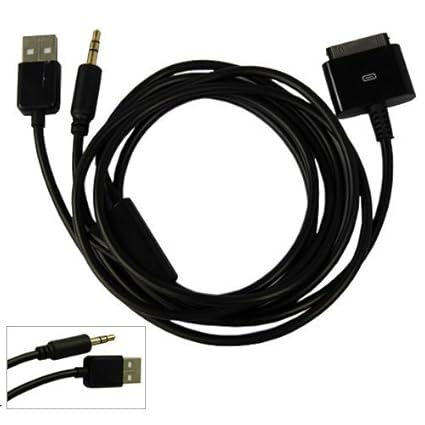
There's a cool company called SendStation that sells these cool docks, they allow you to keep your iPod in its case. I glued one to my laptop. The one I had in my car disappeared. They are a bit expensive and ship from Germany.
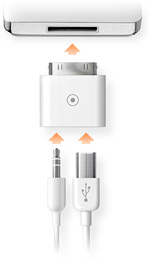
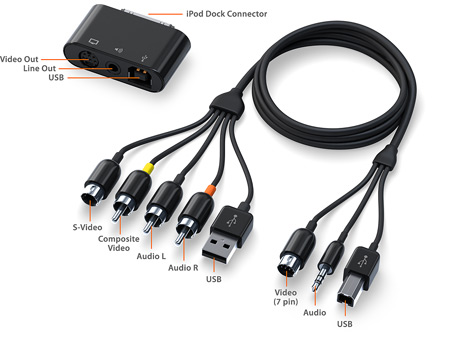
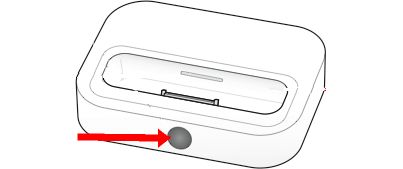
The old Apple Universal Dock is cooler than the current Universal Dock, it has a remote control and a video out that the new iPods and iPhones don't support. Does it fit in a cupholder? Let me check. No it does not.
It can be a simple "splitter" cable that has a USB and an 1/8" audio connector, a breakout dock, you could use the Apple universal dock, it may fit nicely in a cup holder.
I will post some pictures of some things I used on my R50.
I bought these cheap cables from Hong Kong. I went through about three of them at $1.99 a piece.
Here's one at Amazon

There's a cool company called SendStation that sells these cool docks, they allow you to keep your iPod in its case. I glued one to my laptop. The one I had in my car disappeared. They are a bit expensive and ship from Germany.
The old Apple Universal Dock is cooler than the current Universal Dock, it has a remote control and a video out that the new iPods and iPhones don't support. Does it fit in a cupholder? Let me check. No it does not.
Last edited by hammerhands; Oct 30, 2014 at 12:46 PM.
Thread Starter
|
2nd Gear
Joined: Apr 2014
Posts: 76
Likes: 0
From: Boulder, CO
hammerhands, very helpful! Now I'm getting it. You know, I asked the guy in the Apple store about the quality of sound that comes out of the 1/8 audio connector and he assured me it would be great! I'll give your suggestion a try - thanks for the Amazon link.
Maybe this is a bit technical, but I'm curious why the signal coming from one hole is better than the other one?
Maybe this is a bit technical, but I'm curious why the signal coming from one hole is better than the other one?
5th Gear
Joined: Mar 2014
Posts: 981
Likes: 6
From: Cold, Sleepwalking Winnipeg
I got mine on eBay. Buy a few extra, they last many months.
The line-out on the dock is at a nominal level, "line-level", that is expected by the the line-in port, and it should have a standard output impedence.
It also should not be going through the relatively noisy headphone amplifier circuit.
So, less circuitry, less noise and a better match.
You also don't have to mess with the volume on the iPod and will not have problems with the distortion that can cause.
The line-out on the dock is at a nominal level, "line-level", that is expected by the the line-in port, and it should have a standard output impedence.
It also should not be going through the relatively noisy headphone amplifier circuit.
So, less circuitry, less noise and a better match.
You also don't have to mess with the volume on the iPod and will not have problems with the distortion that can cause.
Thread Starter
|
2nd Gear
Joined: Apr 2014
Posts: 76
Likes: 0
From: Boulder, CO
hammerhands, so I did some more experimenting today and got the HK sounding GREAT using the dock and a AUX cable. NOW I think I'm really hearing what the system can do! I recorded over 9000 songs ten years ago in lossless mode. Also tried out a Headroom iPod amp. Not sure yet if I can hear the difference, but I'm definitely getting a lot of bass punch. Of course, it leaves me again with 2 volume controls.
It's all too unwieldy (like you said the dock doesn't fit in the well or cup holders) so I think I'm going to get the Sendstation dock connection. Looks well worth the money and a piece of quality gear. My Mini deserves no less. I think for the time being this will save me $300 for a new iPod until the next thing breaks, the software is outdated or devices won't talk to each other.
Thanks much for the input. You've helped me resolve my first MINI obstacle. Worth the price of admission alone to this forum! (Wait, I mean that in a good way!)
It's all too unwieldy (like you said the dock doesn't fit in the well or cup holders) so I think I'm going to get the Sendstation dock connection. Looks well worth the money and a piece of quality gear. My Mini deserves no less. I think for the time being this will save me $300 for a new iPod until the next thing breaks, the software is outdated or devices won't talk to each other.
Thanks much for the input. You've helped me resolve my first MINI obstacle. Worth the price of admission alone to this forum! (Wait, I mean that in a good way!)
5th Gear
Joined: Mar 2014
Posts: 981
Likes: 6
From: Cold, Sleepwalking Winnipeg
MINI also sells the Y cables. They want lots of money for them.
61122338491
61122344300
http://www.ecstuning.com/Search/Site...pod/ES2672831/
61122338491
61122344300
http://www.ecstuning.com/Search/Site...pod/ES2672831/
3rd Gear
Joined: Nov 2011
Posts: 292
Likes: 0
From: UT, USA
MINI also sells the Y cables. They want lots of money for them. 61122338491 61122344300 http://www.ecstuning.com/Search/Site...pod/ES2672831/

6th Gear

Joined: Feb 2004
Posts: 1,218
Likes: 9
From: Milford Mass
hard drive?
I have a 2016 4-Door on order with the media package, no nav.......i was under the impression that i would need to leave my thumb drive, with the playlists that i have dragged over from itunes, plugged in all the time ....are you saying that the MINI has an internal hard drive which will store the songs, or is this only if the car has Nav ?


Thread
Thread Starter
Forum
Replies
Last Post
igzekyativ
MINIs & Minis for Sale
34
Jul 16, 2020 12:54 PM
igzekyativ
MINIs & Minis for Sale
28
Dec 23, 2015 10:36 AM