


Seeking advice, tips, Techniques and tricks


4th Gear
Joined: Apr 2004
Posts: 552
Likes: 0
From: Wisconsin

5th Gear
Joined: Mar 2006
Posts: 821
Likes: 0
From: San Jose, CA
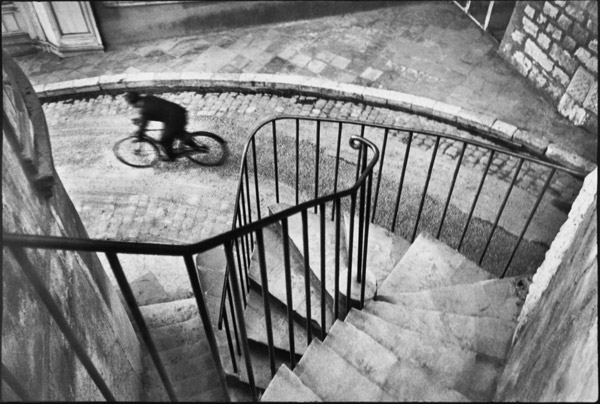
 ). Shoot photos, then go pick up the wife at the train station. Just have to be creative with taking time out to do some photos. Last month, I grabbed some take out food at lunchtime and drove 20 minutes away from work to this spot (on the outskirts of the 10th largest city in the USA, so no excuses about "urban" environments). No photoshop work required to "black out" the neighbors on this one.
 I'd love to see some creative photos of your car on the road (assuming it's safe to do so with the nasty weather up north).


6th Gear
Joined: May 2005
Posts: 15,478
Likes: 2

But ... for probably another month, the Croc isn't going anywhere. The Michelin PSs are like ice skates below 45 degrees. They are actually dangerous as they break loose with a minimum of gas. Sorry but come better weather, we are going to get out.
As to locations ... hehe, your in CA where you have some good location. I got ... concrete! But we will try
Right now we got an ice storm coming through tomorrow with maybe 1/2" ice. Not good at all.
So this is what I got in my driveway at the moment
 Car tucked away and the RAV4 gets to do its thing Notice my handy dandy windshield ice remover
5th Gear
Joined: Mar 2006
Posts: 821
Likes: 0
From: San Jose, CA
But ... for probably another month, the Croc isn't going anywhere. The Michelin PSs are like ice skates below 45 degrees. They are actually dangerous as they break loose with a minimum of gas. Sorry but come better weather, we are going to get out.
As to locations ... hehe, your in CA where you have some good location. I got ... concrete! But we will try
Right now we got an ice storm coming through tomorrow with maybe 1/2" ice. Not good at all.
As to locations ... hehe, your in CA where you have some good location. I got ... concrete! But we will try
Right now we got an ice storm coming through tomorrow with maybe 1/2" ice. Not good at all.
The rav4 looks nice and utilitarian while the p-car says "burrrr!". You think in this megaopolis that we're not surrounded by concrete too?
 You've just got to motor out to the farms. Besides, the photo I posted from Henri Cartier-Bresson proves you can still compose something amazing even if you're surrounded by man-made objects out of stone.
Nope, last month it was still mostly brown. However today after a months worth of rain and sun, it's starting to look kinda like Ireland.

6th Gear
Joined: May 2005
Posts: 15,478
Likes: 2
Weather is misery here today.
No cable, no interent until now. Inch of ice over a bit of snow. Heavy as hell.
Then the SNOW PLOW came at 5PM, of course, and the ice blocks are heavy as hell.
Because it just came down as ice pellets rather than freezing rain here, the top layer is all ice ... but not on the trees. We are at the end of a cul-de-sac at the bottom of a small hill.
Pickup throwing salt this morning got STUCK. Took 30 minutes to get up the hill. He drove up on the cul-de-sac curb, and took a running start to get up the hill. However, by noon I got the RAV4 out. Works great in the snow. Nothing like electronic widgets ... electronically locked hubs. Downhill assist. Unfortunately, cold in the teens for another week. Croc aint going anywhere until spring thaw.
I GOT a macro lens today ... WOOT! With ring lite. Brown arrived in the SNOW! I will try to take some pics tomorrow after work.
Pic this morning

No cable, no interent until now. Inch of ice over a bit of snow. Heavy as hell.
Then the SNOW PLOW came at 5PM, of course, and the ice blocks are heavy as hell.
Because it just came down as ice pellets rather than freezing rain here, the top layer is all ice ... but not on the trees. We are at the end of a cul-de-sac at the bottom of a small hill.
Pickup throwing salt this morning got STUCK. Took 30 minutes to get up the hill. He drove up on the cul-de-sac curb, and took a running start to get up the hill. However, by noon I got the RAV4 out. Works great in the snow. Nothing like electronic widgets ... electronically locked hubs. Downhill assist. Unfortunately, cold in the teens for another week. Croc aint going anywhere until spring thaw.
I GOT a macro lens today ... WOOT! With ring lite. Brown arrived in the SNOW! I will try to take some pics tomorrow after work.
Pic this morning
6th Gear
Joined: May 2005
Posts: 15,478
Likes: 2
OK, late start today ... I just love snow
60mm Macro w/ring lite. F16
The very first pics. These are tiny silk? flowers. Ring light is neat because you can have different ratios firing to get different highlights. I'm going to try that tonight and will post if you can actually see the difference.
I got to say you lose a great deal of detail reducing the size and resampling. In original form, they are even sharper.


60mm Macro w/ring lite. F16
The very first pics. These are tiny silk? flowers. Ring light is neat because you can have different ratios firing to get different highlights. I'm going to try that tonight and will post if you can actually see the difference.
I got to say you lose a great deal of detail reducing the size and resampling. In original form, they are even sharper.
5th Gear
Joined: Mar 2006
Posts: 821
Likes: 0
From: San Jose, CA

Guess I was thinking of some macro shots of the pups. You know, a challenge (because I'm sure they hold still really well).
Since you've got so much snow lately, how about some snowflakes? Okay, enough of my childish whining. Someone here previously posted a tip for me on post image shrinking sharpening that I've found very handy.
In PS, use "Filter -> Sharpen -> Smart Sharpen...". Use Amount=35% (adjust to taste), Radius=1.0 pixels, Remove Gaussian Blur. There are many more settings that can be adjusted, but simply using these defaults gives me good results and restores some of the detail lost when re-sizing.
Another note I have with regard to sharpening which is more involved, but looks like a much better method is:
Originally Posted by Dr. Paul Lantos
Photoshop Sharpening:
Here are my strategies to avoid oversharpening.
By Dr. Paul Lantos
1. Sharpen ONLY when you've resized to the final output size (i.e. for print or web sharing). This does not include stylistic or regional sharpening that you do earlier in the workflow. But if you sharpen and THEN resize, even slightly, it will frequently look either unsharpened or oversharpened.
2. Sharpen on a separate layer. In other words, duplicate the background layer and sharpen the new layer. This allows you to vary the opacity of the sharpened layer. You can also do the following two fantastic and important steps:
3. Separate the sharpening into Lighten and Darken layers. Take your duplicated, sharpened layer and duplicate it. So now you have two sharpened layers over your background. Set one to the blending mode 'Darken'. Set the other to the blending mode 'Lighten'. This separates the dark half of the sharpening process from the light half. You can turn on and off the dark and light halves separately to view their respective effects. I usually start by making 'lighten' invisible. I scan the image for areas with inappropriate black outlines or halos, and I decrease the opacity of the Darken layer until it looks better. Darken usually ends up between 70 and 100% opacity. Then reveal the Lighten layer. I usually keep Lighten between 30 and 50% opacity. This is a POWERFUL tool to take control of your sharpening.
4. Use layer masks!! Say, for instance, that you take a picture of your friend at the beach, but your friend is sort of backlit and her face is in the shadow. You want to sharpen the face, but the problem is there is so much contrast between the face and the sky that you'll invariably oversharpen the outline of the head. No problem. Sharpen on a duplicate layer, then open up a layer mask. You should be seeing an oversharpened halo at this stage. Then create a layer mask (by clicking in Photoshop on the little icon that looks like a gray box with a white dot in it). Then take a soft black brush -- like 50 pixels in diameter, hardness of 20%, and opacity of 75%, and trace over the oversharpened area until the oversharpening disappears. * ideally, if you're following my advice about Lighten and Darken layers, you'll do this independently on each of the sharpened layers.
5. For more advanced photoshoppers, consider switching to Lab color mode for this step. The reason is that in RGB the program is limited by a finite number of ways a pixel can be encoded. In Lab, the program can use millions of different 'theoretical' colors, mathematical but fictional colors in the process of sharpening. This allows it to default to a color other than black or white during heavy sharpening. When in Lab color I create a duplicate layer, go to the channels, and click on the Lightness channel. I sharpen that channel alone. Then I go to Image>Mode>RGB, opt to keep the layers (i.e. do not flatten), and voila! Now you can duplicate the sharpened layer again and split them to Lighten and Darken blending modes.
Here are my strategies to avoid oversharpening.
By Dr. Paul Lantos
1. Sharpen ONLY when you've resized to the final output size (i.e. for print or web sharing). This does not include stylistic or regional sharpening that you do earlier in the workflow. But if you sharpen and THEN resize, even slightly, it will frequently look either unsharpened or oversharpened.
2. Sharpen on a separate layer. In other words, duplicate the background layer and sharpen the new layer. This allows you to vary the opacity of the sharpened layer. You can also do the following two fantastic and important steps:
3. Separate the sharpening into Lighten and Darken layers. Take your duplicated, sharpened layer and duplicate it. So now you have two sharpened layers over your background. Set one to the blending mode 'Darken'. Set the other to the blending mode 'Lighten'. This separates the dark half of the sharpening process from the light half. You can turn on and off the dark and light halves separately to view their respective effects. I usually start by making 'lighten' invisible. I scan the image for areas with inappropriate black outlines or halos, and I decrease the opacity of the Darken layer until it looks better. Darken usually ends up between 70 and 100% opacity. Then reveal the Lighten layer. I usually keep Lighten between 30 and 50% opacity. This is a POWERFUL tool to take control of your sharpening.
4. Use layer masks!! Say, for instance, that you take a picture of your friend at the beach, but your friend is sort of backlit and her face is in the shadow. You want to sharpen the face, but the problem is there is so much contrast between the face and the sky that you'll invariably oversharpen the outline of the head. No problem. Sharpen on a duplicate layer, then open up a layer mask. You should be seeing an oversharpened halo at this stage. Then create a layer mask (by clicking in Photoshop on the little icon that looks like a gray box with a white dot in it). Then take a soft black brush -- like 50 pixels in diameter, hardness of 20%, and opacity of 75%, and trace over the oversharpened area until the oversharpening disappears. * ideally, if you're following my advice about Lighten and Darken layers, you'll do this independently on each of the sharpened layers.
5. For more advanced photoshoppers, consider switching to Lab color mode for this step. The reason is that in RGB the program is limited by a finite number of ways a pixel can be encoded. In Lab, the program can use millions of different 'theoretical' colors, mathematical but fictional colors in the process of sharpening. This allows it to default to a color other than black or white during heavy sharpening. When in Lab color I create a duplicate layer, go to the channels, and click on the Lightness channel. I sharpen that channel alone. Then I go to Image>Mode>RGB, opt to keep the layers (i.e. do not flatten), and voila! Now you can duplicate the sharpened layer again and split them to Lighten and Darken blending modes.
6th Gear
Joined: May 2005
Posts: 15,478
Likes: 2
We are not snowbound but its pretty miserable outside, unlike your shot of ragweed out their in CA (nice pic BTW).Lemme tell you about taking pics of dogs ... it aint easy. My wife is CONSTANTLY taking pics of them. They dont exactly sit still and smile
Now lets see, a macro shot of what? His nose? Hmm. That might be interesting if I can get him to sit still.Snowflakes? How about ICE rocks
We got solid ice everywhere ... not the pretty stuff hanging from trees making icicles but that hard crap. My neighbor, who didn't shovel his driveway, was chipping at the ice with an AXE!!!! this afternoon! I have had enuff of this 10 degree weather.As to sharpening. Hmm, excellent idea to sharpen AFTER resizing.
I read to NEVER resize with resampling. Just change the dimensions in inches but the resolution shoots up near 1000 (vice 72 for the web) so you never lose a pixel. It tried that but the pics on the web were HUGE and the files huge.
I started to sharpen in Canons DPP which works wonders, but the idea to resample and then sharpen seems to be an excellent idea
My wife had been using Ulead photoimpact and now is relearning everything in photoshop so she is pulling her hair out learning about the magnetic lasso and magic selection (which works pretty good). She loves the magic stamp tool creating these original cards using elements of combined pics.
5th Gear
Joined: Mar 2006
Posts: 821
Likes: 0
From: San Jose, CA


(My secret, she was 14 when these were taken, much more mellow)
I'd settle for artistic ice rocks.
That or of your neighbor with the ax and the broken-back-in-progress. Dang, that's a lot of ice!As to sharpening. Hmm, excellent idea to sharpen AFTER resizing.
My wife ... is pulling her hair out learning about the magnetic lasso and magic selection (which works pretty good). She loves the magic stamp tool creating these original cards using elements of combined pics.
My wife ... is pulling her hair out learning about the magnetic lasso and magic selection (which works pretty good). She loves the magic stamp tool creating these original cards using elements of combined pics.

Let's save your wife's hair. I'm assuming here that she is playing with selections on photographs. Please direct her to learn about the quick mask mode and the brush tool. Entering and exiting the quick mask mode is super easy and once you've exited, you have a perfect anti-aliased selection. In quick mask mode, start painting your selection with a large soft brush, then make your brush size smaller and vary the opacity to get the fine details. Look in the Channels tab if you want to see closer detail on how the mask looks. I'll leave it to Tsukiji to explain how a graphics tablet makes this process easier to do (assuming he isn't under a blanket of ice too).
Another benefit is you'd really be surprised how ridiculously easy it is to create custom graduated ND filtering in PS using masking. (see my first Alviso sunset photo)
If your wife wants to persist with the lasso tools for selections, make sure discovers the "feather" option in the Select menu. It cleans up the selected edges nicely, but you'll need to experiment to find the proper value to use.
Now, back to photos of dogs... tag-you're it!
6th Gear
Joined: May 2005
Posts: 15,478
Likes: 2
VERY NICE. OK, now you have inspired me. I'm going to use the macro on the dog and see what happens My bet is he bites the lens
I dont know how he will tolerate having the camera so close to his face but my wife will love this if it works well! Well, I got a 3 day weekend after work tomorrow to try!!!!
Artistic ice. haha. Lemme tell you ... this aint the pretty stuff you see in pics. This is hard packed crap I'll tell you whats funny about the neighbor. I am not making fun of anybody but it was quite a scene. I'm coming home today and here is this guy out their chipping away and he's Hindu. You got to picture the scene ... robes, turban on the head, chipping at the snow
Got it. Next pics I'll try that.
OK, yes, she is using selections with the magnetic lasso and the magic something or another. The magic thing works very well on well defined objects. It sucks on dogs because the hairs are just all over the place and makes it difficult. Feathering we know.
Now shes using photo elements 4.0 on her new mac notebook. I do not think it has channels or masking. I have 7.0 on the PC and can try that. I'm not buying CS2 because CS3 is coming out in April and I think I can get an education discount for CS3 so thats going to have to wait.
She is actually getting good at doing selections. I got to read up on this masking thing.. She loves pulling out objects.
Thanks so much for all the info
Yes, Tag I'm it and its macro pics this weekend
My bet is he bites the lensI dont know how he will tolerate having the camera so close to his face but my wife will love this if it works well! Well, I got a 3 day weekend after work tomorrow to try!!!!
I'll tell you whats funny about the neighbor. I am not making fun of anybody but it was quite a scene. I'm coming home today and here is this guy out their chipping away and he's Hindu. You got to picture the scene ... robes, turban on the head, chipping at the snow Let's save your wife's hair. I'm assuming here that she is playing with selections on photographs. Please direct her to learn about the quick mask mode and the brush tool. Entering and exiting the quick mask mode is super easy and once you've exited, you have a perfect anti-aliased selection. In quick mask mode, start painting your selection with a large soft brush, then make your brush size smaller and vary the opacity to get the fine details. Look in the Channels tab if you want to see closer detail on how the mask looks. I'll leave it to Tsukiji to explain how a graphics tablet makes this process easier to do (assuming he isn't under a blanket of ice too).
Another benefit is you'd really be surprised how ridiculously easy it is to create custom graduated ND filtering in PS using masking. (see my first Alviso sunset photo)
If your wife wants to persist with the lasso tools for selections, make sure discovers the "feather" option in the Select menu. It cleans up the selected edges nicely, but you'll need to experiment to find the proper value to use.
Now, back to photos of dogs... tag-you're it!
Another benefit is you'd really be surprised how ridiculously easy it is to create custom graduated ND filtering in PS using masking. (see my first Alviso sunset photo)
If your wife wants to persist with the lasso tools for selections, make sure discovers the "feather" option in the Select menu. It cleans up the selected edges nicely, but you'll need to experiment to find the proper value to use.
Now, back to photos of dogs... tag-you're it!
Now shes using photo elements 4.0 on her new mac notebook. I do not think it has channels or masking. I have 7.0 on the PC and can try that. I'm not buying CS2 because CS3 is coming out in April and I think I can get an education discount for CS3 so thats going to have to wait.
She is actually getting good at doing selections. I got to read up on this masking thing.. She loves pulling out objects.
Thanks so much for all the info
Yes, Tag I'm it and its macro pics this weekend
http://www.russellbrown.com/tips_tech.html <<<<For those that want some PS techniques
AND
http://photography-on-the.net/forum/...d.php?t=275858 <<<<For those who think SNOW is an excuse not to use the camera
(My photo uploadier is down I'll be posting more photos as soon as it is working again)
AND
http://photography-on-the.net/forum/...d.php?t=275858 <<<<For those who think SNOW is an excuse not to use the camera
(My photo uploadier is down I'll be posting more photos as soon as it is working again)
5th Gear
Joined: Mar 2006
Posts: 821
Likes: 0
From: San Jose, CA
http://photography-on-the.net/forum/...d.php?t=275858 <<<<For those who think SNOW is an excuse not to use the camera
Yeah, that's the ticket!Seriously though, it's too bad 89AKurt is camera-less as the rally shots are his bag.

6th Gear
Joined: May 2005
Posts: 15,478
Likes: 2
OK, FIRST shots w/Macro of the dog........ LONG
I know depth of field isnt great ... F11
This was NOT easy you know. Its not like he's model. He's laying down and any bit of noise, he wants to go out!!!


And my favorite ... the nose ...
I know depth of field isnt great ... F11
This was NOT easy you know. Its not like he's model. He's laying down and any bit of noise, he wants to go out!!!
And my favorite ... the nose ...
5th Gear
Joined: Mar 2006
Posts: 821
Likes: 0
From: San Jose, CA
Now I'm starting to understand the location "Under a pile of Chow fur" much better. Somebody doesn't get cold when they go outside to play.
Next lesson for you Chows that you need to learn right away.
1. Crop tool, set the width or height of the tool to be 1000 pixels so that the max dimension of your photo is 1000 pixels. (e.g. landscape photo, width=1000 pixels) The crop tool takes the guessing out of the image resizing. Stick to 1000 or less pixel width for online images. Just because my screen is 1920 pixels wide doesn't mean everyone else is.
2. Save for the web in the File menu. Select the 2-up view mode so you can compare original to web optimized version. Use it and your photo file sizes will shrink to more manageable sizes. I find 50% quality setting a good compromise for detailed web photo images. This will help also with comshaft as your image host server since you don't get a huge amount of free space and their upload speeds are so-so.
Your photos other than being on the large size look great. The pup looks nice and healthy with that cold wet nose. Your challenge if you choose to accept for the long weekend is for a dynamic pup shot; catch em' in motion. I take no responsibility for anything getting broken in the house though. 
Somebody doesn't get cold when they go outside to play. Next lesson for you Chows that you need to learn right away.
1. Crop tool, set the width or height of the tool to be 1000 pixels so that the max dimension of your photo is 1000 pixels. (e.g. landscape photo, width=1000 pixels) The crop tool takes the guessing out of the image resizing. Stick to 1000 or less pixel width for online images. Just because my screen is 1920 pixels wide doesn't mean everyone else is.
2. Save for the web in the File menu. Select the 2-up view mode so you can compare original to web optimized version. Use it and your photo file sizes will shrink to more manageable sizes. I find 50% quality setting a good compromise for detailed web photo images. This will help also with comshaft as your image host server since you don't get a huge amount of free space and their upload speeds are so-so.
Your photos other than being on the large size look great. The pup looks nice and healthy with that cold wet nose.
Your challenge if you choose to accept for the long weekend is for a dynamic pup shot; catch em' in motion. I take no responsibility for anything getting broken in the house though.
6th Gear
Joined: May 2005
Posts: 15,478
Likes: 2
Now I'm starting to understand the location "Under a pile of Chow fur" much better. Somebody doesn't get cold when they go outside to play.
Next lesson for you Chows that you need to learn right away.
1. Crop tool, set the width or height of the tool to be 1000 pixels so that the max dimension of your photo is 1000 pixels. (e.g. landscape photo, width=1000 pixels) The crop tool takes the guessing out of the image resizing. Stick to 1000 or less pixel width for online images. Just because my screen is 1920 pixels wide doesn't mean everyone else is.
2. Save for the web in the File menu. Select the 2-up view mode so you can compare original to web optimized version. Use it and your photo file sizes will shrink to more manageable sizes. I find 50% quality setting a good compromise for detailed web photo images. This will help also with comshaft as your image host server since you don't get a huge amount of free space and their upload speeds are so-so.
Your photos other than being on the large size look great. The pup looks nice and healthy with that cold wet nose. Your challenge if you choose to accept for the long weekend is for a dynamic pup shot; catch em' in motion. I take no responsibility for anything getting broken in the house though.
Somebody doesn't get cold when they go outside to play. Next lesson for you Chows that you need to learn right away.
1. Crop tool, set the width or height of the tool to be 1000 pixels so that the max dimension of your photo is 1000 pixels. (e.g. landscape photo, width=1000 pixels) The crop tool takes the guessing out of the image resizing. Stick to 1000 or less pixel width for online images. Just because my screen is 1920 pixels wide doesn't mean everyone else is.
2. Save for the web in the File menu. Select the 2-up view mode so you can compare original to web optimized version. Use it and your photo file sizes will shrink to more manageable sizes. I find 50% quality setting a good compromise for detailed web photo images. This will help also with comshaft as your image host server since you don't get a huge amount of free space and their upload speeds are so-so.
Your photos other than being on the large size look great. The pup looks nice and healthy with that cold wet nose.
Your challenge if you choose to accept for the long weekend is for a dynamic pup shot; catch em' in motion. I take no responsibility for anything getting broken in the house though. As to the sizing, I was trying something different. Cropped in photoimpact (same thing as adobe elements) but cropped solely for the better pic, not for online size ... duh

Yeah, it has all the resizing for web images and I just never used that. I would just resize to 144 pixels resolution and 5" width. Will try it out automatically.
I told you I was going to get his NOSE! I think the lens is very sharp in resolution.
Action shots
Now THAT is a problem. Chows are not like most other dogs. When inside, they are usually very quiet. If my wife is at her comp, he will just lay at her feet and guard her. If she's watching TV on the sofa, he lays by the sofa. When he gets "fed up" with us, he goes to his "room" ... the cold utility room with the washer/dryer because he loves it cold and its HIS cave. He know ... its his. If we leave him in the house at night, he goes nuts because every noise he hears outside means a "threat" and he got the whole house to guard
Now outside, that's different. He will run and bark at anything that come close to HIS property.
I'll try. Sometimes he loves to play with his chewies but he aint one to play catch or play with a toy.
Our weather is miserable, 10 degrees everynight. Everything a frozen wasteland. You can walk on top of the snow because of the 1" ice layer on the snow. They say its the second coldest February on record here. So much for global warming BUT ... they are predict temps above freezing by the end of next week. My poor car just sits shivering under its cover and I got to keep the battery tender on every other day. This is driving my wife crazy because SHE can't go out gallavanting around shopping during the day
A good way to save money.OK, I'll try to get action shot with the Macro. That might be hard because it dont zoom. I might switch to the zoom.
6th Gear
Joined: May 2005
Posts: 15,478
Likes: 2
Hey speed, one question.
I found a plugin called Mask Pro. Downloaded a trial version. Ever heard of it.
Wife tried doing selections with lasso and its primitive. This tool does the masking thing you described in about 2 minutes including the hair. I sized this pic to 1000 pixels but its still to wide!
This is a quick example, took 2 mins. I messed up a bit on the top right on the edge of his ear where its straight and left in the white but it did an amazing job on the rest of his hair. This was first attempt. With a bit of practice, It looks pretty easy to do these mask things in alpha channels. I just put it on a black background but, of course, its just a layer and can go anywhere.
What u think?

I found a plugin called Mask Pro. Downloaded a trial version. Ever heard of it.
Wife tried doing selections with lasso and its primitive. This tool does the masking thing you described in about 2 minutes including the hair. I sized this pic to 1000 pixels but its still to wide!
This is a quick example, took 2 mins. I messed up a bit on the top right on the edge of his ear where its straight and left in the white but it did an amazing job on the rest of his hair. This was first attempt. With a bit of practice, It looks pretty easy to do these mask things in alpha channels. I just put it on a black background but, of course, its just a layer and can go anywhere.
What u think?


5th Gear
Joined: Mar 2006
Posts: 821
Likes: 0
From: San Jose, CA
Hair is a PITA to select and I'm no expert on this. I've heard good things about Mask Pro, but have never tried it. I'm getting good masking results with the built in PS tools, but human hair is typically easier than a chow's fur. Some of the edges in your photo look like a quick selection was made, but that nothing a bit more time and practice can't fix. Stay warm and safe there, okay!
5th Gear
Joined: Mar 2006
Posts: 821
Likes: 0
From: San Jose, CA
^^^Are you bloody insane!?!?!
Motor, please, that's just an accident waiting to happen. Be Carefull!!! :impatient
Other than the fact the speed is far too low, I love the speedo photo. Still trying to figure out why the numbers are tack sharp while the emergency flashers has the double image. The lighting looks great too. LDR = DRI ???
Motor, please, that's just an accident waiting to happen. Be Carefull!!!
:impatient Other than the fact the speed is far too low, I love the speedo photo. Still trying to figure out why the numbers are tack sharp while the emergency flashers has the double image. The lighting looks great too. LDR = DRI ???
^^^Are you bloody insane!?!?!
Motor, please, that's just an accident waiting to happen. Be Carefull!!! :impatient
Other than the fact the speed is far too low, I love the speedo photo. Still trying to figure out why the numbers are tack sharp while the emergency flashers has the double image. The lighting looks great too. LDR = DRI ???
Motor, please, that's just an accident waiting to happen. Be Carefull!!!
:impatient Other than the fact the speed is far too low, I love the speedo photo. Still trying to figure out why the numbers are tack sharp while the emergency flashers has the double image. The lighting looks great too. LDR = DRI ???
I had just finished taking photos outside (All of which looked like rap when I got them on the laptop so the car was still less than 20 inside and it was single digits and windy outside, so when I did the longer exposure 1. shivering and 2 not wanting to touch the metal screw to attach my tripod I balanced it off of the sterring wheel for some satbility but not enough (it was about a 2 sec exposure) The speedo face was it's own exposureset to the ligts of the speedo so it was much faster and everything else in the shot was underexposed. the two images where off slightly so I had to eliminate alittle more of the long exposure speedo than I wanted to (wanted a little more glow from the needles). I thought LDR was where I was combineing parts of multiple inmages in layers it may hve been DRI I'd have to go bac a few pages to check. then I merged everything, duplciated masked off the speedo and a little but of the surrounding glow and converted the rest to B&W to get rid of a few distracting colors and burned out a few reflections for the final image. I guess I just need to get on the track at night now so I can get one with the needle a little closer to 134 Yes summer tires in the snow, I've never gotten stuck, and only had a little more drifting than I wanted here and there but because I know the fire I'm playing with I've been leaving myself much more room so the occasional slide always has much room to recover than is actually needed. And I actually feel better/safer with these tires than I did with the all seasons I had last year
(I was going to switch to winters but after a major snowfall and bout of single digit weather decided I didn't really need them)