


Seeking advice, tips, Techniques and tricks


Here is one from early tonight...


Someone in at least one of the threads on NAM said you should try to capture what it feels like to drive your MINI in a photo, it is the first thing that came to my mind with this one despite some of the technical imperfections.

6th Gear
Joined: May 2005
Posts: 15,478
Likes: 2
I like! Great angle, not wild in the HDR.
Dammit Motor ... Now I got to find the time to play with all this stuff... I have no idea how you have so much time to do this all.
Dammit Motor ... Now I got to find the time to play with all this stuff... I have no idea how you have so much time to do this all.
 I don't sleep, I Post Process; and most of the photos are taken while running errands and I just add 5 min sidebars to my schedule.


I hadn't thought about printing yet. I think I'm going to have to do some research.
Put together a DRI type (one exposure but layers used to create a similar effect) photo from the Loop tonight.

Now I just need to get a MINI in front of the camera.
(If I framed it right your eye should be folloing the beams of light up the road and around the bend.)
Now I just need to get a MINI in front of the camera.
(If I framed it right your eye should be folloing the beams of light up the road and around the bend.)

6th Gear
Joined: Sep 2005
Posts: 12,295
Likes: 1
From: Prescott, AZ, USA
 :impatient
BTW: the headlight sure came out nice, from one photo?
Yup thats lucky part of it being slightly under exposed I added a layer played with the shadow/balance to get the headlight detail erased the rest then burned out some of the bumper reflections cropped and patch tooled and burned some of the shadows/reflections for a cleaner image.
MLE gave me some pointers I figure out what masks were 2 weeks ago so I think its time I laern how to really use them now. 
(I was afraid the night pic would have been to cluttered so if it worked I'm happy )
)
EDIT Chows how long does it take for that Conon place to activate the account and elt me post?
MLE gave me some pointers I figure out what masks were 2 weeks ago so I think its time I laern how to really use them now.
(I was afraid the night pic would have been to cluttered so if it worked I'm happy
)EDIT Chows how long does it take for that Conon place to activate the account and elt me post?
6th Gear
Joined: May 2005
Posts: 15,478
Likes: 2
Almost immediately. I actually forget but it might one of those email you the password types.
Read the stickies on each forum before posting. For example, they have limits on photo size, (e..g., 800 x 800 pixels)
Also, I would give them their due props. Many of these ppl, male and female, are professionals who do it for a living. The few times I posts, I made sure they know I'm the newbie and they were very helpful!
You mean http://photography-on-the.net/ ?
Almost immediately. I actually forget but it might one of those email you the password types.
Read the stickies on each forum before posting. For example, they have limits on photo size, (e..g., 800 x 800 pixels)
Also, I would give them their due props. Many of these ppl, male and female, are professionals who do it for a living. The few times I posts, I made sure they know I'm the newbie and they were very helpful!
Almost immediately. I actually forget but it might one of those email you the password types.
Read the stickies on each forum before posting. For example, they have limits on photo size, (e..g., 800 x 800 pixels)
Also, I would give them their due props. Many of these ppl, male and female, are professionals who do it for a living. The few times I posts, I made sure they know I'm the newbie and they were very helpful!
6th Gear
Joined: May 2005
Posts: 15,478
Likes: 2
Yeah I've been registered for a while over there but waiting approval to post for quite a while. I feel like I'm on par with a good chunk of the transportation forum, so there is quite a bit more I'm willing to share there than if I were on another photo forum more professionally targeted.
My little dose of LITHIUM
iTrader: (1)
Joined: Jul 2005
Posts: 2,435
Likes: 2
From: Albuquerque New Mexico
wrt Photography on the net: Pekka Saarinen launched that site on March 27, 2001. It was a revolution amongst Canon digital camera users, before any affordable Canon dSLR. He used a G1. I registered on April 1, 2001. I think I was amongst the first 20 people to join. Web forums were great places back then, really defining small, intimate communities of common interests. Nowdays I don't even think Pekka posts on his own forum! Just like Fred Miranda's site, and even dpreview, the mass consumption of digital cameras has led to an incredible increase in the number of people joining these forums and while most lurk, there's enough repetitive and ignorant posts to make them unattractive. I imagine it's what happens to really cool bars and the like...they get popular and then noisy, then loud, then obnoxious.
Oh, well.
btw, MotorOn: that's a really wonderful image with the light and leaf! Inspired, classic, very well done.
Oh, well.
btw, MotorOn: that's a really wonderful image with the light and leaf! Inspired, classic, very well done.
And I hear you on the comment about the smaller forums (I'm a member of a few for various things) and enjoy the smaller community networking (Kinda have few small groups here on NAM I bounce between for the majority of my posts.

5th Gear
Joined: Mar 2006
Posts: 821
Likes: 0
From: San Jose, CA
 Looks like a great spot to experiment more with.
  Caught me, its and off ramp aside from the $20 and hour P-lot on the right every inch of that roadway I'm pretty sure is no parking zone (and its well over an hours journey for me.)
5th Gear
Joined: Mar 2006
Posts: 821
Likes: 0
From: San Jose, CA
Good grief, I'm behind on NAM posts. :impatient
Okay, PS HDR conversion gets one more shot with another series I shot over the holiday, but for now "it's DEAD to me!".
[HDR hell rant follows]
I dug up on my NAS a photo series that I took hoping to taunt Kurt with (never works FWIW ). It was taken south of Monterey on Hwy1 last spring. I noticed during histogram review the huge differences in exposure, so I shot a quick series of 5 shots @ 1/2 stop between them. I ran the RAW files directly into the convert to HDR process in PS as per tutorials links I previously posted. Did the 8bit color conversion using "local adaptation". The radius slider adjusts how much "blotchiness" you want around high contrast parts of the image (trees silhouetted by bright sky) and the threshold controls how much halo to put around objects in the photo; both are very obnoxious. Setting the sliders to the lowest values yields a smudgy ethereal pastel colored photo. These sliders are as useful as fictional ones to control how much scratches and $0.50/can ASA400 film grain you want in your photo! So going very lightly on the sliders and optimizing the toning curve as much as possible to improve the image contrast, here is the best PS HDR can possibly offer. YECK!

Several years back I remember a article from George Lepp about layering two photos together when the exposure latitude is too great for film or sensors. I processed two separate RAW files, one for the sky and ocean and the other for my Mini. Spent a bunch of time creating the layer mask for overlaying the two images, but it was completely worth the effort. I believe this is exactly what Tsukiji was promoting for us to try. This is what I expect HDR to look like!

Then I learned something new today in PS, but is old school for slide shooters. I used to pay a fortune to have my lab create a contrast mask to overlay on top of my slides when they printed them. Now I've figured it out in PS and I think Motor On could find this technique very handy on his Black Pearl.
Here's what I came up with while using these steps on the previous photo...

This is my layers panel in PS just in case it's any help to give an idea on what I've done:

Guess I'll have to try photomatrix to see if I hate it as much?
Until then, I'll stick to learning more about DRI. I better hurry to post this in the sunset thread before Kurt complains.
Okay, PS HDR conversion gets one more shot with another series I shot over the holiday, but for now "it's DEAD to me!".
[HDR hell rant follows]
I dug up on my NAS a photo series that I took hoping to taunt Kurt with (never works FWIW
). It was taken south of Monterey on Hwy1 last spring. I noticed during histogram review the huge differences in exposure, so I shot a quick series of 5 shots @ 1/2 stop between them. I ran the RAW files directly into the convert to HDR process in PS as per tutorials links I previously posted. Did the 8bit color conversion using "local adaptation". The radius slider adjusts how much "blotchiness" you want around high contrast parts of the image (trees silhouetted by bright sky) and the threshold controls how much halo to put around objects in the photo; both are very obnoxious. Setting the sliders to the lowest values yields a smudgy ethereal pastel colored photo. These sliders are as useful as fictional ones to control how much scratches and $0.50/can ASA400 film grain you want in your photo! So going very lightly on the sliders and optimizing the toning curve as much as possible to improve the image contrast, here is the best PS HDR can possibly offer. YECK! Several years back I remember a article from George Lepp about layering two photos together when the exposure latitude is too great for film or sensors. I processed two separate RAW files, one for the sky and ocean and the other for my Mini. Spent a bunch of time creating the layer mask for overlaying the two images, but it was completely worth the effort. I believe this is exactly what Tsukiji was promoting for us to try. This is what I expect HDR to look like!
Then I learned something new today in PS, but is old school for slide shooters. I used to pay a fortune to have my lab create a contrast mask to overlay on top of my slides when they printed them. Now I've figured it out in PS and I think Motor On could find this technique very handy on his Black Pearl.
- Copy the image layer to a new layer.
- On the image copy layer, perform the following steps:
- Adjust the saturation to -100 (image is now B&W).
- Image -> Adjustments -> Invert (or ctrl + i). Looks like a B&W image negative.
- Set layer mode to "overlay". Adjust opacity to taste.
- Create and use a layer mask to correct for any areas that look over done with this contrast mask.
Here's what I came up with while using these steps on the previous photo...
This is my layers panel in PS just in case it's any help to give an idea on what I've done:
Guess I'll have to try photomatrix to see if I hate it as much?
Until then, I'll stick to learning more about DRI. I better hurry to post this in the sunset thread before Kurt complains.
I completely understand your HDR woes (I battled them for a while and spent hours geting photos I endedup sending to Davy Jones's recyle bin) With some practice thogh I did yeild some decent results. However I am increasingly growing a srong fan of 10-20 layer DRI photos ethier from one image or several. DRI can produce realistic results HDR tends to lend itself toward abstract art and near pointalism with some results I've seen from others. I have grown to absoultely hate Photomatix personall but if you get it to be functional please share as I sure I'm not utilizing it properly. However I did manage to groom this photo using the HDR process

My big beef with DRI is time. It seems to take forever to get a natural looking image that pulls out all the detail I want. And I'm learnign more about masks and using them which will help eliminate the eraser marks I've left in several photos.
And I have had a capture in over two days so even though I'm helping my PS skills, I'm still in need of working on my compostion and getting things clean and right to begin with and using PS to bring out the little things and make good image great.
My big beef with DRI is time. It seems to take forever to get a natural looking image that pulls out all the detail I want. And I'm learnign more about masks and using them which will help eliminate the eraser marks I've left in several photos.
And I have had a capture in over two days so even though I'm helping my PS skills, I'm still in need of working on my compostion and getting things clean and right to begin with and using PS to bring out the little things and make good image great.
6th Gear
Joined: Sep 2005
Posts: 12,295
Likes: 1
From: Prescott, AZ, USA
...
[HDR hell rant follows]
I dug up on my NAS a photo series that I took hoping to taunt Kurt with (never works FWIW ). ...
Guess I'll have to try photomatrix to see if I hate it as much?
Until then, I'll stick to learning more about DRI. I better hurry to post this in the sunset thread before Kurt complains.
[HDR hell rant follows]
I dug up on my NAS a photo series that I took hoping to taunt Kurt with (never works FWIW
). ...Guess I'll have to try photomatrix to see if I hate it as much?
Until then, I'll stick to learning more about DRI. I better hurry to post this in the sunset thread before Kurt complains.
I never complain when a sunset photo is posted, even if it's in another thread. I try to invite new suckers... er people to contribute.

5th Gear
Joined: Mar 2006
Posts: 821
Likes: 0
From: San Jose, CA

My $.02 for an artistic look (assuming that's your intention
), crop even further and get to know the curves adjustment layer better. Curves adjustments are not initially intuitive, but are one of the most powerful tools in PS. As always, practice makes perfect which is why I'm still playing with them a lot. Below is my quick remix with a crop, curves layer, and then hue/sat layer to tone to a different color. YMMV 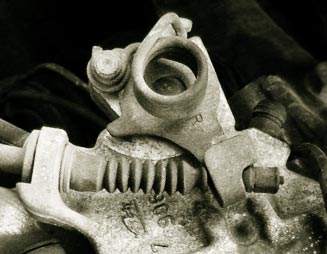
I went back out a few hours after taking that shot, took a bunch and still haven't touched cleaning them up yet however here is ahint at what I did manage to shoot today.
First an HDR local adaptation and another B&W conversion process (I'm getting my use out of this months photoshop)

LDR

Shoadow highlight and another B&W process

Three image LDR layered, but not happy with it

One image LDR I had the WB messed up accitdentally initally so I had to do a bunch of PP little on the warm side and the MINI is a bit noisey from the sharpening. And some shadow balance adjustments.

I have two others but they may be photo contest entries so I'm sitting on them for the time being.
As always input welcome.
First an HDR local adaptation and another B&W conversion process (I'm getting my use out of this months photoshop)
LDR
Shoadow highlight and another B&W process
Three image LDR layered, but not happy with it
One image LDR I had the WB messed up accitdentally initally so I had to do a bunch of PP little on the warm side and the MINI is a bit noisey from the sharpening. And some shadow balance adjustments.
I have two others but they may be photo contest entries so I'm sitting on them for the time being.
As always input welcome.