


Interior/Exterior Removing Rear "Vents" from MCS Bumper


Thread Starter
|
6th Gear
Joined: Jun 2004
Posts: 1,522
Likes: 7
From: San Diego, CA
Removing Rear "Vents" from MCS Bumper
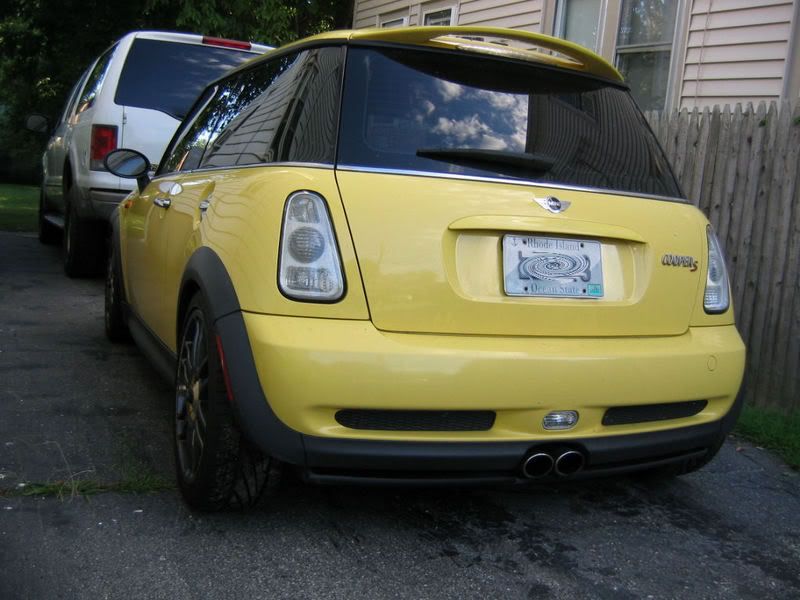
Does anyone know how to remove the black, plastic "vents" from the bottom of the rear MCS bumper? I tried using a credit card to find tabs (like when removing the cowl vents), but I didn't have any luck.
If you have removed them, what does the bumper look like without them? I think it might look better without the vents, but figure there could be conspicuous holes left from the tabs.
Thanks
If you have removed them, what does the bumper look like without them? I think it might look better without the vents, but figure there could be conspicuous holes left from the tabs.
Thanks


2nd Gear
Joined: Dec 2006
Posts: 93
Likes: 0
Not that greatest pic for showing what you want. But with the Aero rear I cut out the openings and installed grill mesh instead. I painted the rear heat shield black, but I will eventually remove it when I do a exhaust system.


3rd Gear
Joined: Jun 2005
Posts: 207
Likes: 0
From: Chicago
There are 4 tabs towards the corners, at least I from what I remember it's been a while since I worked on them. But they pop inwardand then you can just pull them off. I used tin snips to cut the exhaust heat shield down so that it didnt show through the vents when I was done with them. It's quite easy. And don't worry about breaking the tabs on the vents, I wrecked one and bought a replacement from the dealer for $10, so they are not that expensive.


6th Gear
Joined: Nov 2003
Posts: 2,349
Likes: 2
From: Concord, California

Trending Topics

6th Gear
Joined: Nov 2003
Posts: 2,349
Likes: 2
From: Concord, California
I very carefully cut the mesh at the OEM tabs so that they "hook" onto those tabs.
The mesh is about 1 inch larger than the hole.
I can do this mod without removing the rear bumber
Will try to take a close-up photo for you
The mesh is about 1 inch larger than the hole.
I can do this mod without removing the rear bumber
Will try to take a close-up photo for you

Banned
Joined: Nov 2006
Posts: 4,862
Likes: 3
From: Fresno Ca.
 .
.


Thread
Thread Starter
Forum
Replies
Last Post
igzekyativ
MINIs & Minis for Sale
34
Jul 16, 2020 12:54 PM
xraycat
R56 :: Hatch Talk (2007+)
6
Aug 12, 2015 02:36 PM
dyeLucky
MINI Parts for Sale
3
Aug 7, 2015 07:10 AM
bctf1
F55/F56 :: Hatch Talk (2014+)
9
Aug 6, 2015 12:55 PM