


"REV" wireless OBDII for iPhone


Thread Starter
|
5th Gear
Joined: Nov 2003
Posts: 1,027
Likes: 0
From: Miami, Fl
"REV" wireless OBDII for iPhone
So I've been tracking this "App" for a few months now and it looks pretty damned impressive. Only problem is that I haven't seen anbody on any of the forums i go to ever speak of it or mention using it? Anybody have any experience with it yet?
For people who have never heard of it:


You plug a wireless OBDII Scanner into your OBDII port and it connects to the phone through Wifi.

Here are a few quick videos to show a bit of how it works:
http://www.youtube.com/watch?v=iRfLS6jkBMY
http://www.youtube.com/watch?v=o91DX4ODgbU
http://www.youtube.com/watch?v=Anw7Uwx_xRU
http://www.youtube.com/watch?v=prCTs...eature=related
http://www.youtube.com/watch?v=vPho6ubtcDA
So anybody have this? From the fan video's it seems to work pretty well.....
Here's the Official website: http://www.devtoaster.com/products/rev/
For people who have never heard of it:
Rev is the first and best iPhone application to connect directly with your vehicle.
Rev is an application for the iPhone and iPod Touch that monitors, displays, and records real-time vehicle data. By communicating directly with your vehicle's ECU via its OBD-II port, Rev is the first iPhone and iPod touch application to give you complete access to everything you want to know about your vehicle.
Real Time Metrics
Rev can monitor and record several vehicle metrics in real-time:
* Vehicle Speed (including 0-60 time)
* RPM
* Fuel Consumption
* Engine Coolant Temperature
* Fuel Pressure
* and lots more! *
Rev is an application for the iPhone and iPod Touch that monitors, displays, and records real-time vehicle data. By communicating directly with your vehicle's ECU via its OBD-II port, Rev is the first iPhone and iPod touch application to give you complete access to everything you want to know about your vehicle.
Real Time Metrics
Rev can monitor and record several vehicle metrics in real-time:
* Vehicle Speed (including 0-60 time)
* RPM
* Fuel Consumption
* Engine Coolant Temperature
* Fuel Pressure
* and lots more! *
You plug a wireless OBDII Scanner into your OBDII port and it connects to the phone through Wifi.
Here are a few quick videos to show a bit of how it works:
http://www.youtube.com/watch?v=iRfLS6jkBMY
http://www.youtube.com/watch?v=o91DX4ODgbU
http://www.youtube.com/watch?v=Anw7Uwx_xRU
http://www.youtube.com/watch?v=prCTs...eature=related
http://www.youtube.com/watch?v=vPho6ubtcDA
So anybody have this? From the fan video's it seems to work pretty well.....
Here's the Official website: http://www.devtoaster.com/products/rev/


http://www.youtube.com/watch?v=Anw7Uwx_xRU
...
So anybody have this? From the fan video's it seems to work pretty well.....
...
So anybody have this? From the fan video's it seems to work pretty well.....

2nd Gear
Joined: Oct 2007
Posts: 72
Likes: 1
From: gilroy Ca
I have it. I love to use it for when I autocross. the only complaint I have is with the connectivity, sometimes it is a bit slow and it falls off. But other than that is is very useful. It has also replaced my OBDII reader from mini mania. it shows boost only in terms of positive pressure, no vacuum.
Its supposed to be able to do that, I never had.
Trending Topics

4th Gear
Joined: Sep 2004
Posts: 356
Likes: 0
From: Federal Way, WA
I have it and yes, I have reset CELs successfully. It also will give you a list of available pending codes that don't trigger a CEL unless the fault is still present after several drive cycles.


Nice tool
Rev report.
I received my Plex Wifi in the mail on Friday, nicely packed via USPS priority.
Not much on instructions for setup, but not really needed since it is plug and play. The little on/off switch really needs a sharp fingernail to toggle.
I purchased the Rev. software via Itunes a few days ago. I need to visit the Plex wifi and Rev. forums to see what others are doing.
Today I plugged in the unit, fired up and nothing! So, I fiddled, then went inside to think about lack of detailed instructions and what I had done. (Messed up)....
Bottom line, don't second guess, don't mess. I verified the wifi was connecting, turned off everything and tried again after what I fiddled was set back to defaults. You might have to adjust the port in Rev., I did.
Power on, start MINI, start rev. Patience is key, wait for all the lights to go green. It takes a minute or two for the Plex and Rev to sync up.
Neat tool, I like the boost and water temperature most of all, now I need to find out how to use all the rest of the measurements Rev. provides plus data logging.
After I got it running and I was comfortable of the basic measurments I was seeing I took a run down the hill to show one of my MINI racing friends.
He was already planning the permanent wiring and installation for me.
We tested distance from the MINI before I lost signal, about 60 feet away and about 2 feet from the MINI when it picked up the signal and resynced.
Rev. picked up right were I was viewing before, at that time I was watching RPM at idle.
After this visit, I took a loop through the city on our fast perimeter road, part of which is state rural highway. I tested boost, rpm and temp.
All looked good. My 07 MCSa is running about 219/223 degrees. For those with temp gauges in your MCS, is that what you see?
I managed to kick boost up to 12-14 and one overboost I think I saw 16, but I will have to get to know the tool better and how to use logging.

Overall first and second impression, nice combintation of wifi and tool (Rev).
After I get the proper mount and something more secure in the MINI, I will try to take some action pictures or take a passenger to do so.
Now I will not purchase a boost or temperature gauge and go through the hassle of a hard wire install and hard mounts. No pods needed.
Don
I received my Plex Wifi in the mail on Friday, nicely packed via USPS priority.
Not much on instructions for setup, but not really needed since it is plug and play. The little on/off switch really needs a sharp fingernail to toggle.
I purchased the Rev. software via Itunes a few days ago. I need to visit the Plex wifi and Rev. forums to see what others are doing.
Today I plugged in the unit, fired up and nothing!
So, I fiddled, then went inside to think about lack of detailed instructions and what I had done. (Messed up)....Bottom line, don't second guess, don't mess. I verified the wifi was connecting, turned off everything and tried again after what I fiddled was set back to defaults. You might have to adjust the port in Rev., I did.
Power on, start MINI, start rev. Patience is key, wait for all the lights to go green. It takes a minute or two for the Plex and Rev to sync up.
Neat tool, I like the boost and water temperature most of all, now I need to find out how to use all the rest of the measurements Rev. provides plus data logging.
After I got it running and I was comfortable of the basic measurments I was seeing I took a run down the hill to show one of my MINI racing friends.
He was already planning the permanent wiring and installation for me.
We tested distance from the MINI before I lost signal, about 60 feet away and about 2 feet from the MINI when it picked up the signal and resynced.
Rev. picked up right were I was viewing before, at that time I was watching RPM at idle.
After this visit, I took a loop through the city on our fast perimeter road, part of which is state rural highway. I tested boost, rpm and temp.
All looked good. My 07 MCSa is running about 219/223 degrees. For those with temp gauges in your MCS, is that what you see?
I managed to kick boost up to 12-14 and one overboost I think I saw 16, but I will have to get to know the tool better and how to use logging.
Overall first and second impression, nice combintation of wifi and tool (Rev).
After I get the proper mount and something more secure in the MINI, I will try to take some action pictures or take a passenger to do so.
Now I will not purchase a boost or temperature gauge and go through the hassle of a hard wire install and hard mounts. No pods needed.
Don
I tried to make it fit, but the windshield in the R56 is not the right angle. Trying in on the speedo (pie) is not an option, the stalk is to long.

I did not even try the alternate California mount, a little (very little) square of adhesive Velcro. Now that is an insult from Kensington.
Looked like I was trying to twist it in a pretzel. I ordered the Kensngton dash mount via online Apple store. Should be here mid-week.
So for a bit, it is flopping around in the console dip or in my hand. Not optimal.

1st Gear
Joined: Apr 2009
Posts: 44
Likes: 0
From: TX
Hey old81,
Just put in my order for the kiwi. Mounting the iphone is becoming a real issue since I don't want to hold this thing while "testing" the mini around the curves. I'm a heavy iphone3G user so remember wherever/however you mount it... the other iphone goodies need to work as well.. google maps, pandora, btooth on/off (not to mention the silly mini usb/aux cable and charger).
Just put in my order for the kiwi. Mounting the iphone is becoming a real issue since I don't want to hold this thing while "testing" the mini around the curves. I'm a heavy iphone3G user so remember wherever/however you mount it... the other iphone goodies need to work as well.. google maps, pandora, btooth on/off (not to mention the silly mini usb/aux cable and charger).
1st Gear
Joined: Apr 2009
Posts: 44
Likes: 0
From: TX
Searocko, thanks for the update. Kiwi on order.
I installed an Alta turbo back exhaust (and other Alta goodies) and mini started giving an annoying CEL... it cleared on it's own but came back and is currently self cleared ... for now.
I installed an Alta turbo back exhaust (and other Alta goodies) and mini started giving an annoying CEL... it cleared on it's own but came back and is currently self cleared ... for now.

1st Gear
Joined: Apr 2009
Posts: 44
Likes: 0
From: TX
hahaha you are missing the point of a powerful/portable integrated device... iphone/pod won't do much sitting in your car... in the parking lot.
Likewise... who's gonna answer the phone in the middle of chasing down cones?
(sorry.. the engineer in me can't help but optimize)
Likewise... who's gonna answer the phone in the middle of chasing down cones?
(sorry.. the engineer in me can't help but optimize)

3rd Gear
Joined: Jan 2009
Posts: 292
Likes: 0
From: Denver, CO
Check out Ram Mounts (http://www.ram-mount.com/SearchResul.../Default.aspx). They have a good product and a lot of options.
I received my Kinsington Dash mount today, much better. It works via the suction cup on the speedo.
I can imagine for track usage it may wiggle as Btwyx stated.
Now I'm stuck or maybe a bit dull. I set the unit to data log boost, rpm, and speed. When I shut down I expected it to prompt me to save the file.
It did not do this, so what step am I missing to make data logging work correctly. It displays, but does not save.
Any ideas? Suggestions? The FAQ at rev is rather light. ()
Thanks -- Don
I can imagine for track usage it may wiggle as Btwyx stated.
Now I'm stuck or maybe a bit dull. I set the unit to data log boost, rpm, and speed. When I shut down I expected it to prompt me to save the file.
It did not do this, so what step am I missing to make data logging work correctly. It displays, but does not save.
Any ideas? Suggestions? The FAQ at rev is rather light. (
)Thanks -- Don
When you get into the logger, there's a red dot at the bottom of the screen. Hit that to start recording, a green line shows you where you started. The dot changes to a red X, when you hit that the logging stops and it prompts you to save the run.
PS: Isn't all of that in the manual?
Edit: This manual: http://devtoaster.com/products/rev/m...r%20Manual.pdf
PS: Isn't all of that in the manual?
Edit: This manual: http://devtoaster.com/products/rev/m...r%20Manual.pdf
Last edited by Btwyx; Jun 3, 2009 at 10:09 PM.
When you get into the logger, there's a red dot at the bottom of the screen. Hit that to start recording, a green line shows you where you started. The dot changes to a red X, when you hit that the logging stops and it prompts you to save the run.
PS: Isn't all of that in the manual?
Edit: This manual: http://devtoaster.com/products/rev/m...r%20Manual.pdf
PS: Isn't all of that in the manual?
Edit: This manual: http://devtoaster.com/products/rev/m...r%20Manual.pdf
I read that manual 2 times, not that I could see. If it has a red X normally means stop in my book, but hey what do I know. I was a human factors computer engineer (designer) for 30 years.
Thanks for the tip, I will go reread the manual, with a different view.

Don
1st Gear
Joined: Apr 2009
Posts: 44
Likes: 0
From: TX
hahaha... got mine in the mail today. okay.. for something plug and play.. it's not entirely.
I plugged and no play. wifi is connected..car is on.. Rev hardware ip and port are set.... still no love. I'll sit on it before heading back out into the garage.
I plugged and no play. wifi is connected..car is on.. Rev hardware ip and port are set.... still no love. I'll sit on it before heading back out into the garage.
1st Gear
Joined: Apr 2009
Posts: 44
Likes: 0
From: TX
Quick question... does the mini ODBII function in all key positions? I mean engine on and engine off with accessories on.
Rev keeps saying "Device not connected to an ODBII device" ...
I tried connecting the Kiwi to a honda and Rev turned green, read engine codes, but would not display speedo or any of the guages properly (not dynamic.. just reported some odd numbers like ECT at 33 degrees and RPM at zero).
Rev keeps saying "Device not connected to an ODBII device" ...
I tried connecting the Kiwi to a honda and Rev turned green, read engine codes, but would not display speedo or any of the guages properly (not dynamic.. just reported some odd numbers like ECT at 33 degrees and RPM at zero).
Patience grasshopper. Make sure your iphone/itouch is set to the proper wifi.
Then ensure the setup is saved in Rev. make sure it is really port 35000, if your using the Plex Kiwi. It took me about 3 tries of power off, resync and power off on both the Plex and itouch to get everything green.
It takes some fussing. Btwyx must have the patience of a saint.
Now all is golden.
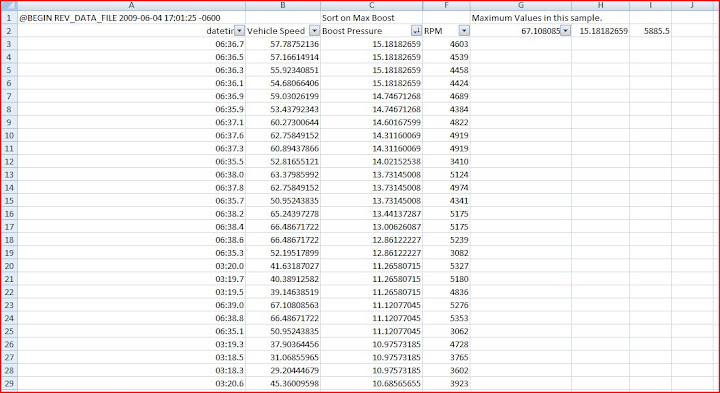
I did data log a run today, my MINI is a strong little beast.
Here is a sorted result snapshot imported into excel. A little boost run on my test strip.
You can go look at the picasa album here and use the magnifier, if you want.
Don
Then ensure the setup is saved in Rev. make sure it is really port 35000, if your using the Plex Kiwi. It took me about 3 tries of power off, resync and power off on both the Plex and itouch to get everything green.
It takes some fussing. Btwyx must have the patience of a saint.
Now all is golden.
I did data log a run today, my MINI is a strong little beast.
Here is a sorted result snapshot imported into excel. A little boost run on my test strip.
You can go look at the picasa album here and use the magnifier, if you want.
Don