


R56 Do I need 1 or 2 front brake pad sensors?


Thread Starter
|
2nd Gear
Joined: Nov 2011
Posts: 94
Likes: 1
From: Los Angeles County
Do I need 1 or 2 front brake pad sensors?
Do the front brakes require 1 or 2 pad sensors? The Monroe front pad set I ordered came with only 1 sensor, but I assume there should be two (1 right, 1 left). The photo used on Monroe's website (which is the actual part, not a stock photo) shows 2 sensors. This will be the first time changing brakes on my wife's R56 base model. Thanks.
Product image from Monroe

http://catalog.monroebrakes.com/cata...layPartDetails
Front pad set I received

Product image from Monroe
http://catalog.monroebrakes.com/cata...layPartDetails
Front pad set I received
Last edited by HKSpeed; Aug 2, 2012 at 08:36 AM.


OVERDRIVE
Joined: Jul 2006
Posts: 7,037
Likes: 283
From: Melbourne, FL
reminder: if the sensor was not tripped it does not have to be replaced, it can be moved to the new pad
by tripped I mean the end was ground off and the wire broken
I just did my fronts this past Saturday
here's a used pad with the worn sensor still in place
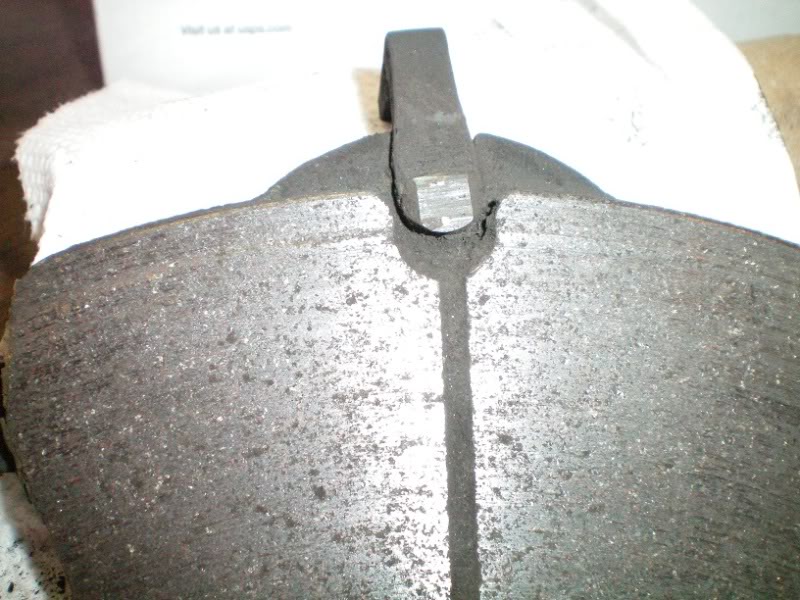
the worn sensor is in the slot, top middle. Look carefully and you'll actually see the two 'dots' that are the wire loop which has been worn off & broken. The dots are one above the other right on the center line of the sensor.
****
I check my brake condition regularly and decided not to mess with the sensors any more. So I cut back the sensor lead, and spliced the two wires together. Here's the sensor lead, sensor clipped off and the two wires (really just one loop) exposed
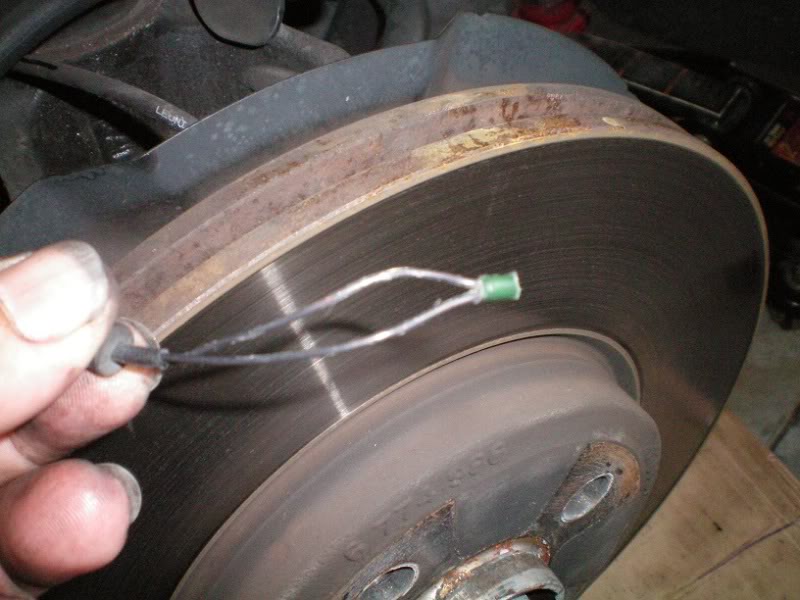
I twisted the ends together and applied some heat shrink tube to seal things up, and zip tied the "sensor" out of the way. The service reminder computer reset just fine, it thinks it sees a new sensor.
*****
a hint, something I forgot from the last time I did this job on a GEN2
note that the 4 pads in the box DO form two pairs and there is a slight difference between the inner and outer pad. It is very easy to miss the difference and I suspect the wrong pad in a location could cause some problems. Probably not major but other posts have mentioned squeals and other sounds. My new pads aren't making a peep. GEN2 rear pads also form such a pairing - I have those waiting on the work bench for the morning. Folks who are familiar with the GEN1 pads note all those clips and retainers that made the pad pairing so obvious are gone . . .
by tripped I mean the end was ground off and the wire broken
I just did my fronts this past Saturday
here's a used pad with the worn sensor still in place
the worn sensor is in the slot, top middle. Look carefully and you'll actually see the two 'dots' that are the wire loop which has been worn off & broken. The dots are one above the other right on the center line of the sensor.
****
I check my brake condition regularly and decided not to mess with the sensors any more. So I cut back the sensor lead, and spliced the two wires together. Here's the sensor lead, sensor clipped off and the two wires (really just one loop) exposed
I twisted the ends together and applied some heat shrink tube to seal things up, and zip tied the "sensor" out of the way. The service reminder computer reset just fine, it thinks it sees a new sensor.
*****
a hint, something I forgot from the last time I did this job on a GEN2
note that the 4 pads in the box DO form two pairs and there is a slight difference between the inner and outer pad. It is very easy to miss the difference and I suspect the wrong pad in a location could cause some problems. Probably not major but other posts have mentioned squeals and other sounds. My new pads aren't making a peep. GEN2 rear pads also form such a pairing - I have those waiting on the work bench for the morning. Folks who are familiar with the GEN1 pads note all those clips and retainers that made the pad pairing so obvious are gone . . .
Last edited by Capt_bj; Aug 2, 2012 at 01:48 PM.
Yeah once the light comes on it is a good idea to find out which sensor it is and then just get the one but, be really carefully the heat from the brakes causes the plastic to become very brittle and pulling out a good sensor can cause them to break.
OVERDRIVE
Joined: Jul 2006
Posts: 7,037
Likes: 283
From: Melbourne, FL
Never happened
I was hoping the old one I had would fall apart so I could show the construction .... didn't happen. It remains a solid block of plastic.
Wire connection points on the other hand . . .
******
having just finished my rear pads I'll amend my statement and say that trying to save the sensors is probably not worth the effort. Could not get the rear sensor out without breaking it. Again no biggie for me as I was not planning of reusing it anyway but if I WAS I'd be unhappy. So I'll change my position to 'if you plan to use sensors, plan to replace them....' I'd never have one really stuck b4, but this time WOW. It was like it had been glued in.
Last edited by Capt_bj; Aug 3, 2012 at 12:58 PM.
Trending Topics

OVERDRIVE
Joined: Jul 2006
Posts: 7,037
Likes: 283
From: Melbourne, FL
karma
aliens
was never clipped it the right pace from the factory
fell out

OVERDRIVE
Joined: Jul 2006
Posts: 7,037
Likes: 283
From: Melbourne, FL
it's here someplace that I can't find . . . .
For Gen 2 2007+ R56 Hatchbacks, 2008+ R55 CLUBMAN, and 2009+ R57 Convertibles
To enter the service Menu:
A. Insert Key
B. Do not press clutch / brake
C. Press Start button
D. Wait until the Car / revelant Service symbol disappears on the Rev counter display
E. Immediately after the symbol goes out - Press and hold Both buttons on the Rev Counter
F. Continue to hold - the system Will run a dash light check
G. Continue to hold
H. Display will then show VIN / Menu, - continue to hold through this until the time Reappears on the display.
I. Now release Only the Right hand Button (trip reset) for about a second, and then press and hold again (whilst still holding the LH button)
J. After another second of 2 the display will show the Front Brake Symbol You Are Now in the Service Menu:D
K. Use the BC Button (on indicator stalk) to scroll through to the relevant symbol -
L. To Reset the warning indicator light - Press & Hold the BC Button at the revelant symbol until RESET appears - then press and hold again until the process is complete.
Turn Off and On the Ignition again - Warning should now have gone!
*************
just used this process and it worked okeedookeee
For Gen 2 2007+ R56 Hatchbacks, 2008+ R55 CLUBMAN, and 2009+ R57 Convertibles
To enter the service Menu:
A. Insert Key
B. Do not press clutch / brake
C. Press Start button
D. Wait until the Car / revelant Service symbol disappears on the Rev counter display
E. Immediately after the symbol goes out - Press and hold Both buttons on the Rev Counter
F. Continue to hold - the system Will run a dash light check
G. Continue to hold
H. Display will then show VIN / Menu, - continue to hold through this until the time Reappears on the display.
I. Now release Only the Right hand Button (trip reset) for about a second, and then press and hold again (whilst still holding the LH button)
J. After another second of 2 the display will show the Front Brake Symbol You Are Now in the Service Menu:D
K. Use the BC Button (on indicator stalk) to scroll through to the relevant symbol -
L. To Reset the warning indicator light - Press & Hold the BC Button at the revelant symbol until RESET appears - then press and hold again until the process is complete.
Turn Off and On the Ignition again - Warning should now have gone!
*************
just used this process and it worked okeedookeee

The reset only works if the sensor hasn't tripped. The sensor's got a half way done mode at about 6mm, and its fully done at 3mm. If the pad's tripped the first level of the sensor, it won't reset and its not obvious why as the brake warning light isn't on.

6th Gear
Joined: Feb 2008
Posts: 2,358
Likes: 1
From: Graham, NC
fwiw, here is a printable version of two different methods to reset the service indicators:
R56 Service Indicator Reset Procedures
For the sensors, there is a test procedure you can use to determine whether they will need to be replaced in order to reset the light.
R56 Service Indicator Reset Procedures
For the sensors, there is a test procedure you can use to determine whether they will need to be replaced in order to reset the light.

Neutral
Joined: Jul 2013
Posts: 4
Likes: 0
Capt_bj: you seem to be the person to talk to about my issue.
I did my brake job already and completed everything but I'm having issues with my brake sensor staying in. I want to utilize the sensor but from time to time, i take a peak at the caliper from behind the car and notice that my sensor is dangling away from the caliper. For some reason, the sensor won't stay in there. I have jacked up the car, taken the right rear wheel off, to make sure the sensor is place in that slot within the brake pad but it would still fall out. What am i doing wrong?
I did my brake job already and completed everything but I'm having issues with my brake sensor staying in. I want to utilize the sensor but from time to time, i take a peak at the caliper from behind the car and notice that my sensor is dangling away from the caliper. For some reason, the sensor won't stay in there. I have jacked up the car, taken the right rear wheel off, to make sure the sensor is place in that slot within the brake pad but it would still fall out. What am i doing wrong?
OVERDRIVE
Joined: Jul 2006
Posts: 7,037
Likes: 283
From: Melbourne, FL
there should be a metal clip around the end of the sensor that helps it hold in the pad. Is yours there? Sometimes they fall off.
I also had one that was just loose in the pad (not OE pads), I put a blob of heat resistant silicone on it and the 'customer' has never complained. It was still attached last time we rotated his tires.
I also had one that was just loose in the pad (not OE pads), I put a blob of heat resistant silicone on it and the 'customer' has never complained. It was still attached last time we rotated his tires.

Thread
Thread Starter
Forum
Replies
Last Post
igzekyativ
MINIs & Minis for Sale
34
Jul 16, 2020 12:54 PM
Yazon
Tires, Wheels, & Brakes
11
Aug 27, 2015 04:41 PM