


R50/53 Mystery navigation issues


Thread Starter
|
1st Gear
Joined: Jan 2014
Posts: 18
Likes: 0
From: San Diego
Mystery navigation issues
Hello everyone, recently I became an owner of a 2006 jcw coupe. It has 94k on it but it was the cleanest one in all aspects so I went for it. Rust free bottom clean engine bay and no stupid interior issues from clumsy owners and their coffee/claw marks.
My dilemma is two fold
One I found a mystery momentary push button switch hidden in the center console behind the toggle switches.
When pressed and held ( key on) the gps sound goes ping and if I do it again the gps voice goes "I'm sorry" over and over again???
And the other is that the phone activation goes on forever with nothing happening! Even though it says "activate phone on the GPS screen and the radio display.
Also there is a apple 30pin cable in the glove box.
It does nothing when I plug a iPod or iPhone to it not even charge. Maybe it's disconnected.
These are the only items that I could not fined a solution too using the search tools so the soup natives will not get irritated
Thanks
My dilemma is two fold
One I found a mystery momentary push button switch hidden in the center console behind the toggle switches.
When pressed and held ( key on) the gps sound goes ping and if I do it again the gps voice goes "I'm sorry" over and over again???
And the other is that the phone activation goes on forever with nothing happening! Even though it says "activate phone on the GPS screen and the radio display.
Also there is a apple 30pin cable in the glove box.
It does nothing when I plug a iPod or iPhone to it not even charge. Maybe it's disconnected.
These are the only items that I could not fined a solution too using the search tools so the soup natives will not get irritated
Thanks

3rd Gear
Joined: Apr 2013
Posts: 199
Likes: 27
From: nj
my apple 30 pin cable doesnt charge the ipod either. i had to buy this little adapter after the 30 pin and into my ipod for the car to charge it. then i hit the mode button to make my ipod play.
http://www.ebay.com/itm/Scosche-passPORT-IFWAR-iPod-iPhone-USB-Charging-Adapter-for-Select-Car-Stereos-/301091262922?pt=Battery_Chargers&hash=item461a7011ca
i dont have phone activation in mine so i cant help you there
and i never heard of a button and dont see one on mine maybe a pic can help.
http://www.ebay.com/itm/Scosche-passPORT-IFWAR-iPod-iPhone-USB-Charging-Adapter-for-Select-Car-Stereos-/301091262922?pt=Battery_Chargers&hash=item461a7011ca
i dont have phone activation in mine so i cant help you there
and i never heard of a button and dont see one on mine maybe a pic can help.


The mystery button hidden under the toggle bank is the extra button in the full bluetooth kit ( with center console snap in ) or the simple bluetooth kit, no armrest snap in kit.
The kits use the steering wheel buttons if they are optioned or present. MINI included the key pad incase you dont have the R/T and phone button on the steering wheel. I have mine hooked up and it goes on the down pillar , but some people don't like the extra pad and the tuck it under the dash.
See here for the full bluetooth kit we offer and the simple one. Then you will know which one you have and how to use. it. Also the early key pads light up green ( ford color ), the newer ones light up Orange-ish like MINI interior lights.
https://www.northamericanmotoring.co...-retrofit.html
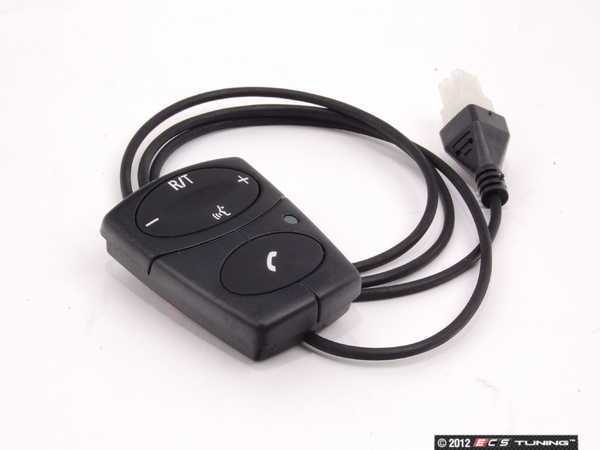
You might have the factory MINI Ipod kit with the cable in the glove box. You have to select the option through the mode button to select it. * but i remember it was not suppose to work with the MINI Handfree Bluetooth kit ??
Another option is the more integrated MINI Official IPod kit. Part Number 65110439432
http://www.ecstuning.com/Search/SiteSearch/65110439432/

Here is the install instructions. Its the previous part number that superseded to the one above.
Thanks
The kits use the steering wheel buttons if they are optioned or present. MINI included the key pad incase you dont have the R/T and phone button on the steering wheel. I have mine hooked up and it goes on the down pillar , but some people don't like the extra pad and the tuck it under the dash.
See here for the full bluetooth kit we offer and the simple one. Then you will know which one you have and how to use. it. Also the early key pads light up green ( ford color ), the newer ones light up Orange-ish like MINI interior lights.
https://www.northamericanmotoring.co...-retrofit.html
You might have the factory MINI Ipod kit with the cable in the glove box. You have to select the option through the mode button to select it. * but i remember it was not suppose to work with the MINI Handfree Bluetooth kit ??
Another option is the more integrated MINI Official IPod kit. Part Number 65110439432
http://www.ecstuning.com/Search/SiteSearch/65110439432/
Here is the install instructions. Its the previous part number that superseded to the one above.
Thanks
__________________

MINI Guru/ MINI Owner Since 2004 | NEW Lifetime Part Replacement | Local Pickup
Milltek | Genuine MINI | Forge Motorsport | NM Engineering | ECS Performance | M7 Speed
Customer Service Hours: 8am-8pm EST|Sales Team Hours: 8am-11pm | SAT 10am-7pm 800.924.5172
MINI Guru/ MINI Owner Since 2004 | NEW Lifetime Part Replacement | Local Pickup
Milltek | Genuine MINI | Forge Motorsport | NM Engineering | ECS Performance | M7 Speed
Customer Service Hours: 8am-8pm EST|Sales Team Hours: 8am-11pm | SAT 10am-7pm 800.924.5172

5th Gear
Joined: Sep 2012
Posts: 699
Likes: 7
Follow the pairing instructions for a ULF. First locate the BT pin. It's printed on the module which is behind the speedo or under the passenger seat with the HK amp and should also be on the inside of the phone manual. With the keys out, press and hold the sneezing man on the steering wheel and turn on the car. When you see BT PAIRING begin the BT search from your phone. Type in the PIN to complete.
The button you found is the paring button from a retrofit and may also do the same job.
The ipod doesn't charge as the ancient and useless factory ipod adapter uses FireWire charging and moder iPods are USB charging. I wouldn't waste a penny trying to get it to work and would instead look at something a bit more expensive such as a dice media bridge or a dension.
The button you found is the paring button from a retrofit and may also do the same job.
The ipod doesn't charge as the ancient and useless factory ipod adapter uses FireWire charging and moder iPods are USB charging. I wouldn't waste a penny trying to get it to work and would instead look at something a bit more expensive such as a dice media bridge or a dension.
Thread Starter
|
1st Gear
Joined: Jan 2014
Posts: 18
Likes: 0
From: San Diego
Thanks Guys for the inputs.
I tried the BMW/MINI Universal Hands Free Setup procedure but instead of"BT paring" is says "activate phone" instead! and then theBritish lady says "sorry" "sorry" as if it understands myfrustration.
In the gps display I can chose Nav, comp, telephone, setup. choosing thetelephone shows nothing and using the phone button still says activate phonebut without the comp saying "sorry" only when pressing the mysterybutton the comp talks!!!
I figure that I need to open up the console and see what adaptors are thereand update this post from there.
I tried the BMW/MINI Universal Hands Free Setup procedure but instead of"BT paring" is says "activate phone" instead! and then theBritish lady says "sorry" "sorry" as if it understands myfrustration.
In the gps display I can chose Nav, comp, telephone, setup. choosing thetelephone shows nothing and using the phone button still says activate phonebut without the comp saying "sorry" only when pressing the mysterybutton the comp talks!!!
I figure that I need to open up the console and see what adaptors are thereand update this post from there.
5th Gear
Joined: Sep 2012
Posts: 699
Likes: 7
ACTIVATE PHONE = ACTIVATE EXISTING PAIRED PHONE
BT PAIRING = BT PAIRING NEW PHONE
Go throughout he steps more carefully, don't skip any steps, until you see BT PAIRING. Try the steering wheel and the momentary pairing button. Find BMW ULF PAIRING threads on google.
BT PAIRING = BT PAIRING NEW PHONE
Go throughout he steps more carefully, don't skip any steps, until you see BT PAIRING. Try the steering wheel and the momentary pairing button. Find BMW ULF PAIRING threads on google.
Thread Starter
|
1st Gear
Joined: Jan 2014
Posts: 18
Likes: 0
From: San Diego
Ok found another loose item you know where this going after I saw that. Dealer stealer must have disconnected it to make an extra buck

So I said screw it a tore that sucker down a good opportunity to see what's doing
In less then 30 min I got to this

Got to this in another 10 min
Clearly that cable was manually unplugged
Note the twisted blk/wht wires from the momentary run to the radio harness.
I will deal with paring later 2 hrs total to get it open and back together
Took the time and cleaned the spilt coffee stains and vacuumed the dirt under the center console.
Plus lubed the shifter ball with some poly grease
Also added noise dampening foam in the plastic pillars squeak free woo hoo
Routed the iPod cable and momentary sw thru the bottom and moved the adapter right above the small door. For ease of access later if need be.

Now if I could only get my iPhone 5s to work
The 30 pin adaptor to the new one does not get seen by the unit but my iPhone 4 does!!!
I'll deal with that later it's dark.
I'll keep you guys posted
Mimi Poopa
Sent using NAMotoring
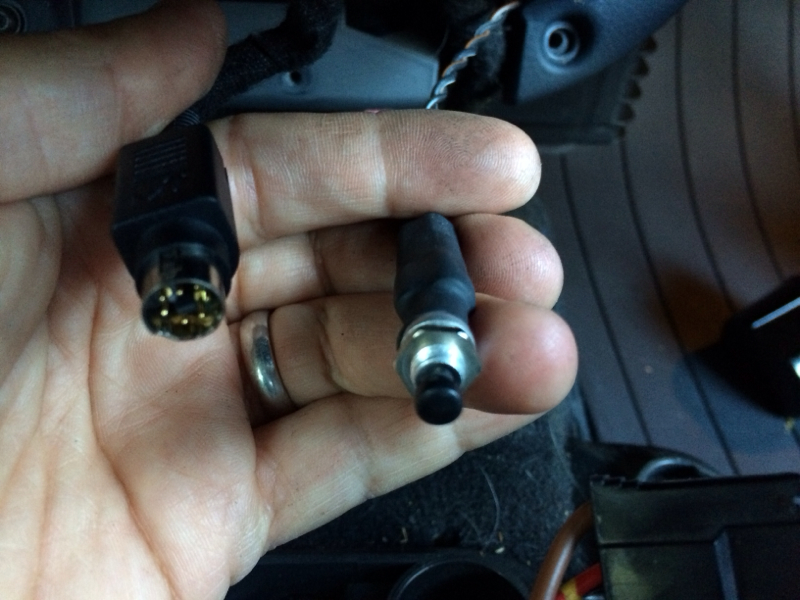
So I said screw it a tore that sucker down a good opportunity to see what's doing
In less then 30 min I got to this
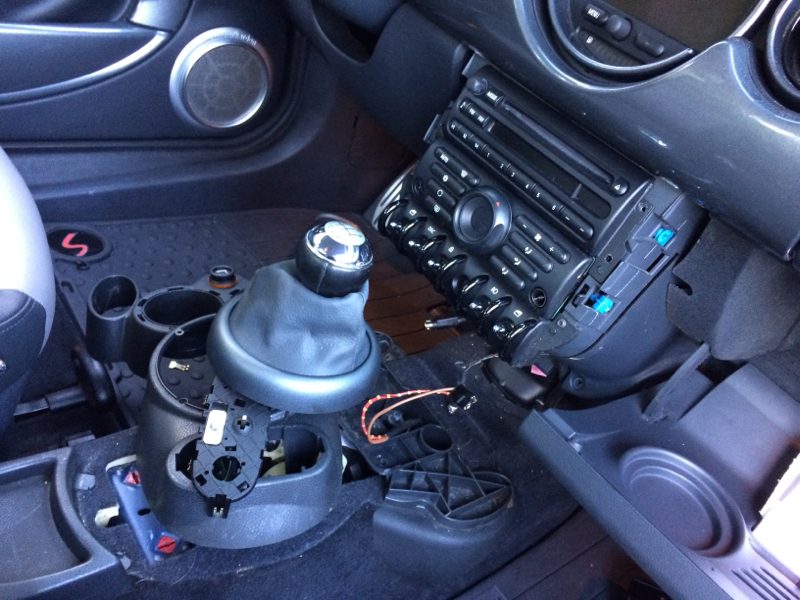
Got to this in another 10 min

Clearly that cable was manually unplugged
Note the twisted blk/wht wires from the momentary run to the radio harness.
I will deal with paring later 2 hrs total to get it open and back together
Took the time and cleaned the spilt coffee stains and vacuumed the dirt under the center console.
Plus lubed the shifter ball with some poly grease
Also added noise dampening foam in the plastic pillars squeak free woo hoo
Routed the iPod cable and momentary sw thru the bottom and moved the adapter right above the small door. For ease of access later if need be.

Now if I could only get my iPhone 5s to work
The 30 pin adaptor to the new one does not get seen by the unit but my iPhone 4 does!!!
I'll deal with that later it's dark.
I'll keep you guys posted
Mimi Poopa
Sent using NAMotoring
Trending Topics
Thread Starter
|
1st Gear
Joined: Jan 2014
Posts: 18
Likes: 0
From: San Diego
And here is the model of the adaptor

Forgot to add this
Also if an admin can move this over to the more appropriate naviPod section it would appreciated.
I thought the visibility in the general desc would been seen by more folks.
Tks
Sent using NAMotoring

Forgot to add this
Also if an admin can move this over to the more appropriate naviPod section it would appreciated.
I thought the visibility in the general desc would been seen by more folks.
Tks
Sent using NAMotoring
5th Gear
Joined: Sep 2012
Posts: 699
Likes: 7
So you have two 40 pin connectors. Looks like one is for a retrofit kit, possibly for navigation?
The white 12 pin is your cd changer or iPod audio.
http://www.m5board.com/vbulletin/att...3-20pinout.jpg
The white 12 pin is your cd changer or iPod audio.
http://www.m5board.com/vbulletin/att...3-20pinout.jpg
Thread Starter
|
1st Gear
Joined: Jan 2014
Posts: 18
Likes: 0
From: San Diego
Ok then got the sucker to pair iPod works but what the heck is the pass code this car... It came with no Manuel's nata
I tried 0000 00000 last 4 digits of vin last 5 digits
AHHAHAAHH I don't want to go to the dealer just for this only
Sent using NAMotoring
Thread Starter
|
1st Gear
Joined: Jan 2014
Posts: 18
Likes: 0
From: San Diego
That blows
So even though it's a mini instal with all BMW hardware!!!!
That Sucks $&@ls
Sent using NAMotoring
Thread Starter
|
1st Gear
Joined: Jan 2014
Posts: 18
Likes: 0
From: San Diego
So just to be clear about this issue
Is the ULF module behind the Nav unit or under the driver seat? The Nav DVD is under the passenger side since it is visible.
Thanks guys
Sent using NAMotoring
Is the ULF module behind the Nav unit or under the driver seat? The Nav DVD is under the passenger side since it is visible.
Thanks guys
Sent using NAMotoring
ULF Module , behind the center speedo or Nav screen, dependent on what you have. DVD driver under the seat.
__________________
MINI Guru/ MINI Owner Since 2004 | NEW Lifetime Part Replacement | Local Pickup
Milltek | Genuine MINI | Forge Motorsport | NM Engineering | ECS Performance | M7 Speed
Customer Service Hours: 8am-8pm EST|Sales Team Hours: 8am-11pm | SAT 10am-7pm 800.924.5172
MINI Guru/ MINI Owner Since 2004 | NEW Lifetime Part Replacement | Local Pickup
Milltek | Genuine MINI | Forge Motorsport | NM Engineering | ECS Performance | M7 Speed
Customer Service Hours: 8am-8pm EST|Sales Team Hours: 8am-11pm | SAT 10am-7pm 800.924.5172

Thread Starter
|
1st Gear
Joined: Jan 2014
Posts: 18
Likes: 0
From: San Diego
That was a good one
I have tried all the obvious numbers
I ave tried 50 or so out of 10000 possible combinations
This is a sample of what I am looking for "Bluetooth pass key"

Newer units have the default 0000 as the pass key.
Sent using NAMotoring
I have tried all the obvious numbers
I ave tried 50 or so out of 10000 possible combinations
This is a sample of what I am looking for "Bluetooth pass key"

Newer units have the default 0000 as the pass key.
Sent using NAMotoring
Yes, looks like this on the ULF module.
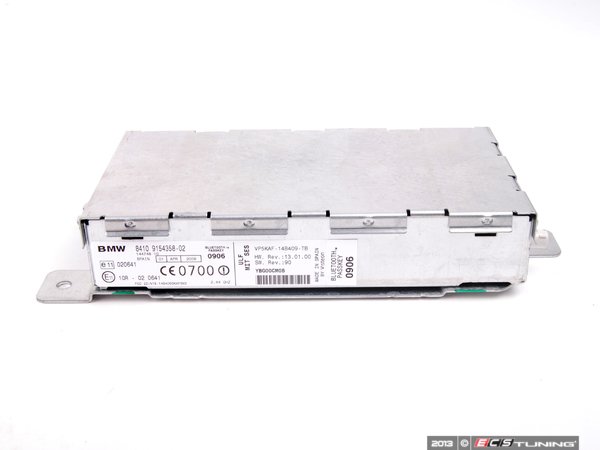
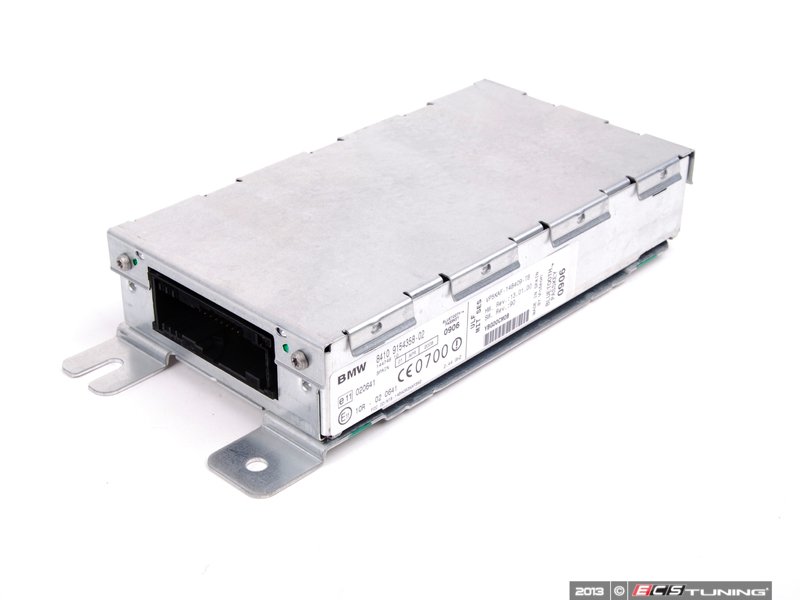
There is a four digit number code on the side of the unit on the sticker on the left side right about that CE0700 number. There is also the other sticker with the bluetooth passkey on the right side end , its might be on there also , that part of the sticker is suppose to be taken off and put into the Bluetooth user manual as a reference. The Bluetooth user manual is a separate manual from the owners manual. I would take the center Nav screen unit out and peek at the ULF unit for the sticker on the side. Then write it in the manual for future reference.
Thanks
There is a four digit number code on the side of the unit on the sticker on the left side right about that CE0700 number. There is also the other sticker with the bluetooth passkey on the right side end , its might be on there also , that part of the sticker is suppose to be taken off and put into the Bluetooth user manual as a reference. The Bluetooth user manual is a separate manual from the owners manual. I would take the center Nav screen unit out and peek at the ULF unit for the sticker on the side. Then write it in the manual for future reference.
Thanks
__________________
MINI Guru/ MINI Owner Since 2004 | NEW Lifetime Part Replacement | Local Pickup
Milltek | Genuine MINI | Forge Motorsport | NM Engineering | ECS Performance | M7 Speed
Customer Service Hours: 8am-8pm EST|Sales Team Hours: 8am-11pm | SAT 10am-7pm 800.924.5172
MINI Guru/ MINI Owner Since 2004 | NEW Lifetime Part Replacement | Local Pickup
Milltek | Genuine MINI | Forge Motorsport | NM Engineering | ECS Performance | M7 Speed
Customer Service Hours: 8am-8pm EST|Sales Team Hours: 8am-11pm | SAT 10am-7pm 800.924.5172

Thread
Thread Starter
Forum
Replies
Last Post
Navigation & Audio Question About Mini cd retrofit to Navigation Display
Bank999
Navigation/Audio
0
Aug 30, 2015 08:51 PM
Navigation & Audio Aftermarket In-Dash Navigation
kitty90034
Navigation and Audio
1
Aug 25, 2015 12:47 PM
kyungmanpark
MINIs & Minis for Sale
0
Aug 23, 2015 07:26 PM