


R50/53 Bluetooth Phone and Music Streaming Options


Thread Starter
|
2nd Gear
Joined: Jun 2013
Posts: 70
Likes: 0
From: Pinson, Alabama
Bluetooth Phone and Music Streaming Options
I have been looking at options that can get me use of my phone and streaming of music over bluetooth all while gaining some of the features of the multifunction steering wheel. I think I am needing one of the Dension devices, from these folks http://www.autotoys.com/x/product.php?productid=25718.
Anyone have suggestions which unit I need? Has anyone had any experience with these people?
Anyone have suggestions which unit I need? Has anyone had any experience with these people?
Thread Starter
|
2nd Gear
Joined: Jun 2013
Posts: 70
Likes: 0
From: Pinson, Alabama
OK, I researched and determined that I need a Dension GBL3BMW. It should give me the functionality I'm looking for. I have ordered one from www.autotoys.com I will update how everything goes once I get it.

Thread Starter
|
2nd Gear
Joined: Jun 2013
Posts: 70
Likes: 0
From: Pinson, Alabama
I received the Dension GBL3BM4 GATEWAY LITE unit. I also purchased the special iPod cable that allows me to use my ipod with it. Even though there is a USB port on the unit, it will not play an iPod and you must use their special cable to do so. Total cost $160...
The install was fairly simple. You just remove the radio, unplug it, put the Dension inline and plug everything back in. No cutting or splicing is necessary. You also have to run the mic cord up to the roof so that you can use the phone handsfree.
The included instructions are a little vague and I had to read them several times to understand them. The company I bought it from advertises that if you buy from them, they will give you access to uncut full length installation videos, but I never figured out how to access them. Some programming has to be done to the radio that lets it display text (programming only necessary if you want the song info displayed on your head unit), but I only figured that out after doing some searching on youtube.
Basically the unit fools the radio into thinking it has two external CD drives (I think). The mode switch on the front of the radio cycles thru them (Radio, CD 1 which is the iPod if you purchased the cable, CD 2 which is the USB port on the unit.
The unit is good for playing music from the iPod, but it has limited functionality being that (as far as I can tell) you can only have 6 folders (playlists) to separate the music. In other words, a folder for rock, a folder for pop, etc...up to 6 folders. Also the only navigating that you can do is next song within the folder by the forward/back controls on the steering wheel or the radio. You change the folder (or playlist) by using the number buttons on the front of the radio.
The usb port has basically the same functionality as the USB. The only thing is you have to leave the control box assessable to insert a thumb drive. So I used a 1 foot long USB extension cable and mounted the open port in the front edge of the down tube (had to do a little modifying). I plugged the other end into the Dension control box and hid it up under the dash.
To use the phone in handsfree mode, the radio has to be in one of the two CD modes. This is the only way the audio will be routed over the speakers. The phone button on the MFSW has no effect regardless. All dialing must be done from the phone although it may be answered by hitting the FF button on the radio and you can hang up by hitting the RW button on the radio.
Also the BT button on the MFSW has no effect and does nothing.
The volume buttons and the up/down buttons do function on the steering wheel.
Oh, and as long as you're in one of the two CD modes, you can stream music from you phone via bluetooth and it sounds pretty good. You can also use the up/down and volume on the steering wheel.
Was it worth the $160? I think for me it is, however if I had it to do again, I think I would do the OEM kit for complete functionality. I just like gadgets and this is just another for me to play with in my ride...
The install was fairly simple. You just remove the radio, unplug it, put the Dension inline and plug everything back in. No cutting or splicing is necessary. You also have to run the mic cord up to the roof so that you can use the phone handsfree.
The included instructions are a little vague and I had to read them several times to understand them. The company I bought it from advertises that if you buy from them, they will give you access to uncut full length installation videos, but I never figured out how to access them. Some programming has to be done to the radio that lets it display text (programming only necessary if you want the song info displayed on your head unit), but I only figured that out after doing some searching on youtube.
Basically the unit fools the radio into thinking it has two external CD drives (I think). The mode switch on the front of the radio cycles thru them (Radio, CD 1 which is the iPod if you purchased the cable, CD 2 which is the USB port on the unit.
The unit is good for playing music from the iPod, but it has limited functionality being that (as far as I can tell) you can only have 6 folders (playlists) to separate the music. In other words, a folder for rock, a folder for pop, etc...up to 6 folders. Also the only navigating that you can do is next song within the folder by the forward/back controls on the steering wheel or the radio. You change the folder (or playlist) by using the number buttons on the front of the radio.
The usb port has basically the same functionality as the USB. The only thing is you have to leave the control box assessable to insert a thumb drive. So I used a 1 foot long USB extension cable and mounted the open port in the front edge of the down tube (had to do a little modifying). I plugged the other end into the Dension control box and hid it up under the dash.
To use the phone in handsfree mode, the radio has to be in one of the two CD modes. This is the only way the audio will be routed over the speakers. The phone button on the MFSW has no effect regardless. All dialing must be done from the phone although it may be answered by hitting the FF button on the radio and you can hang up by hitting the RW button on the radio.
Also the BT button on the MFSW has no effect and does nothing.
The volume buttons and the up/down buttons do function on the steering wheel.
Oh, and as long as you're in one of the two CD modes, you can stream music from you phone via bluetooth and it sounds pretty good. You can also use the up/down and volume on the steering wheel.
Was it worth the $160? I think for me it is, however if I had it to do again, I think I would do the OEM kit for complete functionality. I just like gadgets and this is just another for me to play with in my ride...


2nd Gear
Joined: Nov 2013
Posts: 75
Likes: 0
I went a similar route but ended up with the competing product from Audiovox. I got the silver line mediabridge and let me say, I'm impressed. It connected in the boot on the right side and I fished the cables up to the glovebox where I store the unit itself. Ran the mic from the a pillar to the unit as well. Streaming audio works, I can fully control the phone with the MFSW to include the OEM BT buttons... If I hold the 'phone' button, that activates Siri so I can voice dial, ask for directions etc. it's as close to a modern BT setup you can get. I have noticed that the quality of sound is much better when my phone is plugged in, but it's nice not having to take the phone out of my pocket, hit the 'next' button on my steering wheel and music starts playing. Also of note, this is the only iPhone integration on the market that works with the iPhone 5 without an adaptor. You use an oem apple cable to link the phone via USB, so the integration is truly seamless. I paid about $10 more than the OP and could not be happier.

6th Gear
Joined: Nov 2004
Posts: 2,607
Likes: 316
From: Arnold, MO.
Very cool, I love all the functionality these offer.
For anyone looking for the most "basic"of music streaming options there's this:
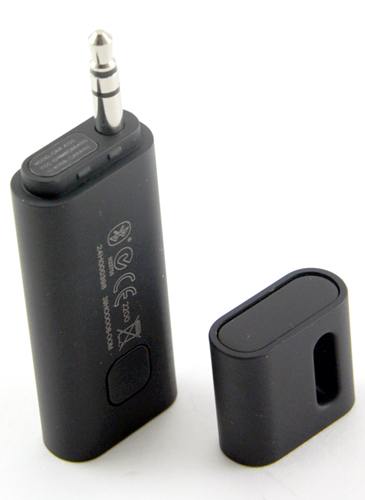
HTC Car Audio Adaptor, works with any Bluetooth & any 3.5mm Jack (car, home, wherever)
Full charge lasts 6 to 8 hours, micro usb charging, and can be left plugged in. $45 - $60 around the web, and the sound quality is pretty good.
For anyone looking for the most "basic"of music streaming options there's this:
HTC Car Audio Adaptor, works with any Bluetooth & any 3.5mm Jack (car, home, wherever)
Full charge lasts 6 to 8 hours, micro usb charging, and can be left plugged in. $45 - $60 around the web, and the sound quality is pretty good.
Trending Topics

5th Gear
Joined: Aug 2012
Posts: 1,056
Likes: 3
From: Bronx,NY
I went a similar route but ended up with the competing product from Audiovox. I got the silver line mediabridge and let me say, I'm impressed. It connected in the boot on the right side and I fished the cables up to the glovebox where I store the unit itself. Ran the mic from the a pillar to the unit as well. Streaming audio works, I can fully control the phone with the MFSW to include the OEM BT buttons... If I hold the 'phone' button, that activates Siri so I can voice dial, ask for directions etc. it's as close to a modern BT setup you can get. I have noticed that the quality of sound is much better when my phone is plugged in, but it's nice not having to take the phone out of my pocket, hit the 'next' button on my steering wheel and music starts playing. Also of note, this is the only iPhone integration on the market that works with the iPhone 5 without an adaptor. You use an oem apple cable to link the phone via USB, so the integration is truly seamless. I paid about $10 more than the OP and could not be happier.
Thanks
5th Gear
Joined: Aug 2012
Posts: 1,056
Likes: 3
From: Bronx,NY
Very cool, I love all the functionality these offer.
For anyone looking for the most "basic"of music streaming options there's this:
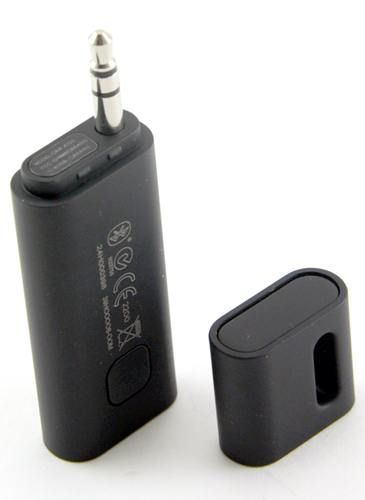
HTC Car Audio Adaptor, works with any Bluetooth & any 3.5mm Jack (car, home, wherever)
Full charge lasts 6 to 8 hours, micro usb charging, and can be left plugged in. $45 - $60 around the web, and the sound quality is pretty good.
For anyone looking for the most "basic"of music streaming options there's this:
HTC Car Audio Adaptor, works with any Bluetooth & any 3.5mm Jack (car, home, wherever)
Full charge lasts 6 to 8 hours, micro usb charging, and can be left plugged in. $45 - $60 around the web, and the sound quality is pretty good.


Thanks for the mention.
Yes we have them on sale right now as part of the Holiday Sale.
https://www.northamericanmotoring.co...s-on-sale.html
The install PDF are linked also under the main image.

Thanks
__________________

MINI Guru/ MINI Owner Since 2004 | NEW Lifetime Part Replacement | Local Pickup
Milltek | Genuine MINI | Forge Motorsport | NM Engineering | ECS Performance | M7 Speed
Customer Service Hours: 8am-8pm EST|Sales Team Hours: 8am-11pm | SAT 10am-7pm 800.924.5172
MINI Guru/ MINI Owner Since 2004 | NEW Lifetime Part Replacement | Local Pickup
Milltek | Genuine MINI | Forge Motorsport | NM Engineering | ECS Performance | M7 Speed
Customer Service Hours: 8am-8pm EST|Sales Team Hours: 8am-11pm | SAT 10am-7pm 800.924.5172

1st Gear
Joined: Aug 2011
Posts: 39
Likes: 0
From: Kyle, TX
I've noticed some quirkiness with Windows Phones, but we're in still in the minority so they don't seem to care
 haha
haha

2nd Gear
Joined: Oct 2013
Posts: 97
Likes: 0
If you have and Iphone and the 30 pin adapter - the Bluetooth adapter ViseeO Tune2air works wonders. Steering wheel buttons work, songlist available and just leave it connected to the adapter because it shuts off. It does not interfere with Iphone BT connection with the car.

I went a similar route but ended up with the competing product from Audiovox. I got the silver line mediabridge and let me say, I'm impressed. It connected in the boot on the right side and I fished the cables up to the glovebox where I store the unit itself. Ran the mic from the a pillar to the unit as well. Streaming audio works, I can fully control the phone with the MFSW to include the OEM BT buttons... If I hold the 'phone' button, that activates Siri so I can voice dial, ask for directions etc. it's as close to a modern BT setup you can get. I have noticed that the quality of sound is much better when my phone is plugged in, but it's nice not having to take the phone out of my pocket, hit the 'next' button on my steering wheel and music starts playing. Also of note, this is the only iPhone integration on the market that works with the iPhone 5 without an adaptor. You use an oem apple cable to link the phone via USB, so the integration is truly seamless. I paid about $10 more than the OP and could not be happier.
When using the Audiovox device, does it display the track names? Have you found any folder/playlist limitations like the OP's device?
2nd Gear
Joined: Nov 2013
Posts: 75
Likes: 0
Yes sir, track names are displayed in my NAV screen (if you have NAV and want to code it that way) and I can swap playlists using the numbered buttons on the stereo. No limitations, it just scrolls down the playlists that are loaded into my iPhone. I don't usually listen to music this way, so that feature is moot for me. You can also "code" the unit to only talk to the head unit, in which case the track names are displayed there in lieu of the NAV unit. I'm toying with the notion of going this route, as currently while I'm driving, every time the song changes the song name pops up on the NAV screen and takes over the directions I might be using. NAV is totally NOT a requirement for this mod, but it makes the song names a little more prominently displayed on your dash.

very cool, i love all the functionality these offer. For anyone looking for the most "basic"of music streaming options there's this: Htc car audio adaptor, works with any bluetooth & any 3.5mm jack (car, home, wherever) full charge lasts 6 to 8 hours, micro usb charging, and can be left plugged in. $45 - $60 around the web, and the sound quality is pretty good.

2nd Gear
Joined: Jan 2014
Posts: 117
Likes: 0
If you have and Iphone and the 30 pin adapter - the Bluetooth adapter ViseeO Tune2air works wonders. Steering wheel buttons work, songlist available and just leave it connected to the adapter because it shuts off. It does not interfere with Iphone BT connection with the car.
Last edited by turbofun; Jan 7, 2014 at 08:15 PM.

2nd Gear
Joined: Oct 2013
Posts: 93
Likes: 2
From: MidMich
Can anyone help me with my Mediabridge install.
I can't seem to get it to work right. When connected, The Wave won't recognize it but my iPod shows the audivox logo as if it was connected.
I can't find the "mediabridge" option when flipping though the modes.
After frustration, I reconnected my iPod to my factory ipod cable and I was able to get get to the bluetooth option. I synced my phone but I get no audio. I see the text scroll on the screen but no sound. While synced I can't make/receive calls either.
Is the issue having factory iPod & Aux installed?
The instructions are clear as mud so those weren't much help outside of wiring up.
I can't seem to get it to work right. When connected, The Wave won't recognize it but my iPod shows the audivox logo as if it was connected.
I can't find the "mediabridge" option when flipping though the modes.
After frustration, I reconnected my iPod to my factory ipod cable and I was able to get get to the bluetooth option. I synced my phone but I get no audio. I see the text scroll on the screen but no sound. While synced I can't make/receive calls either.
Is the issue having factory iPod & Aux installed?
The instructions are clear as mud so those weren't much help outside of wiring up.
2nd Gear
Joined: Nov 2013
Posts: 75
Likes: 0
Can anyone help me with my Mediabridge install.
I can't seem to get it to work right. When connected, The Wave won't recognize it but my iPod shows the audivox logo as if it was connected.
I can't find the "mediabridge" option when flipping though the modes.
After frustration, I reconnected my iPod to my factory ipod cable and I was able to get get to the bluetooth option. I synced my phone but I get no audio. I see the text scroll on the screen but no sound. While synced I can't make/receive calls either.
Is the issue having factory iPod & Aux installed?
The instructions are clear as mud so those weren't much help outside of wiring up.
I can't seem to get it to work right. When connected, The Wave won't recognize it but my iPod shows the audivox logo as if it was connected.
I can't find the "mediabridge" option when flipping though the modes.
After frustration, I reconnected my iPod to my factory ipod cable and I was able to get get to the bluetooth option. I synced my phone but I get no audio. I see the text scroll on the screen but no sound. While synced I can't make/receive calls either.
Is the issue having factory iPod & Aux installed?
The instructions are clear as mud so those weren't much help outside of wiring up.
1st Gear
Joined: Aug 2011
Posts: 39
Likes: 0
From: Kyle, TX
Btw, make sure you are running the latest firmware on the Mediabridge. Dice's website has the old versions. These are the new (and much more stable!) versions.
http://www.audiovoxoei.com/firmware/
http://www.audiovoxoei.com/firmware/
2nd Gear
Joined: Oct 2013
Posts: 93
Likes: 2
From: MidMich
I had that feeling but didn't want to rip out the radio to unplug. Looks like that's the next step this weekend.

Neutral
Joined: Jul 2014
Posts: 4
Likes: 1
Yes sir, track names are displayed in my NAV screen (if you have NAV and want to code it that way) and I can swap playlists using the numbered buttons on the stereo. No limitations, it just scrolls down the playlists that are loaded into my iPhone. I don't usually listen to music this way, so that feature is moot for me. You can also "code" the unit to only talk to the head unit, in which case the track names are displayed there in lieu of the NAV unit. I'm toying with the notion of going this route, as currently while I'm driving, every time the song changes the song name pops up on the NAV screen and takes over the directions I might be using. NAV is totally NOT a requirement for this mod, but it makes the song names a little more prominently displayed on your dash.

Thread
Thread Starter
Forum
Replies
Last Post
penguinhomey
1st Gen Countryman (R60) Talk (2010-2015)
38
Jul 7, 2019 09:24 PM
Mr Wiggles
1st Gen Countryman (R60) Talk (2010-2015)
1
Aug 18, 2015 07:14 PM
tippin
F55/F56 :: Hatch Talk (2014+)
3
Aug 5, 2015 08:43 AM