Navigation & Audio Audio upgrades, bluetooth, and navigation discussions surrounding the Clubman (R55), Cooper and Cooper S (R56), and Cabrio (R57) MINIs.

Navigation & Audio iPod problem with AUX port...

Thread Tools
 
Search this Thread
 
Old Apr 18, 2007 | 09:16 AM
  #1  
S2ki.com's Avatar
S2ki.com
Thread Starter
|
2nd Gear
Joined: Mar 2007
Posts: 52
Likes: 0
iPod problem with AUX port...

Ok, Problem. My girl has an 07'. When we plug in the iPod into the AUX port, you can only hear from the front left speaker.
 
Reply
Old Apr 18, 2007 | 10:00 AM
  #2  
Loony2N's Avatar
Loony2N
6th Gear
Joined: Feb 2007
Posts: 15,966
Likes: 1
If it only happens with the ipod, the problem is the plug or wire from the ipod connector. If it's with anything you plug in, it's the aux jack, most likely.
 
Reply
Old Apr 18, 2007 | 10:42 AM
  #3  
S2ki.com's Avatar
S2ki.com
Thread Starter
|
2nd Gear
Joined: Mar 2007
Posts: 52
Likes: 0
as in a crappy RadioShack plug or incorrectly plugged in? B/c I messed with the plug several time plugging it in and out and nothing...
 
Reply
Old Apr 18, 2007 | 10:57 AM
  #4  
Loony2N's Avatar
Loony2N
6th Gear
Joined: Feb 2007
Posts: 15,966
Likes: 1
It isn't out of the question
 
Reply
Old Apr 18, 2007 | 11:23 AM
  #5  
rkw's Avatar
rkw
OVERDRIVE
Joined: May 2005
Posts: 8,233
Likes: 127
From: San Francisco
Originally Posted by S2ki.com
When we plug in the iPod into the AUX port, you can only hear from the front left speaker.
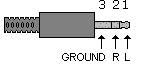
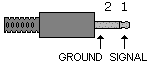
Nothing from the rear left speaker? Play with the fade setting on the radio to verify. If you get sound only on the left side (both front and rear), check that your cord is stereo, not mono.

A stereo plug has 3 segments.


A mono plug only has two segments.
 

Last edited by rkw; Apr 18, 2007 at 11:31 AM.
Reply
Old Apr 18, 2007 | 01:23 PM
  #6  
S2ki.com's Avatar
S2ki.com
Thread Starter
|
2nd Gear
Joined: Mar 2007
Posts: 52
Likes: 0
Originally Posted by rkw
Nothing from the rear left speaker? Play with the fade setting on the radio to verify. If you get sound only on the left side (both front and rear), check that your cord is stereo, not mono.

A stereo plug has 3 segments.


A mono plug only has two segments.
Thanks man, I'll check it out.
 
Reply
Old Apr 20, 2007 | 07:45 AM
  #7  
S2ki.com's Avatar
S2ki.com
Thread Starter
|
2nd Gear
Joined: Mar 2007
Posts: 52
Likes: 0
Fixed, thanks guys!
 
Reply
Old Apr 20, 2007 | 08:12 AM
  #8  
Loony2N's Avatar
Loony2N
6th Gear
Joined: Feb 2007
Posts: 15,966
Likes: 1
Originally Posted by S2ki.com
Fixed, thanks guys!
Glad to hear it. So what was the problem?
 
Reply
Old Apr 30, 2007 | 01:21 PM
  #9  
MINI69069's Avatar
MINI69069
2nd Gear
Joined: Feb 2007
Posts: 51
Likes: 0
Originally Posted by S2ki.com
Fixed, thanks guys!

how did you fix it?
 
Reply
Old Jun 20, 2007 | 09:09 PM
  #10  
qwiksilver's Avatar
qwiksilver
1st Gear
Joined: Jun 2007
Posts: 11
Likes: 0
I have a question for others using the aux port for things like an ipod or XM/Sirius. I have the lineout on my XM SkyFi unit cranked all the way up and the volume into the factory system is a lot lower than the FM radio. I do get stereo sound just not as loud as I'd expect. For example: while listening to XM I have the volume on the factory radio set at '8' to hear at a good cruising level. If I switch to the turner without adjusting the volume the radio is way louder.

So my question I guess is really a request for something to try to help with the line level.
 
Reply
Old Jun 20, 2007 | 09:37 PM
  #11  
TheBigNewt's Avatar
TheBigNewt
OVERDRIVE
Joined: Mar 2007
Posts: 5,602
Likes: 107
From: Arizona
If the XM SkyFi is anything like an iPod then if you are using a lineout from XM to Mini Aux connection (vs. connecting to the XM headphone jack to Mini Aux) the volume control on the XM does nothing because the amplifier is bypassed. You can't crank it up like you can the headphone jack. The volume lineout of the XM may be pretty minimal so you have to use the Mini to increase it.
 
Reply
Old Jun 20, 2007 | 09:45 PM
  #12  
qwiksilver's Avatar
qwiksilver
1st Gear
Joined: Jun 2007
Posts: 11
Likes: 0
I'm almost certain you can adjust the line out on the SkyFi unit while docked into the carkit. Normally I would use an FM modulator but with a lineout jack and an aux port in the car there's no need for the modulator. I was using the modulator the first week or so until I could get somewhere to buy the stereo cable to connect in-line. There was a noticeable difference between the volume with the modulator and line to aux port.
 
Reply
Old Jun 20, 2007 | 10:26 PM
  #13  
rkw's Avatar
rkw
OVERDRIVE
Joined: May 2005
Posts: 8,233
Likes: 127
From: San Francisco
The headunit has a setting for aux input level. Have you tried adjusting it?
 
Reply
Old Jun 21, 2007 | 03:14 AM
  #14  
glangford's Avatar
glangford
6th Gear
Joined: Dec 2006
Posts: 1,113
Likes: 0
rkw is right. I have my head unit aux volume adjusted to about 3 or 4, it comes default set at 1. So crank that up a couple of notches. I use a xm roady with the aux input and it does just fine.
 
Reply
Old Jun 21, 2007 | 06:04 AM
  #15  
qwiksilver's Avatar
qwiksilver
1st Gear
Joined: Jun 2007
Posts: 11
Likes: 0
That was it thanks. Works great now.
 
Reply
Old Jul 23, 2007 | 02:25 PM
  #16  
jlevy's Avatar
jlevy
3rd Gear
Joined: Aug 2006
Posts: 164
Likes: 2
From: League City, TX
Originally Posted by glangford
rkw is right. I have my head unit aux volume adjusted to about 3 or 4, it comes default set at 1. So crank that up a couple of notches. I use a xm roady with the aux input and it does just fine.
I've looked for this adjustment many times. How do you get to the Aux input level adjustment?

Nevermind - I want out to the car after writing this and found it.

Thanks.

-JL
 

Last edited by jlevy; Jul 23, 2007 at 06:40 PM.
Reply
Related Topics
Thread
Thread Starter
Forum
Replies
Last Post
Branto
MINI Parts for Sale
4
Aug 11, 2017 05:32 PM
khumpert
MINIs & Minis for Sale
1
Nov 30, 2015 11:48 AM
Chippawaguy
Electrical
5
Nov 8, 2015 08:27 PM
ROCNDAV
Navigation & Audio
3
Oct 20, 2015 01:08 PM
Jgj1988
MINI Parts for Sale
0
Aug 12, 2015 10:11 PM


All times are GMT -7. The time now is 01:47 PM.