


Navigation & Audio Stereo install help R53 (newbie alert!)


Thread Starter
|
1st Gear
Joined: Mar 2014
Posts: 22
Likes: 0
Stereo install help R53 (newbie alert!)
(I should preface this by saying I'm completely technologically minded and build computers regularly, but when it comes to cars I'm an idiot.)
So after way too much trouble (one of the TORX bolts was stripped) I finally got access to the stock stereo and removed it. I bought an Alpine from Crutchfield and got the harness kit - went ahead and matched wires up. I have a few issues:
- rather than the red wire going in the harness, Crutchfield has me running it behind the steering wheel into the fuse box. Is this normal?
- do I need to disconnect the battery to install this thing? (just doing headunit, not speakers)
- the orange and blue striped wires have no match, so I'm guessing I'm just taping them off?
- any suggestions on where to send the BT microphone?
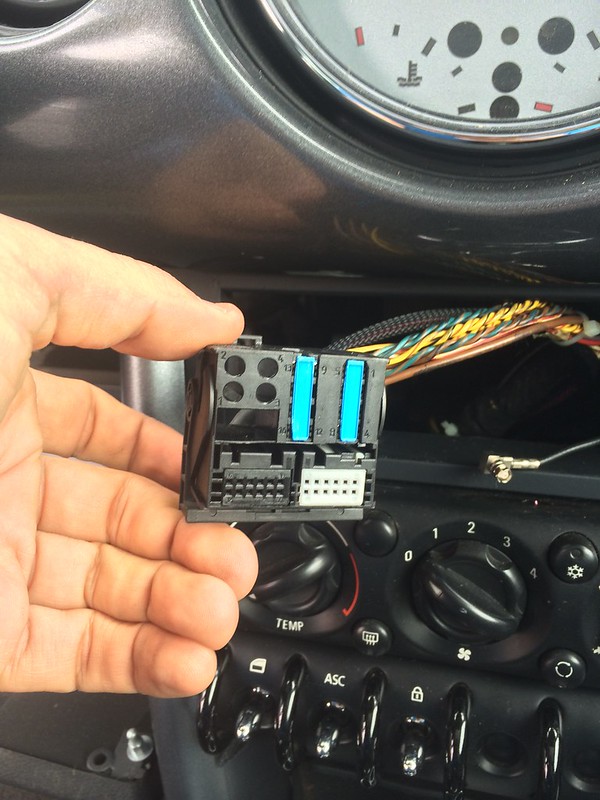
- the stock wire harness has these stupid blue things on it so I can't plug it into my new harness - do I just take these off and how so? (See image)
Thanks in advance for any help, most appreciated - sorry I'm an idiot!
So after way too much trouble (one of the TORX bolts was stripped) I finally got access to the stock stereo and removed it. I bought an Alpine from Crutchfield and got the harness kit - went ahead and matched wires up. I have a few issues:
- rather than the red wire going in the harness, Crutchfield has me running it behind the steering wheel into the fuse box. Is this normal?
- do I need to disconnect the battery to install this thing? (just doing headunit, not speakers)
- the orange and blue striped wires have no match, so I'm guessing I'm just taping them off?
- any suggestions on where to send the BT microphone?
- the stock wire harness has these stupid blue things on it so I can't plug it into my new harness - do I just take these off and how so? (See image)
Thanks in advance for any help, most appreciated - sorry I'm an idiot!

For the red wire in the harness: Do you have a multimeter? If so see if there is a Constant 12+ at the Radio, if not run the wire like the crutchfield instructions say. Pin 15 on the MINI harness should be RED/Brown that is the 12v+ Lead. (check with Multimeter)
Do you need to disconnect battery: I would disconnect the ground on the battery EXCEPT when you are searching for that +12v. Side note I never do, but I did mobile electronics for 10+years, but I will tell you that there is a good chance to trip a code sensor if you do disconnect the wrong thing with the power ON.
Orange and Blue Stripped Wires: Need more info, are those on the radio or the car? What are they listed as for functions?
Bluetooth Mike: I put mine in the sunroof trim behind the little speaker/mike cutout for the factory mike.
Stupid Blue Things: I dont know, do you have a factory HK amp? I would suggest a quick chat with Crutchfield. A quick check of the MINI wiring Diagram shows that those Stupid Blue Things are covering the Speaker Wires, which makes me think that you have a factory AMP.
I will take a look at my Bentley Manual; if you are going to be doing work on the car, I would HIGHLY suggest that you get this manual, there is pretty much always one for sale on the FS General Section, Money well spent!
Do you need to disconnect battery: I would disconnect the ground on the battery EXCEPT when you are searching for that +12v. Side note I never do, but I did mobile electronics for 10+years, but I will tell you that there is a good chance to trip a code sensor if you do disconnect the wrong thing with the power ON.
Orange and Blue Stripped Wires: Need more info, are those on the radio or the car? What are they listed as for functions?
Bluetooth Mike: I put mine in the sunroof trim behind the little speaker/mike cutout for the factory mike.
Stupid Blue Things: I dont know, do you have a factory HK amp? I would suggest a quick chat with Crutchfield. A quick check of the MINI wiring Diagram shows that those Stupid Blue Things are covering the Speaker Wires, which makes me think that you have a factory AMP.
I will take a look at my Bentley Manual; if you are going to be doing work on the car, I would HIGHLY suggest that you get this manual, there is pretty much always one for sale on the FS General Section, Money well spent!
Last edited by c0op3r; Mar 14, 2014 at 02:11 PM.
Orange is Illumination from the radio, if you want the radio to dim at night when you turn on the lights you have to connect this wire.
This should be the Grey/Red on the MINI harness (check with Multimeter) it should go 12v+ when light are turned on.
Blue/White - is remote turn on, you use this if you have an aftermarket amp.
Taping off both of these will not effect your install, just the lose of those functions.

This should be the Grey/Red on the MINI harness (check with Multimeter) it should go 12v+ when light are turned on.
Blue/White - is remote turn on, you use this if you have an aftermarket amp.
Taping off both of these will not effect your install, just the lose of those functions.
Last edited by c0op3r; Mar 14, 2014 at 02:12 PM.
Jon
Couple of questions:
Did that car have a Radio from the factory? I notice that the car has an antenna lead, but in the pictures of your car I do not see an antenna.
Also it looks like the car was not fully optioned (I am not picking on you, just an observation) you have the NON-Convenience pack A/C Controls, and do not have either of the Fog Light Switches.
I am wondering if the Blue Covers on that harness have something to do with the options on the car, as they are covering the Speaker Output connections.
Couple of questions:
Did that car have a Radio from the factory? I notice that the car has an antenna lead, but in the pictures of your car I do not see an antenna.
Also it looks like the car was not fully optioned (I am not picking on you, just an observation) you have the NON-Convenience pack A/C Controls, and do not have either of the Fog Light Switches.
I am wondering if the Blue Covers on that harness have something to do with the options on the car, as they are covering the Speaker Output connections.

5th Gear
Joined: Sep 2012
Posts: 699
Likes: 7
1) Always disconnect the battery. The intermediate connection and disconnection of power during assembly can cause voltage spikes. Same as building computers.
2) The blue covers are not covers. They are holding in the sockets. The pins pass into the sockets next to the blue locks.
Order this
http://www.ebay.com/itm/12-004-ISO-W...-/281118355822
and this
http://www.ebay.com/itm/BMW-MINI-AER...-/190844151234
OR
http://www.ebay.com/itm/BMW-X3-E83-Single-Din-Facia-Adaptor-Alpine-Stalk-Steering-Wheel-Interface-/141221653617?pt=UK_In_Car_Technology&hash=item20e1776c71http://www.ebay.com/itm/PC99-X33-BMW...-/181004384618
You want the BMW/MINI 40 pin connector type (iBus cars 1999-2006ish)
I notice your antenna connector, do you have two, one small one large? If so you have a very early car with diversity which means more headaches.
2) The blue covers are not covers. They are holding in the sockets. The pins pass into the sockets next to the blue locks.
Order this
http://www.ebay.com/itm/12-004-ISO-W...-/281118355822
and this
http://www.ebay.com/itm/BMW-MINI-AER...-/190844151234
OR
http://www.ebay.com/itm/BMW-X3-E83-Single-Din-Facia-Adaptor-Alpine-Stalk-Steering-Wheel-Interface-/141221653617?pt=UK_In_Car_Technology&hash=item20e1776c71http://www.ebay.com/itm/PC99-X33-BMW...-/181004384618
You want the BMW/MINI 40 pin connector type (iBus cars 1999-2006ish)
I notice your antenna connector, do you have two, one small one large? If so you have a very early car with diversity which means more headaches.
Thread Starter
|
1st Gear
Joined: Mar 2014
Posts: 22
Likes: 0
For the red wire in the harness: Do you have a multimeter? If so see if there is a Constant 12+ at the Radio, if not run the wire like the crutchfield instructions say. Pin 15 on the MINI harness should be RED/Brown that is the 12v+ Lead. (check with Multimeter)
Do you need to disconnect battery: I would disconnect the ground on the battery EXCEPT when you are searching for that +12v. Side note I never do, but I did mobile electronics for 10+years, but I will tell you that there is a good chance to trip a code sensor if you do disconnect the wrong thing with the power ON.
Orange and Blue Stripped Wires: Need more info, are those on the radio or the car? What are they listed as for functions?
Bluetooth Mike: I put mine in the sunroof trim behind the little speaker/mike cutout for the factory mike.
Stupid Blue Things: I dont know, do you have a factory HK amp? I would suggest a quick chat with Crutchfield. A quick check of the MINI wiring Diagram shows that those Stupid Blue Things are covering the Speaker Wires, which makes me think that you have a factory AMP.
I will take a look at my Bentley Manual; if you are going to be doing work on the car, I would HIGHLY suggest that you get this manual, there is pretty much always one for sale on the FS General Section, Money well spent!
Do you need to disconnect battery: I would disconnect the ground on the battery EXCEPT when you are searching for that +12v. Side note I never do, but I did mobile electronics for 10+years, but I will tell you that there is a good chance to trip a code sensor if you do disconnect the wrong thing with the power ON.
Orange and Blue Stripped Wires: Need more info, are those on the radio or the car? What are they listed as for functions?
Bluetooth Mike: I put mine in the sunroof trim behind the little speaker/mike cutout for the factory mike.
Stupid Blue Things: I dont know, do you have a factory HK amp? I would suggest a quick chat with Crutchfield. A quick check of the MINI wiring Diagram shows that those Stupid Blue Things are covering the Speaker Wires, which makes me think that you have a factory AMP.
I will take a look at my Bentley Manual; if you are going to be doing work on the car, I would HIGHLY suggest that you get this manual, there is pretty much always one for sale on the FS General Section, Money well spent!
Orange is Illumination from the radio, if you want the radio to dim at night when you turn on the lights you have to connect this wire.
This should be the Grey/Red on the MINI harness (check with Multimeter) it should go 12v+ when light are turned on.
Blue/White - is remote turn on, you use this if you have an aftermarket amp.
Taping off both of these will not effect your install, just the lose of those functions.
This should be the Grey/Red on the MINI harness (check with Multimeter) it should go 12v+ when light are turned on.
Blue/White - is remote turn on, you use this if you have an aftermarket amp.
Taping off both of these will not effect your install, just the lose of those functions.
Jon
Couple of questions:
Did that car have a Radio from the factory? I notice that the car has an antenna lead, but in the pictures of your car I do not see an antenna.
Also it looks like the car was not fully optioned (I am not picking on you, just an observation) you have the NON-Convenience pack A/C Controls, and do not have either of the Fog Light Switches.
I am wondering if the Blue Covers on that harness have something to do with the options on the car, as they are covering the Speaker Output connections.
Couple of questions:
Did that car have a Radio from the factory? I notice that the car has an antenna lead, but in the pictures of your car I do not see an antenna.
Also it looks like the car was not fully optioned (I am not picking on you, just an observation) you have the NON-Convenience pack A/C Controls, and do not have either of the Fog Light Switches.
I am wondering if the Blue Covers on that harness have something to do with the options on the car, as they are covering the Speaker Output connections.
It is a factory CD player, and there's a stubby antenna up top. I just bought the car last week, so unfortunately inherited it as not fully optioned! I did get a wiring harness from Crutchfield, and they're telling me it's the correct one and will fit the stock harness - it seemed to require too much force when I tried it multiple times today, but they insist it's right and that I should give it a firm push to connect it. I'm going to try again tomorrow and fingers crossed, it'll be good to go.
Thanks again for all your help!
1) Always disconnect the battery. The intermediate connection and disconnection of power during assembly can cause voltage spikes. Same as building computers.
2) The blue covers are not covers. They are holding in the sockets. The pins pass into the sockets next to the blue locks.
Order this
http://www.ebay.com/itm/12-004-ISO-W...-/281118355822
and this
http://www.ebay.com/itm/BMW-MINI-AER...-/190844151234
OR
BMW x3 E83 Single DIN Facia Adaptor Alpine Stalk Steering Wheel Interface | eBay
http://www.ebay.com/itm/PC99-X33-BMW...-/181004384618
You want the BMW/MINI 40 pin connector type (iBus cars 1999-2006ish)
I notice your antenna connector, do you have two, one small one large? If so you have a very early car with diversity which means more headaches.
2) The blue covers are not covers. They are holding in the sockets. The pins pass into the sockets next to the blue locks.
Order this
http://www.ebay.com/itm/12-004-ISO-W...-/281118355822
and this
http://www.ebay.com/itm/BMW-MINI-AER...-/190844151234
OR
BMW x3 E83 Single DIN Facia Adaptor Alpine Stalk Steering Wheel Interface | eBay
http://www.ebay.com/itm/PC99-X33-BMW...-/181004384618
You want the BMW/MINI 40 pin connector type (iBus cars 1999-2006ish)
I notice your antenna connector, do you have two, one small one large? If so you have a very early car with diversity which means more headaches.
5th Gear
Joined: Sep 2012
Posts: 699
Likes: 7
Trending Topics

1st Gear
Joined: Aug 2006
Posts: 16
Likes: 0
From: Bay Area, CA
Cruising this sub forum, haven't checked it in a while...
JonChar, did you get your install to work? I recently did mine with a crutchfield harness, and like yours, I was missing 3 wires. I ended up buying another one for ~$15 (well worth the time/effort saved) from a local car stereo shop.
See https://www.northamericanmotoring.co...25-post76.html for more info regarding the specifc use of the extra wires.
JonChar, did you get your install to work? I recently did mine with a crutchfield harness, and like yours, I was missing 3 wires. I ended up buying another one for ~$15 (well worth the time/effort saved) from a local car stereo shop.
See https://www.northamericanmotoring.co...25-post76.html for more info regarding the specifc use of the extra wires.
Thread Starter
|
1st Gear
Joined: Mar 2014
Posts: 22
Likes: 0
Cruising this sub forum, haven't checked it in a while...
JonChar, did you get your install to work? I recently did mine with a crutchfield harness, and like yours, I was missing 3 wires. I ended up buying another one for ~$15 (well worth the time/effort saved) from a local car stereo shop.
See https://www.northamericanmotoring.co...25-post76.html for more info regarding the specifc use of the extra wires.
JonChar, did you get your install to work? I recently did mine with a crutchfield harness, and like yours, I was missing 3 wires. I ended up buying another one for ~$15 (well worth the time/effort saved) from a local car stereo shop.
See https://www.northamericanmotoring.co...25-post76.html for more info regarding the specifc use of the extra wires.
Thanks for following up and posting that thread, I appreciate it. The stereo works so I don't think I'll hassle with it until I take the dash apart for something else, but then I'll change it up. Glad your install went well!


Thread
Thread Starter
Forum
Replies
Last Post
igzekyativ
MINIs & Minis for Sale
34
Jul 16, 2020 12:54 PM
Navigation & Audio My 07 COOPER S has an mp3 jack STOCK!
surfblue
Navigation & Audio
4
Oct 24, 2018 01:20 AM
squawSkiBum
MINI Parts for Sale
15
Oct 2, 2015 09:21 AM