


Navigation & Audio hooking up ipod to stock radio


Thread Starter
|
2nd Gear
Joined: Jan 2013
Posts: 103
Likes: 0
hooking up ipod to stock radio
Hello all, I have an 05 s was just wondering if any one knows how to wire an ipod directly into your stock radio. I want to be anle to play my ipod through my radio. Any help would be great.

You should have a 3.5mm jack in your glove box on the left hand side. You can either use that or get an iPod interface like the "Dice" unit.
Do a search on here and you'll find many options.
Do a search on here and you'll find many options.


Yes, like above. If you don't have its already i the glove box or under the toggle bank in the center console there is the Aux in. Its a very popular upgrade for the Gen 1 MINIs. You will know if you have it or not if you see the aux in. Then using a 3.5mm jack connect to you device. Toggle through to you reach Aux on the screen with the Mode button.
Aux Input Cable Install Set Part number 82110153367
http://www.ecstuning.com/Search/SiteSearch/82110153367/ES194874/
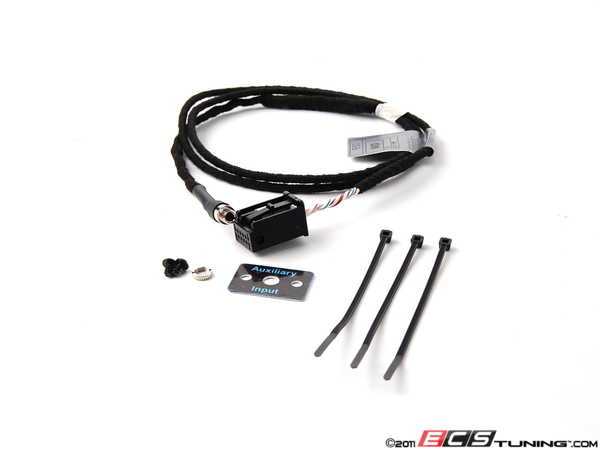
3.5 aux jack.
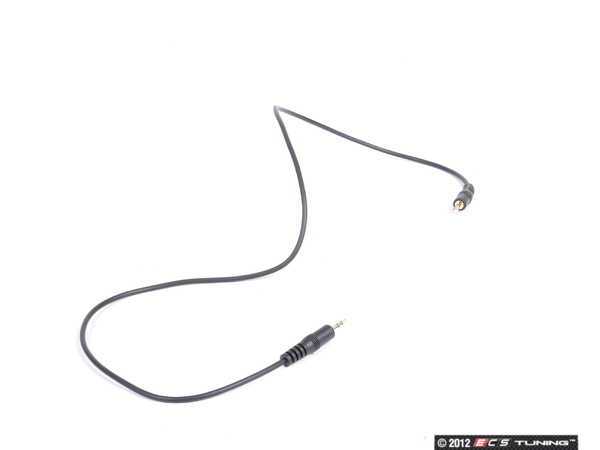
Another option is the more integrated MINI Official IPod kit. Part Number 65110439432
http://www.ecstuning.com/Search/SiteSearch/65110439432/

Here is the install instructions. Its the previous part number that superseded to the one above.
We have the "Dice" Products also below.
http://www.ecstuning.com/Mini-2005-Cooper-R53-S-Coupe-L4_1.6L_W11B16A/Interior/Sound_System/Auxiliary_Input/
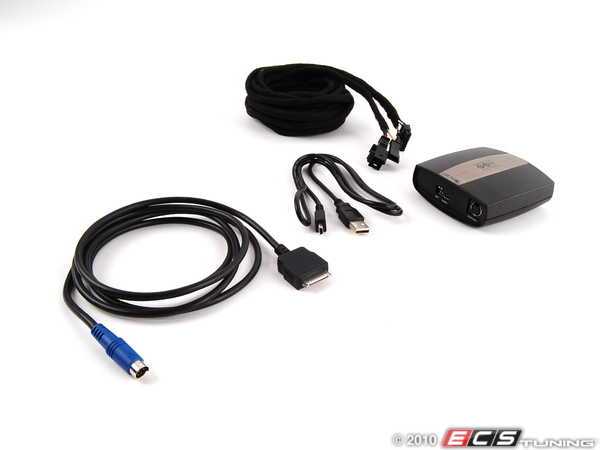
Thanks
Aux Input Cable Install Set Part number 82110153367
http://www.ecstuning.com/Search/SiteSearch/82110153367/ES194874/
3.5 aux jack.
Another option is the more integrated MINI Official IPod kit. Part Number 65110439432
http://www.ecstuning.com/Search/SiteSearch/65110439432/
Here is the install instructions. Its the previous part number that superseded to the one above.
We have the "Dice" Products also below.
http://www.ecstuning.com/Mini-2005-Cooper-R53-S-Coupe-L4_1.6L_W11B16A/Interior/Sound_System/Auxiliary_Input/
Thanks
__________________

MINI Guru/ MINI Owner Since 2004 | NEW Lifetime Part Replacement | Local Pickup
Milltek | Genuine MINI | Forge Motorsport | NM Engineering | ECS Performance | M7 Speed
Customer Service Hours: 8am-8pm EST|Sales Team Hours: 8am-11pm | SAT 10am-7pm 800.924.5172
MINI Guru/ MINI Owner Since 2004 | NEW Lifetime Part Replacement | Local Pickup
Milltek | Genuine MINI | Forge Motorsport | NM Engineering | ECS Performance | M7 Speed
Customer Service Hours: 8am-8pm EST|Sales Team Hours: 8am-11pm | SAT 10am-7pm 800.924.5172
Last edited by ECSTuning; Jul 24, 2013 at 11:44 AM.

OVERDRIVE
Joined: May 2005
Posts: 8,233
Likes: 128
From: San Francisco
Only if a previous owner installed it (and chose to locate it in the glove box). It was not standard equipment for an 05 S.

1st Gear
Joined: May 2012
Posts: 35
Likes: 0
From: Minnesota
I thought it was an option from the factory in the glove box? I thought I saw it in the owners manual.

6th Gear
Joined: Sep 2003
Posts: 2,268
Likes: 4
From: Always curious ...
That's what rkw is saying. Either the previous owner (a) chose the option and MINI then would install it in the glovebox, or (b) the precious owner installed it herself/himself in which case the jack could be anywhere.
6th Gear
Joined: Sep 2003
Posts: 2,268
Likes: 4
From: Always curious ...
Trending Topics
OVERDRIVE
Joined: May 2005
Posts: 8,233
Likes: 128
From: San Francisco
However, for 2002-2006 it was only sold as an accessory part to be installed by the dealer or owner. The official installation instructions specified the jack to be in the glovebox, and there is a flat spot where it was designed to be mounted. Many of us preferred to mount the jack somewhere more accessible, like the center console cubby.

+1 . Correct it was added on across the board 2007+ R52 MINI Convertible , I believe when its was factory on the late model R52 Convertible it was installed from the factory in the glove box at one time. And then the R56 2007 MINI came with a similar aux option ( standard ) under the toggle back.
Many older Gen 1 MINIs have this installed. So it seems very common.
Many older Gen 1 MINIs have this installed. So it seems very common.
__________________
MINI Guru/ MINI Owner Since 2004 | NEW Lifetime Part Replacement | Local Pickup
Milltek | Genuine MINI | Forge Motorsport | NM Engineering | ECS Performance | M7 Speed
Customer Service Hours: 8am-8pm EST|Sales Team Hours: 8am-11pm | SAT 10am-7pm 800.924.5172
MINI Guru/ MINI Owner Since 2004 | NEW Lifetime Part Replacement | Local Pickup
Milltek | Genuine MINI | Forge Motorsport | NM Engineering | ECS Performance | M7 Speed
Customer Service Hours: 8am-8pm EST|Sales Team Hours: 8am-11pm | SAT 10am-7pm 800.924.5172


Another option, maybe more than you want, is this: http://www.outmotoring.com/gen-1-min...in-module.html I have it in my MINI more because I wanted hands-free phone. Extra plus for me is bluetooth audio streaming from the iPhone as well...

I'm going to keep it real with you, since this was my experience,
DO NOT GET THE OEM IPOD ADAPTER!!!
It caused all kinds of strange gremlins (Turn signals inside would not work but outside they would & interior lights would stay on until i disconnected the battery, battery was constantly drained, etc...) after the 1st year of use. I ended up with a GROM USB2 UNIT. So far its stable and it shows the music info on the face of the dash.
DO NOT GET THE OEM IPOD ADAPTER!!!
It caused all kinds of strange gremlins (Turn signals inside would not work but outside they would & interior lights would stay on until i disconnected the battery, battery was constantly drained, etc...) after the 1st year of use. I ended up with a GROM USB2 UNIT. So far its stable and it shows the music info on the face of the dash.

6th Gear
Joined: Jun 2009
Posts: 1,113
Likes: 76
From: New Brunswick, CANADA
Question: does the Aux Input Cable allow you to navigate through tunes on your ipod with the radio's buttons or do you still have to navigate (search, skip, rewind. etc.) for music with the ipod itself?
Thanks
Thanks

6th Gear
Joined: Sep 2005
Posts: 3,925
Likes: 2
From: Laurel MD
No AUX cable will allow this. AUX is only a jack that will plug into your headphone jack to hear the music. You will have to control the music via the iPod.

Thread
Thread Starter
Forum
Replies
Last Post
igzekyativ
MINIs & Minis for Sale
34
Jul 16, 2020 12:54 PM
Navigation & Audio My 07 COOPER S has an mp3 jack STOCK!
surfblue
Navigation & Audio
4
Oct 24, 2018 01:20 AM
Navigation & Audio iPhone5 / Lightning adapter for OEM ipod interface
ROCNDAV
Navigation & Audio
3
Oct 20, 2015 01:08 PM