


Navigation & Audio New Mini Owner - XM question


Thread Starter
|
Neutral
Joined: Jun 2010
Posts: 4
Likes: 0
New Mini Owner - XM question
Hi all, new mini owner, first time poster, long time admirer and lurker, chili red '10 cabriolet named Miss Scarlett.
Ok, so I've (now) done my homework and know there is a factory installed antennae under the passenger seat. I plan to tie into that, so if anyone has an photos of that box or the input, I would really appreciate it.
Next question: I've been running XM in the mini off the skydock, the new iphone unit, and I've noticed the high-pitched interference whine when I accelerate. I'm assuming this is because it's powered by the cigarette lighter? I've ordered a new dash unit (onyx) and plan to tie this one into the OEM antennae, but I'm wondering if there are any recommended alternatives to powering the unit. Will the new onyx unit plug into the lighter as well? Or, are there alternatives that would give me less audio interference?
Anyone know of the best option to mount without tearing up my dash?
If this doesn't work better than the skydock, I'm going to have to resort to paying the dealer 800+ dollars to retrofit it into the OEM head unit, which I would really rather avoid. Any ideas?
MUCH appreciated =)
Ok, so I've (now) done my homework and know there is a factory installed antennae under the passenger seat. I plan to tie into that, so if anyone has an photos of that box or the input, I would really appreciate it.
Next question: I've been running XM in the mini off the skydock, the new iphone unit, and I've noticed the high-pitched interference whine when I accelerate. I'm assuming this is because it's powered by the cigarette lighter? I've ordered a new dash unit (onyx) and plan to tie this one into the OEM antennae, but I'm wondering if there are any recommended alternatives to powering the unit. Will the new onyx unit plug into the lighter as well? Or, are there alternatives that would give me less audio interference?
Anyone know of the best option to mount without tearing up my dash?
If this doesn't work better than the skydock, I'm going to have to resort to paying the dealer 800+ dollars to retrofit it into the OEM head unit, which I would really rather avoid. Any ideas?
MUCH appreciated =)


4th Gear
Joined: Aug 2004
Posts: 539
Likes: 0
From: Culpeper, VA
Hi all, new mini owner, first time poster, long time admirer and lurker, chili red '10 cabriolet named Miss Scarlett.
Ok, so I've (now) done my homework and know there is a factory installed antennae under the passenger seat. I plan to tie into that, so if anyone has an photos of that box or the input, I would really appreciate it.
Next question: I've been running XM in the mini off the skydock, the new iphone unit, and I've noticed the high-pitched interference whine when I accelerate. I'm assuming this is because it's powered by the cigarette lighter? I've ordered a new dash unit (onyx) and plan to tie this one into the OEM antennae, but I'm wondering if there are any recommended alternatives to powering the unit. Will the new onyx unit plug into the lighter as well? Or, are there alternatives that would give me less audio interference?
Anyone know of the best option to mount without tearing up my dash?
If this doesn't work better than the skydock, I'm going to have to resort to paying the dealer 800+ dollars to retrofit it into the OEM head unit, which I would really rather avoid. Any ideas?
MUCH appreciated =)
Ok, so I've (now) done my homework and know there is a factory installed antennae under the passenger seat. I plan to tie into that, so if anyone has an photos of that box or the input, I would really appreciate it.
Next question: I've been running XM in the mini off the skydock, the new iphone unit, and I've noticed the high-pitched interference whine when I accelerate. I'm assuming this is because it's powered by the cigarette lighter? I've ordered a new dash unit (onyx) and plan to tie this one into the OEM antennae, but I'm wondering if there are any recommended alternatives to powering the unit. Will the new onyx unit plug into the lighter as well? Or, are there alternatives that would give me less audio interference?
Anyone know of the best option to mount without tearing up my dash?
If this doesn't work better than the skydock, I'm going to have to resort to paying the dealer 800+ dollars to retrofit it into the OEM head unit, which I would really rather avoid. Any ideas?
MUCH appreciated =)
https://www.northamericanmotoring.co...e-antenna.html
https://www.northamericanmotoring.co...install-2.html
https://www.northamericanmotoring.co...hardwired.html
I was able to fish the wire out from under the seat without removing seat...just kinda go in by the vent that is there. I have a Clubman so I ran the power cord back under the driver's seat and connected an extension cord (from Radio Shack) back and connected to the auxiliary power point in the trunk .....that way there is nothing cluttering up the front.
Philip

Next question: I've been running XM in the mini off the skydock, the new iphone unit, and I've noticed the high-pitched interference whine when I accelerate. I'm assuming this is because it's powered by the cigarette lighter? I've ordered a new dash unit (onyx) and plan to tie this one into the OEM antennae, but I'm wondering if there are any recommended alternatives to powering the unit. Will the new onyx unit plug into the lighter as well? Or, are there alternatives that would give me less audio interference?
to many options to really comment on. but you can look at Kuda mounts and search the forums as many people have done many different things to mount SAT controllers.
The OEM SAT box mounts under the passenger seat. But if you do not have the antenna then the dealer will probably not install it.
Thread Starter
|
Neutral
Joined: Jun 2010
Posts: 4
Likes: 0
Ok, so I might be such a noob I'm missing something. BUT - it appears to me that there are two different locations/configurations for the under the seat. The black box everyone keeps referring to, that looks like this:

Looks like it rests above the carpet, clearly has several bolts and lifts off.
Alternately, looks like there's a carpet covered, deeper version you can't possibly fish for. Someone mentioned this briefly in a post, but never showed pics to compare the two. This post is exactly what my car looks like under the seat. This pic shows the front, no box, looks just like mine and totally flat except for a slit in the carpet and a single cord:

Pull out the seat and you see no box, it's all under the carpet. Now I can feel some "Stuff" under the carpet, but it looks exactly like this. I'm just wondering about how to get the carpet back, if you're unlucky enough to have a carpet covered one as I am? Anyone have any experience pulling door trim off, like he did here?

I'm guessing that's why some people can fish it out easily after they remove the screws and the box cover. The metal box version looks a lot easier to fish out:
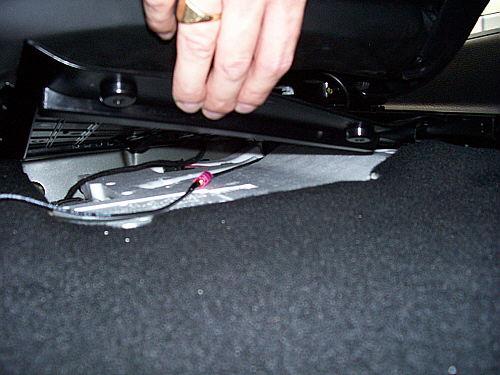
Carpet version, not so easy:
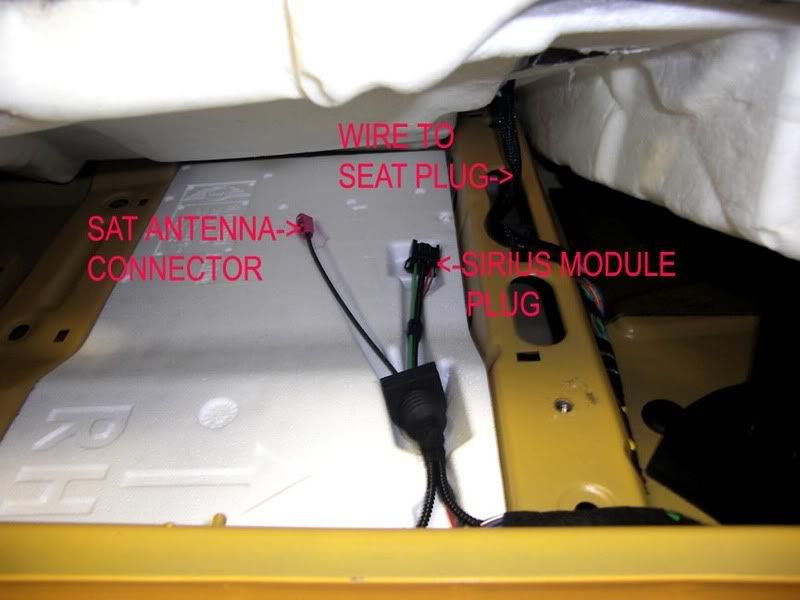
Sigh. I'm all game to take off screws, but cutting carpet or removing door trim makes me realllllllly leary. Neighbor is a certified mechanic and will help, but I really don't want to go through all that if that antennae isn't there.
Is it possible that the experts here think it's not there anymore because there's no box on later models? Or has someone gone as far as the above poster, lifted up the carpets, foam, drama, etc., and not found a lovely little purple jack waiting for them? I think I'm savvy enough to do this myself - I just am nervous to. And I really don't want to strong arm a seat out (I weigh about 110 lbs soaking wet, so I'm not exactly a SUPER strong girl) unless I KNOW there's that little purple problem solver there. Any way to check against the vin with the dealer or something?
On the flip side, XM (who has royally screwed me, too long of a story for here) has sent me a free dash unit and best buy gift/install card. Supposedly they will install it for me, but I'm guessing they won't be willing to take seats out to fish for a hypothetical antennae, and that they'll be cavemen and mashers with my new mini. Anyone here have experience with Best Buy technicians, are they going to be willing to do this right in regards to fuses and ground wires, or will they just default to trying to stick with lighter power, drill my dash to mount it, and stick a fat plastic antennae to my hood?
So many questions! Thanks in advance.
Looks like it rests above the carpet, clearly has several bolts and lifts off.
Alternately, looks like there's a carpet covered, deeper version you can't possibly fish for. Someone mentioned this briefly in a post, but never showed pics to compare the two. This post is exactly what my car looks like under the seat. This pic shows the front, no box, looks just like mine and totally flat except for a slit in the carpet and a single cord:
Pull out the seat and you see no box, it's all under the carpet. Now I can feel some "Stuff" under the carpet, but it looks exactly like this. I'm just wondering about how to get the carpet back, if you're unlucky enough to have a carpet covered one as I am? Anyone have any experience pulling door trim off, like he did here?
I'm guessing that's why some people can fish it out easily after they remove the screws and the box cover. The metal box version looks a lot easier to fish out:
Carpet version, not so easy:
Sigh. I'm all game to take off screws, but cutting carpet or removing door trim makes me realllllllly leary. Neighbor is a certified mechanic and will help, but I really don't want to go through all that if that antennae isn't there.
Is it possible that the experts here think it's not there anymore because there's no box on later models? Or has someone gone as far as the above poster, lifted up the carpets, foam, drama, etc., and not found a lovely little purple jack waiting for them? I think I'm savvy enough to do this myself - I just am nervous to. And I really don't want to strong arm a seat out (I weigh about 110 lbs soaking wet, so I'm not exactly a SUPER strong girl) unless I KNOW there's that little purple problem solver there. Any way to check against the vin with the dealer or something?
On the flip side, XM (who has royally screwed me, too long of a story for here) has sent me a free dash unit and best buy gift/install card. Supposedly they will install it for me, but I'm guessing they won't be willing to take seats out to fish for a hypothetical antennae, and that they'll be cavemen and mashers with my new mini. Anyone here have experience with Best Buy technicians, are they going to be willing to do this right in regards to fuses and ground wires, or will they just default to trying to stick with lighter power, drill my dash to mount it, and stick a fat plastic antennae to my hood?
So many questions! Thanks in advance.
Last edited by wendlynne; Jul 7, 2010 at 08:23 PM.

Well, it isn't the antenna, it's the antenna connector...lol
The antenna is on the roof, in the base of the radio antenna...
Mine was in the box and easy to get out.
The antenna is on the roof, in the base of the radio antenna...
Mine was in the box and easy to get out.
Trending Topics
4th Gear
Joined: Aug 2004
Posts: 539
Likes: 0
From: Culpeper, VA
Ok Wendlynne........At first I thought the antenna connector was going to be under the black plastic box (which is under the drivers seat in the US) but everyone kept saying it was under the passenger seat....I think some confusion entered in because of UK drive versions and US drive versions. Anyway the sat antenna cable terminates under the passenger seat in the US. My wife has the car otherwise I'd take a pic right now. Slide the passenger seat right back....Under the passenger seat there is a small vent about 3 to 4 inches long and about 1 inch deep.....this pokes out from a slot that's cut in the floor carpeting........NOW....without cutting anything....I was able to lift the carpet around that vent (it tore up my fingers a little) and by practically HANGING UPSIDE DOWN in the seat (that's an exaggeration but you get my drift) able to see the sat cable just "sitting there!" I then got a piece of wire and bent a hook on the end and went fishing....it took me a couple of tries but I hooked the wire fairly easily and pulled it through. I then pushed the carpet back around the vent.......now to connect to that terminal on the end of the sat antenna you will need to buy this cable http://www.cdint.com/catalog/model/SB9SBJ-174-5 it is unlikely that Best Buy or anywhere else will have this cable. I ordered it and it came in about a week. You'll see that it is MINI Cooper specific.
I hope this helps.....
Philip
I hope this helps.....
Philip
Thread Starter
|
Neutral
Joined: Jun 2010
Posts: 4
Likes: 0
I know it's not the ACTUAL antennae, LOL! I've installed them myself in other vehicles =) I might be a chick, but I'm also a bit of a geek, own a classic car, and work in technology.
Thank you indeed Phillip, and all of you for your responses and info, this has been enormously helpful. I'll hang upside down myself and see if I can wrangle or even SEE the cable (in this case, being a girl and having small hands might HELP), and if all else fails I'll get the neighbor to help me pull the seat out. If I find the connector I'll get the part you recommended, then tell best buy exactly what I want them to do re: power via the fuse box and grounding. I mean, I'll DO it myself, but if I can get at least part of this done for free why not!
Thank you thank you!
Thank you indeed Phillip, and all of you for your responses and info, this has been enormously helpful. I'll hang upside down myself and see if I can wrangle or even SEE the cable (in this case, being a girl and having small hands might HELP), and if all else fails I'll get the neighbor to help me pull the seat out. If I find the connector I'll get the part you recommended, then tell best buy exactly what I want them to do re: power via the fuse box and grounding. I mean, I'll DO it myself, but if I can get at least part of this done for free why not!
Thank you thank you!
4th Gear
Joined: Aug 2004
Posts: 539
Likes: 0
From: Culpeper, VA
I know it's not the ACTUAL antennae, LOL! I've installed them myself in other vehicles =) I might be a chick, but I'm also a bit of a geek, own a classic car, and work in technology.
Thank you indeed Phillip, and all of you for your responses and info, this has been enormously helpful. I'll hang upside down myself and see if I can wrangle or even SEE the cable (in this case, being a girl and having small hands might HELP), and if all else fails I'll get the neighbor to help me pull the seat out. If I find the connector I'll get the part you recommended, then tell best buy exactly what I want them to do re: power via the fuse box and grounding. I mean, I'll DO it myself, but if I can get at least part of this done for free why not!
Thank you thank you!
Thank you indeed Phillip, and all of you for your responses and info, this has been enormously helpful. I'll hang upside down myself and see if I can wrangle or even SEE the cable (in this case, being a girl and having small hands might HELP), and if all else fails I'll get the neighbor to help me pull the seat out. If I find the connector I'll get the part you recommended, then tell best buy exactly what I want them to do re: power via the fuse box and grounding. I mean, I'll DO it myself, but if I can get at least part of this done for free why not!
Thank you thank you!
Philip
Wendlynne,
As for the pictures you show below. Each of these is of a different car and model year. 07/08/and part of 09 there was a black cover as show in the first picture then late 09 and 10's seem to be mixed some have covers some do not. It may be a matter of what options were ordered as to if there is a opening in the carpet and a cover or no opening.
As for teh connector it will be PINK if you can find it.
VERY IMPORTANT NOTE:
DO NOT disconnect the wireing harness to the seat until the battery has been disconnected, otherwise you will need to go to the dealer to have theAir Bag Light reset.
As for the pictures you show below. Each of these is of a different car and model year. 07/08/and part of 09 there was a black cover as show in the first picture then late 09 and 10's seem to be mixed some have covers some do not. It may be a matter of what options were ordered as to if there is a opening in the carpet and a cover or no opening.
As for teh connector it will be PINK if you can find it.
VERY IMPORTANT NOTE:
DO NOT disconnect the wireing harness to the seat until the battery has been disconnected, otherwise you will need to go to the dealer to have theAir Bag Light reset.
Ok, so I might be such a noob I'm missing something. BUT - it appears to me that there are two different locations/configurations for the under the seat. The black box everyone keeps referring to, that looks like this:
Looks like it rests above the carpet, clearly has several bolts and lifts off.
Alternately, looks like there's a carpet covered, deeper version you can't possibly fish for. Someone mentioned this briefly in a post, but never showed pics to compare the two. This post is exactly what my car looks like under the seat. This pic shows the front, no box, looks just like mine and totally flat except for a slit in the carpet and a single cord:
Pull out the seat and you see no box, it's all under the carpet. Now I can feel some "Stuff" under the carpet, but it looks exactly like this. I'm just wondering about how to get the carpet back, if you're unlucky enough to have a carpet covered one as I am? Anyone have any experience pulling door trim off, like he did here?
I'm guessing that's why some people can fish it out easily after they remove the screws and the box cover. The metal box version looks a lot easier to fish out:
Carpet version, not so easy:
Sigh. I'm all game to take off screws, but cutting carpet or removing door trim makes me realllllllly leary. Neighbor is a certified mechanic and will help, but I really don't want to go through all that if that antennae isn't there.
Is it possible that the experts here think it's not there anymore because there's no box on later models? Or has someone gone as far as the above poster, lifted up the carpets, foam, drama, etc., and not found a lovely little purple jack waiting for them? I think I'm savvy enough to do this myself - I just am nervous to. And I really don't want to strong arm a seat out (I weigh about 110 lbs soaking wet, so I'm not exactly a SUPER strong girl) unless I KNOW there's that little purple problem solver there. Any way to check against the vin with the dealer or something?
On the flip side, XM (who has royally screwed me, too long of a story for here) has sent me a free dash unit and best buy gift/install card. Supposedly they will install it for me, but I'm guessing they won't be willing to take seats out to fish for a hypothetical antennae, and that they'll be cavemen and mashers with my new mini. Anyone here have experience with Best Buy technicians, are they going to be willing to do this right in regards to fuses and ground wires, or will they just default to trying to stick with lighter power, drill my dash to mount it, and stick a fat plastic antennae to my hood?
So many questions! Thanks in advance.
Looks like it rests above the carpet, clearly has several bolts and lifts off.
Alternately, looks like there's a carpet covered, deeper version you can't possibly fish for. Someone mentioned this briefly in a post, but never showed pics to compare the two. This post is exactly what my car looks like under the seat. This pic shows the front, no box, looks just like mine and totally flat except for a slit in the carpet and a single cord:
Pull out the seat and you see no box, it's all under the carpet. Now I can feel some "Stuff" under the carpet, but it looks exactly like this. I'm just wondering about how to get the carpet back, if you're unlucky enough to have a carpet covered one as I am? Anyone have any experience pulling door trim off, like he did here?
I'm guessing that's why some people can fish it out easily after they remove the screws and the box cover. The metal box version looks a lot easier to fish out:
Carpet version, not so easy:
Sigh. I'm all game to take off screws, but cutting carpet or removing door trim makes me realllllllly leary. Neighbor is a certified mechanic and will help, but I really don't want to go through all that if that antennae isn't there.
Is it possible that the experts here think it's not there anymore because there's no box on later models? Or has someone gone as far as the above poster, lifted up the carpets, foam, drama, etc., and not found a lovely little purple jack waiting for them? I think I'm savvy enough to do this myself - I just am nervous to. And I really don't want to strong arm a seat out (I weigh about 110 lbs soaking wet, so I'm not exactly a SUPER strong girl) unless I KNOW there's that little purple problem solver there. Any way to check against the vin with the dealer or something?
On the flip side, XM (who has royally screwed me, too long of a story for here) has sent me a free dash unit and best buy gift/install card. Supposedly they will install it for me, but I'm guessing they won't be willing to take seats out to fish for a hypothetical antennae, and that they'll be cavemen and mashers with my new mini. Anyone here have experience with Best Buy technicians, are they going to be willing to do this right in regards to fuses and ground wires, or will they just default to trying to stick with lighter power, drill my dash to mount it, and stick a fat plastic antennae to my hood?
So many questions! Thanks in advance.

Thread
Thread Starter
Forum
Replies
Last Post