


Navigation & Audio XM radio self install


6th Gear
Joined: Mar 2007
Posts: 1,369
Likes: 0
From: Bryan Texas
I will be interested to hear feedback on other people that
install the XM, non sportster model. The sound is perfectly clear
but only about 1/2 as loud and not as full as the radio or CD.
I have the inputs/outputs turned all the way up. I have also
used a cheapo Rio MP3 player through the aux input with
similar results. Which makes me think the aux input loses
something in regards to sound.
install the XM, non sportster model. The sound is perfectly clear
but only about 1/2 as loud and not as full as the radio or CD.
I have the inputs/outputs turned all the way up. I have also
used a cheapo Rio MP3 player through the aux input with
similar results. Which makes me think the aux input loses
something in regards to sound.

6th Gear
Joined: Sep 2007
Posts: 1,342
Likes: 4
From: Youngsville, NC, USA
I have the head unit input set on +6. (max)
I have the output on the XM set on max.
After thinking about it I can't make a comparison
for the MP3 player because I only played audio
MP3 files not music.
I need to check the XM and see if there are more options.
Although it worked great with the blaupunkt radio using
RCA inputs when in my E36.
I have the output on the XM set on max.
After thinking about it I can't make a comparison
for the MP3 player because I only played audio
MP3 files not music.
I need to check the XM and see if there are more options.
Although it worked great with the blaupunkt radio using
RCA inputs when in my E36.
6th Gear
Joined: Mar 2007
Posts: 1,369
Likes: 0
From: Bryan Texas
I use a Creative Labs mp3 player and the loading software has an option to adjust the playback volume during loading. It also has an option to adjust all the songs (or mp3 files) to the same loudness level.
Maybe the reduction in volume can be adjusted when you load your mp3s?
Both of our mp3 players and the XM are at the same level, just a hair below the radio. Heck, FM is louder than AM....kinda the same difference.
Upon further review....Maybe you could use the XM FM modulator. That would boost the signal because you would be using the radio signal rather than the direct link. That is if the direct link is the culprit.
Good luck.
Maybe the reduction in volume can be adjusted when you load your mp3s?
Both of our mp3 players and the XM are at the same level, just a hair below the radio. Heck, FM is louder than AM....kinda the same difference.
Upon further review....Maybe you could use the XM FM modulator. That would boost the signal because you would be using the radio signal rather than the direct link. That is if the direct link is the culprit.
Good luck.
Last edited by 4xAAA; Jan 4, 2008 at 01:44 PM.

Thread Starter
|
1st Gear
Joined: Dec 2007
Posts: 31
Likes: 0
Hi, I just had the xm unit I got installed by Tweeter. The job I did was mediocre at best. They did a good job at hidding everything, including the power adapater that plugs into the lighter. I ended up using the XM antenna that came with the Unit.

Neutral
Joined: Jan 2008
Posts: 4
Likes: 0
Hi BriMini.. where did they place the antenna? I dont think I have many options at this point for XM besides having Best Buy install.. was hoping to use the stock headunit but because of some fiber optic interface Im told it cant be done.. uhg!
Thread Starter
|
1st Gear
Joined: Dec 2007
Posts: 31
Likes: 0
re:
Hi xanderbear. They placed it right after the Mini radio antenna on the roof. As for where they hid all the wires I'm not sure. It took about 1 hour and 45 minutes to finish the job.
I was curious when you said fiber optic interface. I'm not sure what that means with radio. I know about fiber optic when it comes to home theater applications. Is it similar?
I was curious when you said fiber optic interface. I'm not sure what that means with radio. I know about fiber optic when it comes to home theater applications. Is it similar?


Here is a copy of my previous post. Since that post, I have switched from using the XM antenna on the dash to using the factory connection to the sirius antenna under the passenger seat. In my experience, the reception has been just as good (which is very good). I purchased a extender and right angle connector from two different vendors off ebay.
This is a brief write up of my XM install in my week 34 MCSa. I purchased a Sportcaster from "myradio" for $20 and the direct wire fused link for $19.95. I got around to installing it today. The only item I don't have yet is the antenna extender to plug into the oem link below the passenger seat, but I ran the supplied antenna to the dash and it it mounted on the right hand corner by the windscreen where it gets good reception and is hardly noticeable.
It took me some time to decide where exactly I was going to install the mount. I initially was going to mount it on the angled portion of the center just below the aux plug in, but the angle was too hard to drill holes and it is also flexes alot (making me wonder about vibrational stability of the XM. I wound up drilling holes in the flat portion that is vertical. I used two plastic trim inserts and then trim screws to attach the mount-seemed pretty secure.
One thing that I learned in particular with the Sportscaster is that it is ~4.5" long and the space for mounting is ~5.25" wide. So, right angle miniplugs (or adapters) are necessary. The power plug is right angle as well as the supplied XM antenna (I am a little worried that the antenna lead extender for using the factory antenna might not fit).
Another issue is the lack of any significant metal in the cockpit for running a ground. After several attempts to find something, I drilled a 3/16 hole in the metal brace visible in the fuse area and attached a ground screw there-works very well. I used the "add a fuse" at fuse #21 (I don't have nav, so no joy stick).
All wires were run in a loom and everything zip-tied to make it look good and stay hidden.
The display of the unit is as close to the color of the instrument display as it can be and it looks like it is supposed to be there.
I will keep this until the merger and everything is sorted out and then I will consider the sat radio, but this is pretty good now.
See the pix attached. If there are questions, let me know.
Attached Thumbnails

This is a brief write up of my XM install in my week 34 MCSa. I purchased a Sportcaster from "myradio" for $20 and the direct wire fused link for $19.95. I got around to installing it today. The only item I don't have yet is the antenna extender to plug into the oem link below the passenger seat, but I ran the supplied antenna to the dash and it it mounted on the right hand corner by the windscreen where it gets good reception and is hardly noticeable.
It took me some time to decide where exactly I was going to install the mount. I initially was going to mount it on the angled portion of the center just below the aux plug in, but the angle was too hard to drill holes and it is also flexes alot (making me wonder about vibrational stability of the XM. I wound up drilling holes in the flat portion that is vertical. I used two plastic trim inserts and then trim screws to attach the mount-seemed pretty secure.
One thing that I learned in particular with the Sportscaster is that it is ~4.5" long and the space for mounting is ~5.25" wide. So, right angle miniplugs (or adapters) are necessary. The power plug is right angle as well as the supplied XM antenna (I am a little worried that the antenna lead extender for using the factory antenna might not fit).
Another issue is the lack of any significant metal in the cockpit for running a ground. After several attempts to find something, I drilled a 3/16 hole in the metal brace visible in the fuse area and attached a ground screw there-works very well. I used the "add a fuse" at fuse #21 (I don't have nav, so no joy stick).
All wires were run in a loom and everything zip-tied to make it look good and stay hidden.
The display of the unit is as close to the color of the instrument display as it can be and it looks like it is supposed to be there.
I will keep this until the merger and everything is sorted out and then I will consider the sat radio, but this is pretty good now.
See the pix attached. If there are questions, let me know.
Attached Thumbnails

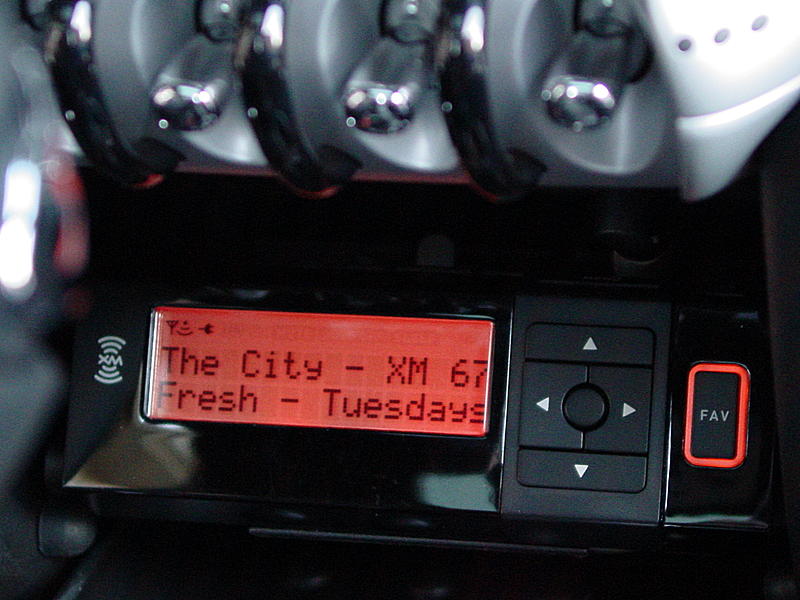
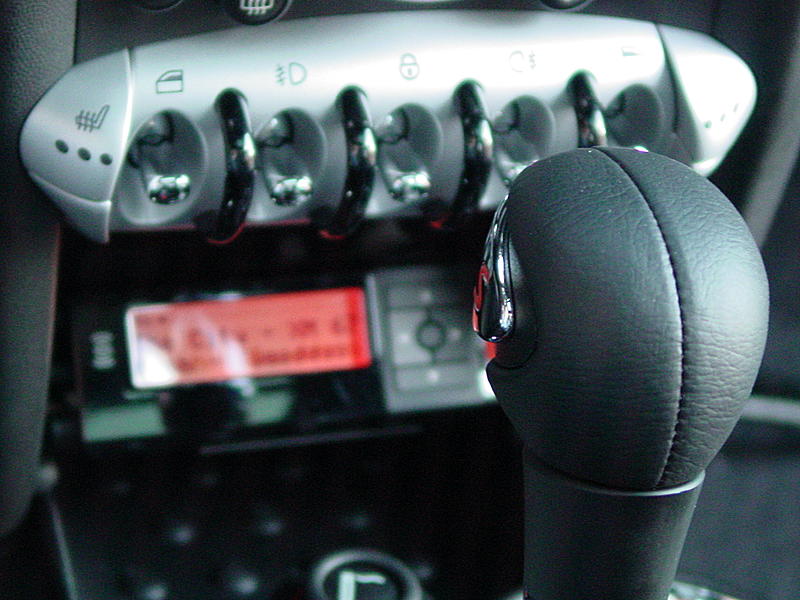
6th Gear
Joined: Mar 2007
Posts: 1,369
Likes: 0
From: Bryan Texas
Spfdhed, Our installs look very similar. I mounted just a bit lower and I need the 90 degree turn for the antenna, but all in all pretty slick.
I especially like the fact the XM radio display matches the dash lights.
Plus the tunes are way better than Clear channel's commercials.
I especially like the fact the XM radio display matches the dash lights.
Plus the tunes are way better than Clear channel's commercials.
Neutral
Joined: Jan 2008
Posts: 4
Likes: 0
BriMini.. I was told that the 2007 hardtop has a fiber optic connection cable for the sat radio.. if you get inside the cubby in your boot (right saide behind cover) youll see 2 different connectors, 1 is a white multi connector and the other a thin single cable with loads of shielding, I belive this to be the fiber optic cable.. I talked to Blitzsafe and they said they will not be making a fiver optic interface for the 2007 Mini's, *sigh*.. if there is something out there allowing me to use the factory headunit, well Im all ears!

2nd Gear
Joined: Nov 2007
Posts: 60
Likes: 0
From: Bay Area, CA
Well, after finally getting my power back on from that nasty storm, I can finally check this thread again. So... the '07's use a fiber optic cable? I'm sure someone will come out with an XM adapter (XM, come on?!) if Sirus has a fiber optic cable do-hickie to run theirs. Someone chime in and tell me there are more options?
6th Gear
Joined: Sep 2007
Posts: 1,342
Likes: 4
From: Youngsville, NC, USA
Here's the pictures of the XM install.
If I had known about the under the seat
antena connection at that time I would
have used that.
http://i214.photobucket.com/albums/c...596/radio4.jpg
http://i214.photobucket.com/albums/c...596/radio3.jpg
http://i214.photobucket.com/albums/c...596/radio2.jpg
http://i214.photobucket.com/albums/c...596/radio1.jpg
If I had known about the under the seat
antena connection at that time I would
have used that.
http://i214.photobucket.com/albums/c...596/radio4.jpg
http://i214.photobucket.com/albums/c...596/radio3.jpg
http://i214.photobucket.com/albums/c...596/radio2.jpg
http://i214.photobucket.com/albums/c...596/radio1.jpg


6th Gear
Joined: Sep 2007
Posts: 1,342
Likes: 4
From: Youngsville, NC, USA
Thanks!
Also, I forgot to say.
The lighter adapter is in that pic with the opening.
I took some heavy speaker wire and soldered it to
the plug (found out later about the hard wire install kit).
I just ran the power to the fuse box. The ground wire
is attached to a bolt outside the fuse box but in
the general area (can be seen you take off fuse box
cover).
That way I didn't have to mess with a separate wire
trying to find a good ground under the dash/cubby/whatever.
If I stay with XM long term (still not 100% sure) I'll want
to get that thing for the boot where you can use the radio controls.
I honestly view the setup I have as temporary.
Although temporary might end up being 2 years ha ha
Also, I forgot to say.
The lighter adapter is in that pic with the opening.
I took some heavy speaker wire and soldered it to
the plug (found out later about the hard wire install kit).
I just ran the power to the fuse box. The ground wire
is attached to a bolt outside the fuse box but in
the general area (can be seen you take off fuse box
cover).
That way I didn't have to mess with a separate wire
trying to find a good ground under the dash/cubby/whatever.
If I stay with XM long term (still not 100% sure) I'll want
to get that thing for the boot where you can use the radio controls.
I honestly view the setup I have as temporary.
Although temporary might end up being 2 years ha ha

2nd Gear
Joined: Aug 2007
Posts: 80
Likes: 0
All wires were run in a loom and everything zip-tied to make it look good and stay hidden.
The display of the unit is as close to the color of the instrument display as it can be and it looks like it is supposed to be there.
I will keep this until the merger and everything is sorted out and then I will consider the sat radio, but this is pretty good now.
See the pix attached. If there are questions, let me know.
Attached Thumbnails
The display of the unit is as close to the color of the instrument display as it can be and it looks like it is supposed to be there.
I will keep this until the merger and everything is sorted out and then I will consider the sat radio, but this is pretty good now.
See the pix attached. If there are questions, let me know.
Attached Thumbnails
The Roady XT fits well in the cubby; I got a Low Boy mount from Xmfanstore, and that is the perfect size for the cubby--it positions the XM Roady exactly in the right place.
I used the hardwire power adapter, also from XMfanstore, and spliced it into the cig lighter power using the quick connects that came with it. The little box that is part of the adapter fits snugly behind the XM in the cubby, and I velcro'd it in there for good measure. I bought an add-a-circuit, but did not end up using it.
Overall, I am pleased with this setup. It was cheap and relatively easy to install. The Roady's backlight is more red than BMW orange, but the installation is otherwise fairly clean. My big complaints are that the Roady's buttons are very small, and it is difficult to quickly glance down and read the display while driving. I would have done the OEM Sirius unit (I liked having the integrated unit on my old E46 330), but it was just too much money to justify. My total outlay on the XM setup was about $100, compared to $500+ for the OEM unit.
Thread Starter
|
1st Gear
Joined: Dec 2007
Posts: 31
Likes: 0
It could be my imagination but does the volume with the stereo go down when you come to a full stop?
Does anyone happen to know what speakers the mini use for the stock option?
Thank you for your help.
Does anyone happen to know what speakers the mini use for the stock option?
Thank you for your help.

1st Gear
Joined: Aug 2008
Posts: 38
Likes: 0
Thanks!


I'm wondering if the factory Sirius unit mounts under the passenger seat and "talks" to the head unit via the additional wires that are under the seat. I hooked my XM to the antenna lead under the seat but there were other wires there that may be the connections for the factory Sirius unit. Perhaps someone out there with factory Sirius can look under the seat and see what is there and how it is hooked up.
3rd Gear

Joined: Nov 2002
Posts: 290
Likes: 1
From: New Castle, NH
Don't know if you knew but there is a XM radio antenna already in all Minis in 2007 - underneath the passenger seat there is a wire with a pink connector , it leads to the FM antenna on the roof that has a XM radio antenna in the base of it. I put my XM in the bottom of the center stack , in the cubby hole. Kept it from moving with some "hook and loop" strips - the cable from the output goes right to the Aux. connector. I put power on by using a "Add a circuit" connector in the fuse box. Looks nice to me - have 2 Minis actually - one has a old Roady2 in it - the other has a Delphi SkyFi 2.
-Jim

The antenna cable should be there but until verified i would not count on it 100%.
The reason I say that is that MINI has started removing wiring harness items to save money like on the 07-09's the OEM Alarm system wiring is in all cars, but in the 10's it is only in cars that were ordered with the Alarm System, so retro fitting the OEM alarm is not possible as plug and play in the 2010's as it was on the earlier model years.
The reason I say that is that MINI has started removing wiring harness items to save money like on the 07-09's the OEM Alarm system wiring is in all cars, but in the 10's it is only in cars that were ordered with the Alarm System, so retro fitting the OEM alarm is not possible as plug and play in the 2010's as it was on the earlier model years.

1st Gear
Joined: Nov 2007
Posts: 12
Likes: 0
https://www.northamericanmotoring.co...8-mcs-r56.html The link listed above has excellent instructions along with really clear pictures.

Thread
Thread Starter
Forum
Replies
Last Post
squawSkiBum
MINI Parts for Sale
15
Oct 2, 2015 09:21 AM