


Navigation & Audio HOW TO: Add Auxiliary Input to Switch Panel and Change Switch LED color


HOW TO: Add Auxiliary Input to Switch Panel and Change Switch LED color
So this was going to be a temporary solution for my iPhone then I really liked the idea of having my unused switch turn into a plug for my iPhone. While I was at it I had a spare blue LED from my door handle project, and decided to change the green light to a blue one.
First things first:
I have a an 11/2003 R53, so my tools maybe different then the ones you need.
I used a T15 to remove my down tubes and the center part of my dash.
Then using the same T15 I removed my switch panel and radio.
Once the switch panel is out there are two (2) clips on the bottom to remove the front half from the rear half.
Then there are three (3) clips separating the two sections of the rear portion. Be careful not to loose the white spacers inside. They have the potential of flying every-which-way.
Now the next few steps are if you want to change the LED color:
Grab the silicone board and twist and remove the green light.
I used 5mm LEDs so the hole needed a little grinding before the LED would fit. Once done it should look like this:


For me, the side with the pink dot was positive. In LEDs THIS DOES MATTER. The short lead side is positive, the side with the flat spot is negative.
I used a 5V LED so the resistor I needed was 270ohm, if you're not sure HERE is a calculator.
Soldered in:


The leads must be cut to fit in the plastic housing. Everything must be as small and compact as possible without short circuiting.

DONE! With that part. If thats where you're stopping then just make sure everything fits back together and use the steps in reverse to finish up.
Now if you're moving on, hopefully you have the OEM Auxiliary jack.
The heat-shrink tubing needs to be cut off the end so that the wires can make the bend in the housing.

Then the hole needs to be drilled in the front of the switch plate. I would do this slowly and accurately, as this is what you will be seeing everyday. I started from the inside on the first pass to get centered, and then switched sides to make sure the hole was clean.

And this is what it looks like screwed in, but don't waste your time screwing it in yet, you'll just have to remove it later.

Now you need to drill the hole through the rear outer casing, circuit board, and the white rubber.
I used a spot near the passenger window switch because there aren't many contacts there. You can see in the picture where:


ALMOST THERE!
the wire needs a place to go, that's out of the way. So the little plastic walls need to be cut.

A better idea of what your looking at with the routing:

Now Clip everything back together!!!! Make sure you put the white spacers back in if you took them out.


I took it one step further...

And final assembly:


At night:

First things first:
I have a an 11/2003 R53, so my tools maybe different then the ones you need.
I used a T15 to remove my down tubes and the center part of my dash.
Then using the same T15 I removed my switch panel and radio.
Once the switch panel is out there are two (2) clips on the bottom to remove the front half from the rear half.
Then there are three (3) clips separating the two sections of the rear portion. Be careful not to loose the white spacers inside. They have the potential of flying every-which-way.
Now the next few steps are if you want to change the LED color:
Grab the silicone board and twist and remove the green light.
I used 5mm LEDs so the hole needed a little grinding before the LED would fit. Once done it should look like this:
For me, the side with the pink dot was positive. In LEDs THIS DOES MATTER. The short lead side is positive, the side with the flat spot is negative.
I used a 5V LED so the resistor I needed was 270ohm, if you're not sure HERE is a calculator.
Soldered in:
The leads must be cut to fit in the plastic housing. Everything must be as small and compact as possible without short circuiting.
DONE! With that part. If thats where you're stopping then just make sure everything fits back together and use the steps in reverse to finish up.
Now if you're moving on, hopefully you have the OEM Auxiliary jack.
The heat-shrink tubing needs to be cut off the end so that the wires can make the bend in the housing.
Then the hole needs to be drilled in the front of the switch plate. I would do this slowly and accurately, as this is what you will be seeing everyday. I started from the inside on the first pass to get centered, and then switched sides to make sure the hole was clean.
And this is what it looks like screwed in, but don't waste your time screwing it in yet, you'll just have to remove it later.
Now you need to drill the hole through the rear outer casing, circuit board, and the white rubber.
I used a spot near the passenger window switch because there aren't many contacts there. You can see in the picture where:
ALMOST THERE!
the wire needs a place to go, that's out of the way. So the little plastic walls need to be cut.
A better idea of what your looking at with the routing:
Now Clip everything back together!!!! Make sure you put the white spacers back in if you took them out.
I took it one step further...
And final assembly:
At night:
Last edited by FL_blue_MINI; Mar 15, 2010 at 05:38 PM.
6th Gear
Joined: Apr 2009
Posts: 1,361
Likes: 4
From: Yorktown, VA
That's exactly I wanted to do! 
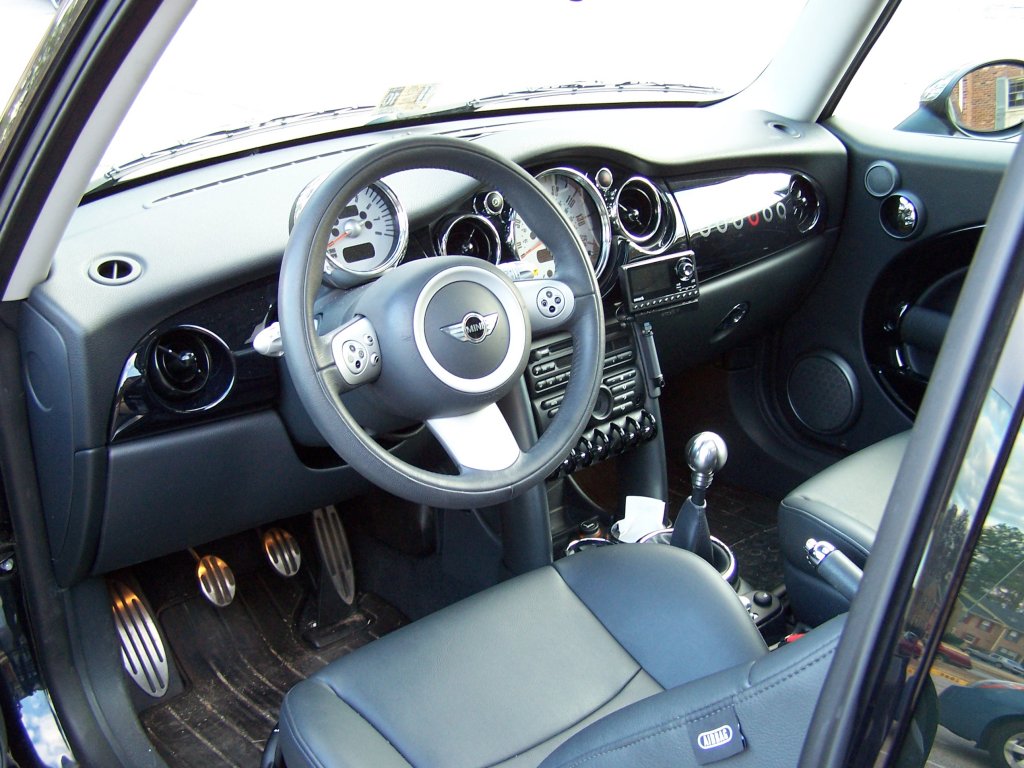
I ended up hard-mounting my satellite radio to my AUX jack. First, I removed the stock cup holder. I tucked the AUX wire above the stereo and cut a couple of small notches in the top of the right center console tube. The power wire comes up from the bottom and is tucked inside the tube. It is tied into the AUX socket, and I don't have power drop issues that some have mentioned previously.
I bought a long threaded bar from Lowe's and cut off about a 1 1/2" piece for the cup holder hole. The satellite radio mount is bolted to a cut piece of 20-gauge steel and is bent at a 90-degree angle. I used four nuts, two on top of the plate and two on the bottom w/the threaded bolt to hold them together. I wrapped the bolt with some thin plastic from a baggy at the base to help take up the slack (trying not to use glue). It's still a little loose in the socket.
I don't want to fiddle with an iPod while driving. My solution is to buy an updated factory CD changer that handles MP3s. At about 150 songs per disk, that's still pretty good.

I ended up hard-mounting my satellite radio to my AUX jack. First, I removed the stock cup holder. I tucked the AUX wire above the stereo and cut a couple of small notches in the top of the right center console tube. The power wire comes up from the bottom and is tucked inside the tube. It is tied into the AUX socket, and I don't have power drop issues that some have mentioned previously.
I bought a long threaded bar from Lowe's and cut off about a 1 1/2" piece for the cup holder hole. The satellite radio mount is bolted to a cut piece of 20-gauge steel and is bent at a 90-degree angle. I used four nuts, two on top of the plate and two on the bottom w/the threaded bolt to hold them together. I wrapped the bolt with some thin plastic from a baggy at the base to help take up the slack (trying not to use glue). It's still a little loose in the socket.
I don't want to fiddle with an iPod while driving. My solution is to buy an updated factory CD changer that handles MP3s. At about 150 songs per disk, that's still pretty good.
Last edited by JumpingJackFlash; Mar 15, 2010 at 01:50 PM. Reason: Updated mount info


I actually engraved the icon into the plastic. I just used an X-Acto knife. The light is already behind, Thank you Mini!

Neutral
Joined: Mar 2011
Posts: 1
Likes: 0
I'm in the process of doing exactly this, but I have one question.
Where exactly do those white spacers go? They pretty much flew out as you said when I dismantled everything, but now I can't figure out where to put them again.
Where exactly do those white spacers go? They pretty much flew out as you said when I dismantled everything, but now I can't figure out where to put them again.

3rd Gear
Joined: Jun 2010
Posts: 271
Likes: 0
From: Mass-North Quabbin
Beautiful!
and..
Dang! I wish I had seen this thread before I did mine last week. I ended up putting mine in the console.
I think I'll buy a new mirror switch and do it over with these instructions.
Thanks!
and..
Dang! I wish I had seen this thread before I did mine last week. I ended up putting mine in the console.
I think I'll buy a new mirror switch and do it over with these instructions.
Thanks!
Last edited by Mynewt; Sep 22, 2011 at 06:49 AM.
Trending Topics

2nd Gear
Joined: Sep 2011
Posts: 57
Likes: 1
Thanks for the post. I did took your advie and did the same thing. I built a cable for free using the instructions here https://www.northamericanmotoring.co...x-install.html.
One word of advice - when I carved my ipod into the black housing - i found that it was easier to use a "scaple" shaped blade rather then a traditional pointy exacto blade. I also would like the emphasize that you must use the same "white line" thickness as the rest of the images to get a true stock appearance. I did both and mine came out almost perfect
Thanks again!
One word of advice - when I carved my ipod into the black housing - i found that it was easier to use a "scaple" shaped blade rather then a traditional pointy exacto blade. I also would like the emphasize that you must use the same "white line" thickness as the rest of the images to get a true stock appearance. I did both and mine came out almost perfect
Thanks again!

Thread
Thread Starter
Forum
Replies
Last Post
igzekyativ
MINIs & Minis for Sale
34
Jul 16, 2020 12:54 PM
TunedGP
MINI Parts for Sale
1
Oct 1, 2015 04:18 PM
M7Speed
R50/R53 :: Hatch Talk (2002-2006)
0
Aug 14, 2015 01:42 PM