


Navigation & Audio Remove console with NAV


Thread Starter
|
3rd Gear
Joined: Mar 2009
Posts: 274
Likes: 0
From: Pennsyltuckey
Remove console with NAV
Can someone please point me in the direction of how to remove the center console bits around the stereo, radio and climate controls? I found an instructional on here for one without the NAV but I have a NAV in mine and can't seem to figure out how to get it all apart and can't figure out what in the world is holding it on.
Basically what I'm trying to do is get to the back of the AUX port; i ran a wire from the arm rest down through the center and want to soldier or attach it to the back of the port. Right now it just has another 3.5mm jack on it but I want it tidier (is that a word?) Any help anyone can give me would be fantastic; pictures would be even better!
Basically what I'm trying to do is get to the back of the AUX port; i ran a wire from the arm rest down through the center and want to soldier or attach it to the back of the port. Right now it just has another 3.5mm jack on it but I want it tidier (is that a word?) Any help anyone can give me would be fantastic; pictures would be even better!

OVERDRIVE
Joined: May 2005
Posts: 8,233
Likes: 127
From: San Francisco
Did you intend to post in the 2nd gen forum? Your signature shows an R56 (this is the 1st gen forum).
From the BMW-TIS manual, it looks like you just have to pry up the little panel that the jack is on. No need to disassemble the center console.
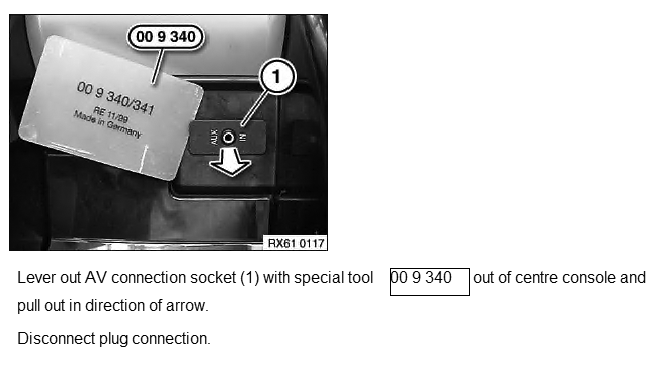
From the BMW-TIS manual, it looks like you just have to pry up the little panel that the jack is on. No need to disassemble the center console.
Thread Starter
|
3rd Gear
Joined: Mar 2009
Posts: 274
Likes: 0
From: Pennsyltuckey
Oh crap you're right, I did. Yes I meant this to go in the 2nd Gen forum.
Thanks for the help anyway, I'll give this a shot. If it's that simple I'm going to be kicking myself all night - had the dash completely ripped apart last night for this
Thanks for the help anyway, I'll give this a shot. If it's that simple I'm going to be kicking myself all night - had the dash completely ripped apart last night for this

4th Gear

Joined: Apr 2007
Posts: 313
Likes: 0
From: Mesa, AZ
Try this one: https://www.northamericanmotoring.com/forums/navigation-and-audio/105178-how-to-remove-the-oem-stereo.html
I have NAV and used it to remove everything.
Good luck
I have NAV and used it to remove everything.
Good luck
Thread Starter
|
3rd Gear
Joined: Mar 2009
Posts: 274
Likes: 0
From: Pennsyltuckey
Try this one: https://www.northamericanmotoring.com/forums/navigation-and-audio/105178-how-to-remove-the-oem-stereo.html
I have NAV and used it to remove everything.
Good luck
I have NAV and used it to remove everything.
Good luck
Thanks, yeah thats what I was following and I got the whole way to the point of where I needed to pop off the speedo and got stuck. Couldn't figure out how to get past that part.
OVERDRIVE
Joined: May 2005
Posts: 8,233
Likes: 127
From: San Francisco
Trending Topics

Thread
Thread Starter
Forum
Replies
Last Post
igzekyativ
MINIs & Minis for Sale
34
Jul 16, 2020 12:54 PM
kevinminict
F55/F56/F57 Stock Problems/Issues
7
Jun 3, 2016 01:31 PM
igzekyativ
MINIs & Minis for Sale
28
Dec 23, 2015 10:36 AM
xraycat
R56 :: Hatch Talk (2007+)
6
Aug 12, 2015 02:36 PM