


f56 Auto dimming of the dash / nav brightness


Thread Starter
|
4th Gear
Joined: Jul 2007
Posts: 591
Likes: 0
 f56 Auto dimming of the dash / nav brightness
I'm sure others have noticed there is a sensor on the speedo to the left that when in the direct sunlight your nav screen / center cluster ring light gets super bright and when the car goes in the shade it gets darker. It's very annoying especially when wearing sunglasses and driving on back roads going in and out of the sun. The nav screen goes dark then brightens up when I'm in full sun. I WISH there was a way to disable it. I've never seen any other make do this. We have a Lexus GS350 and the nav screen stays one brightness for day and when headlights are on it goes in night mode whish is how the MINI should be!
Last edited by kevinminict; Aug 24, 2015 at 12:25 PM.

2nd Gear
Joined: Nov 2009
Posts: 94
Likes: 0
From: Miami, Fl
I have a similar problem with that damn sensor. I have my windows tinted and when its a bit cloudy or overcast, the nav screen and the center ring are too dim. So I go and adjust the brightness up a bit but then at night its too bright so I adjust it again... This gets annoying really fast.
I wish that sensor was mounted on the dash, that way I don't have to worry about the tint messing with it. If someone figures out a way to either disable it or somehow adjust the amount of light that the sensor needs to start dimming things please let us know!
I wish that sensor was mounted on the dash, that way I don't have to worry about the tint messing with it. If someone figures out a way to either disable it or somehow adjust the amount of light that the sensor needs to start dimming things please let us know!

6th Gear
Joined: Jan 2011
Posts: 1,599
Likes: 42
From: Bothell, WA
I have a similar problem with that damn sensor. I have my windows tinted and when its a bit cloudy or overcast, the nav screen and the center ring are too dim. So I go and adjust the brightness up a bit but then at night its too bright so I adjust it again... This gets annoying really fast.
I wish that sensor was mounted on the dash, that way I don't have to worry about the tint messing with it. If someone figures out a way to either disable it or somehow adjust the amount of light that the sensor needs to start dimming things please let us know!
I wish that sensor was mounted on the dash, that way I don't have to worry about the tint messing with it. If someone figures out a way to either disable it or somehow adjust the amount of light that the sensor needs to start dimming things please let us know!
- I'll use the dimmer dial by the headlight controls, which dims the light ring, but also dims everything else.
OR
- What I ended up doing is assigning one of my favorites buttons (the 1-6) to turn off the screen and another to turn off the light ring.

I sometimes have this problem too. I have a couple ways I've dealt with it:
- I'll use the dimmer dial by the headlight controls, which dims the light ring, but also dims everything else.
OR
- What I ended up doing is assigning one of my favorites buttons (the 1-6) to turn off the screen and another to turn off the light ring.
- I'll use the dimmer dial by the headlight controls, which dims the light ring, but also dims everything else.
OR
- What I ended up doing is assigning one of my favorites buttons (the 1-6) to turn off the screen and another to turn off the light ring.

1st Gear
Joined: Sep 2015
Posts: 31
Likes: 2
Sorry to resurrect an old thread, but the black tape thing would do the opposite thing? If it always thought it was dark, it'd stay dim, right?
I'm asking b/c i'm dealing with the same issue and looking to get rid of auto dimming entirely. Even when I turn the auto lights off, like just to DRLs, the dash lights are still dark and faint...
I'm asking b/c i'm dealing with the same issue and looking to get rid of auto dimming entirely. Even when I turn the auto lights off, like just to DRLs, the dash lights are still dark and faint...


2nd Gear
Joined: Jan 2016
Posts: 56
Likes: 0
From: Cumming GA
I would have to get keys and start car to find exactly which setting it is but you can do the same. Under settings you can turn off the ability to dim under bright light. That being said, it will still dim (on occasion) but simply sliding the sunshade open and back again seems to wake up the eye to the 'off' setting.
It's on my list of minor annoying features that wouldn't make me take it back. More annoying than that are features like the 'MiNi' apps that are very selective re: which phones they work with or the speedo's that read faster speeds than actually going.
It's on my list of minor annoying features that wouldn't make me take it back. More annoying than that are features like the 'MiNi' apps that are very selective re: which phones they work with or the speedo's that read faster speeds than actually going.
I'm sure others have noticed there is a sensor on the speedo to the left that when in the direct sunlight your nav screen / center cluster ring light gets super bright and when the car goes in the shade it gets darker. It's very annoying especially when wearing sunglasses and driving on back roads going in and out of the sun. The nav screen goes dark then brightens up when I'm in full sun. I WISH there was a way to disable it. I've never seen any other make do this. We have a Lexus GS350 and the nav screen stays one brightness for day and when headlights are on it goes in night mode whish is how the MINI should be!
Trending Topics
1st Gear
Joined: Sep 2015
Posts: 31
Likes: 2
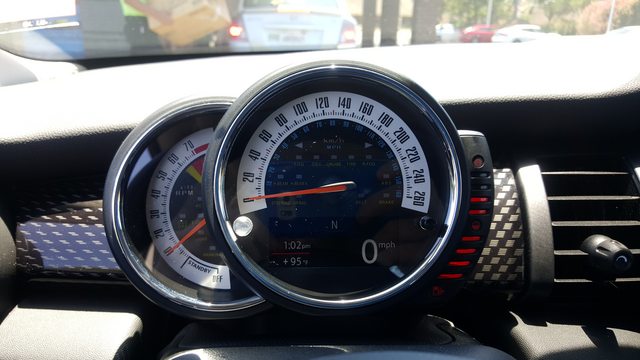
Ok, so check this out - I was trying to think of a way to get more light to the light sensor, and I realized I had some stick-on clear plastic rubber feet/cushion things. I got them at Wal Mart a while ago and wondered if they'd catch some light in the spot I need it to fool the sensor to give me brighter gauges in sun. Tell you what, it looks like it works! I included a pic of my gauges and the sheet of those little stick-on guys.
Something that may look a little classier or have a better finish to it may be those watch monocles that you see over the date. They're small and cheap online too, like $3. I'll see how this goes for a while and see if it holds up as is for now, but I'm pretty surprised at how well this works so far.
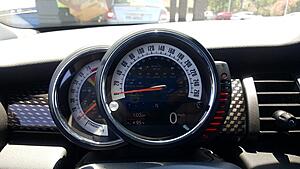
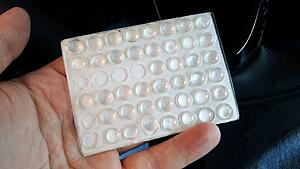
Something that may look a little classier or have a better finish to it may be those watch monocles that you see over the date. They're small and cheap online too, like $3. I'll see how this goes for a while and see if it holds up as is for now, but I'm pretty surprised at how well this works so far.


Thread
Thread Starter
Forum
Replies
Last Post
molala
MINIs & Minis for Sale
1
Oct 2, 2015 01:53 PM
