F55/F56 :: Hatch Talk (2014+) MINI Cooper and Cooper S (F55/F56) hatchback discussions.

F55/F56 Retrofit LCI2 blind ring cover on pre-LCI models

Thread Tools
 
Search this Thread
 
Old Sep 13, 2021 | 04:36 PM
  #1  
bgdrewsif's Avatar
bgdrewsif
Thread Starter
|
2nd Gear
Joined: Apr 2016
Posts: 146
Likes: 6
From: Upper Sandusky, Ohio, USA
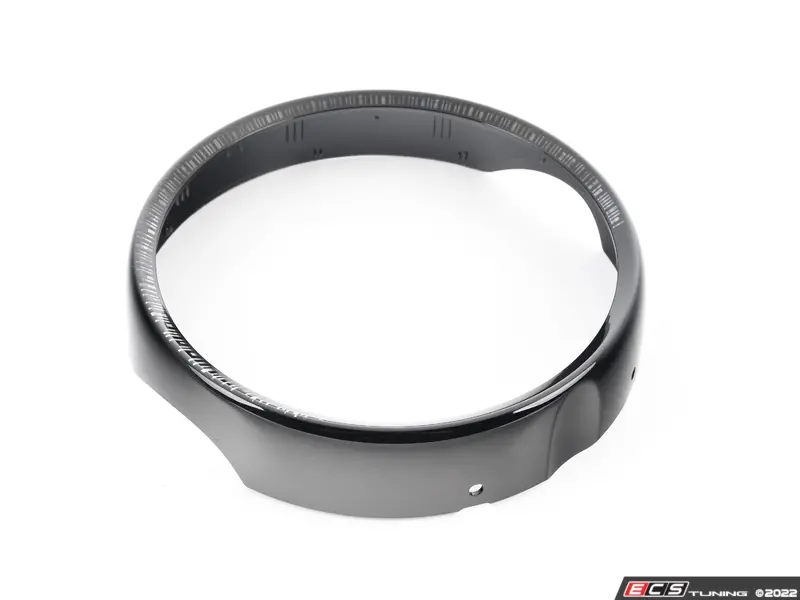
Retrofit LCI2 blind ring cover on pre-LCI models

I just wanted to confirm to anyone who may be curious that the new LCI2 'blind ring' that goes over the center instrument LED ring does indeed fit all pre-LCI 3rd gen MINIs. I just received and installed my new blind ring on my 2016 F56 and it is an exact fit, the physical part did not change molds, just a new paint job over the transparent window where the LED ring shows thru. The official BMW part number is 65509843968. I ordered mine through MiniPartsDirect which is really a MINI/BMW dealership in North Carolina. They had to order the part from Europe and it took about 2 months to get the part... I also ordered a passenger side flip-down side visor through ECS months ago which is now delayed until November due to all the supply chain problems... so ordering any OEM MINI parts that are not already in stock is very delayed regardless of the vendor these days... especially if the parts are coming from MINI/BMW in Europe. It is not the vendor's fault and patience is a virtue... (Just a fair warning in case some of you were unaware that the global supply chain is having some issues lately because... reasons. )

 
Reply
Old Sep 14, 2021 | 05:12 AM
  #2  
spyked's Avatar
spyked
3rd Gear
Joined: May 2016
Posts: 193
Likes: 10
From: DC Metro
Nice! Easy to install? That is one of the few updates I like from the 2022 models.
 
Reply
Old Sep 14, 2021 | 06:26 AM
  #3  
bgdrewsif's Avatar
bgdrewsif
Thread Starter
|
2nd Gear
Joined: Apr 2016
Posts: 146
Likes: 6
From: Upper Sandusky, Ohio, USA
Originally Posted by spyked
Nice! Easy to install? That is one of the few updates I like from the 2022 models.
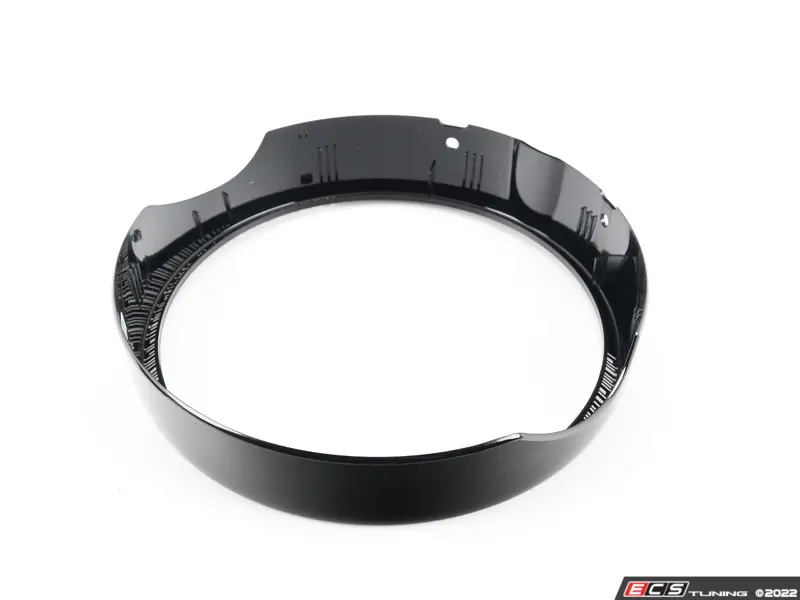
Same here... and yes, super easy to do. There are 2 plastic pins on the underside of the blind ring, just pull them out first. You may be able to pull them out with your fingers even, or use a non-marring trim pry tool if you can't get then with your fingers... they aren't in very tight. Then pull outwards from the bottom of the blind ring until the bottom snaps off and then pull upwards to remove the top of the piece... the top tends to be harder to pry loose and it snaps on and off a bit tighter then the bottom half but pull and it will come off... just hold the sides of the ring with both hands and pull and wiggle up and out... the first time I ever removed the blind ring I thought I was going to break it in half but it eventually popped off with some force and now I have removed and reinstalled it so many times I can get it on and off in about 30 seconds... Then install the new blind ring in the reverse order, just use the palm of your hand to snap it into place once you got everything lined up correctly...
 
Reply
Old Sep 14, 2021 | 06:27 AM
  #4  
bgdrewsif's Avatar
bgdrewsif
Thread Starter
|
2nd Gear
Joined: Apr 2016
Posts: 146
Likes: 6
From: Upper Sandusky, Ohio, USA
EDIT: deleted double post
 
Reply
Old Jan 31, 2023 | 07:53 AM
  #5  
ECSTuning's Avatar
ECSTuning
Platinum Sponsor
10 Year Member
Liked
Loved
Community Favorite
Joined: Jan 2013
Posts: 36,719
Likes: 2,537
From: Wadsworth, Ohio
Just an update, we have picture now of it in with the back side,yep its just a simple twist and pull out. After you take the two pins out on the bottom.

https://www.ecstuning.com/b-genuine-...d/65509843968/


__________________

MINI Guru/ MINI Owner Since 2004 | NEW Lifetime Part Replacement | Local Pickup
Milltek | Genuine MINI | Forge Motorsport | NM Engineering | ECS Performance | M7 Speed
Customer Service Hours: 8am-8pm EST|Sales Team Hours: 8am-11pm | SAT 10am-7pm 800.924.5172

Last edited by ECSTuning; Jan 31, 2023 at 08:08 AM.
Reply
Old Mar 1, 2023 | 08:24 AM
  #6  
Roman726's Avatar
Roman726
1st Gear
Joined: Dec 2021
Posts: 30
Likes: 10
From: Tennessee
Would this work with the smaller screen, I have the 6.5" screen.
 
Reply
Old Mar 1, 2023 | 11:50 AM
  #7  
ECSTuning's Avatar
ECSTuning
Platinum Sponsor
10 Year Member
Liked
Loved
Community Favorite
Joined: Jan 2013
Posts: 36,719
Likes: 2,537
From: Wadsworth, Ohio
Its just the outside, so i don't see why not. But we have not tested it with the smaller screen yet, let me know if you do. I dont have a smaller screen here to test.

 
__________________

MINI Guru/ MINI Owner Since 2004 | NEW Lifetime Part Replacement | Local Pickup
Milltek | Genuine MINI | Forge Motorsport | NM Engineering | ECS Performance | M7 Speed
Customer Service Hours: 8am-8pm EST|Sales Team Hours: 8am-11pm | SAT 10am-7pm 800.924.5172
Reply
Old Mar 1, 2023 | 04:08 PM
  #8  
RichsMINI's Avatar
RichsMINI
3rd Gear
5 Year Member
Liked
Loved
Community Favorite
Joined: Jul 2020
Posts: 266
Likes: 166
From: New York State
Originally Posted by Roman726
Would this work with the smaller screen, I have the 6.5" screen.
Hi Roman, I’m in the same boat too. I would love to upgrade to the LCI2 blind ring but the part is listed for the 8.8” display.

There are two different part numbers for the 6.5” and 8.8” blind rings prior to the LCI2 refresh. Here’s an example from the ECS Tuning site:


The 8.8” display is now standard on the LCI2.

Maybe someone who works at @ECSTuning could open and compare the LCI2 8.8” to the original 6.5” version

If it’s identical than count me in -Rich
 
Reply
Old Mar 2, 2023 | 05:46 AM
  #9  
ECSTuning's Avatar
ECSTuning
Platinum Sponsor
10 Year Member
Liked
Loved
Community Favorite
Joined: Jan 2013
Posts: 36,719
Likes: 2,537
From: Wadsworth, Ohio
I would be the only one to test and I don't have a smaller screen MINI F56+. I had a loaner F54 LCI2 with 8.8".

Just the cars we have here and no one here owns a newer F56+ MINI.

 
__________________

MINI Guru/ MINI Owner Since 2004 | NEW Lifetime Part Replacement | Local Pickup
Milltek | Genuine MINI | Forge Motorsport | NM Engineering | ECS Performance | M7 Speed
Customer Service Hours: 8am-8pm EST|Sales Team Hours: 8am-11pm | SAT 10am-7pm 800.924.5172
Reply
Old Mar 2, 2023 | 05:56 AM
  #10  
RichsMINI's Avatar
RichsMINI
3rd Gear
5 Year Member
Liked
Loved
Community Favorite
Joined: Jul 2020
Posts: 266
Likes: 166
From: New York State
Originally Posted by ECSTuning
I would be the only one to test and I don't have a smaller screen MINI F56+. I had a loaner F54 LCI2 with 8.8".

Just the cars we have here and no one here owns a newer F56+ MINI.
Got it
Just for clarification I meant to open both parts and physically compare them

They must be physically different and that’s why MINI has two different part numbers -Rich
 
Reply
Old Mar 2, 2023 | 07:26 AM
  #11  
ECSTuning's Avatar
ECSTuning
Platinum Sponsor
10 Year Member
Liked
Loved
Community Favorite
Joined: Jan 2013
Posts: 36,719
Likes: 2,537
From: Wadsworth, Ohio
Ok, we don't have them in stock yet here. When they do i can check them

 
__________________

MINI Guru/ MINI Owner Since 2004 | NEW Lifetime Part Replacement | Local Pickup
Milltek | Genuine MINI | Forge Motorsport | NM Engineering | ECS Performance | M7 Speed
Customer Service Hours: 8am-8pm EST|Sales Team Hours: 8am-11pm | SAT 10am-7pm 800.924.5172
Reply
Old Mar 5, 2023 | 11:47 AM
  #12  
justenx_1's Avatar
justenx_1
1st Gear
Joined: Feb 2023
Posts: 13
Likes: 2
Originally Posted by ECSTuning
Ok, we don't have them in stock yet here. When they do i can check them
Did you get a chance to check it?
I am in the same situation, want to order it for my mini but it has a 6.5 inch display.
 
Reply
Related Topics
Thread
Thread Starter
Forum
Replies
Last Post
ericyuhk
F55/F56 :: Hatch Talk (2014+)
5
Aug 8, 2017 06:40 AM
hammerhands
F55/F56 :: Hatch Talk (2014+)
5
Oct 30, 2014 06:55 AM
R99
F55/F56 :: Hatch Talk (2014+)
4
Oct 7, 2014 12:22 PM
MRM69
F55/F56 :: Hatch Talk (2014+)
9
Sep 15, 2014 10:39 AM
Bubbleboy1008
Electrical
1
Feb 16, 2011 06:10 AM


All times are GMT -7. The time now is 06:48 PM.