When you click on links to various merchants on this site and make a purchase, this can result in this site earning a commission. Affiliate programs and affiliations include, but are not limited to, the eBay Partner Network.
That seemed to work, no more blinky and it is working correctly.
Set my Air recycling switch and left the car for hours came back and the AC is still flashing. I only changed the recycling switch. I assume you changed the Remember AC setting too? Maybe it only works if you change both?
Set my Air recycling switch and left the car for hours came back and the AC is still flashing. I only changed the recycling switch. I assume you changed the Remember AC setting too? Maybe it only works if you change both?
I can not get this feature to work on my 2014 F56/S either. I've tried multiple times with no success. The auto door unlock all doors with engine off and turn signals in HUD are the 2 options I want but can't find a way to get them working.
I'm currently using PSDZ 56.1 and Esys 3.24.3
May have a workaround for this.
Just spent some time in the car with cable connected. I was about to recode the BDC section of the car's ECU. Shawn at Bimmer told me how. Was a bit nervous even though the MINI ECU coding is way out of date (well on my 2016 anyway...)
So was looking and noticed a switch in the BDC called VAM_TIME_DISABLE_UNLOCK. I noticed it was set to 04 and thought that's how long we are all pushing the black button on our drivers doors before anything happens...so I changed it to 01. Now when I stop the passenger door remained locked and I push the drivers door lock button and it locks! Sometimes it's 2 pushes but that still works for me!
The good thing about this is that you may not want all your doors to open when you stop. Hope this is of some help.
Finally got my new light switch panel this afternoon. Got it installed and now I have working rear fog lights. YAY! Drove around a bit in the rain to make sure I didn't throw any codes or have other issues, but they work. Will do a full write up soon.
Last edited by LordWinslow; Nov 12, 2015 at 12:25 PM.
Hi,
last week I retrofitted my r53 JCW with the Harman Kardon audio system, its working fine, but im wondering if anyone did recode the HU for HK? Thanks in advance
Finally got my new light switch panel this afternoon. Got it installed and now I have working rear fog lights. YAY! Drove around a bit in the rain to make sure I didn't throw any codes or have other issues, but they work. Will do a full write up soon.
Nice!
I think you're the first MINI owner I've seen that's successfully completed the retrofit. About how much did it run you back?
I think you're the first MINI owner I've seen that's successfully completed the retrofit. About how much did it run you back?
I got very lucky, first of all I place a Bid in Ebay for a kit placed in italy starting at u$90, so a bid for u$91 and forgot about it... next saturday I win the bid! So speakers and amplifier u$91 plus the shipping, then I bought the wire harness in ebay for u$100, and both sides doors panels but I ask the seller to send me only the HK twitter and speakers covers for u$70. So total u$161, plus shippings u$60 plus installation u$300... total u$520 aprox.
Last edited by Vitovillabilbao; Nov 13, 2015 at 05:28 AM.
I think you're the first MINI owner I've seen that's successfully completed the retrofit. About how much did it run you back?
Nothing for the old laptop and the E-Sys software, just time to get it working correctly. The new light switch for my car (Have the LED option) cost about $135 shipped and another $20 for the OBD II to RJ-45 cable for the laptop.
I am working on a write up with photos of some of the stuff I did. As far as additions or Mods for the car this one is very straight forward once you got the switch and the E-Sys software is working. I should have the write up early next week as I got a couple Mini events this weekend so I don't have a lot of time.
If I were to buy the new light switch module, and the LED foglight housings, would I be able to enable front and rear foglights via this software instead of taking it to the dealer?
If I were to buy the new light switch module, and the LED foglight housings, would I be able to enable front and rear foglights via this software instead of taking it to the dealer?
You could, beyond the Rear Fogs I don't know what codes you need to change to accept the LED front lights and LED Fogs. In sections 3062-3065 in the BDC Module there a several hundred options that can be changed for the lights. The other issue is the codes are in German so unless you understand German it can be hit or miss when you change something. So you may need to hit up the dealer to replace your headlights and fogs with LED ones.
I've got LED headlamps, but halogen fog lamps. So I'd like to purchase the new retrofit OEM DRL LED foglights from MINI.
So looking at:
-New Light Switch Module
-New Front Fog lights
-Updated coding
What else would I need for the retrofit?
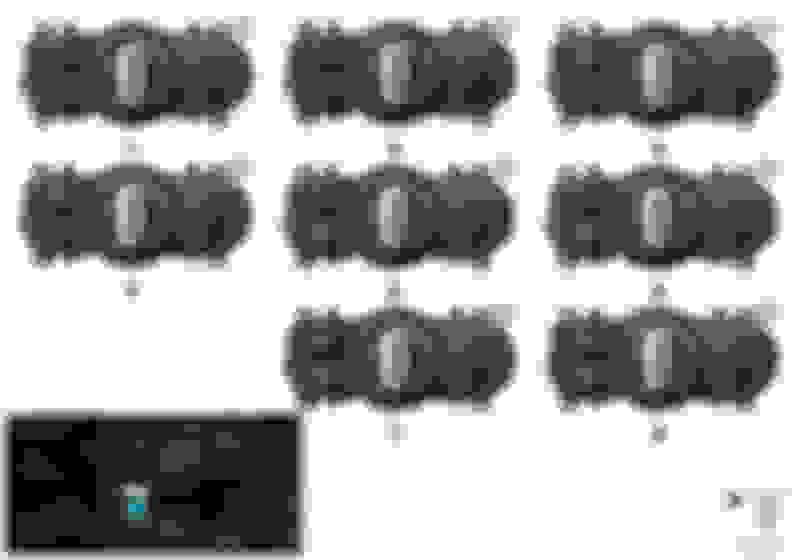
The coding will most likely be telling the car there are different non-bulb lights with LED control. Do a search, others who have swapped out bulbs for LEDs have had to change a few things to get them to work so the car doesn't report a bulb out (mostly don't check the light or turn the check voltage way down). The assembly for the fog light is a sealed unit like the headlights, you get the parking lights and fogs, both LED. If you have the LED headlights then you most likely have the modules you need to run them but just need the coding to change out the parking and fog lights. As for the switch you need to make sure you get the one that matches what you have with the right button.
I had number 4 and went to number 8 when I added the Rear Fog functionality.
The coding will most likely be telling the car there are different non-bulb lights with LED control. Do a search, others who have swapped out bulbs for LEDs have had to change a few things to get them to work so the car doesn't report a bulb out (mostly don't check the light or turn the check voltage way down). The assembly for the fog light is a sealed unit like the headlights, you get the parking lights and fogs, both LED. If you have the LED headlights then you most likely have the modules you need to run them but just need the coding to change out the parking and fog lights. As for the switch you need to make sure you get the one that matches what you have with the right button.
I had number 4 and went to number 8 when I added the Rear Fog functionality.
Sounds good, thank you! I'm looking at #7 so I can just do the rear fogs at the same time.
Hmmm now that I got the Rear Fogs done. I want to see if I can retro fit the sport paddles and upgrade the VO of the car with the sport automatic transmission. Figuring since the Auto Box is the same reguardless of model it is just software. Going to start looking into it.
Hey coding experts. I have to take my Mini in for service in the next week or so and they will performing a software update, from my understanding, I will lose all of my coded changes. Does anyone know of a way to export my current configuration and restore it after I get my car back?
I thought if anyone would know it would defiantly be someone in this thread.
I an certainly no expert....but when you code you are changing the programmed "switches" in the cars computer. When the software is updated the switches are set to whatever the factory decides. If they are different than what you what then you will have to change them. You could "flash" your old modified software but normally they update for a reason. My new JCW has software that is miles older than the latest version...
The only way for you to do what you want would be to have e-sys some how blanket remember your choices and for it to automatically flash these. Doubt this is possible and really how long does it really take to change 20 switches...
Hey coding experts. I have to take my Mini in for service in the next week or so and they will performing a software update, from my understanding, I will lose all of my coded changes. Does anyone know of a way to export my current configuration and restore it after I get my car back?
I thought if anyone would know it would defiantly be someone in this thread.
Thanks!
Safer thing to do would be to re-code your settings.
I have all the instructions and the software. I would only update specific sections rather than the whole thing. You can backup beefier you maker changes - guys on the BMW forum do it all the time.
Found the instructions on BMWesys - realized I would need to invest in a good power supply...May not be worth it.
I'm basically trying to update my software so I can see if I can code in the JCW sport displays in my HUD. I haven't been able to, but my suspicion is that my software is too old as another Cooper S owner was able to with more recent software.
I thought I saw somewhere that you can change the animation and gong to bmw i3. If so, please post the coding parameters. I've been searching but can't seem to find it.
I thought I saw somewhere that you can change the animation and gong to bmw i3. If so, please post the coding parameters. I've been searching but can't seem to find it.
Display: HU_NBT -> 3001 -> STARTUP_EMBLEM
I am going on memory here, but I believe the default setting is VARIANT 4 which is MINI. I think you want VARIANT 3 for BMW i. I could be wrong on the VARIANTS so you may need to play around... I recall they go from 0-9
Sounds: HU_NBT -> 3002 -> SOUND_SIGNAL_SET
Change the default value, again, going off memory, you may need to play around, to 0_BMW