


Drivetrain Dash Command data log graphs


First attempt
Ok so here is my first attempt at creating a graph from a Data Log. Just wanted to throw this up hoping some of you more experienced folks can give me tips on how to highlight RPM, and gears, etc...
BTW, this was just a hasty pull heading up the on ramp. I captured it at Top Speed just to get a basic snapshot. Will do a Solid 4th Gear Pull tomorrow night.
Also, this run was without my JB+ Tune installed. I removed it yesterday due to some boost cut issues. Drove it for the prescribed miles w/no tune. All looks good according to this graph. I set the HP and Torque to "At the Wheels", but this would be hard to believe, LOL...
Let me know what improvements or values I should be tracking.
Thanks.
BTW, this was just a hasty pull heading up the on ramp. I captured it at Top Speed just to get a basic snapshot. Will do a Solid 4th Gear Pull tomorrow night.
Also, this run was without my JB+ Tune installed. I removed it yesterday due to some boost cut issues. Drove it for the prescribed miles w/no tune. All looks good according to this graph. I set the HP and Torque to "At the Wheels", but this would be hard to believe, LOL...
Let me know what improvements or values I should be tracking.
Thanks.

3rd Gear
Joined: Nov 2012
Posts: 188
Likes: 1
From: Vancouver Island BC
anyone know how accurate dash command is. I just installed a JB+ on my GP2 and logged a quick rip in my car.

picture sharing
picture sharing

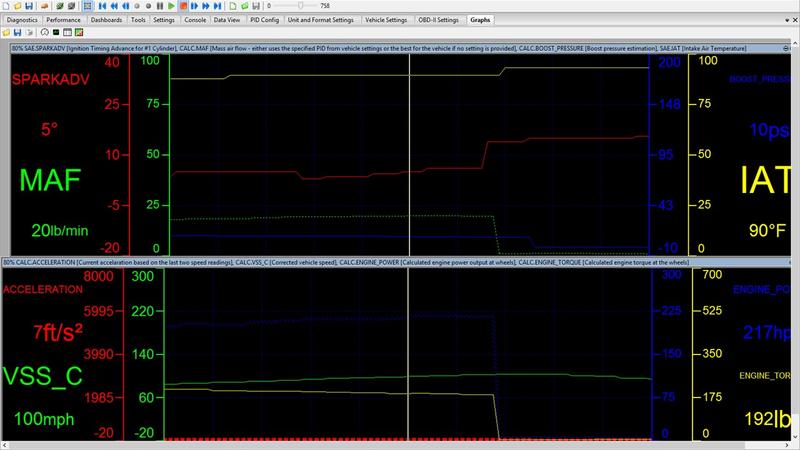
Ok so here is my first attempt at creating a graph from a Data Log. Just wanted to throw this up hoping some of you more experienced folks can give me tips on how to highlight RPM, and gears, etc...
Attachment 94681
BTW, this was just a hasty pull heading up the on ramp. I captured it at Top Speed just to get a basic snapshot. Will do a Solid 4th Gear Pull tomorrow night.
Also, this run was without my JB+ Tune installed. I removed it yesterday due to some boost cut issues. Drove it for the prescribed miles w/no tune. All looks good according to this graph. I set the HP and Torque to "At the Wheels", but this would be hard to believe, LOL...
Let me know what improvements or values I should be tracking.
Thanks.
Attachment 94681
BTW, this was just a hasty pull heading up the on ramp. I captured it at Top Speed just to get a basic snapshot. Will do a Solid 4th Gear Pull tomorrow night.
Also, this run was without my JB+ Tune installed. I removed it yesterday due to some boost cut issues. Drove it for the prescribed miles w/no tune. All looks good according to this graph. I set the HP and Torque to "At the Wheels", but this would be hard to believe, LOL...
Let me know what improvements or values I should be tracking.
Thanks.
All the measured PID's should be accurate enough - it's what the car's sensors are putting out. Some of the calculated items such as hp and torque depend on various constants which might make them rather suspect.
I read your past post and saw your graphs with the Licensed version of Scan XL. I like the way you set that up. I am definitely getting that when I install my W/M Kit. Just need to practice with the free version for now.
Also did you install you Aquamist kit yourself? Looking at possibly having Euro Motors in Raleigh install my SP Kit...
Laters.

4th Gear
Joined: Dec 2013
Posts: 507
Likes: 4
From: Vegas
well I'm playing with my scanXL via Laptop .....
I'm getting all the gauges to slowly work but I can't click on them to modify them or make custom gausges.
I travel for work so right now I'm logging the rental car....lolol
Cerenkov - - I sent you a PM since you seam to be one of the few who logs to a laptop top. The baud rate seams to help with getting good graphs .
I put my Aquamist4 on but have not had a chance to test and try it out...
I'm getting all the gauges to slowly work but I can't click on them to modify them or make custom gausges.
I travel for work so right now I'm logging the rental car....lolol
Cerenkov - - I sent you a PM since you seam to be one of the few who logs to a laptop top. The baud rate seams to help with getting good graphs .
I put my Aquamist4 on but have not had a chance to test and try it out...
In ScanXL, I exclusively use the graphing function, I find it the most useful. So I can't answer questions on gauges (DashXL). You may have to use the DashXL Skin Editor to customize gauges. But here is a summary on my setup for graphing:
On the SETTINGS TAB
1.) Enter "Owner info"
2.) Enter the "Vehicle Info"
3.) Enter the "Vehicle Settings" - Note: my drive ratios are for an automatic, the manuals are not the same.

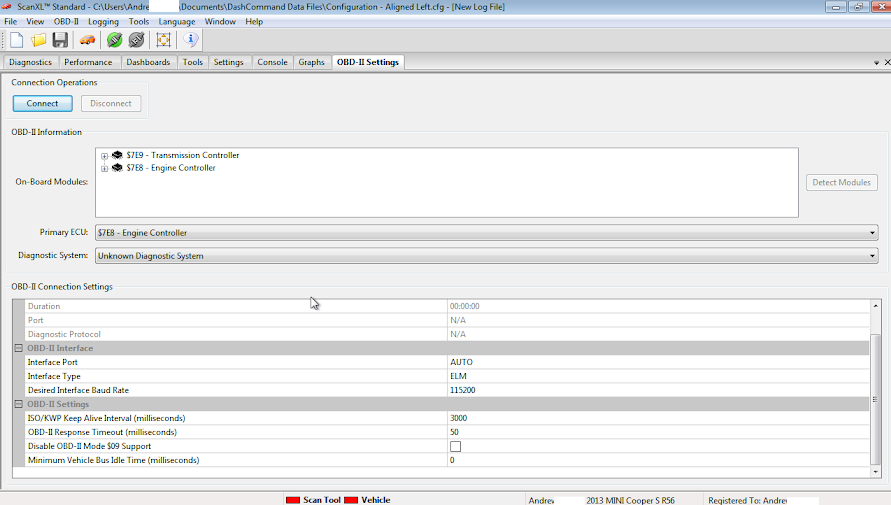
4.) Enter the ODB-II Settings
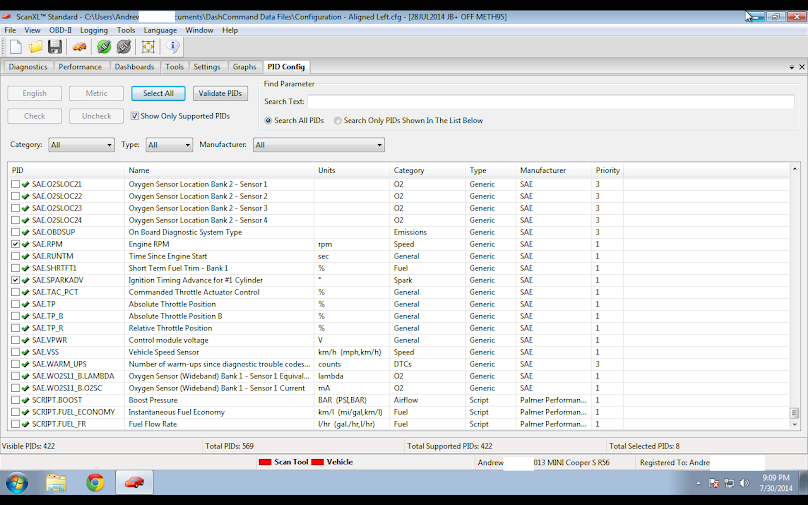
5.) Select the PIDs you will be monitoring, you may find yourself selecting and de-selecting PIDs regularly. I find that selecting only the PIDs that I'm interested in helps increase the scan rate. The software has a system of PID priorities. There are 3 priorities of PIDs, where priority 1 is monitored every frame, priority 2 is monitored every 10 priority 1 frames, and priority 3 is monitored every 5 priority 2 frames (or 50 Priority 1 frames). For example priority 3 is a good setting for Ambient Temp (SAE.AAT) but for Spark Advance (SAE.SPARKADV) you would probably want priority 1.
GRAPHS
This is the only thing that I typically use. Sometimes I'll quickly check "Data View" under the DIAGNOSTICS tab to verify what PIDs I'm actively scanning.
1.) Right Click on the Graph to access the settings. You can have up to 8 PIDs on each graph. Most of the time I'm not scanning that many PIDs and uncheck the ones that I do want so that there is less clutter on the graph. This only changes what is graphed. To change what is being scanned this must be done in the PID Config tab.

This is my template for graphing and I modify it as needed. As you can see I'm only graphing 6 PIDs:
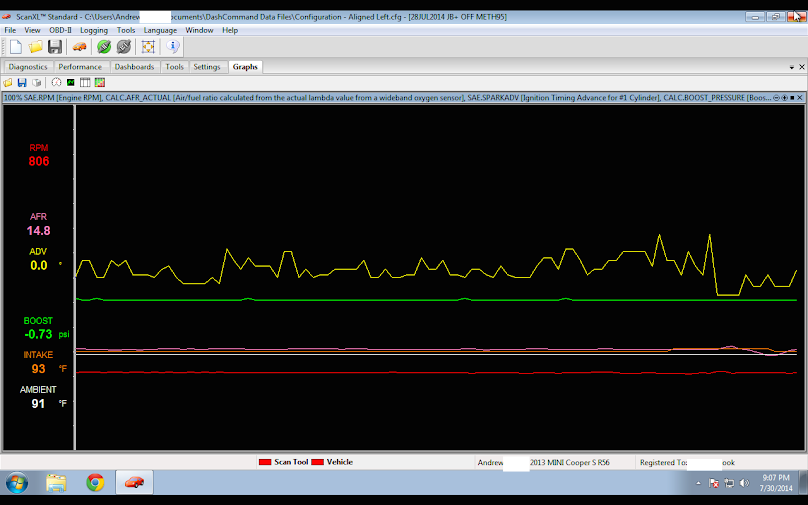
Here's a link to my configuration file on my Google Drive. Feel free use it as a starting template. Download it and edit it however you want.
https://drive.google.com/file/d/0B9g...it?usp=sharing
Configuration file also saves others settings such as which PIDs are selected where as a layout file only saves the the formatting of the graph.
On the SETTINGS TAB
1.) Enter "Owner info"
2.) Enter the "Vehicle Info"
3.) Enter the "Vehicle Settings" - Note: my drive ratios are for an automatic, the manuals are not the same.
4.) Enter the ODB-II Settings
5.) Select the PIDs you will be monitoring, you may find yourself selecting and de-selecting PIDs regularly. I find that selecting only the PIDs that I'm interested in helps increase the scan rate. The software has a system of PID priorities. There are 3 priorities of PIDs, where priority 1 is monitored every frame, priority 2 is monitored every 10 priority 1 frames, and priority 3 is monitored every 5 priority 2 frames (or 50 Priority 1 frames). For example priority 3 is a good setting for Ambient Temp (SAE.AAT) but for Spark Advance (SAE.SPARKADV) you would probably want priority 1.
GRAPHS
This is the only thing that I typically use. Sometimes I'll quickly check "Data View" under the DIAGNOSTICS tab to verify what PIDs I'm actively scanning.
1.) Right Click on the Graph to access the settings. You can have up to 8 PIDs on each graph. Most of the time I'm not scanning that many PIDs and uncheck the ones that I do want so that there is less clutter on the graph. This only changes what is graphed. To change what is being scanned this must be done in the PID Config tab.
This is my template for graphing and I modify it as needed. As you can see I'm only graphing 6 PIDs:
Here's a link to my configuration file on my Google Drive. Feel free use it as a starting template. Download it and edit it however you want.
https://drive.google.com/file/d/0B9g...it?usp=sharing
Configuration file also saves others settings such as which PIDs are selected where as a layout file only saves the the formatting of the graph.
Last edited by cerenkov; Jul 30, 2014 at 06:57 PM.

For connecting to the laptop I find that the fastest is WIFI (for quality dongles) then USB then Bluetooth. I used to have a generic WIFI dongle from www.newegg.com but I'm currently using OBDLink WIFI (discontinued) from www.scantool.net and find that it is faster. I'm using a splitter in the ODB port, one for the P3Car gauge and the other to the ODBLink mounted in the glove box.

OBDLink MX WIFI should be released in August and I may upgrade to that if it is reported as faster.
OBDLink MX WIFI should be released in August and I may upgrade to that if it is reported as faster.

I haven't had any issues. I do notice that the scan rate in scanXL will be slightly slower if I'm using the Y splitter, but both devices work.
4th Gear
Joined: Dec 2013
Posts: 507
Likes: 4
From: Vegas
cerenkov- man thanks for stepping up and helping out. The pics are nice.
I have been trying to change gauges units etc and have no luck by clicking on them like everyone claims. I think that works if you have the iPhone etc....
I'm with you on using the graphs.... I played a little bit this morning and got to change some stuff around on the graph. I'm trying to learn the X , Y Axis to get every thing over to one side like yours. I like how you set it up , nice and clean.
I was seeing everyone write out the gear ratios in lines and keep thinking I had a different Vehicle Settings page until I saw yours. I see you separated each gear ratio with a comma .
I'm getting there....lol
Seams like scanXL would have a flow chart to aid with setting this up. Its a little over whelming at first cause everyone wants plug and play, but if you stick with it and learn a little each day it does seam to start coming around and making sense..
Thanks again cerenkov for the info.... feel free to share more...LOLOLOLOL
A little bit of info I found to help i think....
The SAE.XXX PIDs are directly from the vehicle. These are accurate, as long as your vehicle is reporting valid information.
The SCRIPT.XXX PIDs are custom PID scripts, which can be edited (or created) using the Script Editor, found in the Tools menu (or Tools tab). These can be created by other users also, and might not always be accurate (the ones that come with ScanXL should be fine). You can create a custom PID script to calculate just about anything you want.
The CALC.XXX PIDs are new with the latest release of ScanXL, and calculate just about everything from MPG, to which gear it thinks your in. These are probably the best to use, since you can also customize them to your car using the Vehicle Settings under the Settings tab. I would recommend using these if one is available for the information you need.
I have been trying to change gauges units etc and have no luck by clicking on them like everyone claims. I think that works if you have the iPhone etc....
I'm with you on using the graphs.... I played a little bit this morning and got to change some stuff around on the graph. I'm trying to learn the X , Y Axis to get every thing over to one side like yours. I like how you set it up , nice and clean.
I was seeing everyone write out the gear ratios in lines and keep thinking I had a different Vehicle Settings page until I saw yours. I see you separated each gear ratio with a comma .
I'm getting there....lol
Seams like scanXL would have a flow chart to aid with setting this up. Its a little over whelming at first cause everyone wants plug and play, but if you stick with it and learn a little each day it does seam to start coming around and making sense..
Thanks again cerenkov for the info.... feel free to share more...LOLOLOLOL
A little bit of info I found to help i think....
The SAE.XXX PIDs are directly from the vehicle. These are accurate, as long as your vehicle is reporting valid information.
The SCRIPT.XXX PIDs are custom PID scripts, which can be edited (or created) using the Script Editor, found in the Tools menu (or Tools tab). These can be created by other users also, and might not always be accurate (the ones that come with ScanXL should be fine). You can create a custom PID script to calculate just about anything you want.
The CALC.XXX PIDs are new with the latest release of ScanXL, and calculate just about everything from MPG, to which gear it thinks your in. These are probably the best to use, since you can also customize them to your car using the Vehicle Settings under the Settings tab. I would recommend using these if one is available for the information you need.
Have you selected the PIDs in the PID Config Tab?

Is there anyone in the SF Bay Area who has Scan XL or has done data logging?
Interested in having it done as it seems a little tricky and I wouldn't mind compensating someone for their experience before I delve in.
Interested in having it done as it seems a little tricky and I wouldn't mind compensating someone for their experience before I delve in.
Scantool.net sells package deals.
4th Gear
Joined: Dec 2013
Posts: 507
Likes: 4
From: Vegas
cerenkov - I see the AFR has "none" after the description on the select list , I tried them anyway's...lol I have tried CONST.LAMBDA_ACTUAL_PID and CALC.LAMBDA_ACTUAL as well
The boost I have tried CALC.BOOST_PRESSURE and didn't work.. My short trim fuel is working but not my long term SAE.LONGFT1 .... also my TP never goes pass 76% and my scaling is 0-100%
Those are a few , I played around with gear indication- CALC.GEAR.CURRENT and didn't get any change as well. I do have my gear ratio's in the settings.
Any help or ideas ???
Indimanic , if you just buy the cable for OBD2 to USB and connect to your laptop and give me remote access to your laptop I can help you set it up. As you can see I'm no pro at this..... yet , but I'm trying Once you see how things are done you can take it from there and run with it.....
The boost I have tried CALC.BOOST_PRESSURE and didn't work.. My short trim fuel is working but not my long term SAE.LONGFT1 .... also my TP never goes pass 76% and my scaling is 0-100%
Those are a few , I played around with gear indication- CALC.GEAR.CURRENT and didn't get any change as well. I do have my gear ratio's in the settings.
Any help or ideas ???
Indimanic , if you just buy the cable for OBD2 to USB and connect to your laptop and give me remote access to your laptop I can help you set it up. As you can see I'm no pro at this..... yet , but I'm trying Once you see how things are done you can take it from there and run with it.....
cerenkov - I see the AFR has "none" after the description on the select list , I tried them anyway's...lol I have tried CONST.LAMBDA_ACTUAL_PID and CALC.LAMBDA_ACTUAL as well
The boost I have tried CALC.BOOST_PRESSURE and didn't work.. My short trim fuel is working but not my long term SAE.LONGFT1 .... also my TP never goes pass 76% and my scaling is 0-100%
Those are a few , I played around with gear indication- CALC.GEAR.CURRENT and didn't get any change as well. I do have my gear ratio's in the settings.
Any help or ideas ???
The boost I have tried CALC.BOOST_PRESSURE and didn't work.. My short trim fuel is working but not my long term SAE.LONGFT1 .... also my TP never goes pass 76% and my scaling is 0-100%
Those are a few , I played around with gear indication- CALC.GEAR.CURRENT and didn't get any change as well. I do have my gear ratio's in the settings.
Any help or ideas ???
Throttle will never get to 100%, mine tops out around 86% or so, I forget the actual number. IIRC the N18s use variable valve lift for throttle control (not sure if the N14s do too). I just like to monitor TP sometimes so that I know when I lift off the throttle.
Both my fuel trims work. SAE.SHRTFT1 and SAE.LONGFT1
For boost, do SAE.MAP and SAE.BARO work? SAE.MAP minus SAE.BARO is CALC.BOOST_PRESSURE.
You have to be moving for the gear calculation to work. It is just using standard math to figure out what gear your in. Did you supply tire dimensional information?
Anything with "CONST" is just a constant used for calculations. Don't monitor these.
What OBD2 dongle are you using?
4th Gear
Joined: Dec 2013
Posts: 507
Likes: 4
From: Vegas
I don't know if its the year of my car or my scanXL but in my PID is has none in parentheses at the end of CALC.AFR_ACTUAL.....?????
I wonder what is up with my long term and boost cause I have tried those. Do you think maybe I got a bad download or something I need to contact Palmer ??
I wonder what is up with my long term and boost cause I have tried those. Do you think maybe I got a bad download or something I need to contact Palmer ??
I don't know if its the year of my car or my scanXL but in my PID is has none in parentheses at the end of CALC.AFR_ACTUAL.....????? I wonder what is up with my long term and boost cause I have tried those. Do you think maybe I got a bad download or something I need to contact Palmer ??