


R60 Is there a way to disable HD Radio?


Thread Starter
|
1st Gear
Joined: Apr 2011
Posts: 47
Likes: 0
From: New Jersey
Is there a way to disable HD Radio?
Unfortunately I live kind of out in the boonies. Because of this my HD Radio signal is not very strong. So as I am driving the radio switches back and forth between regular radio and HD Radio. Now I would not mind if I did not notice when It did, but every time it switches It I hear a significant difference. It switches often so it has become very annoying at this point. I looked through the radio setting and did not see a way to disable the HD Radio, but that does not mean I didnt miss it.
Is there a way to disable it?
Thanks,
Eric
Is there a way to disable it?
Thanks,
Eric

1st Gear
Joined: Apr 2011
Posts: 18
Likes: 0
Yes, you can turn it off in the radio settings. I think it's under the "SET" selection. It's also detailed in the manual.
I had the same problem. I was surprised at how different it sounded between HD and not HD for an AM station. Also, couldn't believe that the radio would just keep switching back and forth without automatically turning it off.
I had the same problem. I was surprised at how different it sounded between HD and not HD for an AM station. Also, couldn't believe that the radio would just keep switching back and forth without automatically turning it off.


6th Gear
Joined: Jan 2011
Posts: 1,461
Likes: 2
From: Cottage City, MD
I'm really confused.  When listening to HD, if I loose the signal it goes to nothing. There's no switching to non-HD. Maybe it has to do with HD stations here being totally different from non? ie WMZQ is commercial country pap, WMZQ HD is classic and edgier country. I'll also note that it seems that HD is not quite ready for prime time. Here in DC I loose it alot.
When listening to HD, if I loose the signal it goes to nothing. There's no switching to non-HD. Maybe it has to do with HD stations here being totally different from non? ie WMZQ is commercial country pap, WMZQ HD is classic and edgier country. I'll also note that it seems that HD is not quite ready for prime time. Here in DC I loose it alot.


5th Gear
Joined: Mar 2011
Posts: 1,033
Likes: 1
From: SF Bay Area
https://www.northamericanmotoring.co...r-antenna.html


2nd Gear
Joined: Mar 2011
Posts: 55
Likes: 0
At least that's how it is for the connected interface.
What will drive you nuts though is that this same screen exists for Sirius channels too, but you can't stay on it when switching between sources.
Trending Topics

2nd Gear
Joined: Feb 2011
Posts: 75
Likes: 0
After bringing Archie home cross country I was able to observe the HD stations in many dimensions. Now, this is totally anectdotal, so feel free to call BS whenever, but I only noticed the auto switching to nonHD channels on those designated as HD1. Channels that were 2 or 3 or beyond would just go silent when not strong enough signal. The same holds true here at home where I have only 1 hd (broadcasting 3 channels...1 switches, 2,3 go silent). Hope this helps.
6th Gear
Joined: Jan 2011
Posts: 1,461
Likes: 2
From: Cottage City, MD


4th Gear
Joined: Feb 2010
Posts: 302
Likes: 0
From: HSV, AL
There isn't necessarily a 1 2 and 3. Those are basically sub channels of a main frequency because digital(HD) takes up much less frequency space so you can have multiple channels near the same frequency but people don't have to use them. Most of the time I've seen radios broadcasting their HD stream on the same frequency as their old standard stream which is why you will see it bounce back to normal when you lose the HD signal. If a station broadcasts an HD stream on a seperate frequency than their normal stream then there won't be anything to fall back on when the HD signal drops out.

2nd Gear
Joined: Nov 2010
Posts: 57
Likes: 0
But how do you switch between a single station's separate HD broadcasts? For example, her in Philly 94.1 FM advertises that they also broadcast different music on HD2, traffic and weather (i think) on HD3, and Phillies info on HD4. I believe that these all come under 94.1 FM, but I can't figure out how to tune between these. Or is the countryman radio unable to do that?
2nd Gear
Joined: Feb 2011
Posts: 75
Likes: 0
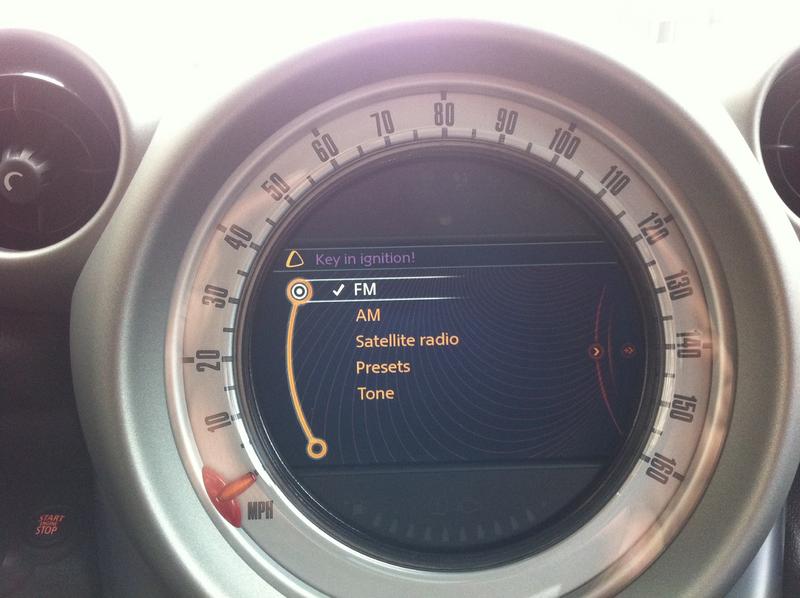
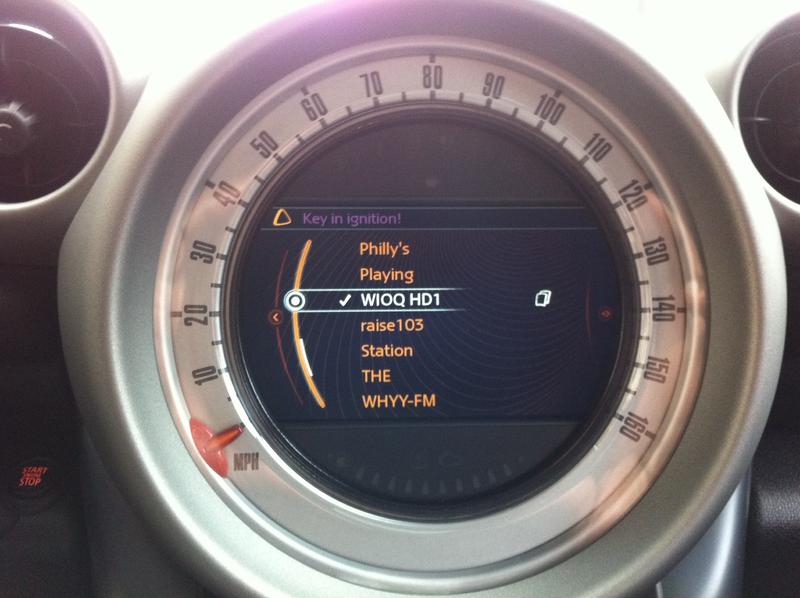
(note, I have connected so if you don't your mileage may vary): while in the FM radio section, navigate to your desired HD station that you believe broadcasts on multiple channels. Toggle right on the joystick and screen SHOULD slide to reveal 1,2,3 etc. From here you can add them to your presets that will constantly show as <StationID>HD1 or whichever you choose. Hope this helps.
3rd Gear
Joined: Aug 2008
Posts: 179
Likes: 4
From: Philadelphia,Pa
I to have Connected hope the visual aid helps.
Click Horse Nipple

Click Horse Nipple

Click Horse Nipple
The ony exception I found was when you enter it thru your presets, you have to click on it twice untill you get the two pieces of paper on the side.
Click Horse Nipple
Click Horse Nipple
Click Horse Nipple
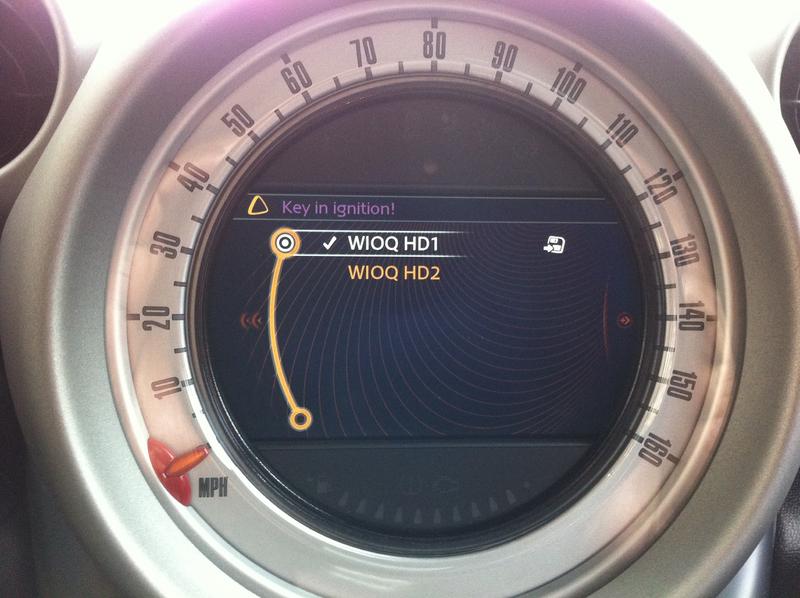
The ony exception I found was when you enter it thru your presets, you have to click on it twice untill you get the two pieces of paper on the side.


2nd Gear
Joined: Jun 2011
Posts: 106
Likes: 9
Page 105 in your instruction manual.
When on the tuner, press "set", uncheck the "HD" box. You radio will now display "(HD)" next to the station instead of "HD". "(HD)" is a station transmitting an HD signal, however digital radio reception is switched off.
When on the tuner, press "set", uncheck the "HD" box. You radio will now display "(HD)" next to the station instead of "HD". "(HD)" is a station transmitting an HD signal, however digital radio reception is switched off.

Thread
Thread Starter
Forum
Replies
Last Post