


Brake pad wear sensor light issue (Search was used, need advice)


Thread Starter
|
1st Gear
Joined: Jul 2006
Posts: 13
Likes: 0
From: Eden Prairie, MN
Brake pad wear sensor light issue (Search was used, need advice)
So to start off I have been researching all night on the internet and this forum with nothing working so please assist if you have any advice.
I am in the process of trading my mini in and i had my brake pad wear sensor light on. The dealership wanted to know what it was and i told them it was the wear sensor but the brakes are all brand new (I forgot to replace the sensor when i did the brake job, but had the new sensors in the garage). They stated it was state law that they were hooked up and working properly so i said i would install them and it would be fine.
After installing a new rear sensor (which was the one that got tripped) I could not get the light to go off, so i replace the front as well. Still the light would not go out.
I tried the turn key 2 clicks and wait 30 seconds (actually waited minutes with no luck)
I tried the trick of pushing the tire pressure sensor button to reset it and that did not work
I disconnected the battery for a good 5 minutes with no luck
I also found a thread on resetting the ecu or gauge cluster via the trip button and followed that procedure as well.
If anyone can think of something i missed or recommend something new i would really appreciate it. I do not want to incur another large bill from the ealer ship to fix this issue. Please help!
I am in the process of trading my mini in and i had my brake pad wear sensor light on. The dealership wanted to know what it was and i told them it was the wear sensor but the brakes are all brand new (I forgot to replace the sensor when i did the brake job, but had the new sensors in the garage). They stated it was state law that they were hooked up and working properly so i said i would install them and it would be fine.
After installing a new rear sensor (which was the one that got tripped) I could not get the light to go off, so i replace the front as well. Still the light would not go out.
I tried the turn key 2 clicks and wait 30 seconds (actually waited minutes with no luck)
I tried the trick of pushing the tire pressure sensor button to reset it and that did not work
I disconnected the battery for a good 5 minutes with no luck
I also found a thread on resetting the ecu or gauge cluster via the trip button and followed that procedure as well.
If anyone can think of something i missed or recommend something new i would really appreciate it. I do not want to incur another large bill from the ealer ship to fix this issue. Please help!


6th Gear
Joined: May 2004
Posts: 2,486
Likes: 7
From: Orcutt, CA
Sounds like you tried the normal things to reset the light.
Are you sure there still isn't an open circuit in one of the two sensor wires somewhere? Things to check:
Check the wires for any damage, all it takes is a little nick in the wire to open the circuit and cause the light to come on.
Check the connection of the sensor wire to the vehicle wiring harness, make sure it is correctly connected.
Check the sensor to make sure it is not already broken. If you have a test meter or test light disconnect the sensor wire from the harness and verify that there is continuity through the wire and sensor. The sensor can stay in the pad for this test.
With the sensor wire disconnected, short out the two leads at the vehicle wiring harness (connect the two wires together to close the circuit). If the light goes out it is the sensor that is still bad.
Are you sure there still isn't an open circuit in one of the two sensor wires somewhere? Things to check:
Check the wires for any damage, all it takes is a little nick in the wire to open the circuit and cause the light to come on.
Check the connection of the sensor wire to the vehicle wiring harness, make sure it is correctly connected.
Check the sensor to make sure it is not already broken. If you have a test meter or test light disconnect the sensor wire from the harness and verify that there is continuity through the wire and sensor. The sensor can stay in the pad for this test.
With the sensor wire disconnected, short out the two leads at the vehicle wiring harness (connect the two wires together to close the circuit). If the light goes out it is the sensor that is still bad.


Lots of BAD ADVISE HERE...PLEASE KNOW HOW SOMETHING WORKS BEFORE OFFERING ADVISE!!
On a GEN1 MINI, once the brake sensor is tripped, the sensor...one on the front, and one on the back, must be replaced to get rid of the warning.
The "sensor is just a hunk of wire...when the pad wears down and the wire makes contact with the rotor, the circurit is broken, and the light goes on.
One simple way to fix it...just find the wire for the sensor (the replaceable part) and cut it...then twist the ends together...The light will be out shortly. This was once the ONLY way to get rid of the light, since many pads for a long time did not have the cutout for the sensor.
State law...LOL...NO STATE LAW REQUIRES BREAK WEAR SENSORS!!
Just a sales man talking out is butt.
http://www.waymotorworks.com/brake-pad-sensor.html

The "sensor is just a hunk of wire...when the pad wears down and the wire makes contact with the rotor, the circurit is broken, and the light goes on.
One simple way to fix it...just find the wire for the sensor (the replaceable part) and cut it...then twist the ends together...The light will be out shortly. This was once the ONLY way to get rid of the light, since many pads for a long time did not have the cutout for the sensor.
State law...LOL...NO STATE LAW REQUIRES BREAK WEAR SENSORS!!
Just a sales man talking out is butt.
http://www.waymotorworks.com/brake-pad-sensor.html
Anytime you replace your R50 R52 R53 MINI Cooper or MINI Cooper S brake pads, you need to replace the sensor that turned the light on in the dash. These sensors you'll find in the left front and right rear inner brake pads. As they contact the rotor they break and cause the dash light to come on. Replace this sensor each time you replace the pads to keep the warning system functioning.
See the above post...on a gen1 MINI, the is no need to go into the computer....just replace or trick the part...and a few cycles of the computer later, it will go out on a GEN1 car.
6th Gear
Joined: May 2004
Posts: 2,486
Likes: 7
From: Orcutt, CA
ZippyNH,
The original poster stated that they had replaced both sensors and still could not get the light to turn off.
The original poster stated that they had replaced both sensors and still could not get the light to turn off.
Trending Topics

This is a timely thread for me. Yesterday I had that blasted brake nanny light go on. Funny thing is at about 6,000 miles I replaced the OEM coal dust pads & tied the sensors up out of the way hoping that I would never be bothered with them again.Most likely road debris has taken one out. This weekend I'll find the broken wire & use my soldering iron.
True, and good point!! But careful reading says he bought them, but forgot to install/bring them to install....
One thing to add....the sensor is not really a "sensor" in the truest sense of the word, just a wire, than when broken will turn off the light. Restore the circuirt...maybe the sensor was bad, a wire got pinched on install, or it is grounding out...but as long as you complete the circurit, the light will go out in a couple minutes/engine cycles....he has done that part, so the loop is still open..the most likely culprit is a loose plug, or the sealant on the wires where it clips to the pad was thin, and it is grounding out...simplest fix, cut the sensor wire, bypass the sensor, and monitor pad life like 75% of the cars on the road...

And yes........some states req that ALL SAFTEY WARNING SYSTEMS be in good working order before they can pass inspection. This includes any warning/failure lights on the dash. This is indeed a sensor as it will trip a warning light when triggered, nothing different from the TPMS/tire pressure warning.
As you stated, please know what the facts are before posting.......shheesh
As you stated, please know what the facts are before posting.......shheesh

4th Gear
Joined: Sep 2008
Posts: 560
Likes: 1
From: South central Nebraska
brake pad sensor
Is the sensor hard to replace? How do you do it? I had my pads replaced and no sensor available where I am, so thought I would do it when I can, or is it something a mechanic has to do?

3rd Gear
Joined: Jul 2010
Posts: 231
Likes: 1
From: right here
yes back from the dead anyone know at what level of pad wear that the sensor triggers the light? Mine just came on and I measure 5mm + left of pad and the rotors are in great shape.
seems pretty premature to me
seems pretty premature to me

5th Gear
Joined: Oct 2002
Posts: 779
Likes: 4
Two likely possibilities: 1) Where you're measuring pad depth isn't the same as where the sensor is; or 2) the sensor has failed, become dislodged in the pad, wiring has failed, etc.
- Mark
3rd Gear
Joined: Jul 2010
Posts: 231
Likes: 1
From: right here
Don't have a precise spec but I recall the sensor was exposed with about 2mm left on the pad.
Two likely possibilities: 1) Where you're measuring pad depth isn't the same as where the sensor is; or 2) the sensor has failed, become dislodged in the pad, wiring has failed, etc.
- Mark
Two likely possibilities: 1) Where you're measuring pad depth isn't the same as where the sensor is; or 2) the sensor has failed, become dislodged in the pad, wiring has failed, etc.
- Mark
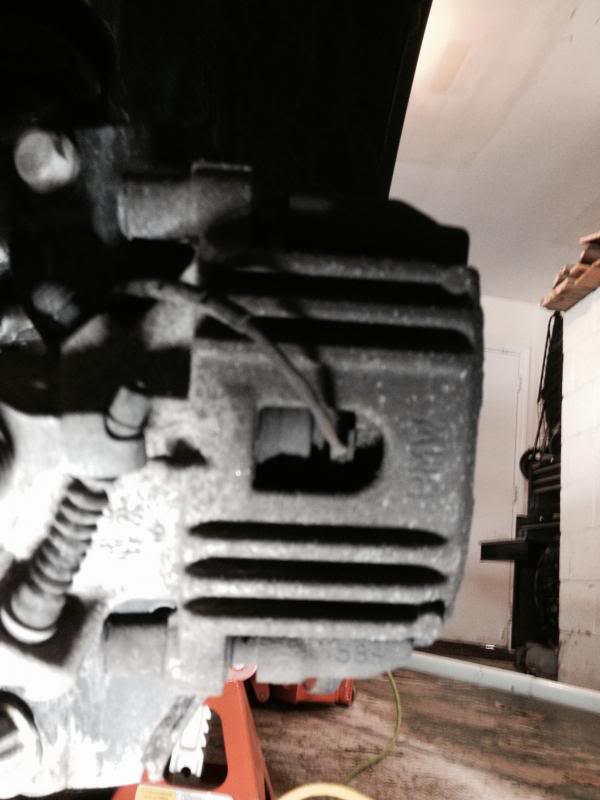
I know the pic sucks but here is where I was looking. I changed the fronts last year and they are looking great. I am clearly at 5mm so if you are correct on the 2mm I am confused.
3rd Gear
Joined: Jul 2010
Posts: 231
Likes: 1
From: right here

I agree that these sensors are not fancy. I am honestly looking for any excuse to not change my brake pads in my very, very, very cold garage.
I think I will just wait off a few weeks and revisit when it's warmer.


You should be fine for a few weeks, or months. Especially on the rears, which don't get much use. As long as you've done a visual, you're good. My OEM rotors needed replacing when the pads went anyway.
not just a wire like a gen1
BUT a sensor...and a computer with software that estimates break-wear...
try a post in the gen2 section...

3rd Gear
Joined: Jul 2010
Posts: 231
Likes: 1
From: right here
Thanks Eric I am hoping they will last up until March when I hope we can get some better temperatures.

Thread
Thread Starter
Forum
Replies
Last Post
igzekyativ
MINIs & Minis for Sale
34
Jul 16, 2020 12:54 PM
R50/53 Guidance on selling a 2005 S
Toolman
R50/R53 :: Hatch Talk (2002-2006)
8
Jan 20, 2016 06:50 AM