


Navigation & Audio Auxillary input help....


Thread Starter
|
3rd Gear

Joined: Sep 2005
Posts: 163
Likes: 16
From: OHIO
Auxillary input help....
I purchased my MINI GP earlier this year and finally got some time to look into the Auxillary Input that came with the car. It appears to be the aftermarket part from MINI, and I've pulled the radio, and it's connected correctly, but it still doesn't work. I'm assuming you select MODE to switch to AUX, but all I get is "NO DISC". I'm not sure what else the issue could be, so I'd thought I'd ask for some help from the forum. Any advice? Maybe it's time to just replace the stereo.......
-Andy
-Andy


Should definitely cycle through Aux with the mode button.
What is the build date of the head unit? The early ('02) models didn't support Aux-in.
Best would be to try it in another car, if you know any other MINI folks.
It can install/uninstall in a few minutes in the back of the radio (no need to remove it.)
What is the build date of the head unit? The early ('02) models didn't support Aux-in.
Best would be to try it in another car, if you know any other MINI folks.
It can install/uninstall in a few minutes in the back of the radio (no need to remove it.)


Yea,
Follow the wires and make sure its plugged into the port. For Reference. Maybe the cables bad ?
https://www.northamericanmotoring.co...lled-pics.html
Aux Input Cable Retrofit Kit Part # 82110153367
http://www.ecstuning.com/Search/SiteSearch/82110153367/
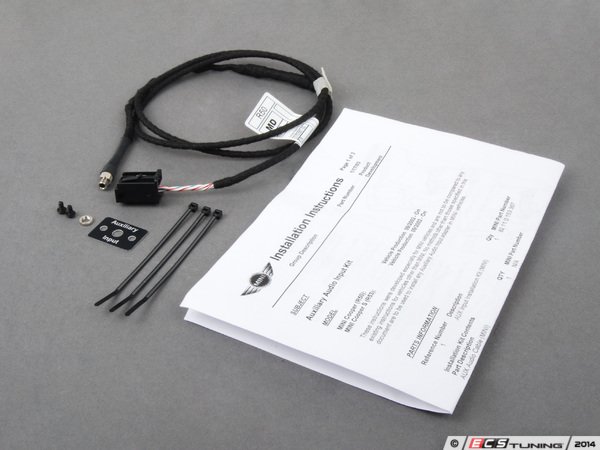
Thanks
Follow the wires and make sure its plugged into the port. For Reference. Maybe the cables bad ?
https://www.northamericanmotoring.co...lled-pics.html
Aux Input Cable Retrofit Kit Part # 82110153367
http://www.ecstuning.com/Search/SiteSearch/82110153367/
Thanks
__________________

MINI Guru/ MINI Owner Since 2004 | NEW Lifetime Part Replacement | Local Pickup
Milltek | Genuine MINI | Forge Motorsport | NM Engineering | ECS Performance | M7 Speed
Customer Service Hours: 8am-8pm EST|Sales Team Hours: 8am-11pm | SAT 10am-7pm 800.924.5172
MINI Guru/ MINI Owner Since 2004 | NEW Lifetime Part Replacement | Local Pickup
Milltek | Genuine MINI | Forge Motorsport | NM Engineering | ECS Performance | M7 Speed
Customer Service Hours: 8am-8pm EST|Sales Team Hours: 8am-11pm | SAT 10am-7pm 800.924.5172
I've got both aux-in and CD changer wiring, but it's possible that you have to relocate some pins in the harness. Though I thought that was only for Nav.

OVERDRIVE
Joined: Jul 2006
Posts: 7,037
Likes: 283
From: Melbourne, FL
from OUTMOTORING.COM listing for the part ...
IMPORTANT** This does not work with any 02 MINI's that have the factory radio installed, sorry! ALSO, does NOT work on any year Gen 1 MINI with the stock Cassette deck OR the 6 CD changer installed (if you unplug the CD changer it will work though)!!
had neither on my 02 so can't confirm or deny
IMPORTANT** This does not work with any 02 MINI's that have the factory radio installed, sorry! ALSO, does NOT work on any year Gen 1 MINI with the stock Cassette deck OR the 6 CD changer installed (if you unplug the CD changer it will work though)!!
had neither on my 02 so can't confirm or deny
Thread Starter
|
3rd Gear
Joined: Sep 2005
Posts: 163
Likes: 16
From: OHIO
I've traced the wire back and it's definitely plugged into the head unit. I've also checked the cable and see no signs of damage, but I guess it could have just went bad? Is that even possible?
Trending Topics

2nd Gear
Joined: Jan 2014
Posts: 65
Likes: 1
From: Charlotte, NC
AUX input issue
****UPDATE**** So, based on more forum reading/searching, it appears I may be experiencing the common "ground loop" issue. I will try to analyze it based on this new found knowledge (like unplug the power from the music source and see if AUX appears). I'll report back.
___________________________________________
I'm having a similar issue on my 03 S. What's interesting about mine is that it is intermittent. I have a portable XM radio plugged into the retrofit AUX cable. You do in fact toggle through the mode button to get to AUX.
Sometimes it works just fine, but it will often switch out of the AUX mode and back to FM for no apparent reason. Then, when I push mode to get back to the AUX, it will only display "No Disc" and stay on the FM setting.
Sometimes, if I turn radio off/on or unplug the XM patch cord from AUX cord and plug back in, the AUX mode will reappear and work again, but usually not for long.
Seems to be no rhyme or reason. The only thing I haven't done is remove radio to verify that cable hasn't come partially disconnected. I plan to do that next, but not hopeful that it will be the cause.
Anyone else ever experience this?
Very frustrating!
___________________________________________
I'm having a similar issue on my 03 S. What's interesting about mine is that it is intermittent. I have a portable XM radio plugged into the retrofit AUX cable. You do in fact toggle through the mode button to get to AUX.
Sometimes it works just fine, but it will often switch out of the AUX mode and back to FM for no apparent reason. Then, when I push mode to get back to the AUX, it will only display "No Disc" and stay on the FM setting.
Sometimes, if I turn radio off/on or unplug the XM patch cord from AUX cord and plug back in, the AUX mode will reappear and work again, but usually not for long.
Seems to be no rhyme or reason. The only thing I haven't done is remove radio to verify that cable hasn't come partially disconnected. I plan to do that next, but not hopeful that it will be the cause.
Anyone else ever experience this?
Very frustrating!
Last edited by PSA1; Nov 19, 2014 at 12:33 PM. Reason: Found possible solution

2nd Gear
Joined: May 2014
Posts: 119
Likes: 12
did you try connecting an audio player or phone to the aux input and try switching the input selection ? If the resistor in the aux input cable is broken, it wouldn't display AUX, until you connect something to it

Thread
Thread Starter
Forum
Replies
Last Post
QuickCooper
MINI Parts for Sale
4
Dec 29, 2016 06:46 PM
eliseo1981
MINI Parts for Sale
4
Nov 2, 2015 11:24 AM