

I have just purchased the Kuda mount for the dash, but am wondering how I can hide the cord. The nuvi has traffic so I need to use the cord provided for that to work but it has a big lump close to the end 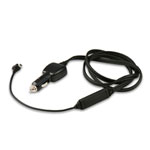 I am going to add another accessory plug under the dash but am at a loss how to route the wire. Anyone ?
I am going to add another accessory plug under the dash but am at a loss how to route the wire. Anyone ?

Depends on where you want to mount the Garmin of course. I mounted mine to the left and slightly above the tach so the lump is not hideable, I tucked it behind the tach so it really doesn't show...then routed the wire down and hid it behind the panels - it still plugs into the lighter tho, so it's still showing....
No real good answers since the antenna is the wire.
I found the real time traffic to be of little value for me, by the time I got the warning I was usually already in it. Sometimes it showed traffic where there was none, and sometimes it didn't show it at all when I was sitting still, stuck in a mile long jam. On top of that, those coupons really pissed me off, and when you turn them off you lose the traffic feature too. That was OK with me...
Don't get me wrong, I love my Garmin - but I really hated those coupons!
No real good answers since the antenna is the wire.
I found the real time traffic to be of little value for me, by the time I got the warning I was usually already in it. Sometimes it showed traffic where there was none, and sometimes it didn't show it at all when I was sitting still, stuck in a mile long jam. On top of that, those coupons really pissed me off, and when you turn them off you lose the traffic feature too. That was OK with me...
Don't get me wrong, I love my Garmin - but I really hated those coupons!
This Garmin came with lifetime traffic and I won't get the advertising unless I change the cord (GTM 25), so I don't mind it.
I think I'll try to find an adapter cable and see if it works usbfirewire.com has female to male mini-b extensions
I think I'll try to find an adapter cable and see if it works usbfirewire.com has female to male mini-b extensions
Why does the cord matter?
My understanding was the only way to turn off coupons turned off traffic as well - lose one, lose them both....
Where will you mount the unit? To the right of the tach?
Some people mount them down low on the console, but I think that would be hard to see without taking your eyes off the road - it makes hiding the wiring pretty easy tho.
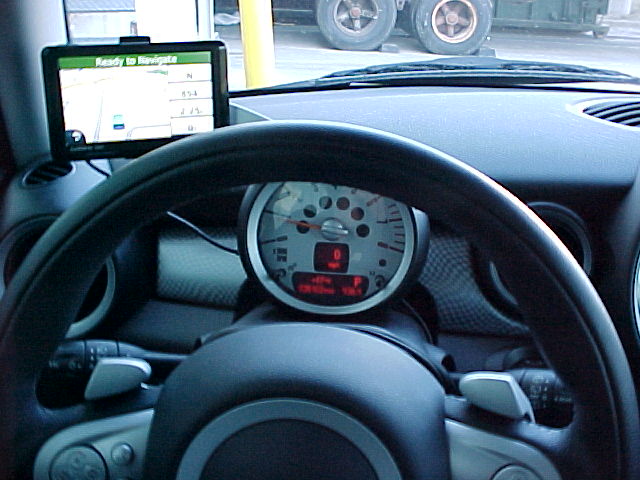
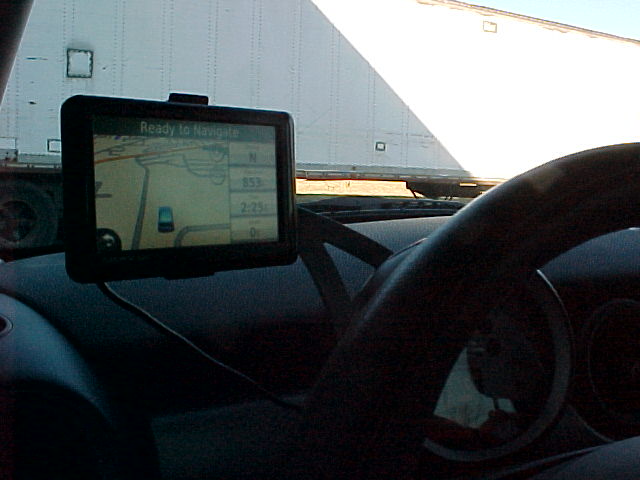
Here's how I did mine, you can just see the wire and the lump behind the tach...I probably could have hidden the wire behind the bracket too...it really doesn't bother me, and it makes it easy when I take the Garmin out of the bracket to hide it, as you have to pull the wire out of the back to disconnect it, unlike the earlier units where it was part of the bracket connection.
The extension cord idea could work well.....
My understanding was the only way to turn off coupons turned off traffic as well - lose one, lose them both....
Where will you mount the unit? To the right of the tach?
Some people mount them down low on the console, but I think that would be hard to see without taking your eyes off the road - it makes hiding the wiring pretty easy tho.
Here's how I did mine, you can just see the wire and the lump behind the tach...I probably could have hidden the wire behind the bracket too...it really doesn't bother me, and it makes it easy when I take the Garmin out of the bracket to hide it, as you have to pull the wire out of the back to disconnect it, unlike the earlier units where it was part of the bracket connection.
The extension cord idea could work well.....


3rd Gear
Hi, guys--Santa brought me a Garmin nuvi for Christmas with LMT and I do occasionally see ads, but not many. And the two times it's shown me traffic on my route it's done so very early on. One of the times it navigated me around it (the other time it was only a 2 minute delay). I'm quite happy so far.  Oh, and I also have the Eco HD fob that plugs in under the dash and gives me access to most of the gauges I wish the factory gave me (voltage, water temp--only missing oil pressure) and a lot more I don't fully understand yet!
As for mounting it, I think I'll mount it to the right (the opposite of MINIDave's setup) of the tachometer. I've ordered the Craven speed kit which comes with a hidden cig adapter that can be installed under the center trim. My only open question is like mini44's--how to route the cable from under the trip up near the unit's mounting point. I'm hopping I can run it behind trim pieces and have it come out near the steering column so it's only exposed for the length of the Craven Speed arm.
I'm hoping the Craven kit comes this week and I can play around with it this weekend.
Oh, and I also have the Eco HD fob that plugs in under the dash and gives me access to most of the gauges I wish the factory gave me (voltage, water temp--only missing oil pressure) and a lot more I don't fully understand yet!As for mounting it, I think I'll mount it to the right (the opposite of MINIDave's setup) of the tachometer. I've ordered the Craven speed kit which comes with a hidden cig adapter that can be installed under the center trim. My only open question is like mini44's--how to route the cable from under the trip up near the unit's mounting point. I'm hopping I can run it behind trim pieces and have it come out near the steering column so it's only exposed for the length of the Craven Speed arm.
I'm hoping the Craven kit comes this week and I can play around with it this weekend.

2nd Gear
Quote:
Oh, and I also have the Eco HD fob that plugs in under the dash and gives me access to most of the gauges I wish the factory gave me (voltage, water temp--only missing oil pressure) and a lot more I don't fully understand yet!
As for mounting it, I think I'll mount it to the right (the opposite of MINIDave's setup) of the tachometer. I've ordered the Craven speed kit which comes with a hidden cig adapter that can be installed under the center trim. My only open question is like mini44's--how to route the cable from under the trip up near the unit's mounting point. I'm hopping I can run it behind trim pieces and have it come out near the steering column so it's only exposed for the length of the Craven Speed arm.
I'm hoping the Craven kit comes this week and I can play around with it this weekend.
Which Garmin Nuvi model did you get? And where did you buy the Eco HD fob? Thanks!Originally Posted by Dodgy
Hi, guys--Santa brought me a Garmin nuvi for Christmas with LMT and I do occasionally see ads, but not many. And the two times it's shown me traffic on my route it's done so very early on. One of the times it navigated me around it (the other time it was only a 2 minute delay). I'm quite happy so far. Oh, and I also have the Eco HD fob that plugs in under the dash and gives me access to most of the gauges I wish the factory gave me (voltage, water temp--only missing oil pressure) and a lot more I don't fully understand yet!As for mounting it, I think I'll mount it to the right (the opposite of MINIDave's setup) of the tachometer. I've ordered the Craven speed kit which comes with a hidden cig adapter that can be installed under the center trim. My only open question is like mini44's--how to route the cable from under the trip up near the unit's mounting point. I'm hopping I can run it behind trim pieces and have it come out near the steering column so it's only exposed for the length of the Craven Speed arm.
I'm hoping the Craven kit comes this week and I can play around with it this weekend.
3rd Gear
Quote:
Had to look it up--I got the 1390 LMT and the Ecoroute HD was also part of the gift, but I'd bet money "Santa" purchased it on Amazon--it was on sale for about $60. The price fluctuates a lot, so I'd keep an eye out for a deal (it's closer to $100 right now).Originally Posted by MCSonMymind
Which Garmin Nuvi model did you get? And where did you buy the Eco HD fob? Thanks!
Quote:
My understanding was the only way to turn off coupons turned off traffic as well - lose one, lose them both....
Where will you mount the unit? To the right of the tach?
Some people mount them down low on the console, but I think that would be hard to see without taking your eyes off the road - it makes hiding the wiring pretty easy tho.
Here's how I did mine, you can just see the wire and the lump behind the tach...I probably could have hidden the wire behind the bracket too...it really doesn't bother me, and it makes it easy when I take the Garmin out of the bracket to hide it, as you have to pull the wire out of the back to disconnect it, unlike the earlier units where it was part of the bracket connection.
The extension cord idea could work well.....
Originally Posted by MINIdave
Why does the cord matter?My understanding was the only way to turn off coupons turned off traffic as well - lose one, lose them both....
Where will you mount the unit? To the right of the tach?
Some people mount them down low on the console, but I think that would be hard to see without taking your eyes off the road - it makes hiding the wiring pretty easy tho.
Here's how I did mine, you can just see the wire and the lump behind the tach...I probably could have hidden the wire behind the bracket too...it really doesn't bother me, and it makes it easy when I take the Garmin out of the bracket to hide it, as you have to pull the wire out of the back to disconnect it, unlike the earlier units where it was part of the bracket connection.
The extension cord idea could work well.....
The 1 800 guys said there are different types of traffic receivers and its in the cords. My particular one doesn't have ads.
I've ordered this mount and was going to try and fish is behind somehow?
