


Navigation & Audio Confusion Abounds


Thread Starter
|
2nd Gear
Joined: Aug 2005
Posts: 147
Likes: 0
From: Toledo, Ohio
Confusion Abounds
Recently I bought and installed a Sirius Starmate 5 in my 2004 Cooper S with the H/K radio system. It soon became apparent that using the supplied FEA is not the best, so decided to get an FM Direct Adapter. Then the more I read here I see references to AUX plug on the H/K radio, and it might be hidden somewhere. I have not been able to find it.
Is there an AUX connector on my radio or not and where is it? I am going to have to pull the radio to hook up the FM Direct Adapter anyway am I going to find the AUX plug?
Next Question: does the FM Direct Adapter go behind what is referred to as the Head Unit in the dash?
Is there an AUX connector on my radio or not and where is it? I am going to have to pull the radio to hook up the FM Direct Adapter anyway am I going to find the AUX plug?
Next Question: does the FM Direct Adapter go behind what is referred to as the Head Unit in the dash?
Last edited by Frank in Toledo; Sep 20, 2009 at 05:20 AM. Reason: Added another question.

1st Gear
Joined: Sep 2009
Posts: 11
Likes: 0
From: WV
Look Here
I just installed the Auxiliary Audio Input. It was a single wire with a plug on one end that goes into the back of the radio. I simply removed the panel under the steering wheel, and the left upright next to the radio. The write-up is on my web site. The only other thing I removed was the glove box (5 screws) and made the hole for mounting the input. Then I put the glove box, upright, and panel under the steering wheel back together. 30 minutes.
Then I installed XM radio and iPOd and a few other things. They plug into the Aux Audio input. No FM Modulation here...
Click the picture for the write-up.
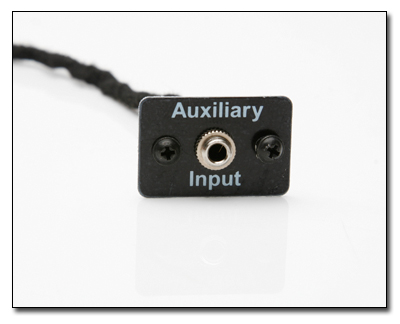
Then I installed XM radio and iPOd and a few other things. They plug into the Aux Audio input. No FM Modulation here...
Click the picture for the write-up.
Thread Starter
|
2nd Gear
Joined: Aug 2005
Posts: 147
Likes: 0
From: Toledo, Ohio
I just installed the Auxiliary Audio Input. It was a single wire with a plug on one end that goes into the back of the radio. I simply removed the panel under the steering wheel, and the left upright next to the radio. The write-up is on my web site. The only other thing I removed was the glove box (5 screws) and made the hole for mounting the input. Then I put the glove box, upright, and panel under the steering wheel back together. 30 minutes.
Then I installed XM radio and iPOd and a few other things. They plug into the Aux Audio input. No FM Modulation here...
Click the picture for the write-up.
Then I installed XM radio and iPOd and a few other things. They plug into the Aux Audio input. No FM Modulation here...
Click the picture for the write-up.
1st Gear
Joined: Sep 2009
Posts: 11
Likes: 0
From: WV
Honestly, I would have a hard time without the factory service manual (TIS)
There's a lot of if's ands and buts with these cars.


Yes, the factory Nav uses a plug which encompasses the Aux-in pin. As ppro said, you just have to pull the connector from the aux-in and insert into the Nav connector. Great Bear has a writeup on it somewhere around here...
Thread Starter
|
2nd Gear
Joined: Aug 2005
Posts: 147
Likes: 0
From: Toledo, Ohio
Thanks to All who helped
Your help and advice was very valuable and made my job of installing a FM Direct Adapter very easy. The Sirius radio now works great with no static and better volume.
Thanks again for all your assistance.
Thanks again for all your assistance.
Last edited by Frank in Toledo; Sep 23, 2009 at 09:21 AM. Reason: Added necessary words.
1st Gear
Joined: Sep 2009
Posts: 11
Likes: 0
From: WV
Did you install the Aux Audio Input? What's the FM Direct Adapter?
Trending Topics

2nd Gear
Joined: Mar 2004
Posts: 58
Likes: 0
From: Columbus, Ohio
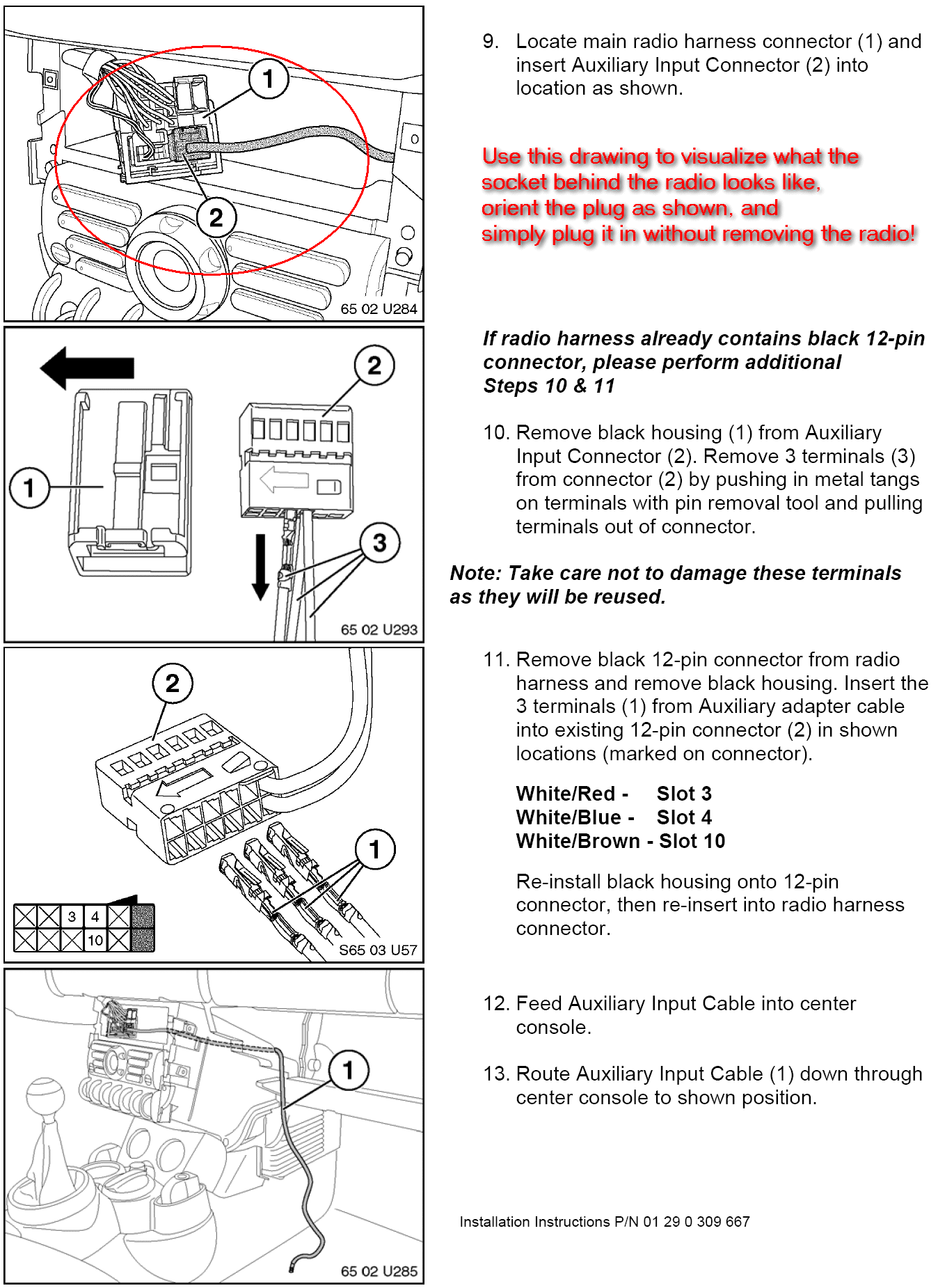
I have 05 Mini with factory Nav. Installed the auxiliary per diagram in pins 3, 4 and 10, with the Nav in pins 2, 8, and 9. However, the factory radio does not recognize auxilary so I can't play my iPod. Has anyone run into this issue or know the solution? Thanks...

Thread
Thread Starter
Forum
Replies
Last Post

