


Navigation & Audio iPod in a 2007 R56 Cooper S with Convenience Package


Thread Starter
|
1st Gear
Joined: Sep 2008
Posts: 43
Likes: 0
iPod in a 2007 R56 Cooper S with Convenience Package
Hi guys,
I just picked up my 2007 Cooper S yesterday and wanted to clarify a few things with regard to iPods.
The car is pretty much fully loaded (with the exception of Nav, Park Distance, and Rear Fog as best I can tell) so I was expecting it to have a USB connection under the dash (which I thought was standard with the convenience package...but that could be only on '08+ cars) however it only has an AUX input.
That said, I'd like to integrate my iPhone with the factory radio interface, is there an easy way since I have the convinience packages, bluetooth, etc or am I stuck using a dice adapter or something along those lines?
Thanks,
Jeremy
I just picked up my 2007 Cooper S yesterday and wanted to clarify a few things with regard to iPods.
The car is pretty much fully loaded (with the exception of Nav, Park Distance, and Rear Fog as best I can tell) so I was expecting it to have a USB connection under the dash (which I thought was standard with the convenience package...but that could be only on '08+ cars) however it only has an AUX input.
That said, I'd like to integrate my iPhone with the factory radio interface, is there an easy way since I have the convinience packages, bluetooth, etc or am I stuck using a dice adapter or something along those lines?
Thanks,
Jeremy

as far as i know activate bluetooth in the car and phone, press "pair", then turn on the phone...they'll recognize...put in a passkey 1234 and then the same on the iphone. should be something like that. i did it last night playing around.
the problem is the voice commands don't work with the phone book. so you have to manually enter those...or i did. maybe i missed something. but press the voice command button and say help and it'll tell you all the commands. you should be set to save some.
the aux is great cause then you don't have to deal with the crap ipod interface! you can just control from the ipod/iphone
the problem is the voice commands don't work with the phone book. so you have to manually enter those...or i did. maybe i missed something. but press the voice command button and say help and it'll tell you all the commands. you should be set to save some.
the aux is great cause then you don't have to deal with the crap ipod interface! you can just control from the ipod/iphone
Thread Starter
|
1st Gear
Joined: Sep 2008
Posts: 43
Likes: 0
Thanks for the reply J!
I think my original post was somewhat unclear. I was actually asking about using the iPhone for music, I already have it set up with the bluetooth handsfree system.
I have a 2G iPhone which has a screwy headphone jack that is set deep into the phone requiring an adapter, so between that and the aux cable it generally doesn't perform optimally. It seems (on paper at least) that using the radio interface to control the music on the iPhone would be a good thing...if its not then maybe I'll just get a dock to aux connector from EAS.
Thanks,
Jeremy
I think my original post was somewhat unclear. I was actually asking about using the iPhone for music, I already have it set up with the bluetooth handsfree system.
I have a 2G iPhone which has a screwy headphone jack that is set deep into the phone requiring an adapter, so between that and the aux cable it generally doesn't perform optimally. It seems (on paper at least) that using the radio interface to control the music on the iPhone would be a good thing...if its not then maybe I'll just get a dock to aux connector from EAS.
Thanks,
Jeremy
oh i see. yea i'd get a aux cord. there are some nice ones that'll fit the iphone. i keep on in the car when i'm really sick of the interface. it's pretty bad. that's likely your only option. you could put a dock in that space and run a cord from there. that would act the same but not go into the top of the iphone at all

6th Gear
Joined: Mar 2007
Posts: 7,578
Likes: 4
From: Paradise
The USB option was not available in 2007, unfortunately. Here are the choices I'm aware of.
1. Connect the iPhone dock port to the MINI AUX port. There are several ways to do it. Cheapest is just get a dock port to 3.5mm stereo jack cable. This will just send music to the MINI's AUX input. iPhone will run off its battery.
To charge the battery and connect to AUX, get an Apple Universal Dock with iPhone insert, and a cigarette lighter to USB charger like the Belkin Micro or Griffin Powerjolt. You will also need a 3.5mm to 3.5mm stereo cable, which will plug into the dock and AUX. This is better quality than using the headphone jack on the iPhone.
This is the setup I use. It feeds audio to the AUX, charges the iPhone, and provides a remote for "tactile" control of Next, Previous, Play and Pause. The remote has to be line-of-sight to the small hole in the front of the dock for the infrared signal to be seen. I have mine velcroed to the side of the shift console in front of the driver's seat. I can reach down and advance or pause a song by feel.
Next/Previous on the MFSW don't work with this setup. You need the USB connection for that. However, the MFSW volume control is still quite useful.
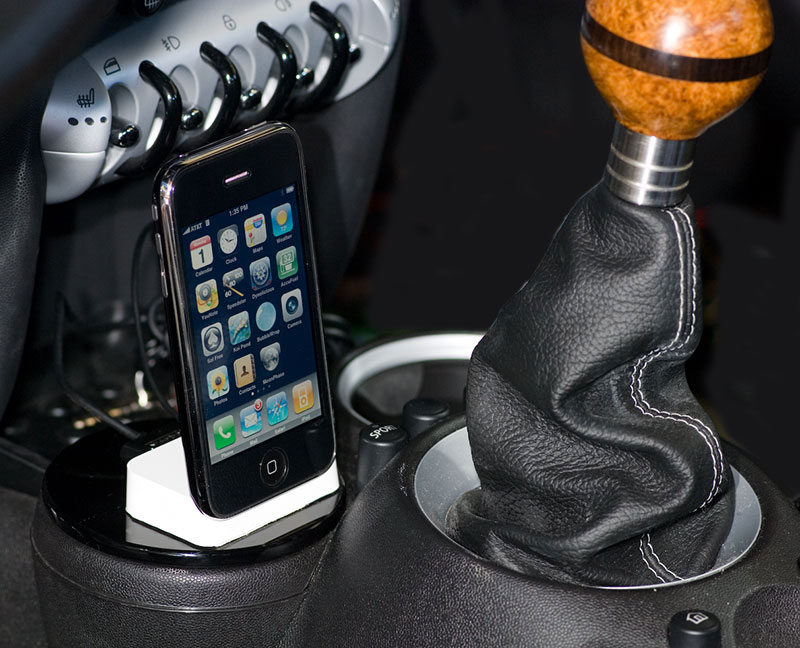
You will have to research the next options to make sure they work with the 2007 and your iPhone.
2. There is a dealer installed iPod connection that goes in the secret compartment and works much like the USB connection for controlling the iPod with the MFSW. Last I checked, this would cost over $600 to install.
3. If you have the factory armrest, an iPhone cradle is available. With USB optioned MINIs, this provides full control of audio in an iPhone. Not sure if that is true for 2007 models. I had the armrest, but it annoyed me so much I ripped it out before the iPhone cradle became available. So, I didn't look into that option.
1. Connect the iPhone dock port to the MINI AUX port. There are several ways to do it. Cheapest is just get a dock port to 3.5mm stereo jack cable. This will just send music to the MINI's AUX input. iPhone will run off its battery.
To charge the battery and connect to AUX, get an Apple Universal Dock with iPhone insert, and a cigarette lighter to USB charger like the Belkin Micro or Griffin Powerjolt. You will also need a 3.5mm to 3.5mm stereo cable, which will plug into the dock and AUX. This is better quality than using the headphone jack on the iPhone.
This is the setup I use. It feeds audio to the AUX, charges the iPhone, and provides a remote for "tactile" control of Next, Previous, Play and Pause. The remote has to be line-of-sight to the small hole in the front of the dock for the infrared signal to be seen. I have mine velcroed to the side of the shift console in front of the driver's seat. I can reach down and advance or pause a song by feel.
Next/Previous on the MFSW don't work with this setup. You need the USB connection for that. However, the MFSW volume control is still quite useful.
You will have to research the next options to make sure they work with the 2007 and your iPhone.
2. There is a dealer installed iPod connection that goes in the secret compartment and works much like the USB connection for controlling the iPod with the MFSW. Last I checked, this would cost over $600 to install.
3. If you have the factory armrest, an iPhone cradle is available. With USB optioned MINIs, this provides full control of audio in an iPhone. Not sure if that is true for 2007 models. I had the armrest, but it annoyed me so much I ripped it out before the iPhone cradle became available. So, I didn't look into that option.
Thread Starter
|
1st Gear
Joined: Sep 2008
Posts: 43
Likes: 0
Thanks for the reply Robin, I'm tolerating my armrest but if it continues to squeek I'll end up ripping it out as well. I am aware of the iPhone dock but thought that it didn't offer music playback and only charged the iphone...can you confirm? I assume there's no USB functionality in the armrest of a 2007 car...is there?
6th Gear
Joined: Mar 2007
Posts: 7,578
Likes: 4
From: Paradise
Thanks for the reply Robin, I'm tolerating my armrest but if it continues to squeek I'll end up ripping it out as well. I am aware of the iPhone dock but thought that it didn't offer music playback and only charged the iphone...can you confirm? I assume there's no USB functionality in the armrest of a 2007 car...is there?

It provides charging, music, and bluetooth still functions.
The back of the Apple Dock has a 3.5mm connector that comes from the iPhone's dock port (so better quality than the headphone jack). The Dock also has a dock connecor that can be used with a car charger for the iPhone.
Since 2007's didn't have a USB option, I assume the armrest wouldn't either. I ripped mine out before the iPhone cradle became available, so don't know how well it worked.
Trending Topics

3rd Gear
Joined: Mar 2009
Posts: 274
Likes: 0
From: Pennsyltuckey
I looked into the iPod connector for my 07 MCS as well. What I found is that it is possible to integrate and you can buy the kits to do it after market for around ~$200-300 however even after you install it yourself it still requires a dealer flash for it to properly integrate into the radio for controls. By the time you get them to do that you'll probably be out another $200 or so depending on how benevolant your dealer is willing to be. In the end I decided it'd be better just to manually hard wire a 3.5mm jack into the aux connector.
Basically I pulled the aux connector out, went to radio shack and got a 3.5mm 15' stereo extension cable, soldiered it onto the aux jack and ran it through the console into the arm rest (all the wire management is already in place inside the console/arm rest).
I still want to run another wire along with it for power as well and hardwire it off the bottom of the 12V in the console, but that's goign to require a fuse and such. Either way, thats the easiest way I've found to do it. Keep in mind I don't have bluetooth so your setup may be different.
Basically I pulled the aux connector out, went to radio shack and got a 3.5mm 15' stereo extension cable, soldiered it onto the aux jack and ran it through the console into the arm rest (all the wire management is already in place inside the console/arm rest).
I still want to run another wire along with it for power as well and hardwire it off the bottom of the 12V in the console, but that's goign to require a fuse and such. Either way, thats the easiest way I've found to do it. Keep in mind I don't have bluetooth so your setup may be different.

OVERDRIVE
Joined: Mar 2007
Posts: 5,602
Likes: 107
From: Arizona
My advice is to avoid that dreaded iPod connector kit that puts it into the secret compartment. It's more expensive than 2 new iPods and it's a bear to work through the radio interface because it basically consists of a jerryrigged CD changer connection. Some people can't get to the end of their artists because it only holds 250 names.
What I use is a $7 dock connector to aux input wire. Won't charge the unit but the sound is twice as good as a male/male wire to my ears. I just select the music from the iPod. The armrest thing basically is a $125 phone charger, no music comes from it. I know you can probably use the iPhone for music and just BT it to the phone and that'll work I think. If not get a dedicated iPod for music, a case and wire, and set it in the tray under the ebrake, but the phone in the armrest and go for it.
What I use is a $7 dock connector to aux input wire. Won't charge the unit but the sound is twice as good as a male/male wire to my ears. I just select the music from the iPod. The armrest thing basically is a $125 phone charger, no music comes from it. I know you can probably use the iPhone for music and just BT it to the phone and that'll work I think. If not get a dedicated iPod for music, a case and wire, and set it in the tray under the ebrake, but the phone in the armrest and go for it.
6th Gear
Joined: Mar 2007
Posts: 7,578
Likes: 4
From: Paradise
My advice is to avoid that dreaded iPod connector kit that puts it into the secret compartment. It's more expensive than 2 new iPods and it's a bear to work through the radio interface because it basically consists of a jerryrigged CD changer connection. Some people can't get to the end of their artists because it only holds 250 names.
1. Integration into the NAV screen and MFSW (with limitations mentioned above).
2. Hiding the iPod in the secret compartment.
That just wasn't worth $600 to me.
What I use is a $7 dock connector to aux input wire. Won't charge the unit but the sound is twice as good as a male/male wire to my ears.
Apple docks also have a dock port on the back. This is where you connect a Griffen Powerjolt car charger, or the Belkin Mini Car Charger.
So, good music quality and charging.
I use the Apple Universal Dock so I can use either my iPhone or iPod. Also, it comes with a remote. I velcro the remote to the console so it is inline with the infrared port on the Dock. This gives me a tactile control of Next, Previous, and iPod volume. I don't have to look at it to change tracks. Not as good as the MFSW, but for $600+ I can live with it.
I just select the music from the iPod. The armrest thing basically is a $125 phone charger, no music comes from it. I know you can probably use the iPhone for music and just BT it to the phone and that'll work I think. If not get a dedicated iPod for music, a case and wire, and set it in the tray under the ebrake, but the phone in the armrest and go for it.
6th Gear
Joined: Mar 2007
Posts: 7,578
Likes: 4
From: Paradise

3rd Gear
Joined: Mar 2009
Posts: 274
Likes: 0
From: Pennsyltuckey
Please do share how you do it. I just got a Curve 8330 and I just can't get it to pump out enough volume. Drives me nuts.

Motorholic
Joined: Feb 2007
Posts: 396
Likes: 0
From: Alexandria, VA
Hi,
I just got an iPod connector-to-3.5mm-jack (as in #1 below) and tried it out in my RCS 2007 (no USB/Ipod Integration package---like others in this thread, I thought it was too expensive). I plugged the jack in the AUX and connected the other end to my iTouch (2nd gen, I think), hit Play and made sure I selected Aux and pumped up the volume in the radio, but nothing seems to come through. Is there some specific steps I need to take to make sure the radio will take in music from the Aux port?
Thanks!
Chewning
I just got an iPod connector-to-3.5mm-jack (as in #1 below) and tried it out in my RCS 2007 (no USB/Ipod Integration package---like others in this thread, I thought it was too expensive). I plugged the jack in the AUX and connected the other end to my iTouch (2nd gen, I think), hit Play and made sure I selected Aux and pumped up the volume in the radio, but nothing seems to come through. Is there some specific steps I need to take to make sure the radio will take in music from the Aux port?
Thanks!
Chewning
The USB option was not available in 2007, unfortunately. Here are the choices I'm aware of.
1. Connect the iPhone dock port to the MINI AUX port. There are several ways to do it. Cheapest is just get a dock port to 3.5mm stereo jack cable. This will just send music to the MINI's AUX input. iPhone will run off its battery.
To charge the battery and connect to AUX, get an Apple Universal Dock with iPhone insert, and a cigarette lighter to USB charger like the Belkin Micro or Griffin Powerjolt. You will also need a 3.5mm to 3.5mm stereo cable, which will plug into the dock and AUX. This is better quality than using the headphone jack on the iPhone.
This is the setup I use. It feeds audio to the AUX, charges the iPhone, and provides a remote for "tactile" control of Next, Previous, Play and Pause. The remote has to be line-of-sight to the small hole in the front of the dock for the infrared signal to be seen. I have mine velcroed to the side of the shift console in front of the driver's seat. I can reach down and advance or pause a song by feel.
Next/Previous on the MFSW don't work with this setup. You need the USB connection for that. However, the MFSW volume control is still quite useful.
You will have to research the next options to make sure they work with the 2007 and your iPhone.
2. There is a dealer installed iPod connection that goes in the secret compartment and works much like the USB connection for controlling the iPod with the MFSW. Last I checked, this would cost over $600 to install.
3. If you have the factory armrest, an iPhone cradle is available. With USB optioned MINIs, this provides full control of audio in an iPhone. Not sure if that is true for 2007 models. I had the armrest, but it annoyed me so much I ripped it out before the iPhone cradle became available. So, I didn't look into that option.
1. Connect the iPhone dock port to the MINI AUX port. There are several ways to do it. Cheapest is just get a dock port to 3.5mm stereo jack cable. This will just send music to the MINI's AUX input. iPhone will run off its battery.
To charge the battery and connect to AUX, get an Apple Universal Dock with iPhone insert, and a cigarette lighter to USB charger like the Belkin Micro or Griffin Powerjolt. You will also need a 3.5mm to 3.5mm stereo cable, which will plug into the dock and AUX. This is better quality than using the headphone jack on the iPhone.
This is the setup I use. It feeds audio to the AUX, charges the iPhone, and provides a remote for "tactile" control of Next, Previous, Play and Pause. The remote has to be line-of-sight to the small hole in the front of the dock for the infrared signal to be seen. I have mine velcroed to the side of the shift console in front of the driver's seat. I can reach down and advance or pause a song by feel.
Next/Previous on the MFSW don't work with this setup. You need the USB connection for that. However, the MFSW volume control is still quite useful.
You will have to research the next options to make sure they work with the 2007 and your iPhone.
2. There is a dealer installed iPod connection that goes in the secret compartment and works much like the USB connection for controlling the iPod with the MFSW. Last I checked, this would cost over $600 to install.
3. If you have the factory armrest, an iPhone cradle is available. With USB optioned MINIs, this provides full control of audio in an iPhone. Not sure if that is true for 2007 models. I had the armrest, but it annoyed me so much I ripped it out before the iPhone cradle became available. So, I didn't look into that option.
Last edited by Mini_Voyager; Jun 27, 2009 at 10:48 AM.
6th Gear
Joined: Mar 2007
Posts: 7,578
Likes: 4
From: Paradise
Hi,
I just got an iPod connector-to-3.5mm-jack (as in #1 below) and tried it out in my RCS 2007 (no USB/Ipod Integration package---like others in this thread, I thought it was too expensive). I plugged the jack in the AUX and connected the other end to my iTouch (2nd gen, I think), hit Play and made sure I selected Aux and pumped up the volume in the radio, but nothing seems to come through. Is there some specific steps I need to take to make sure the radio will take in music from the Aux port?
Thanks!
Chewning
I just got an iPod connector-to-3.5mm-jack (as in #1 below) and tried it out in my RCS 2007 (no USB/Ipod Integration package---like others in this thread, I thought it was too expensive). I plugged the jack in the AUX and connected the other end to my iTouch (2nd gen, I think), hit Play and made sure I selected Aux and pumped up the volume in the radio, but nothing seems to come through. Is there some specific steps I need to take to make sure the radio will take in music from the Aux port?
Thanks!
Chewning
Motorholic
Joined: Feb 2007
Posts: 396
Likes: 0
From: Alexandria, VA
Yep did that--absolutely nothing. I went into the Aux part of the radio and it just has one option, "Aux-Vol" and I adjusted it all the way up to see if it make any difference....
Motorholic
Joined: Feb 2007
Posts: 396
Likes: 0
From: Alexandria, VA
Found the problem....
Turned out the cable I got was not compatible with my iTouch, but compatible with my gf's iPod. 
 Since she's the one who insisted on being able to use iPod with my car's stereo, I'll let her have the cable and I'll continue to play from my MP3 CDs.
Thanks for the help!
P.S. In case anyone is in the same situation as mine (having an iTouch and wanting to just plug in), here's the link to the suitable (I hope) cable.
Since she's the one who insisted on being able to use iPod with my car's stereo, I'll let her have the cable and I'll continue to play from my MP3 CDs. Thanks for the help!
P.S. In case anyone is in the same situation as mine (having an iTouch and wanting to just plug in), here's the link to the suitable (I hope) cable.
Last edited by Mini_Voyager; Jun 28, 2009 at 12:39 PM. Reason: Added link to cable

I got the Ipod interface for my 07 MCS. Without the navi system I wouldn't do it again its to hard to navigate the Ipod. You can get an audio cord and run your ipod directly into the aux port and it will be a lot easier to use.
6th Gear
Joined: Mar 2007
Posts: 7,578
Likes: 4
From: Paradise
At least you get to use the Next and Previous buttons on the MFSW.

1st Gear
Joined: Feb 2011
Posts: 15
Likes: 0
Hey guys, Sorry Im new to this. I have a quick Question... Im using thr aux jack in my 07 cooper S with my ipod touch 4th Gen. The problem im having is that the audio coming into the aux jack is very quiet compared to the radio. I have the volume limit off on my ipod and the volume is all the way up. Im not sure if something is wrong with the car or if this is just how is it. If anyone can offer any advise or assistance I would appreciate it greatly. I could use a radio tuner but I drive 162 miles one way to work and its kinda tough to find a good station. Thanks again...

3rd Gear
Joined: Aug 2010
Posts: 180
Likes: 0
From: Kyle, TX
Have you adjusted the aux volume on the radio? When using the aux jack, there should be a selection on the radio for adjusting the aux volume level too, I think it is the 4th radio button? I use an iPod Nano 3g and the line out through the dock connector, and with my aux volume set at 4 (out of 6) my iPod volume is about the same as the radio volume.
Good luck!
Good luck!
1st Gear
Joined: Feb 2011
Posts: 15
Likes: 0
I think That was it. Is it under the S-VOL menu? I put the volume on the aux on "6" and the radio and the cd down to "1". That seemed to make the volume louder on the ipod. They were all 3 at max before. I do think it helped though. Ill post again tomorrow when I get to drive it around for a few hours. Thanks alot Man...
3rd Gear
Joined: Aug 2010
Posts: 180
Likes: 0
From: Kyle, TX
I think it is "aux-vol" or "vol-aux". When actually playing music through the aux jack, I think it is the only option available on the radio screen. At least, it is on my 2008.
"S-vol" I think is the sensitivity of the speed variable volume.
A recent post can explain it much better than I: https://www.northamericanmotoring.co...in-volume.html
"S-vol" I think is the sensitivity of the speed variable volume.
A recent post can explain it much better than I: https://www.northamericanmotoring.co...in-volume.html
1st Gear
Joined: Feb 2011
Posts: 15
Likes: 0
DUDE YOU ROCK!!! that was it. Its been staring me in the face the last few days and I never thought to push a button... Go figure, I'm usually all over trying everything. Thanks very much for the help. I appreciate it alot.

