


Navigation & Audio New '09 R55 Owner: Bluetooth/iPhone/iPod questions

Thread Starter
|
4th Gear
Joined: Feb 2008
Posts: 545
Likes: 0
From: Castle Rock, CO
New '09 R55 Owner: Bluetooth/iPhone/iPod questions
I just moved from an '06 MCS to an '09 Clubman S
I have been searching and have found multiple answers to my multiple questions...however a lot of the answers are conflicting.
- I have the $500 Bluettooth/iPod/AUX option.
- I have two 3G iPhone in the family
- I have a 20gb gen 3 iPod
?s
1) Can I sync both 3G iPhones with the system? (husband and wife)
2) Can I play music via Bluettooth? If not now with the 3.0 iPhone software update in Aug, I will get FULL Bluetooth functionality?
3) Why when I try to use the voice commands does it always say the phone book is empty? Can I download the phone book and just keep it in the cars data...or does it have to pull it from the phone every time?
4) When I play songs via the short cable and the 20gb iPod the songs are very staticy...not getting iPhone interferenace...the songs just sound really crappy when the volume is turned up. Radio comes in clear, ipod worked great in the '06 MCS. Songs are ripped in good quality, etc. I tried using another we have, but it happens on all the iPod we have in the house, not just this one. Trust me songs are ripped at 256 kbps.
Thanks for the helping a 2nd Gen Newbie
I have been searching and have found multiple answers to my multiple questions...however a lot of the answers are conflicting.
- I have the $500 Bluettooth/iPod/AUX option.
- I have two 3G iPhone in the family
- I have a 20gb gen 3 iPod
?s
1) Can I sync both 3G iPhones with the system? (husband and wife)
2) Can I play music via Bluettooth? If not now with the 3.0 iPhone software update in Aug, I will get FULL Bluetooth functionality?
3) Why when I try to use the voice commands does it always say the phone book is empty? Can I download the phone book and just keep it in the cars data...or does it have to pull it from the phone every time?
4) When I play songs via the short cable and the 20gb iPod the songs are very staticy...not getting iPhone interferenace...the songs just sound really crappy when the volume is turned up. Radio comes in clear, ipod worked great in the '06 MCS. Songs are ripped in good quality, etc. I tried using another we have, but it happens on all the iPod we have in the house, not just this one. Trust me songs are ripped at 256 kbps.
Thanks for the helping a 2nd Gen Newbie

6th Gear
Joined: Mar 2007
Posts: 7,578
Likes: 5
From: Paradise
My 2007 MCS predates the introduction of the USB option, so i have the iPhone 3G connected to a cigarette lighter charger, and the AUX. Music plays through the AUX. When a call comes in, it interrupts the music and uses Bluetooth for the call.
My understanding is that the cable that comes with the USB option is a Y cable that connects to both the USB and the AUX. Music plays through the AUX. The USB is used for charging (supposedly), and displaying playlists on the NAV or radio readout.
4) When I play songs via the short cable and the 20gb iPod the songs are very staticy...not getting iPhone interferenace...the songs just sound really crappy when the volume is turned up. Radio comes in clear, ipod worked great in the '06 MCS. Songs are ripped in good quality, etc. I tried using another we have, but it happens on all the iPod we have in the house, not just this one. Trust me songs are ripped at 256 kbps.
Thread Starter
|
4th Gear
Joined: Feb 2008
Posts: 545
Likes: 0
From: Castle Rock, CO
No cables and havin the ability to be 100% wireless with our 3G iPhones.
Bluetooth for music would be great. I had a set of wireless headphones that used BT. The new 3.0 iPhone software release will allow for more communication options. Only if the Mini will allow for those incomeing connections.
I would love to not have to use the cable and a separate iPod for music.
Bluetooth for music would be great. I had a set of wireless headphones that used BT. The new 3.0 iPhone software release will allow for more communication options. Only if the Mini will allow for those incomeing connections.
I would love to not have to use the cable and a separate iPod for music.

3rd Gear
Joined: Jan 2009
Posts: 222
Likes: 0
From: Atlanta, GA
Smartphone prep + iPhone 3G cradle = no cables, music works, external antenna, charging, iPhone is not in a cupholder.
That's the direction I went.
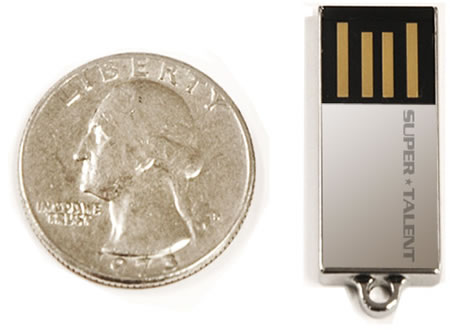
Voice dial worked even before I got the cradle, so not sure why you are having issues. Does the phone book sync up? I heard of people having issues syncing up the iPhone, but I've never had any issues. And also before the cradle got released I just had a tiny 8GB flash drive plugged into USB with all my music in MP3 - worked like a charm and no need for cables or a bulky iPod.
Here's the flash drive I used:
I wouldn't hold my breath for BT music connectivity, btw, even with 3.0 release this summer.
That's the direction I went.
Voice dial worked even before I got the cradle, so not sure why you are having issues. Does the phone book sync up? I heard of people having issues syncing up the iPhone, but I've never had any issues. And also before the cradle got released I just had a tiny 8GB flash drive plugged into USB with all my music in MP3 - worked like a charm and no need for cables or a bulky iPod.
Here's the flash drive I used:
I wouldn't hold my breath for BT music connectivity, btw, even with 3.0 release this summer.
Thread Starter
|
4th Gear
Joined: Feb 2008
Posts: 545
Likes: 0
From: Castle Rock, CO
After some playing in the car this afternoon...it looks like it's just taking some time for the phonebook to "sync". I am guessing that the "phonebook" is not really present on the mini, just accessing the data on the phone.
In my world syncing means data is transfered from one device to another. Morfing the iPhones address book is really not syncing. Hense the delay I am getting.
However even though I can now see the contacts..I can still not voice command. It still claims the phonebook is empty.
hmm

You can sync up to 4 phones with the MINI.
Bluetooth only works for telephone functions. music can not be played via bluetooth. This is a limitation of the MINI not the phone. I have a Blackberry that i use with a seperate bluetooth stereo gateway the gets pluged into the AUX connector and allows me to play music via bluetooth. But with teh limitations on the bluetooth frequency response and all it does sound okay but it is better going straight from the phone via wire.
I you have NAV the BLuetooth uses the phone book in the phone. If you do not have the NAV then you MUST set up the phone book by recording the info into the voice system. There are a number of threads on this subject. See this post it will list other posts/thread to help you out
https://www.northamericanmotoring.co...615-post2.html
There is a limit of 20 names/number for the Non-Nav voice system.
Check the "iPod Input Volume" on the radio. You can get to it by having the radio set to iPod and then pressing the button with the musical note on it. There is then a input volume adjustment there somewhere. See if that helps. I don't have my mini with me today so i can not get you the exact directions to adjust this. If you have problems let me know and i will get back to you tomorrow with the exact way to adjust this.
https://www.northamericanmotoring.co...615-post2.html
There is a limit of 20 names/number for the Non-Nav voice system.
4) When I play songs via the short cable and the 20gb iPod the songs are very staticy...not getting iPhone interferenace...the songs just sound really crappy when the volume is turned up. Radio comes in clear, ipod worked great in the '06 MCS. Songs are ripped in good quality, etc. I tried using another we have, but it happens on all the iPod we have in the house, not just this one. Trust me songs are ripped at 256 kbps.
Thanks for the helping a 2nd Gen Newbie
Thanks for the helping a 2nd Gen Newbie
Trending Topics
Thread Starter
|
4th Gear
Joined: Feb 2008
Posts: 545
Likes: 0
From: Castle Rock, CO
schatzy62,
Great reply thanks!
I plugged the iPod and in and did a clean restore. I also took the iPod out of disk mode, therefore removing all the large files. I wonder if Apple compresses the sync'ed audio files when iPods are in disk mode. This would cause the loss of quality I was experiancing.
I will look up the name recording feature in the OM. I looked but could not find it (NO NAV)
Thanks again for the info!
Great reply thanks!
I plugged the iPod and in and did a clean restore. I also took the iPod out of disk mode, therefore removing all the large files. I wonder if Apple compresses the sync'ed audio files when iPods are in disk mode. This would cause the loss of quality I was experiancing.
I will look up the name recording feature in the OM. I looked but could not find it (NO NAV)
Thanks again for the info!

Thread
Thread Starter
Forum
Replies
Last Post
ECSTuning
Interior/Exterior Products
0
Aug 28, 2015 12:56 PM
ECSTuning
Vendor Classifieds
0
Aug 21, 2015 12:58 PM
ECSTuning
Vendor Announcements
0
Aug 19, 2015 12:51 PM
ECSTuning
Accessory Products
0
Aug 11, 2015 12:37 PM