


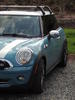
finally finished editing the non-hdr shots




3rd Gear
Joined: Dec 2008
Posts: 197
Likes: 0
From: Greenville, SC
I'm confused, are those even edited? They are pretty dull and flat but you did say plain-jane. Number 3 would be great with the levels and exposure corrected and the vibrancy bumped up. Throw an unsharp mask or high pass filter over it and you have a winner.
Here's an edit I just did:

There are no colors to work with saturation wise so I overlayed a black and white processed version with a slight blue tint over it. I ran a high pass filter for the grass, unsharp mask for the car. I tweaked the overall levels for a little more contrast then adjusted the red level to make everything a little more mellow and blue. It doesn't look very sharp when the forums shrink it down, and I probably could have done more sharpening but I didn't want any artifacts from the lowres jpg.
Editing really does make a world of a difference, let me know if you need any help!
Here's an edit I just did:
There are no colors to work with saturation wise so I overlayed a black and white processed version with a slight blue tint over it. I ran a high pass filter for the grass, unsharp mask for the car. I tweaked the overall levels for a little more contrast then adjusted the red level to make everything a little more mellow and blue. It doesn't look very sharp when the forums shrink it down, and I probably could have done more sharpening but I didn't want any artifacts from the lowres jpg.
Editing really does make a world of a difference, let me know if you need any help!

3rd Gear
Joined: Dec 2008
Posts: 197
Likes: 0
From: Greenville, SC
I adjusted the level to shift more towards some blue tones. The grass was far from vibrant so there was not much I could do to help it. Can't bring out anymore sharpness or definition without jpeg artifacts from hell. Low resolution jpgs are never a good starting point.

Banned
Joined: Apr 2010
Posts: 71
Likes: 0
From: Dallas, Texas
What's up with the blue cast? Was that done on purpose or is the white balance off?
There's also some ghosting around the trees?
There's also some ghosting around the trees?
Trending Topics
3rd Gear
Joined: Dec 2008
Posts: 197
Likes: 0
From: Greenville, SC
I did it to compensate for the lack of color and gloomy sky, it also seemed better than black and white. I don't know what else to do to an almost desaturated photo.
The ghosting is not from processing, thats from the original. I believe the spots without color are from the blown out highlights but the blue areas had a better exposure.
The ghosting is not from processing, thats from the original. I believe the spots without color are from the blown out highlights but the blue areas had a better exposure.

Thread
Thread Starter
Forum
Replies
Last Post
StrongIslandMini
MINI Parts for Sale
10
Sep 19, 2015 10:58 AM