


F55/F56 OK 3rd Gen Coding/Experts Come In-Front/Rear Fogs & DRLs??


Thread Starter
|
2nd Gear
Joined: Oct 2013
Posts: 148
Likes: 13
OK 3rd Gen Coding/Experts Come In-Front/Rear Fogs & DRLs??
okay I am somewhat stumped and my dealership is as well, so to the forum's I go.....
My questions are surrounding the front & rear fog lights, switches, coding and DRL's.
I have a 2016 F55 S, with the LED headlights and no rear fog lights. I have read on NAM about the rear fogs being on the car and you just need to buy the OEM switch to control the rear fogs and get the car coded to control them and they will work. I have done that and the rear fogs work just fine. I bought the switch mentioned on here part # 61-31-9-390-255, which has the headlight switch, front fog and rear fog switches.
Ever since installing the new switch to control the rears, the issue is now with the front fogs. When I push the button to turn on the front fogs, the icon on the dash lights up, but the front fogs do NOT turn on.
So what gives, why don't my front fogs work now?
I didn't see anything in the coding options that needed to be selected in order to control the fronts with this new switch. Is there a coding command that I need to specify to have the new switch control both front & rear fogs? I assume this is the case.
So in the photos below (not my car, it's a service loaner)
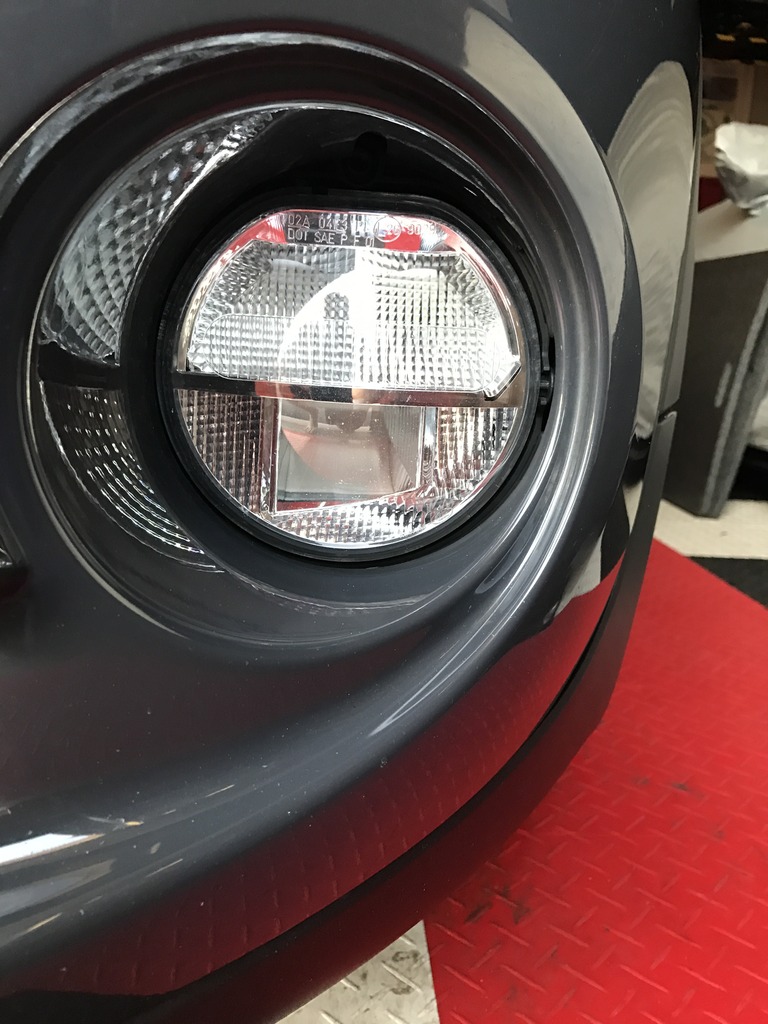
It shows the front fog lights with the upper & lower portion of the lens. The top portion comes on every time I turn on the car and they do not turn off unless I turn off the ignition.
My dealer has my original switch that does not have the rear controls on it, and they are going to swap out switches to see if the original switch will control my fronts, but then I loose the rears and I don't want to do that, I want the rears.
So chime in with your thoughts. Thanks
Front Fog Area with upper and lower bulbs - Both turned OFF
Front fog area top section ON, comes on with ignition, assume as a part of the DRL's, daytime Running Lamps
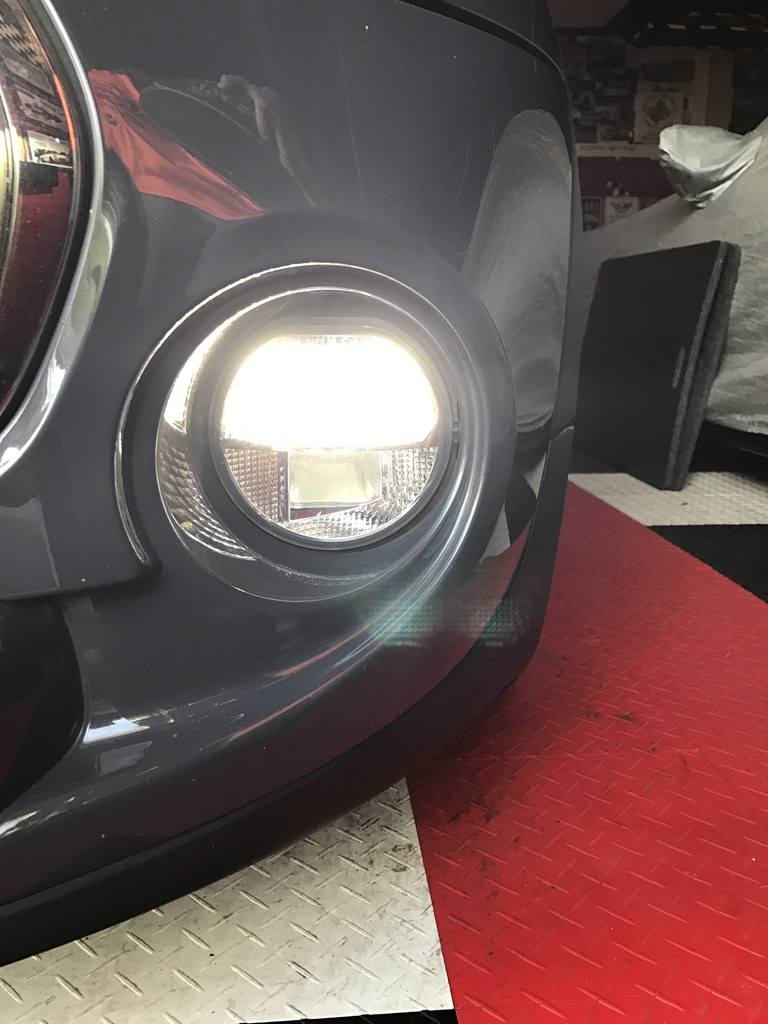
Both top and bottom of front fog light area turned ON by pushing front fog light button on the dash. This works on the service loaner but not on my coded car.
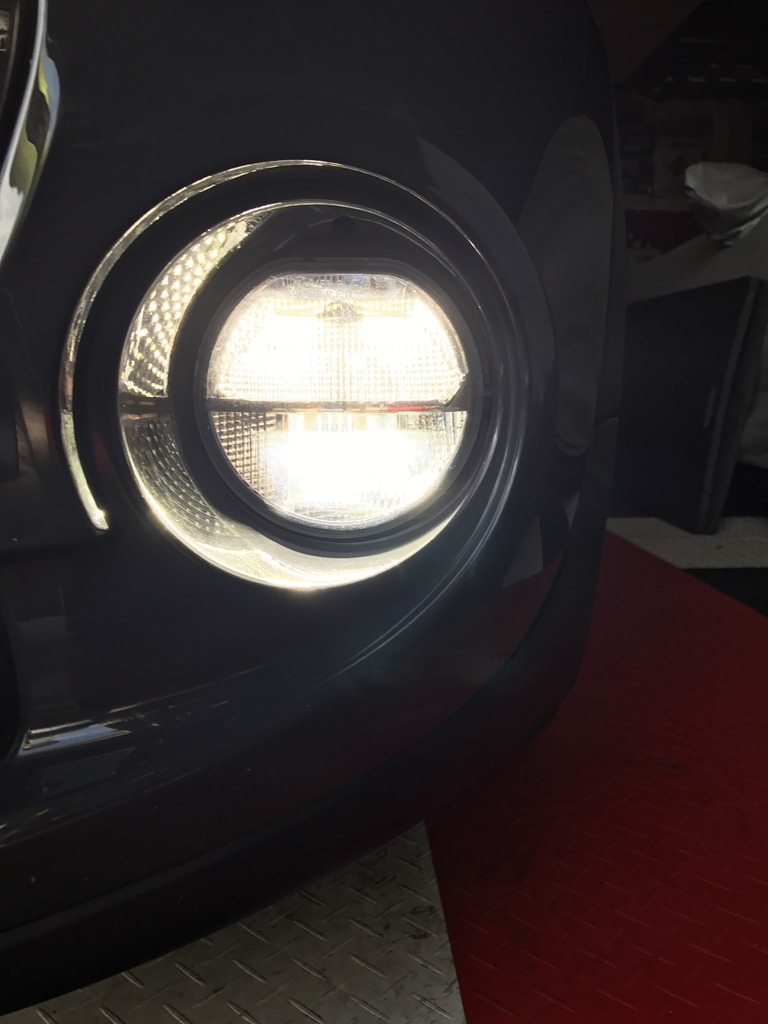
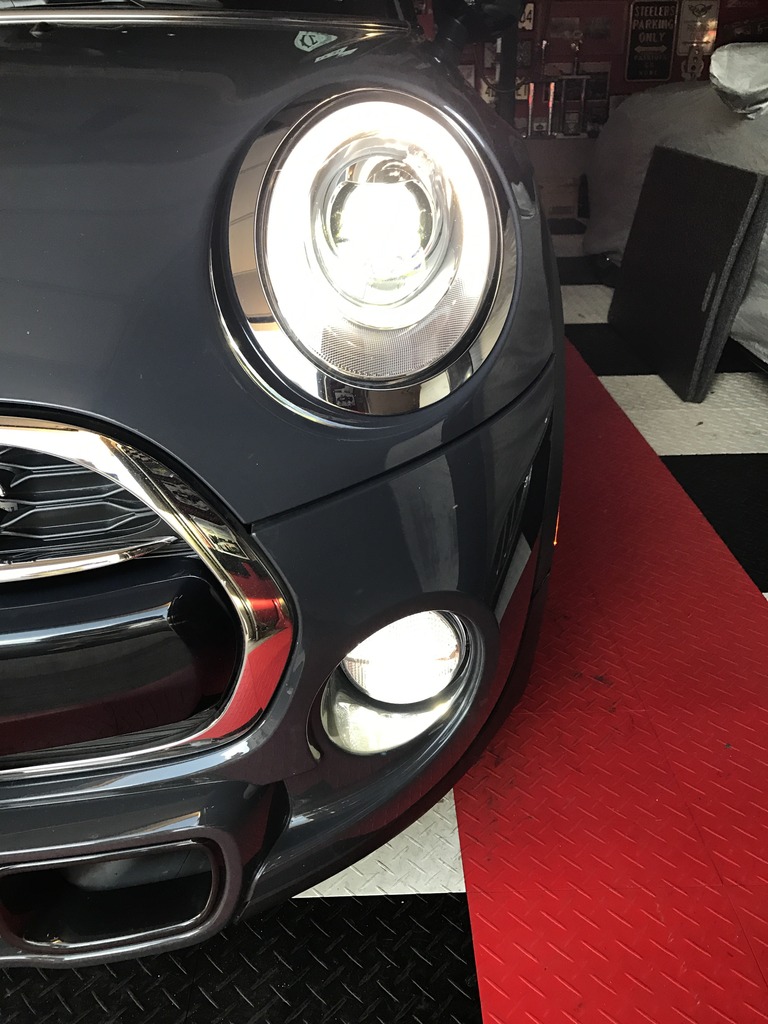
Photo of LED headlight on with trim LED and both sections of front fogs ON
My questions are surrounding the front & rear fog lights, switches, coding and DRL's.
I have a 2016 F55 S, with the LED headlights and no rear fog lights. I have read on NAM about the rear fogs being on the car and you just need to buy the OEM switch to control the rear fogs and get the car coded to control them and they will work. I have done that and the rear fogs work just fine. I bought the switch mentioned on here part # 61-31-9-390-255, which has the headlight switch, front fog and rear fog switches.
Ever since installing the new switch to control the rears, the issue is now with the front fogs. When I push the button to turn on the front fogs, the icon on the dash lights up, but the front fogs do NOT turn on.
So what gives, why don't my front fogs work now?
I didn't see anything in the coding options that needed to be selected in order to control the fronts with this new switch. Is there a coding command that I need to specify to have the new switch control both front & rear fogs? I assume this is the case.
So in the photos below (not my car, it's a service loaner)
It shows the front fog lights with the upper & lower portion of the lens. The top portion comes on every time I turn on the car and they do not turn off unless I turn off the ignition.
My dealer has my original switch that does not have the rear controls on it, and they are going to swap out switches to see if the original switch will control my fronts, but then I loose the rears and I don't want to do that, I want the rears.
So chime in with your thoughts. Thanks
Front Fog Area with upper and lower bulbs - Both turned OFF

Front fog area top section ON, comes on with ignition, assume as a part of the DRL's, daytime Running Lamps

Both top and bottom of front fog light area turned ON by pushing front fog light button on the dash. This works on the service loaner but not on my coded car.

Photo of LED headlight on with trim LED and both sections of front fogs ON


5th Gear
Joined: Feb 2014
Posts: 830
Likes: 31
From: NYC
that's odd and doesn't make sense. let's pretend you didn't do the coding. you would have swapped the switch and everything would have worked. no reason why the front fogs would just STOP working. assuming you coded just the pieces that needed to be coded, then the front fog has nothing to do with this coding experience.
i really hope the dealer isnt' charging you for the time to swap out the switch...it takes all of 30 seconds.
let me/us know how we can help. i wanna figure this out.
i really hope the dealer isnt' charging you for the time to swap out the switch...it takes all of 30 seconds.
let me/us know how we can help. i wanna figure this out.


Yea, it does not make sense, let us know what you find.
__________________

MINI Guru/ MINI Owner Since 2004 | NEW Lifetime Part Replacement | Local Pickup
Milltek | Genuine MINI | Forge Motorsport | NM Engineering | ECS Performance | M7 Speed
Customer Service Hours: 8am-8pm EST|Sales Team Hours: 8am-11pm | SAT 10am-7pm 800.924.5172
MINI Guru/ MINI Owner Since 2004 | NEW Lifetime Part Replacement | Local Pickup
Milltek | Genuine MINI | Forge Motorsport | NM Engineering | ECS Performance | M7 Speed
Customer Service Hours: 8am-8pm EST|Sales Team Hours: 8am-11pm | SAT 10am-7pm 800.924.5172
Thread Starter
|
2nd Gear
Joined: Oct 2013
Posts: 148
Likes: 13
Okay so now I am really stumped.
I removed the front/rear fog light switch and replaced it with the front switch that came installed on the car. And the results are the same. I hit the front fog switch, the dash light comes on yet nothing happens at the light itself. The top portion is always on, but the bottom portion has no light at all.
Did it come like this from the factory, i don't remember since I coded my car early on, so I am not certain if something is wrong in the coding?
Any thoughts?
I removed the front/rear fog light switch and replaced it with the front switch that came installed on the car. And the results are the same. I hit the front fog switch, the dash light comes on yet nothing happens at the light itself. The top portion is always on, but the bottom portion has no light at all.
Did it come like this from the factory, i don't remember since I coded my car early on, so I am not certain if something is wrong in the coding?
Any thoughts?
5th Gear
Joined: Feb 2014
Posts: 830
Likes: 31
From: NYC
Okay so now I am really stumped.
I removed the front/rear fog light switch and replaced it with the front switch that came installed on the car. And the results are the same. I hit the front fog switch, the dash light comes on yet nothing happens at the light itself. The top portion is always on, but the bottom portion has no light at all.
Did it come like this from the factory, i don't remember since I coded my car early on, so I am not certain if something is wrong in the coding?
Any thoughts?
I removed the front/rear fog light switch and replaced it with the front switch that came installed on the car. And the results are the same. I hit the front fog switch, the dash light comes on yet nothing happens at the light itself. The top portion is always on, but the bottom portion has no light at all.
Did it come like this from the factory, i don't remember since I coded my car early on, so I am not certain if something is wrong in the coding?
Any thoughts?
Trending Topics

Did you do the programming yourself? I would go back and undo the programming changes and see if that solves your problem. I coded in my rear fogs but I still have to get the switch installed. Normal front fogs still working fine (also LED version).
Thread Starter
|
2nd Gear
Joined: Oct 2013
Posts: 148
Likes: 13
I had someone remote code the vehicle, and we are going to set up another session to see if we can correct the issue. We just need to find the time to do it. Let me know how you make out once you get yours coded. Thanks
Thread Starter
|
2nd Gear
Joined: Oct 2013
Posts: 148
Likes: 13
okay here's an update.
I took the MINI in for service and had them update the software to the latest version to correct some issues, so that wiped out my custom coding and reset the car back to factory defaults.
So now the front fogs work as such.
Car on, headlights on, the top portion of the fogs come on all the time.
I hit the front fog button and the bottom half of the front fogs come on.
Now I have lost the use of my rear fogs all together.
So I hope to have the car remotely re-coded in the coming month and I will pay special attention to the lighting options during the process.
Thanks
I took the MINI in for service and had them update the software to the latest version to correct some issues, so that wiped out my custom coding and reset the car back to factory defaults.
So now the front fogs work as such.
Car on, headlights on, the top portion of the fogs come on all the time.
I hit the front fog button and the bottom half of the front fogs come on.
Now I have lost the use of my rear fogs all together.
So I hope to have the car remotely re-coded in the coming month and I will pay special attention to the lighting options during the process.
Thanks
Just an update for your guys: MINI updated the part number from 61319390255 to 61316824879
And we can get them now, there was a short-term shortage.
https://www.ecstuning.com/Search/SiteSearch/61316824879/
I dont think that would effect coding, but I would guess they might have had issues with the old one coding on certain models or production runs. Let us know if the coding takes. Did they replace the switch itself?
And we can get them now, there was a short-term shortage.
https://www.ecstuning.com/Search/SiteSearch/61316824879/
I dont think that would effect coding, but I would guess they might have had issues with the old one coding on certain models or production runs. Let us know if the coding takes. Did they replace the switch itself?
__________________
MINI Guru/ MINI Owner Since 2004 | NEW Lifetime Part Replacement | Local Pickup
Milltek | Genuine MINI | Forge Motorsport | NM Engineering | ECS Performance | M7 Speed
Customer Service Hours: 8am-8pm EST|Sales Team Hours: 8am-11pm | SAT 10am-7pm 800.924.5172
MINI Guru/ MINI Owner Since 2004 | NEW Lifetime Part Replacement | Local Pickup
Milltek | Genuine MINI | Forge Motorsport | NM Engineering | ECS Performance | M7 Speed
Customer Service Hours: 8am-8pm EST|Sales Team Hours: 8am-11pm | SAT 10am-7pm 800.924.5172
Thread Starter
|
2nd Gear
Joined: Oct 2013
Posts: 148
Likes: 13
okay I figured I would update the thread with my recent findings.
I went in for service at the dealership for a software update and doing so removed my custom coding and put the car back to factory specs.
So as soon as I got home I tried the front & rear fogs. The fronts worked as intended, meaning the dash light came on and the BOTTOM portion of the front fog illuminated. Also lit up was the top portion of the light housing.
So that leads me to believe somewhere in my previous coding something was de-activated.
As expected I had no rear fog lights after the software update since my car was not ordered with the rears.
So then I had my car coded again, and rather than choosing a bunch of options for the front fogs, such as working with high beams or working with parking lights; I left the front fogs coding options alone. I did however activate my rear fogs, since I still have the OEM switch to control the fronts & rears.
After the coding session, all the lights work as desired. The fronts work the same as mentioned above, bottom and top portions come on when desired and the rears work as well.
So all of my lights now work as I desire them too.
One footnote for new coding according to the person who did my coding. He is mainly a BMW coder and he mentioned this is the case on the new 3 Series cars as well. In the latest BMW/MINI software they have made change to the "3 Flash Turn Signal Function" and in doing so the option to change via coding the number of flashes from 3 to 5 flashes has been removed. In the new cars iDrive you can select 5 flashes and thus you can not code it to do so if your iDrive doesn't have the 5 flash option. Our MINIs only have the option to do a 3 flash turn signal.
Thanks
I went in for service at the dealership for a software update and doing so removed my custom coding and put the car back to factory specs.
So as soon as I got home I tried the front & rear fogs. The fronts worked as intended, meaning the dash light came on and the BOTTOM portion of the front fog illuminated. Also lit up was the top portion of the light housing.
So that leads me to believe somewhere in my previous coding something was de-activated.
As expected I had no rear fog lights after the software update since my car was not ordered with the rears.
So then I had my car coded again, and rather than choosing a bunch of options for the front fogs, such as working with high beams or working with parking lights; I left the front fogs coding options alone. I did however activate my rear fogs, since I still have the OEM switch to control the fronts & rears.
After the coding session, all the lights work as desired. The fronts work the same as mentioned above, bottom and top portions come on when desired and the rears work as well.
So all of my lights now work as I desire them too.
One footnote for new coding according to the person who did my coding. He is mainly a BMW coder and he mentioned this is the case on the new 3 Series cars as well. In the latest BMW/MINI software they have made change to the "3 Flash Turn Signal Function" and in doing so the option to change via coding the number of flashes from 3 to 5 flashes has been removed. In the new cars iDrive you can select 5 flashes and thus you can not code it to do so if your iDrive doesn't have the 5 flash option. Our MINIs only have the option to do a 3 flash turn signal.
Thanks

4th Gear
Joined: Sep 2014
Posts: 520
Likes: 4
From: Tigard, OR
Thanks for the update and for information on the 5 flash turn signals. I did code mine to do 5 flash turn signals even though it shows some error message and it worked fine, until I went into the car's setting menu and it appeared as the flash turn signal function were disabled. I tried turning it on->off->on and now it's back to 3 flash. If I bring the other remote it still does 5 flash. lol. Since then I just keep it at 3 flash since it's not that important and 5 flash did seem kind of long.
By the way, I would recommend switching the front parking lights (upper portion of the fog light) to LED in order to match the color with your headlights. I don't have fog lights, but the white LED parking light looks much better with the LED headlight. It requires coding to do it "the proper way".
By the way, I would recommend switching the front parking lights (upper portion of the fog light) to LED in order to match the color with your headlights. I don't have fog lights, but the white LED parking light looks much better with the LED headlight. It requires coding to do it "the proper way".
Last edited by hp79; Jun 16, 2017 at 12:07 PM.

Just an update for your guys: MINI updated the part number from 61319390255 to 61316824879
And we can get them now, there was a short-term shortage.
https://www.ecstuning.com/Search/SiteSearch/61316824879/
And we can get them now, there was a short-term shortage.
https://www.ecstuning.com/Search/SiteSearch/61316824879/

But happy to get one!!
So then I had my car coded again, and rather than choosing a bunch of options for the front fogs, such as working with high beams or working with parking lights; I left the front fogs coding options alone. I did however activate my rear fogs, since I still have the OEM switch to control the fronts & rears.
After the coding session, all the lights work as desired. The fronts work the same as mentioned above, bottom and top portions come on when desired and the rears work as well.
Thanks
After the coding session, all the lights work as desired. The fronts work the same as mentioned above, bottom and top portions come on when desired and the rears work as well.
Thanks
What I lost was front fogs off during high beam flash to pass, where it alternates high beam with front fogs. Theres no work around to that.
It looked to me that he only checked off one thing to make it happen.
One funny thing, when turning on rear fogs, the front turn on as well, I don't mind that!!
But I can then turn off front fogs, and rears stay!!

5th Gear

Joined: Feb 2005
Posts: 837
Likes: 22
Originally Posted by hp79
By the way, I would recommend switching the front parking lights (upper portion of the fog light) to LED in order to match the color with your headlights. I don't have fog lights, but the white LED parking light looks much better with the LED headlight. It requires coding to do it "the proper way".
Is that what you're referring to? If so, care to share the pertinent section and item name? I use E-sys.
Many thanks!