


F55/F56 Installed: CravenSpeed Phone Mount..(w/Pics)


Thread Starter
|
5th Gear
Joined: Feb 2014
Posts: 830
Likes: 31
From: NYC
Installed: CravenSpeed Phone Mount..(w/Pics)
Got it earlier this afternoon and spent no time getting it installed. really only took about 10 minutes. Drove to pick up dinner with the phone in place and i absolutely love it. the quality of the material is insanely tough. very sturdy and clearly screams attention to detail. the mount fit perfectly snug and the phone snapped in easily. i have an LG/Google Nexus 5 and it fit w/out a problem. Big props to CravenSpeed for putting together this amazing product.
all pics can be seen here...
2014 MINI Cooper Phone Mount Install
Some quick install shots:

Unit out of box

Old vs. New Screw - Longer screws needed to compensate for mount

Rear Shot of the phone mount installed.

Installed

Fiance's phone used as a sample.
all pics can be seen here...
2014 MINI Cooper Phone Mount Install
Some quick install shots:
Unit out of box
Old vs. New Screw - Longer screws needed to compensate for mount
Rear Shot of the phone mount installed.
Installed
Fiance's phone used as a sample.
Last edited by MarcoPolo; Jun 5, 2014 at 10:45 PM.
Thread Starter
|
5th Gear
Joined: Feb 2014
Posts: 830
Likes: 31
From: NYC
https://docs.google.com/document/d/1...8win-EjWXA/pub


5th Gear
Joined: Feb 2014
Posts: 920
Likes: 1
From: Central Connecticut
Trending Topics

2nd Gear
Joined: Mar 2014
Posts: 149
Likes: 0
From: NoVA, USA
[QUOTE=MarcoPolo;3943439]yes...really took all of 10 minutes...2 screws hold the cluster, unplug a harness, remove 3 screws, place mount, put longer screws, place back into slot, put harness and 2 screws back...DONE.
I mounted the GPS mount, did yours have the rubber plugs and a T-20 Torx screws? Really, it did take just 10 minutes and the construction is excellent. Additionally, the mount arms folds out of the way and out of sight when not in use.
I mounted the GPS mount, did yours have the rubber plugs and a T-20 Torx screws? Really, it did take just 10 minutes and the construction is excellent. Additionally, the mount arms folds out of the way and out of sight when not in use.
Last edited by zwazoo; Jun 6, 2014 at 06:30 AM. Reason: added additional comment


 Great stuff.
2nd Gear
Joined: Mar 2014
Posts: 149
Likes: 0
From: NoVA, USA
Yes, I meant the speedo mount screws and plugs covering them. I had the tools, but the current instructions didn't mention removal of the plugs or that a T-20 was required. I e-mailed Kellen, he will update to mention the plugs and T-20. Mount kit contained the same as you mentioned.
5th Gear
Joined: Jul 2006
Posts: 826
Likes: 2
From: Austin, TX
Even though I have the sat nav I do like to use Waze and I would prefer having a place to put it where I can see it in general. I listen to podcasts mainly while driving and I don't want to use Stitcher/Connected for that.
Thread Starter
|
5th Gear
Joined: Feb 2014
Posts: 830
Likes: 31
From: NYC
it doesnt' fold out of the way but also, it's not in the way. it sits in front of the dash and does not block the windshield.
2nd Gear
Joined: Mar 2014
Posts: 149
Likes: 0
From: NoVA, USA
The GPS mount does pivot up or down, so you can move it down when the GPS is removed to a point where it doesn't appear obvious.
5th Gear
Joined: Jul 2006
Posts: 826
Likes: 2
From: Austin, TX
I just installed mine. As stated took about 10 minutes.
You can move it up out of the way depending on how much you mind it being in the field of view of the windshield. If it's the spring connector it's see-through when there's nothing in it. But where I like it it will block a little bit but not much.
One difference in the instructions other than the rubber caps over the two screws that was mentioned -- my cluster had three electrical connectors rather than one. All have tabs that are easy to get to, no big deal.
Now I need to get some small 3M Command hooks or similar to route a cable.
You can move it up out of the way depending on how much you mind it being in the field of view of the windshield. If it's the spring connector it's see-through when there's nothing in it. But where I like it it will block a little bit but not much.
One difference in the instructions other than the rubber caps over the two screws that was mentioned -- my cluster had three electrical connectors rather than one. All have tabs that are easy to get to, no big deal.
Now I need to get some small 3M Command hooks or similar to route a cable.


3rd Gear
Joined: Oct 2010
Posts: 235
Likes: 4
From: Johns Creek, GA

3rd Gear
Joined: Oct 2010
Posts: 235
Likes: 4
From: Johns Creek, GA
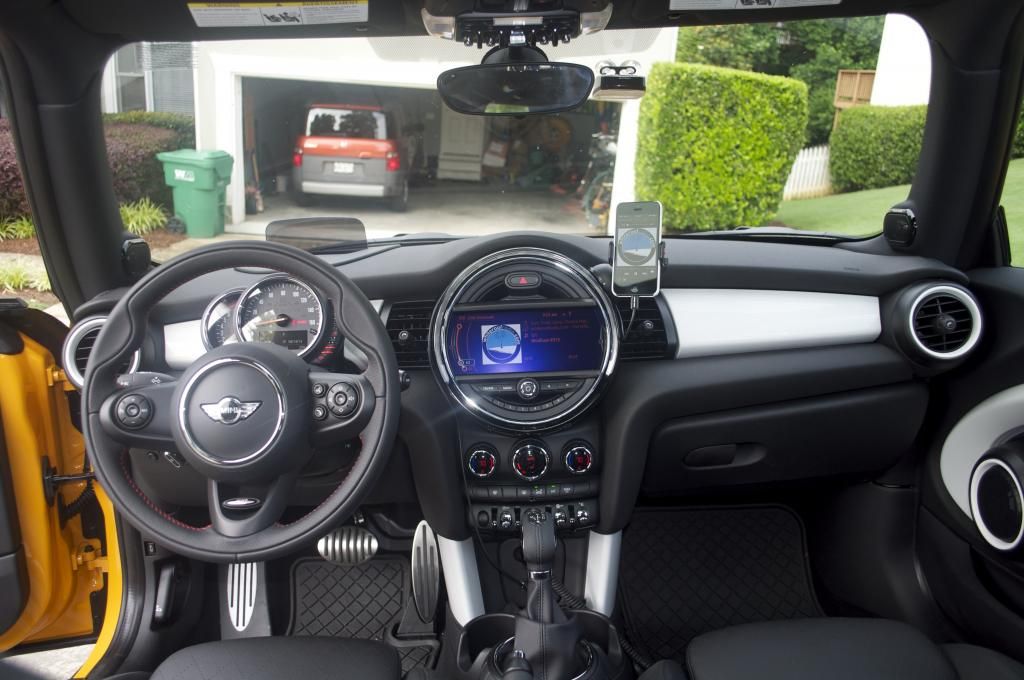
It's been there for five days now without issue. The ring around the radio is very smooth, providing a better surface for the mount than most dashes.
Thread Starter
|
5th Gear
Joined: Feb 2014
Posts: 830
Likes: 31
From: NYC
quick update:
i have an LG Nexus 5 and it has wireless charging capabilities. i don't have any pictures yet, but i was able to take an old round wireless charger that i had laying around (12mm thick) and put a #8 washer on the back of it. i also removed the foam over the hex screw in the middle of the cravenspeed mount and used loctite super glue to attach a #8 washer. this allowed me to attach the wireless charger onto the middle, allowing the X-grips of the mount to move freely. i can now attach my phone to the cravenspeed mount and it will automatically start charging w/out requiring me to plug it in (yes, that was annoying me a lot).
pictures to follow.
i have an LG Nexus 5 and it has wireless charging capabilities. i don't have any pictures yet, but i was able to take an old round wireless charger that i had laying around (12mm thick) and put a #8 washer on the back of it. i also removed the foam over the hex screw in the middle of the cravenspeed mount and used loctite super glue to attach a #8 washer. this allowed me to attach the wireless charger onto the middle, allowing the X-grips of the mount to move freely. i can now attach my phone to the cravenspeed mount and it will automatically start charging w/out requiring me to plug it in (yes, that was annoying me a lot).
pictures to follow.

3rd Gear
Joined: Feb 2012
Posts: 246
Likes: 0
quick update:
i have an LG Nexus 5 and it has wireless charging capabilities. i don't have any pictures yet, but i was able to take an old round wireless charger that i had laying around (12mm thick) and put a #8 washer on the back of it. i also removed the foam over the hex screw in the middle of the cravenspeed mount and used loctite super glue to attach a #8 washer. this allowed me to attach the wireless charger onto the middle, allowing the X-grips of the mount to move freely. i can now attach my phone to the cravenspeed mount and it will automatically start charging w/out requiring me to plug it in (yes, that was annoying me a lot).
pictures to follow.
i have an LG Nexus 5 and it has wireless charging capabilities. i don't have any pictures yet, but i was able to take an old round wireless charger that i had laying around (12mm thick) and put a #8 washer on the back of it. i also removed the foam over the hex screw in the middle of the cravenspeed mount and used loctite super glue to attach a #8 washer. this allowed me to attach the wireless charger onto the middle, allowing the X-grips of the mount to move freely. i can now attach my phone to the cravenspeed mount and it will automatically start charging w/out requiring me to plug it in (yes, that was annoying me a lot).
pictures to follow.

4th Gear
Joined: Jul 2014
Posts: 443
Likes: 1
From: SoCal
yes...really took all of 10 minutes...2 screws hold the cluster, unplug a harness, remove 3 screws, place mount, put longer screws, place back into slot, put harness and 2 screws back...DONE.
https://docs.google.com/document/d/1...8win-EjWXA/pub
https://docs.google.com/document/d/1...8win-EjWXA/pub