


Drivetrain Dash Command data log graphs


Thread Starter
|
4th Gear
Joined: Jan 2011
Posts: 478
Likes: 1
Dash Command data log graphs
Played with this briefly before my car went in for a new clutch/DMF. It would be interesting to see relative comparisons of other people's cars with different mods since so many people have the app and capability to log real data.
I used Dash Command to log the data and the free version of ScanXL to read the file. Entered as many of my car's parameters as were available.
I used alt/prt screen to dump the file into MS paint and reduced it to 75%.
Open to the format but if everyone standardized to the same parameters it would be easier to read and compare.
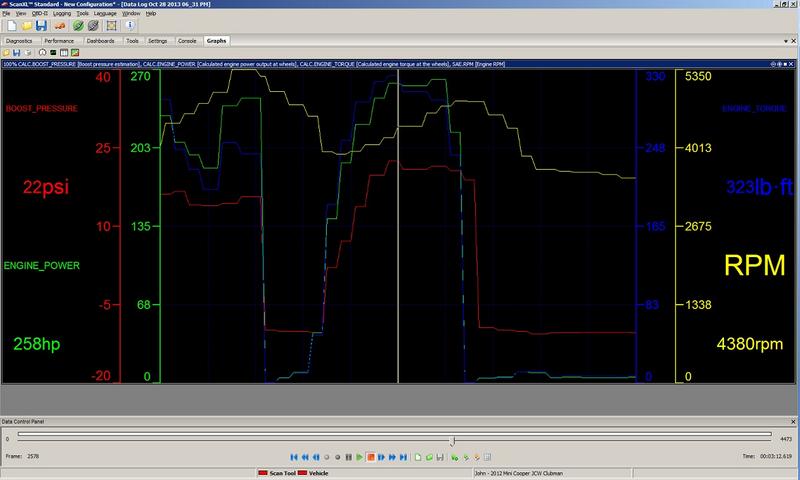
I used Dash Command to log the data and the free version of ScanXL to read the file. Entered as many of my car's parameters as were available.
I used alt/prt screen to dump the file into MS paint and reduced it to 75%.
Open to the format but if everyone standardized to the same parameters it would be easier to read and compare.

3rd Gear
Joined: Jan 2013
Posts: 165
Likes: 1
Cool idea. My only comment is that HP and torque might not be the most useful quantities, since they are estimated using many other inputs (and looking at your output, considerably over-estimated unless you are very highly modified and tuned).
I get similar over-estimates of power, which I don't totally understand. It seems like if you can provide an accurate weight you should be able to derive HP pretty easily. Maybe I'll try to do that using basic parameters and compare it to the DC over-estimates.
Edited to add: I see that those might not be gross over-estimates in your case.
I get similar over-estimates of power, which I don't totally understand. It seems like if you can provide an accurate weight you should be able to derive HP pretty easily. Maybe I'll try to do that using basic parameters and compare it to the DC over-estimates.
Edited to add: I see that those might not be gross over-estimates in your case.
Thread Starter
|
4th Gear
Joined: Jan 2011
Posts: 478
Likes: 1
Hehe. Maybe not but what interests me is the relative differences since a lot of people would be using the same tool.
I'll log a better data set once I get my car back. Before tune, after tune, and then after the DP and new tune.
I'll log a better data set once I get my car back. Before tune, after tune, and then after the DP and new tune.
Cool idea. My only comment is that HP and torque might not be the most useful quantities, since they are estimated using many other inputs (and looking at your output, considerably over-estimated unless you are very highly modified and tuned).
I get similar over-estimates of power, which I don't totally understand. It seems like if you can provide an accurate weight you should be able to derive HP pretty easily. Maybe I'll try to do that using basic parameters and compare it to the DC over-estimates.
Edited to add: I see that those might not be gross over-estimates in your case.
I get similar over-estimates of power, which I don't totally understand. It seems like if you can provide an accurate weight you should be able to derive HP pretty easily. Maybe I'll try to do that using basic parameters and compare it to the DC over-estimates.
Edited to add: I see that those might not be gross over-estimates in your case.


2nd Gear

Joined: Aug 2013
Posts: 59
Likes: 2
From: Texas
- brake specific fuel consumption (most confusing because it is not really a constant)
- Drag coefficients
- Frontal area
My Dashcommand iOS vehicle settings:
Engine displacement: 1598cc (owner manual)
Fuel type: Gasoline
Fuel tank capacity: 13.2 gal (owner manual)
Brake specific fuel consumption: .50
Tire size specification: 205/45R17
Final drive ratios: (NAM VIN Decoder)
- Axle ratio: 3.65
- 1st gear: 3.31
- 2nd gear: 2.13
- 3rd gear: 1.48
- 4th gear: 1.14
- 5th gear: 0.95
- 6th gear: 0.82
- 7th gear: nothing entered
Additional weight: 150 lb (my weight)
Drag coefficients: Hardtop 0.36, Clubman 0.34, Countryman 0.36 (From the TheCheatOSX's service bulletin database here, SIM000210)
Frontal area: 1.99 square meters (here)
Maximum engine speed: 6500 rpm
Minimum engine speed: 700 rpm
Last edited by pepperwhiteknight; Dec 5, 2013 at 10:20 AM. Reason: updated drag coef. and weight
Thread Starter
|
4th Gear
Joined: Jan 2011
Posts: 478
Likes: 1
I did not have frontal area. Good data find. I used 2833 for curb weight since I have a Clubman. Should probably include my 230lbs in there somewhere as well.
Yes definitely. We would also have to agree on a test method too. Ex: flat land, 3rd gear, 3000 rpm to red line, 5 runs take the average. Regardless of the validity of the hp and torque calculations of the app any assistance would be appreciated in picking the best numbers for...
My Dashcommand iOS vehicle settings:
Engine displacement: 1598cc (owner manual)
Fuel type: Gasoline
Fuel tank capacity: 13.2 gal (owner manual)
Brake specific fuel consumption: .50
Tire size specification: 205/45R17
Final drive ratios: (NAM VIN Decoder)
Additional weight: 150 lb (my weight)
Drag coefficients: 0.36 (here)
Frontal area: 1.99 square meters (here)
Maximum engine speed: 6500 rpm
Minimum engine speed: 700 rpm
- brake specific fuel consumption (most confusing because it is not really a constant)
- Drag coefficients
- Frontal area
My Dashcommand iOS vehicle settings:
Engine displacement: 1598cc (owner manual)
Fuel type: Gasoline
Fuel tank capacity: 13.2 gal (owner manual)
Brake specific fuel consumption: .50
Tire size specification: 205/45R17
Final drive ratios: (NAM VIN Decoder)
- Axle ratio: 3.65
- 1st gear: 3.31
- 2nd gear: 2.13
- 3rd gear: 1.48
- 4th gear: 1.14
- 5th gear: 0.95
- 6th gear: 0.82
- 7th gear: nothing entered
Additional weight: 150 lb (my weight)
Drag coefficients: 0.36 (here)
Frontal area: 1.99 square meters (here)
Maximum engine speed: 6500 rpm
Minimum engine speed: 700 rpm
2nd Gear
Joined: Aug 2013
Posts: 59
Likes: 2
From: Texas
Trending Topics


Got my Vgate elm327 connected to my iphone via wifi. Took me a bit to get it to connect to the dash command app. Not sure what happened but as I was in the gauge screen, my car started to stutter at idle until the check engine light came on and it stalled out. Any ideas?
Sent from my iPad using NAMotoring
Sent from my iPad using NAMotoring
Thread Starter
|
4th Gear
Joined: Jan 2011
Posts: 478
Likes: 1
No, but you might have better lucking posting in a trouble shooting forum.
Got my Vgate elm327 connected to my iphone via wifi. Took me a bit to get it to connect to the dash command app. Not sure what happened but as I was in the gauge screen, my car started to stutter at idle until the check engine light came on and it stalled out. Any ideas?
Sent from my iPad using NAMotoring
Sent from my iPad using NAMotoring
Thread Starter
|
4th Gear
Joined: Jan 2011
Posts: 478
Likes: 1
Been running into walls everywhere trying to get this thread up and running. Just got my car back but have to break in the clutch for 300 miles. No hard pulls until then.
Probably better to start new thread once we get a data format hashed out. Or just reformat as people ask to see other data?
Timing advance will be interesting before/after the various pieces I'm bolting on.
Probably better to start new thread once we get a data format hashed out. Or just reformat as people ask to see other data?
Timing advance will be interesting before/after the various pieces I'm bolting on.

This thread is a great idea. I'm also using DC and importing to ScanXL. I've been recording RPM, boost, AFR and timing displayed in the top window. I put IAT in the second window but we could put HP and torque in the second window. I'd be open to other formats though. Anybody else have a preference?
I've mainly been recording this data as my JB+ was just installed and I'm seeing how far I can push it on 93 octane without the ECU pulling timing.
I've mainly been recording this data as my JB+ was just installed and I'm seeing how far I can push it on 93 octane without the ECU pulling timing.
2nd Gear
Joined: Aug 2013
Posts: 59
Likes: 2
From: Texas
No preference but have been changing the graphs around a lot. Been trying to decide how many and which sensors to monitor. Purchased the kiwi2 and dashcommand specifically to monitor timing, boost, and afr.
Graph with Spark Advance, Boost, RPM, Long Term Fuel Trim, AFR, Torque, HP, Short Term Fuel Trim.
https://www.dropbox.com/s/jy0em88u8x...20-%20Copy.vdl
Graph with Spark Advance, Boost, RPM, Long Term Fuel Trim, AFR, Torque, HP, Short Term Fuel Trim.
https://www.dropbox.com/s/jy0em88u8x...20-%20Copy.vdl

2nd Gear
Joined: Nov 2012
Posts: 57
Likes: 0
From: Chicago Area
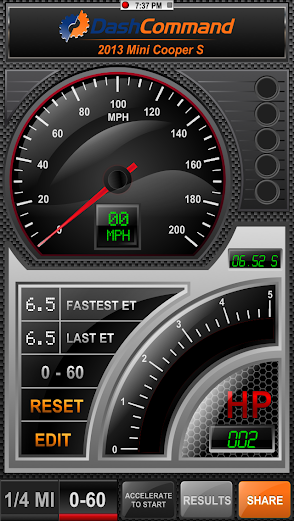
Purchased my dash command ($9.99)and installed my ELM327 WiFi OBD. Had to manually enter the IP address and port in my iPhone and in the app. During my first drive getting to know the Dash Command I recorded 240 hp during a max effort 0-60 run. I am assuming this is shaft HP. Does anyone know of a formula to covert the Dash Command HP to wheel HP? With my mods and the JB+ I had assumed I might be able to obtain about 200-210 HP at the wheels. Is a better way to use the 0-60 time against the vehicle's curb weight? My JB+ is in the default position.
I will enter all the data listed by pepperwhiteknight above. Perhaps that will bring things into a more realistic range.
I do find the app fascinating and expect to have a lot of fun with it.
I will enter all the data listed by pepperwhiteknight above. Perhaps that will bring things into a more realistic range.
I do find the app fascinating and expect to have a lot of fun with it.
Last edited by PenguinOnTheTelly; Nov 9, 2013 at 08:18 PM.
2nd Gear
Joined: Nov 2012
Posts: 57
Likes: 0
From: Chicago Area
BTW I'm hoping the ELM327 goes to sleep after the vehicle does. I don't want to return to a dead battery in the am.
2nd Gear
Joined: Nov 2012
Posts: 57
Likes: 0
From: Chicago Area
Adding a Gauge
I apologize if I am missing something obvious but I would appreciate any feedback on how to add a gauge (i.e. spark advance) to my gauge page(s). Am I correct in that you need to build your gauge from scratch and rename it? I would have thought there would be a default gauge selected to which you could amend the given ranges. If this is the methodology what would be a good range in degrees to set for spark advance/retard?
Additionally is there any way to change the scale range on the dashboard for a greater degree of accuracy. For example I'd like to change the HP and Torque scales from 500 HP to 250 HP.
Additionally is there any way to change the scale range on the dashboard for a greater degree of accuracy. For example I'd like to change the HP and Torque scales from 500 HP to 250 HP.
Last edited by PenguinOnTheTelly; Nov 10, 2013 at 09:47 AM.


I apologize if I am missing something obvious but I would appreciate any feedback on how to add a gauge (i.e. spark advance) to my gauge page(s). Am I correct in that you need to build your gauge from scratch and rename it? I would have thought there would be a default gauge selected to which you could amend the given ranges. If this is the methodology what would be a good range in degrees to set for spark advance/retard? Additionally is there any way to change the scale range on the dashboard for a greater degree of accuracy. For example I'd like to change the HP and Torque scales from 500 HP to 250 HP.
On the gauges screen you can edit the existing gauges or add your own. For example to get timing edit an existing gauge and just change the PID to timing, it's under the spark section. Then scroll down to adjust the scale to what ever to want. Also you other settings, like color, to your liking.
I have boost displayed from 10 to 18 for example with a maximum triangle indicator and the digital part of the gauge displays engine coolant temp. Then I have a graph that displays AFR, Timing and boost. This really helps to see if timing is being pulled while under boost.
There is a link to the manual from inside the app if that helps.
2nd Gear
Joined: Nov 2012
Posts: 57
Likes: 0
From: Chicago Area
Custom Gauge
The short answer is yes you can edit anything in the gauges screen from the app. To edit the dashboard screen it's more involved and you have to use skinXL I think it's called.
On the gauges screen you can edit the existing gauges or add your own. For example to get timing edit an existing gauge and just change the PID to timing, it's under the spark section. Then scroll down to adjust the scale to what ever to want. Also you other settings, like color, to your liking.
I have boost displayed from 10 to 18 for example with a maximum triangle indicator and the digital part of the gauge displays engine coolant temp. Then I have a graph that displays AFR, Timing and boost. This really helps to see if timing is being pulled while under boost.
There is a link to the manual from inside the app if that helps.
On the gauges screen you can edit the existing gauges or add your own. For example to get timing edit an existing gauge and just change the PID to timing, it's under the spark section. Then scroll down to adjust the scale to what ever to want. Also you other settings, like color, to your liking.
I have boost displayed from 10 to 18 for example with a maximum triangle indicator and the digital part of the gauge displays engine coolant temp. Then I have a graph that displays AFR, Timing and boost. This really helps to see if timing is being pulled while under boost.
There is a link to the manual from inside the app if that helps.


After you get a gauge set up and you go to move it be very careful not to accidently hit the delete button instead of the move button, there is no 'undo' button. DashCommand is a real time consumer, lol.
I run my Adv from -20 to 45, boost from 0 to 20, rpm 0 to 7000 and afr from 10 to 30.
On a side note if you have a Mac and the iFunBox app on the Mac you can edit of the skins/gauges in DashXL and upload it directly to your iPhone. The raw iPhone path is /var/mobile/applications/(long string of numbers mine starts with 4CID8A50)/documents/dashxl/ on the phone itself. Been playing with one called ACM Tuxedo. Bit of a PIA though as the DashXL is not very friendly and has a bit of a learning curve.
On a side note if you have a Mac and the iFunBox app on the Mac you can edit of the skins/gauges in DashXL and upload it directly to your iPhone. The raw iPhone path is /var/mobile/applications/(long string of numbers mine starts with 4CID8A50)/documents/dashxl/ on the phone itself. Been playing with one called ACM Tuxedo. Bit of a PIA though as the DashXL is not very friendly and has a bit of a learning curve.
Last edited by Tigger2011; Nov 10, 2013 at 06:27 PM.