


Wheel bearing and Wheel speed sensor?


Thread Starter
|
5th Gear
Joined: Sep 2012
Posts: 938
Likes: 127
Wheel bearing and Wheel speed sensor?
So my 2003 mini copper S (R53) has 142,000 miles and I started hearing something last week that sounded sort of like loud tire noise. I also am feeling a bit of a vibration. The noise gets faster and louder the faster I go. I'm thinking that it's a wheel bearing?
The plot thickened today when my ABS, TPMS, and DSC lights came on today.
I'm wondering if a bad wheel bearing could cause the trifecta or if a wheel speed sensor has gone bad too?
I haven't pulled the wheel or done any work on the car at all as I just started noticing the noise about a week ago. I'm not 100% sure that it is a wheel bearing but it seems to make sense to me that it would be a bearing causing the noise. The tires are a bit old, but probably have 4/32's of tread depth left, I just had it aligned about a year ago after replacing the shocks and springs. The brake discs and pads are about a year old and haven't had any problems.
My main question is could the wheel bearing cause the trifecta? or are the odds better that a wheel speed sensor went bad as well?
forgot to add it seems like the noise and vibration are coming from the front passenger side wheel.
Thanks for the help
The plot thickened today when my ABS, TPMS, and DSC lights came on today.
I'm wondering if a bad wheel bearing could cause the trifecta or if a wheel speed sensor has gone bad too?
I haven't pulled the wheel or done any work on the car at all as I just started noticing the noise about a week ago. I'm not 100% sure that it is a wheel bearing but it seems to make sense to me that it would be a bearing causing the noise. The tires are a bit old, but probably have 4/32's of tread depth left, I just had it aligned about a year ago after replacing the shocks and springs. The brake discs and pads are about a year old and haven't had any problems.
My main question is could the wheel bearing cause the trifecta? or are the odds better that a wheel speed sensor went bad as well?
forgot to add it seems like the noise and vibration are coming from the front passenger side wheel.
Thanks for the help
Last edited by Racingguy04; Feb 18, 2013 at 05:31 PM.


If the bearing has failing in a way that the sensor can't read it right it can really cause the light to come on, but you would need to replace your faulty wheel bearing and see, or have the ABS faults read to verify the fault is the speed sensor that is on the bad wheel bearing.
If you need a bearing we stock them
http://www.waymotorworks.com/wheel-b...0-r52-r53.html
If you need a bearing we stock them
http://www.waymotorworks.com/wheel-b...0-r52-r53.html

Thread Starter
|
5th Gear
Joined: Sep 2012
Posts: 938
Likes: 127
So I changed the wheel bearing with very little drama, however the wheel sensor was damaged so I'm currently waiting for the sensor to arrive. Thought I'd share a couple of pictures of the wheel bearing, I found one of the ***** in about 4 pieces.

1st Gear
Joined: Apr 2009
Posts: 25
Likes: 0
From: Plainfield, IN
I just experienced the exact symptoms. Had someone (more knowledgeable) look and diagnose. Same issue, bad wheel bearing. He changed the wheel bearing and the same lights are on now. He tried to reset the error, no go. So I guess I need a new sensor.
My I ask where did you order yours?
My I ask where did you order yours?

1st Gear
Joined: Oct 2009
Posts: 22
Likes: 0
I got mine at autopartswarehouse.com http://www.autopartswarehouse.com/sk...gs+Best+Seller
it was $46
it was $46
1st Gear
Joined: Apr 2009
Posts: 25
Likes: 0
From: Plainfield, IN
Thank you for a quick response. I'm going to clean and inspect it prior to buying a new one if need be.
Thanks
Thanks
Trending Topics
Thread Starter
|
5th Gear
Joined: Sep 2012
Posts: 938
Likes: 127
No worries, probably a good idea to have a look at it before you commit to replacing it. It was very obvious when I saw mine that it was damaged. I'm betting it was damaged when the bearing blew up. The end of the sensor is plastic and it has wires/metal underneath. When I pulled my wheel bearing/hub off I saw that it had been rubbed and there was metal showing.
I finally replaced mine tonight and it was a bear to get the old one out, I ended up using a hammer and punch to get it out. Since it was already damaged I didn't feel like I needed to be too careful with it. It was also hard to get the new one in. I tried to clean the hole out as best I could and I lubed the sensor but it was still a struggle. I also made the mistake of not cleaning the lube off the sensor, the light didn't go off when I took it for a spin, so I got to pull it all apart again and clean the sensor off.
Now it works like a champ.
I finally replaced mine tonight and it was a bear to get the old one out, I ended up using a hammer and punch to get it out. Since it was already damaged I didn't feel like I needed to be too careful with it. It was also hard to get the new one in. I tried to clean the hole out as best I could and I lubed the sensor but it was still a struggle. I also made the mistake of not cleaning the lube off the sensor, the light didn't go off when I took it for a spin, so I got to pull it all apart again and clean the sensor off.
Now it works like a champ.


Most of the time when you try to pop the sensors out they are rusted into place.
I had one of those snap in two when replacing the wheel bearing. Then tend to seize into the socket.
For the wheel bearing after you remove it, clean the axle carrier where the wheel bearing mounts back in with some fine sand paper, spray some lubercant and then wipe it clean, it helps seat the new wheel bearing seal into place.
Front ABS sensor
http://www.ecstuning.com/Search/34526756384/

When installing the ABS sensor make sure you clean out the insertion hole, as I have had corrosion built up and when you slide it in they tend to stick.
I had one of those snap in two when replacing the wheel bearing. Then tend to seize into the socket.
For the wheel bearing after you remove it, clean the axle carrier where the wheel bearing mounts back in with some fine sand paper, spray some lubercant and then wipe it clean, it helps seat the new wheel bearing seal into place.
Front ABS sensor
http://www.ecstuning.com/Search/34526756384/
When installing the ABS sensor make sure you clean out the insertion hole, as I have had corrosion built up and when you slide it in they tend to stick.
__________________

MINI Guru/ MINI Owner Since 2004 | NEW Lifetime Part Replacement | Local Pickup
Milltek | Genuine MINI | Forge Motorsport | NM Engineering | ECS Performance | M7 Speed
Customer Service Hours: 8am-8pm EST|Sales Team Hours: 8am-11pm | SAT 10am-7pm 800.924.5172
MINI Guru/ MINI Owner Since 2004 | NEW Lifetime Part Replacement | Local Pickup
Milltek | Genuine MINI | Forge Motorsport | NM Engineering | ECS Performance | M7 Speed
Customer Service Hours: 8am-8pm EST|Sales Team Hours: 8am-11pm | SAT 10am-7pm 800.924.5172

4th Gear
Joined: Mar 2011
Posts: 315
Likes: 1
From: Chicago, IL
I just replaced my passenger side front wheel bearing last December after a wheel speed sensor replacement gone wrong (don't drill the old one out when it breaks off, and if you do, be careful  ).
).
Shame you can't just buy those rubber, magnet-impregnated rings separately. At least the job was easy enough. I didn't even have to pop off the LCA/Upright balljoint.
).Shame you can't just buy those rubber, magnet-impregnated rings separately. At least the job was easy enough. I didn't even have to pop off the LCA/Upright balljoint.

I'm thinking I have a bearing issue and plan on replacing mine next weekend. Is it as simple as removing the rotor and pull the bearing? Any DIYs on this? Been looking but can't seem to find anything. Thanks!
Front or rear wheel bearing?
For the front wheel bearing,
1.Pull the wheel off , remove the brakes rotors & set screw for rotor, and remove the brake caliper and set it off to the side.
2.Loosen the main axle nut and remove it .
Main axle nut -
http://www.ecstuning.com/Search/31106773005/ES48891/
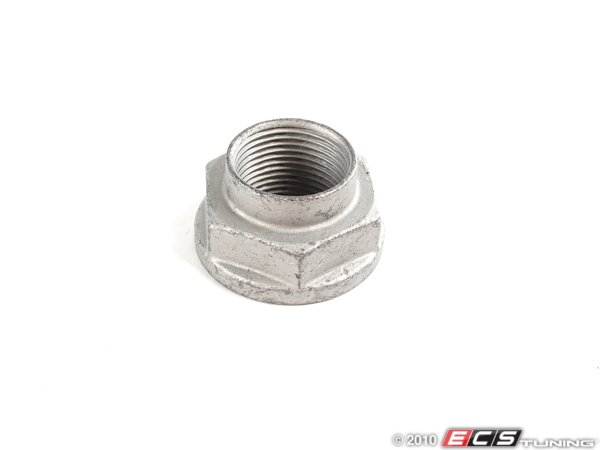
3. Undo the four bolts on the back.
4. Pull the wheel bearing off the carrier and push the axle end through the wheel bearing center.
5. Install the new bearing just work in reverse.
The rear is even less work , because there is not a main axle bolt or axle to mess with.
Here is another link about it :
http://www.minitorque.com/forum/f25/...-bearing-7647/
http://www.mini2.com/forum/maintenan...placement.html
We have wheel bearings and the kits needed.
http://www.ecstuning.com/Mini-2003-Cooper-R53-S-Coupe-L4_1.6L_W11B16A/Drivetrain/Wheel_Bearings/
Click the Link Above: For 2003 MINI Cooper S
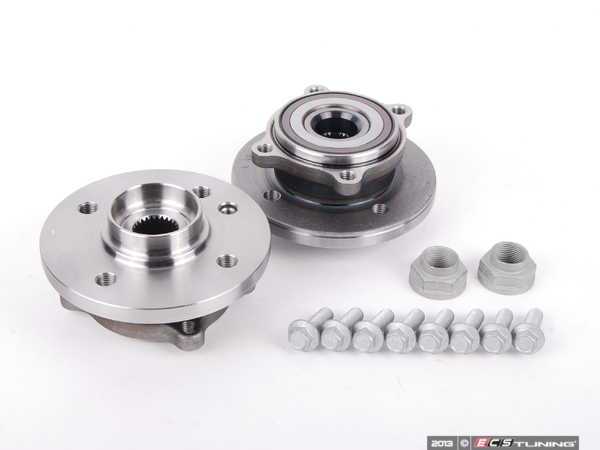
Thanks and I hope that helps.
For the front wheel bearing,
1.Pull the wheel off , remove the brakes rotors & set screw for rotor, and remove the brake caliper and set it off to the side.
2.Loosen the main axle nut and remove it .
Main axle nut -
http://www.ecstuning.com/Search/31106773005/ES48891/
3. Undo the four bolts on the back.
4. Pull the wheel bearing off the carrier and push the axle end through the wheel bearing center.
5. Install the new bearing just work in reverse.
The rear is even less work , because there is not a main axle bolt or axle to mess with.
Here is another link about it :
http://www.minitorque.com/forum/f25/...-bearing-7647/
http://www.mini2.com/forum/maintenan...placement.html
We have wheel bearings and the kits needed.
http://www.ecstuning.com/Mini-2003-Cooper-R53-S-Coupe-L4_1.6L_W11B16A/Drivetrain/Wheel_Bearings/
Click the Link Above: For 2003 MINI Cooper S
Thanks and I hope that helps.
__________________
MINI Guru/ MINI Owner Since 2004 | NEW Lifetime Part Replacement | Local Pickup
Milltek | Genuine MINI | Forge Motorsport | NM Engineering | ECS Performance | M7 Speed
Customer Service Hours: 8am-8pm EST|Sales Team Hours: 8am-11pm | SAT 10am-7pm 800.924.5172
MINI Guru/ MINI Owner Since 2004 | NEW Lifetime Part Replacement | Local Pickup
Milltek | Genuine MINI | Forge Motorsport | NM Engineering | ECS Performance | M7 Speed
Customer Service Hours: 8am-8pm EST|Sales Team Hours: 8am-11pm | SAT 10am-7pm 800.924.5172
Last edited by ECSTuning; Mar 22, 2013 at 08:27 AM.

MTC is a budget friendly option that's carries a 1 year warranty from date of purchase.
Non JCW or Standard front brakes for Gen 1
Caliper can come off with carrier with the larger two bolts in the back.
Caliper is #1 and caliper carrier is #2 , bolts holding the carrier is #3.

If you have JCW Red " john cooper work "front brakes:
Caliper is #3 and caliper carrier is #4, bolts holding the carrier is #5.

For the picture diagrams you can tell what you have.
Thanks
Non JCW or Standard front brakes for Gen 1
Caliper can come off with carrier with the larger two bolts in the back.
Caliper is #1 and caliper carrier is #2 , bolts holding the carrier is #3.
If you have JCW Red " john cooper work "front brakes:
Caliper is #3 and caliper carrier is #4, bolts holding the carrier is #5.
For the picture diagrams you can tell what you have.
Thanks
__________________
MINI Guru/ MINI Owner Since 2004 | NEW Lifetime Part Replacement | Local Pickup
Milltek | Genuine MINI | Forge Motorsport | NM Engineering | ECS Performance | M7 Speed
Customer Service Hours: 8am-8pm EST|Sales Team Hours: 8am-11pm | SAT 10am-7pm 800.924.5172
MINI Guru/ MINI Owner Since 2004 | NEW Lifetime Part Replacement | Local Pickup
Milltek | Genuine MINI | Forge Motorsport | NM Engineering | ECS Performance | M7 Speed
Customer Service Hours: 8am-8pm EST|Sales Team Hours: 8am-11pm | SAT 10am-7pm 800.924.5172
Yes, Some people can slide the caliper and carrier as a whole, depends if the older brake pads hinge up on the lip of the old rotors.
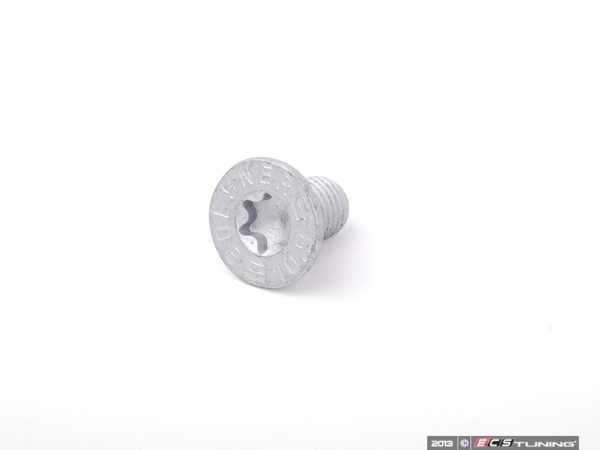
The bolt for the rotor takes a T50 torx and sometimes sticks a little. If you never have had the rotor off that might be the hardest part. When ever I do a brake job I just replace them and put some anti seize on the head of the new ones.
Here is a pic of the brake rotor screw that attaches to the face of the rotor to the hub. One per rotor.
http://www.ecstuning.com/Search/07136772426/ES16458/
Here is another link to help for the wheel bearing and speed senor:
https://www.northamericanmotoring.co...ed-sensor.html
Thanks
The bolt for the rotor takes a T50 torx and sometimes sticks a little. If you never have had the rotor off that might be the hardest part. When ever I do a brake job I just replace them and put some anti seize on the head of the new ones.
Here is a pic of the brake rotor screw that attaches to the face of the rotor to the hub. One per rotor.
http://www.ecstuning.com/Search/07136772426/ES16458/
Here is another link to help for the wheel bearing and speed senor:
https://www.northamericanmotoring.co...ed-sensor.html
Thanks
__________________
MINI Guru/ MINI Owner Since 2004 | NEW Lifetime Part Replacement | Local Pickup
Milltek | Genuine MINI | Forge Motorsport | NM Engineering | ECS Performance | M7 Speed
Customer Service Hours: 8am-8pm EST|Sales Team Hours: 8am-11pm | SAT 10am-7pm 800.924.5172
MINI Guru/ MINI Owner Since 2004 | NEW Lifetime Part Replacement | Local Pickup
Milltek | Genuine MINI | Forge Motorsport | NM Engineering | ECS Performance | M7 Speed
Customer Service Hours: 8am-8pm EST|Sales Team Hours: 8am-11pm | SAT 10am-7pm 800.924.5172
Last edited by ECSTuning; Mar 22, 2013 at 11:22 AM.

2nd Gear
Joined: May 2012
Posts: 129
Likes: 1
From: Boston
I replaced the bearing and sensor earlier this year. Before I was able to make it down my street the ABS TC lights came back up. I had to drill the original sensor out as it was the only option left after breaking that small piece in the sleeve.
Not a year later and my bearing is bad again....
Not a year later and my bearing is bad again....

Get high quality parts. I found WWW.MINIPARTSMASS.COM had the Value Service kit for Front wheel bearing and hardware at a GREAT price. It was OEM and I did both sides over a year ago without a problem.
Happy New Year.
///Rich
Happy New Year.
///Rich
Did you clean the dirt or get any grease on the head of the ABS sensor. Also if you bump the bottom head of the sensor that is exposed , you can crack the sensor and then it will not work. They get rusted into place and fuse themselves in that location. Bump them and they break. See the instructions I posted above with the part #'s , check you OEM part number against them. OEM or aftermarket from US is fine. Don't know about other companies.
My guess on install you got dirt greas on a sensor and it will not pick up on the back of the wheel bearing of you touched and crack one.
Thanks
My guess on install you got dirt greas on a sensor and it will not pick up on the back of the wheel bearing of you touched and crack one.
Thanks
__________________
MINI Guru/ MINI Owner Since 2004 | NEW Lifetime Part Replacement | Local Pickup
Milltek | Genuine MINI | Forge Motorsport | NM Engineering | ECS Performance | M7 Speed
Customer Service Hours: 8am-8pm EST|Sales Team Hours: 8am-11pm | SAT 10am-7pm 800.924.5172
MINI Guru/ MINI Owner Since 2004 | NEW Lifetime Part Replacement | Local Pickup
Milltek | Genuine MINI | Forge Motorsport | NM Engineering | ECS Performance | M7 Speed
Customer Service Hours: 8am-8pm EST|Sales Team Hours: 8am-11pm | SAT 10am-7pm 800.924.5172

2nd Gear
Joined: Apr 2012
Posts: 123
Likes: 0
From: Bay Area, Ca.
Thanks. So this is happening now. The trifecta of lights are on when I start the engine but once I get rolling the lights turn off. Sometimes they do come back on while I am driving but not to often. Weird...

