R56 Things you didn't know about your R56 MINI


6th Gear
Joined: Feb 2012
Posts: 2,264
Likes: 31
From: wisconsin, usa
https://ol.miniusa.com/home/login?keepol=true

2nd Gear
Joined: Mar 2014
Posts: 80
Likes: 0
go here, register and then you can access an obline .pdf of your owners manual
https://ol.miniusa.com/home/login?keepol=true
https://ol.miniusa.com/home/login?keepol=true
6th Gear
Joined: Feb 2012
Posts: 2,264
Likes: 31
From: wisconsin, usa
if set to 1 it is not noticeable

5th Gear


Joined: Jun 2012
Posts: 1,016
Likes: 44
Sport mode only does it with 2013 models. 2013 JCWs always run at 90-95 C

Interesting about the 2013 JCW, ours runs like the others hot until its under load.
5th Gear
Joined: Jun 2012
Posts: 1,016
Likes: 44
With our 2103, sport mode only drops the temoperature after its been under load (like an autocross run). The previous years would drop the temperature under load, but then raise it after the load went away.
Interesting about the 2013 JCW, ours runs like the others hot until its under load.
Interesting about the 2013 JCW, ours runs like the others hot until its under load.

5th Gear
Joined: Feb 2008
Posts: 687
Likes: 19
From: Melbourne Australia
Just check under the carpet beneath the front seats is dry. The control unit for DSC, tire pressures, electronic LSD if fitted and who knows what else is situated there. No, I don't know why. Mine shorted out 2-3 months after carpet got wet, for a $4500 repair bill - the sensor itself is ~$1800.
6th Gear
Joined: Feb 2012
Posts: 2,264
Likes: 31
From: wisconsin, usa
my 03/2012 build all4 drops coolant temp if the rpm is held over 4000 ... sport on or sport off
it also drops coolant temp with A/C on, fan speed and recirculation have no effect, only need the A/C to be on
it also drops coolant temp with A/C on, fan speed and recirculation have no effect, only need the A/C to be on

1st Gear
Joined: Aug 2014
Posts: 37
Likes: 0
Just tested this on mine. My mini auto locks at 10mph and unlocks at shut off.
6th Gear
Joined: Feb 2012
Posts: 2,264
Likes: 31
From: wisconsin, usa
I do have mine set to 6 ... I like the feature of auto volume control ... if anything I wish I could get more increase at speed because I run open windows most of the time
5th Gear
Joined: Feb 2008
Posts: 687
Likes: 19
From: Melbourne Australia


6th Gear
Joined: Dec 2006
Posts: 4,743
Likes: 5
From: Hot Springs Village, AR
Each key is programmed separately, so be sure to do your other one, too. That's true of all of the owner programmable options.

2nd Gear
Joined: Aug 2014
Posts: 134
Likes: 0
Perhaps this has already been posted regarding cruise control on my F56. Let's say you have the cruise set at 63 mph and you hold the down button just briefly, the cruise will reset to 60. Hitting the down button again it will reset to 55 and on and on. Same thing works for upping the cruise. It is quite useful for me when speed limits change, of course, that is assuming you are following the speed limits
6th Gear
Joined: Dec 2006
Posts: 4,743
Likes: 5
From: Hot Springs Village, AR
Perhaps this has already been posted regarding cruise control on my F56. Let's say you have the cruise set at 63 mph and you hold the down button just briefly, the cruise will reset to 60. Hitting the down button again it will reset to 55 and on and on. Same thing works for upping the cruise. It is quite useful for me when speed limits change, of course, that is assuming you are following the speed limits
BTW, If you have an F56, you're on the wrong thread. This one is for Gen 2 cars (R56). Cruise control works the same, though--it's a typical BMW trait.

Things you didn't know about your R56 MINI
Originally Posted by daffodildeb
A light touch (up or down) changes 1 mph. A heavier touch should be 5 mph.
Now that you've given this tip I'm going to have to try it out — I'll try both varying force and duration.
6th Gear
Joined: Dec 2006
Posts: 4,743
Likes: 5
From: Hot Springs Village, AR
I don't think it's so much the force of touch but the duration. I've had the caps off the circuit boards underneath and they appear to be pretty ordinary membrane switches.
Now that you've given this tip I'm going to have to try it out — I'll try both varying force and duration.
Now that you've given this tip I'm going to have to try it out — I'll try both varying force and duration.
If I had my owner's manual we could settle this, but I'm too lazy to walk out to the garage.

Things you didn't know about your R56 MINI
Originally Posted by daffodildeb
I don't know... It's always been force in previous MINIs, and in Bimmers (my last 4 have had this feature).
If I had my owner's manual we could settle this, but I'm too lazy to walk out to the garage.
If I had my owner's manual we could settle this, but I'm too lazy to walk out to the garage.
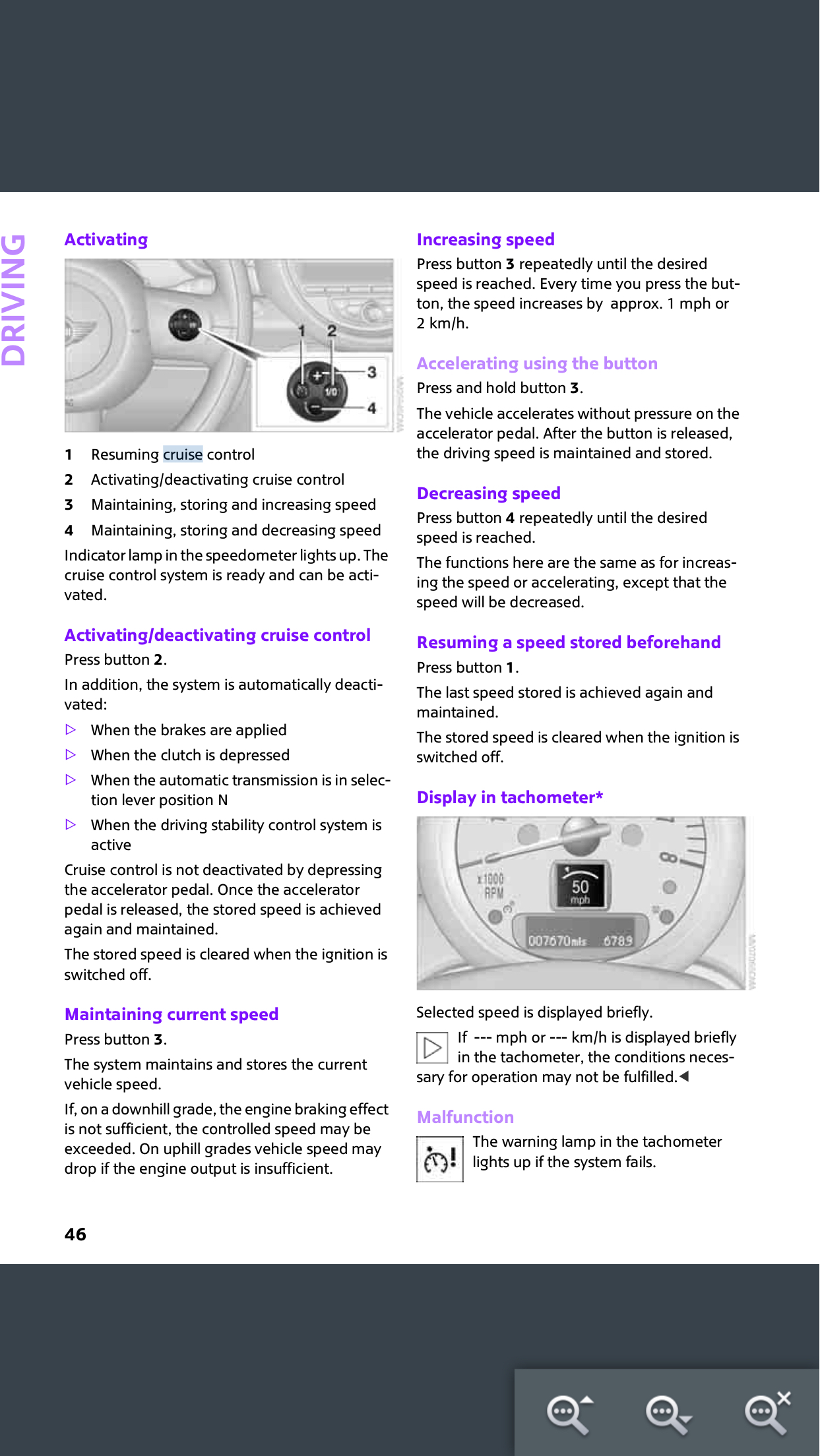
Increasing speed
Press button 3 repeatedly until the desired speed is reached. Every time you press the but-ton, the speed increases by approx. 1 mph or 2 km/h.
Accelerating using the button
Press and hold button 3.
The vehicle accelerates without pressure on the accelerator pedal. After the button is released, the driving speed is maintained and stored.
[b{Decreasing speed [/b]
Press button 4 repeatedly until the desired speed is reached.
The functions here are the same as for increas-ing the speed or accelerating, except that the speed will be decreased.