


Replacing backup / reverse light


Thread Starter
|
Neutral
Joined: Oct 2008
Posts: 6
Likes: 0
Replacing backup / reverse light
I have an 03 Cooper S
Feel kinda ridiculous for asking this, but couldn't find it anywhere on the forum, and my owners manual says that if you have an S you need to take it into the dealer
My backup/reverse light is out and I want to try replacing the bulb. How do I get at the thing? Thanks!
Feel kinda ridiculous for asking this, but couldn't find it anywhere on the forum, and my owners manual says that if you have an S you need to take it into the dealer
My backup/reverse light is out and I want to try replacing the bulb. How do I get at the thing? Thanks!

Hmmm... 03... is that with the light in the bumper?
If so... when the car is COLD (so you don't get burned on the exhaust) lay down and look up under the car. The light housing just snaps into the bumper - squeeze "ears" on either side on the back of the bumper and it releases and pushes out through the hole. Then unplug bulb and replace.
If so... when the car is COLD (so you don't get burned on the exhaust) lay down and look up under the car. The light housing just snaps into the bumper - squeeze "ears" on either side on the back of the bumper and it releases and pushes out through the hole. Then unplug bulb and replace.


Ok, well im going to bring up a dead topic because I am having a similar problem.
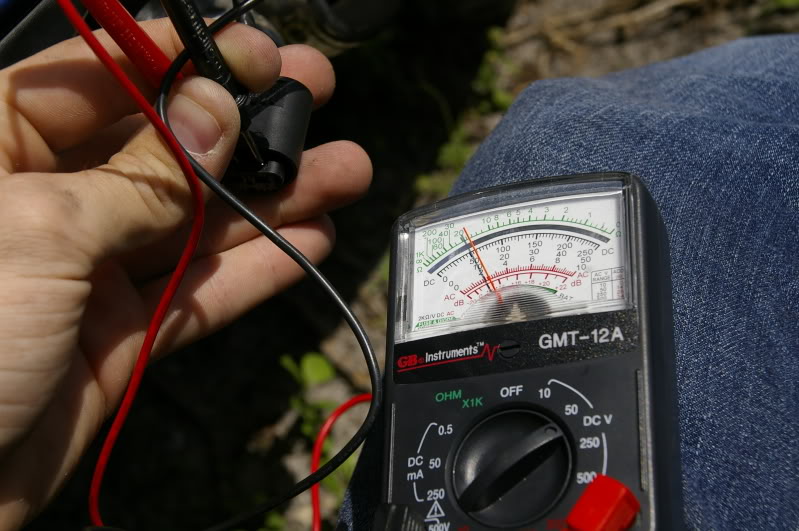
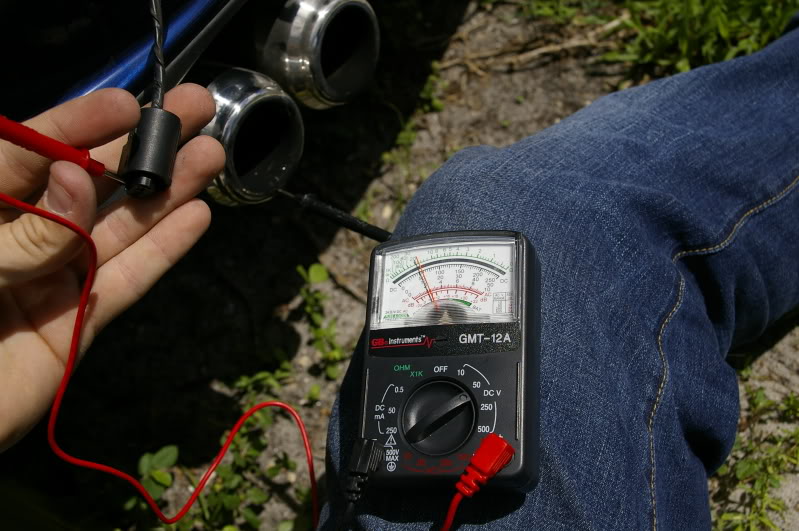
My reverse light went out, and when I went to change it, NADDA! I got out my multimeter and tested it, I'm getting 12v (car was off) at the plug and the socket but the light wont come on!
Some one please help me!
My reverse light went out, and when I went to change it, NADDA! I got out my multimeter and tested it, I'm getting 12v (car was off) at the plug and the socket but the light wont come on!
Some one please help me!

OVERDRIVE
Joined: May 2005
Posts: 8,233
Likes: 128
From: San Francisco
Were you testing both +/- at the socket (if you tested using a ground somewhere else, check the socket's ground). If you are getting 12V at the bulb holder, the only thing I could think of is that the center spring metal contact has compressed and isn''t contacting the bulb. Do you feel it pushing back when you install the bulb? Or else there may be corrosion on the contact -- rub it with a pencil eraser.
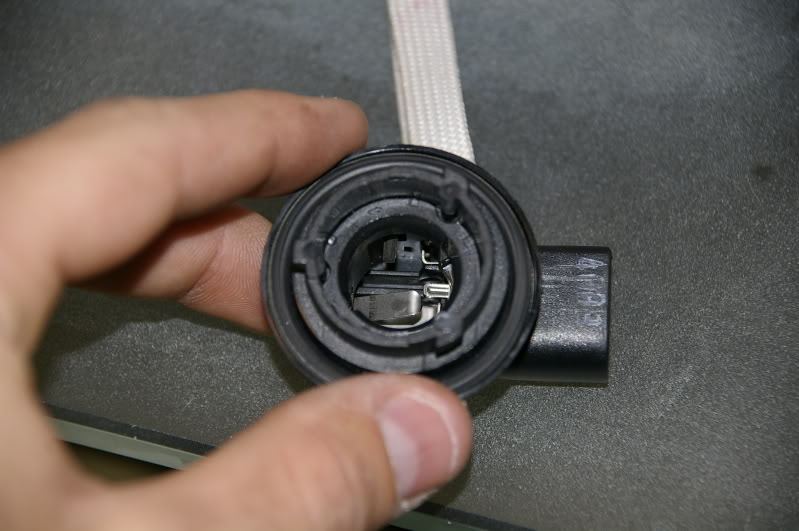
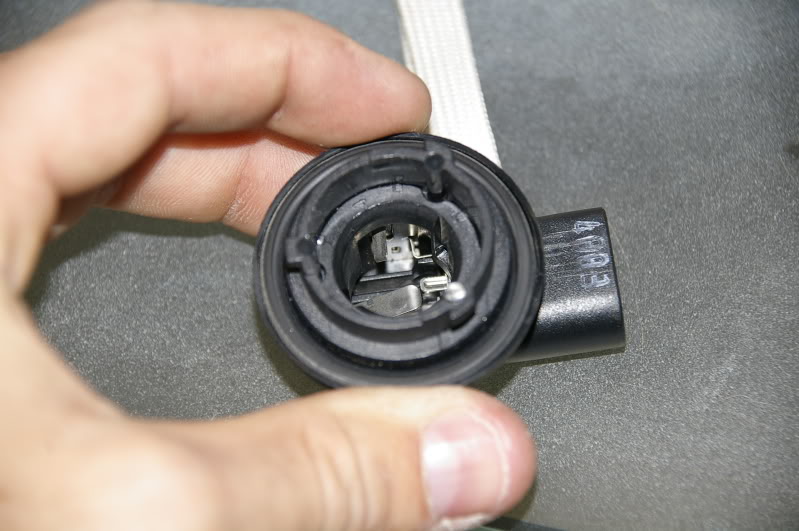
I tested both the + and - at the socket and the plug that goes to the socket. I even tried it with a different ground (exhaust). I looked at the socket and the contacts are scratching the bulb where they contact it, they aren't even corroded, they look almost brand new.
Here are some pictures:
My dad is trying to help me with this also. Neither one of us are engineer status when it comes to electronics, but we do know our way around fairly well.
Any other ideas?
Here are some pictures:
My dad is trying to help me with this also. Neither one of us are engineer status when it comes to electronics, but we do know our way around fairly well.
Any other ideas?
Trending Topics

Coordinator :: M2C2
Joined: Jan 2006
Posts: 653
Likes: 0
From: Charlotte, NC
Put a bulb in the socket. then run an extra piece of wire from + plug to + socket. Take a second piece of wire run from - socket to a good ground. If the light comes on then I would guess there is a ground switch somewhere not making contact. I have never looked for it on a MINI but on my old Omni it was at the shifter.
Well guys..... I got it solved! It was the switch. $17 for parts at my dealer.
It took 5 minutes to replace and just about anyone could do it!
The part number is: 23117527716
Have that handy, as my parts person was looking in the complete wrong section for the part, its in the TRANSMISSION section. NOT the ELECTRICAL.
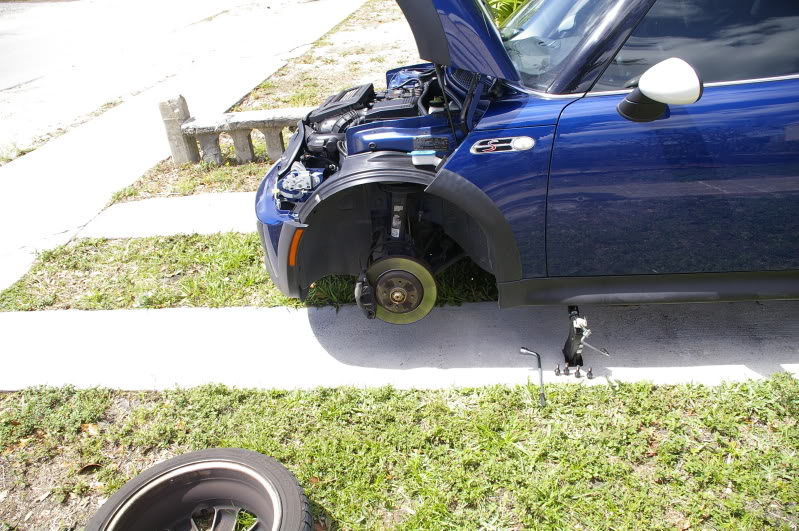
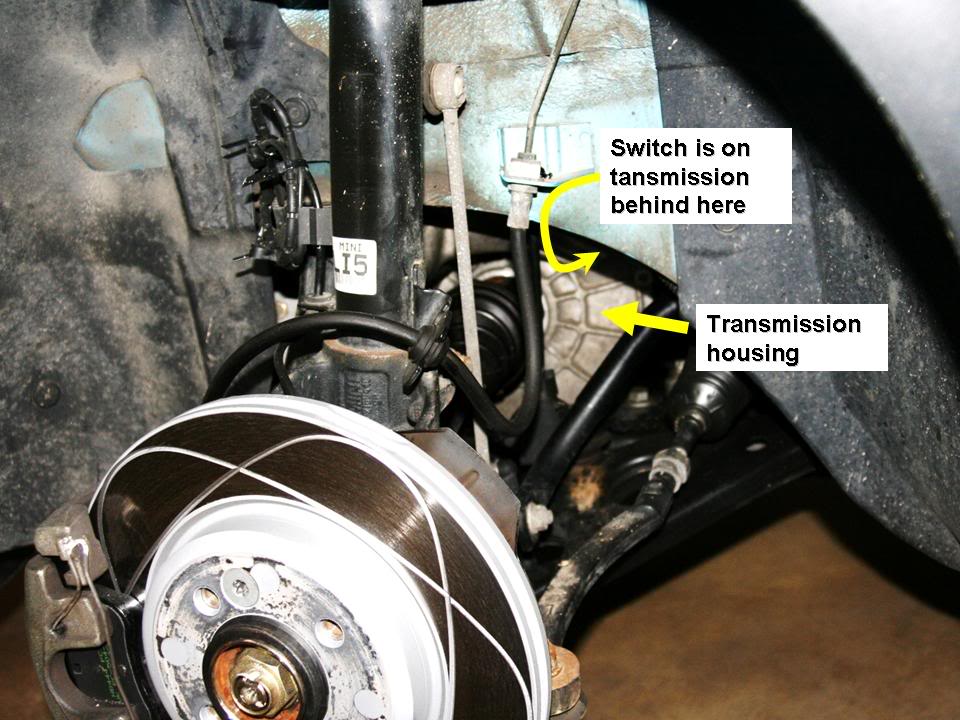
All I did was remove the driver side front tire, like so:
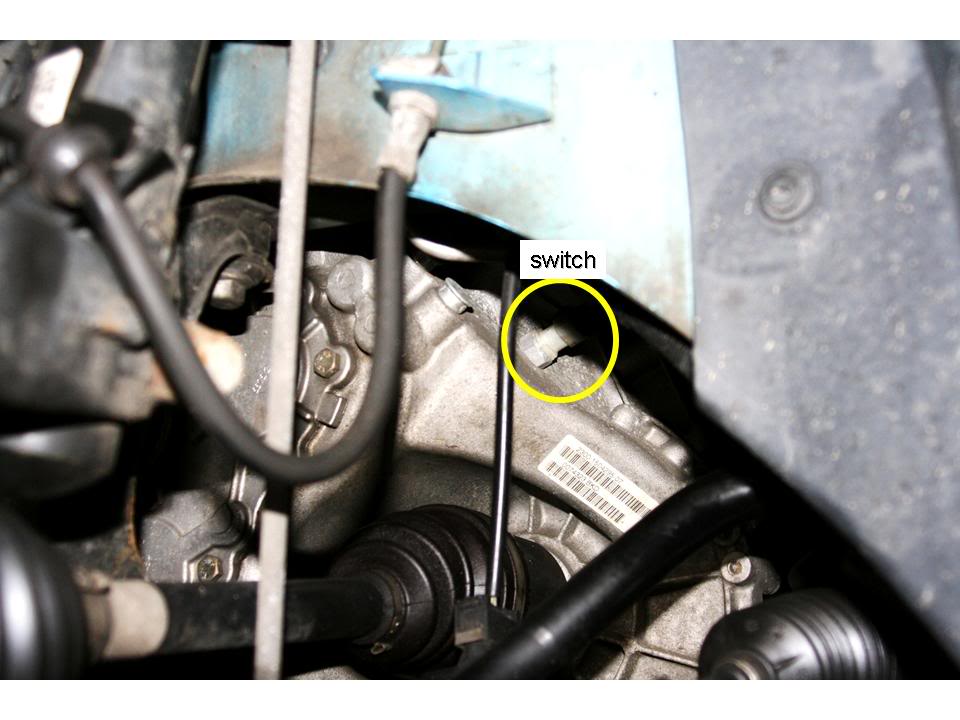
Then I found the switch, when you look under there you see:
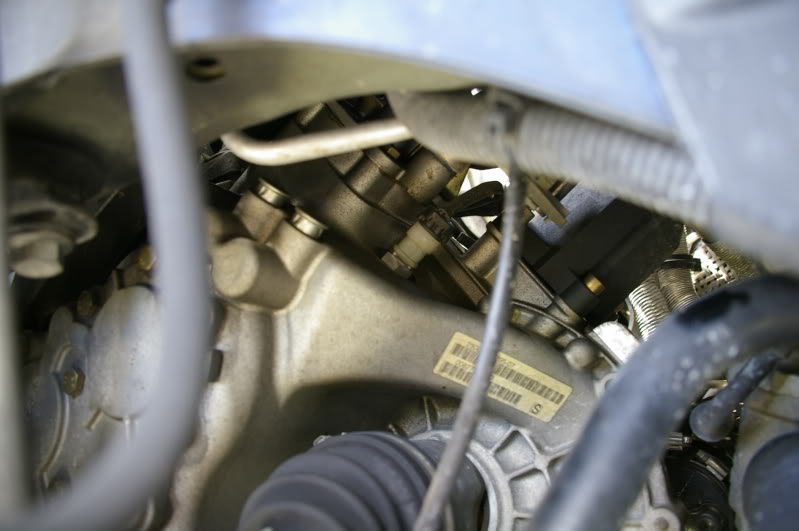
You are looking for the little one all by itself!
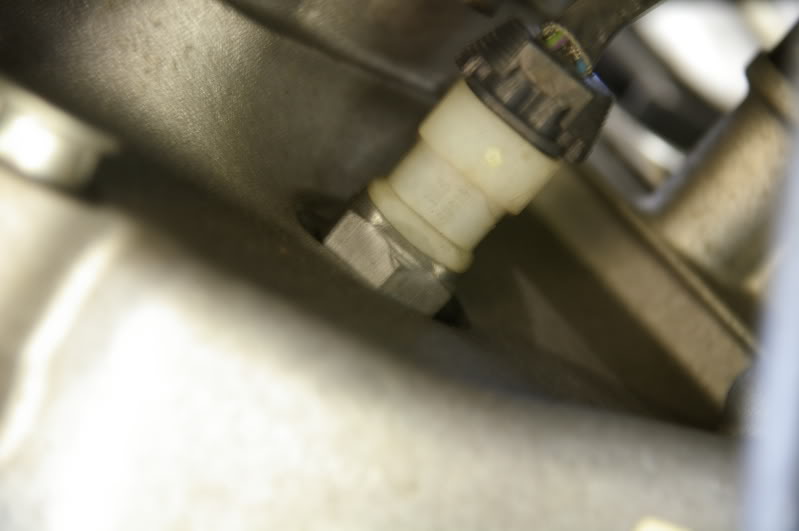
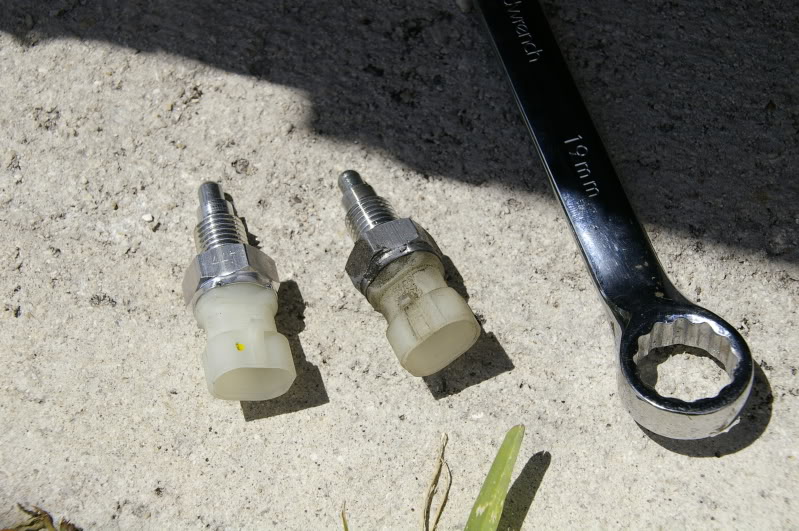
And this is the old switch next to the new one: it takes a 19mm wrench to get off, its not very tight at all.
And vua la (yeah i know thats not spelled right) it all works great now!
Total cost: $17 for switch $2.99 for a pack of bulbs (not needed) and about 4 hours to figure out what the hell was going on! It only took 5 minutes once I knew.
It took 5 minutes to replace and just about anyone could do it!
The part number is: 23117527716
Have that handy, as my parts person was looking in the complete wrong section for the part, its in the TRANSMISSION section. NOT the ELECTRICAL.
All I did was remove the driver side front tire, like so:
Then I found the switch, when you look under there you see:
You are looking for the little one all by itself!
And this is the old switch next to the new one: it takes a 19mm wrench to get off, its not very tight at all.
And vua la (yeah i know thats not spelled right) it all works great now!
Total cost: $17 for switch $2.99 for a pack of bulbs (not needed) and about 4 hours to figure out what the hell was going on! It only took 5 minutes once I knew.


6th Gear
Joined: Sep 2003
Posts: 2,268
Likes: 4
From: Always curious ...
Thanks to this thread and this other thread, I got my reverse light fixed as well. 
It had been out for a while now. I first checked the bulb itself and it turned out to be OK. Purchased the new switch at the dealer (MINI of St. Louis) and replaced the switch. Reverse light works now!
Here are a few more pics to help out:
With front driver's side wheel off:
A bit closer, with switch visible now:
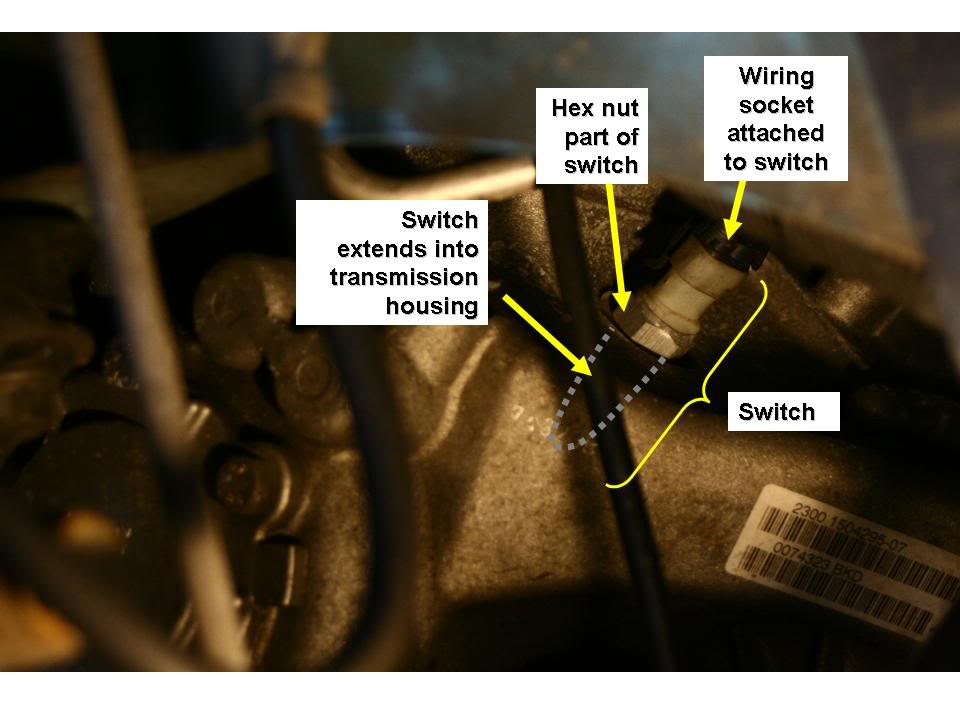
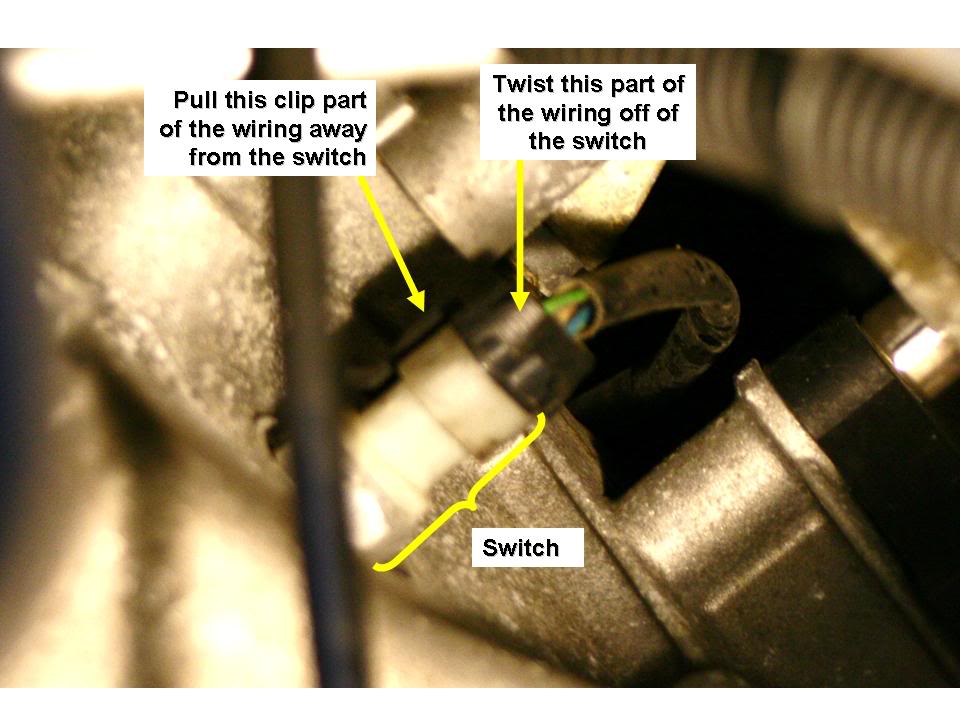
You will need to remove the black socket with wiring from the switch. To do that, you need to lift a tab and twist it off. As stated above, you will need a wrench to remove the switch itself. Once loosened, unscrew by hand.
Recommended torque for switch to transmission is 18.5 ft-lbs as per Bentley manual.
It had been out for a while now. I first checked the bulb itself and it turned out to be OK. Purchased the new switch at the dealer (MINI of St. Louis) and replaced the switch. Reverse light works now!
Here are a few more pics to help out:
With front driver's side wheel off:
A bit closer, with switch visible now:
You will need to remove the black socket with wiring from the switch. To do that, you need to lift a tab and twist it off. As stated above, you will need a wrench to remove the switch itself. Once loosened, unscrew by hand.
Recommended torque for switch to transmission is 18.5 ft-lbs as per Bentley manual.

Wow! What an amazingly helpful post. I ordered the part for my 2002 Cooper S (6 Speed) last night:
http://www.allminiparts.com/products...117527716.html
http://www.allminiparts.com/products...117527716.html
http://www.allminiparts.com/products...117527716.html
http://www.allminiparts.com/products...117527716.html
Well, the part came yesterday and I did the job this morning before work... It really is a five minute job! In fact it took me longer to get the wheel off than it did to replace the part.
Thanks 'FL_Blue_MINI' and 'ofioliti'!!!! Your instructions and pictures made this an easy DIY job.
Thanks 'FL_Blue_MINI' and 'ofioliti'!!!! Your instructions and pictures made this an easy DIY job.


Neutral
Joined: Jan 2010
Posts: 4
Likes: 0
2005 MCS Switch
They altered the backup light setup in 2005, did they get rid of this switch also? My wifes car is having backup light issues (no back up lights) and more importantly, the PDC system is not working at all. Thinking back, this was noticed right after the clutch was replaced, so maybe the dealer repair guys jacked the switch during the replace. Now it is out of warranty, so I need to DIY. Thanks for the help.
6th Gear
Joined: Sep 2003
Posts: 2,268
Likes: 4
From: Always curious ...
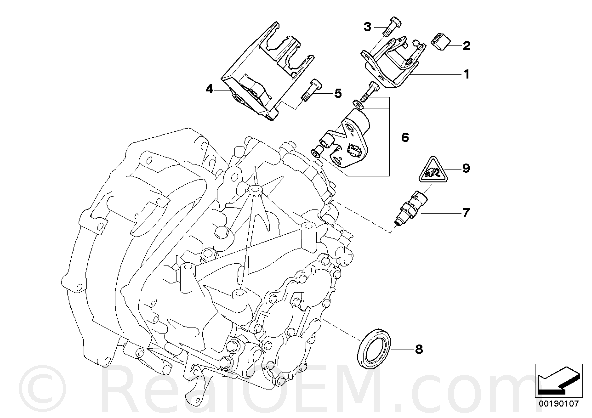
It look like its still there. Go to www.realoem.com and put in your car info, build date, etc. and go to transmission part. This is what it shows for a sept '04 built 2005. It is part no. 7 in the fig.
Neutral
Joined: Jan 2010
Posts: 4
Likes: 0
Fixed!
Thanks, gentlemen. It is still a part on the 05 Cooper S, and was the culprit for the non working backup lights and the PDC not working. Very simple fix, $19 at the closest mini dealer.
On a side note, it does look like the dealer beat up this part at the last service, when the clutch was replaced. It was bent into an angle where the plastic protrudes. Im not very happy with them right now.
I will light this thread as a solution when the PDC isnt working, and the fuse (41) remains intact. Thanks again!
On a side note, it does look like the dealer beat up this part at the last service, when the clutch was replaced. It was bent into an angle where the plastic protrudes. Im not very happy with them right now.
I will light this thread as a solution when the PDC isnt working, and the fuse (41) remains intact. Thanks again!


For those who have done this - is the back-up light switch a male connector?
I'm hoping to solder in a connector to the old CVT wiring harness for the 6-speed swap I just had done. I know which wires to use, etc., I just need the connector that plugs into the backup light switch. I'm wondering if the #9 part, which is a female connector, is what I need:
#9 includes all of these, so it does seem like it's not part of the back-up switch:
PLUG CONNECTION FEMALE - 12527511315
Gasket - 12527511334
Socket housing - 12527511347
Locking mechanism - 12527511349
I can't get a good look at it unless I remove the battery box. Hoping I can get answer here before going that route to save a little time...
I'm hoping to solder in a connector to the old CVT wiring harness for the 6-speed swap I just had done. I know which wires to use, etc., I just need the connector that plugs into the backup light switch. I'm wondering if the #9 part, which is a female connector, is what I need:
#9 includes all of these, so it does seem like it's not part of the back-up switch:
PLUG CONNECTION FEMALE - 12527511315
Gasket - 12527511334
Socket housing - 12527511347
Locking mechanism - 12527511349
I can't get a good look at it unless I remove the battery box. Hoping I can get answer here before going that route to save a little time...

1st Gear
Joined: Nov 2010
Posts: 27
Likes: 3
From: Alpharetta, GA
Thanks for the details here - this post helped fixed the same problem for me. If I can add anything that may be helpful - I didn't have a 19mm wrench but had a 3/4 and that worked fine. Dealer charged $22.28 plus tax for the switch.
