


Navigation & Audio Cost effective iPod set up - in Black


Thread Starter
|
2nd Gear
Joined: Feb 2007
Posts: 109
Likes: 2
Cost effective iPod set up - in Black

[FONT=verdana,arial,helvetica][SIZE=-1]
Thank you for your recent purchases from Amazon.com.
We invite you to submit reviews for the products you purchased or share an image that would benefit other customers. Your input will help customers choose the best products on Amazon.com.
It's easy to submit a review--just click the Review this product button next to the product.
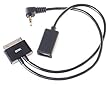 [FONT=verdana,arial,helvetica][SIZE=-1]SiK ram din (black) FireWire and Line-out adapter for iPod (Purchased on 03/09/2007) [/SIZE][/FONT]
[FONT=verdana,arial,helvetica][SIZE=-2]....or share an image.
[/SIZE][/FONT]
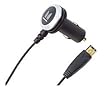 [FONT=verdana,arial,helvetica][SIZE=-1]Monster Cable iCharger Auto Charger for iPod with Firewire (Purchased on 03/09/2007) [/SIZE][/FONT]
 [FONT=verdana,arial,helvetica][SIZE=-2]....or share an image.
[/SIZE][/FONT]
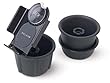 [FONT=verdana,arial,helvetica][SIZE=-1]Belkin F8E467-BLK TuneDok for iPods (Black) (Purchased on 03/09/2007) [/SIZE][/FONT]
 [FONT=verdana,arial,helvetica][SIZE=-2]....or share an image.
[/SIZE][/FONT]
[/SIZE][/FONT]
I thought I'd share this with everyone. These are the tree items I used you hook my IPOD up in my new MCS. They work good and are all black as is my IPOD so they look good with the rest of the interior. I searched quite a bit to find the Sik Ram Din and then find a black charger with the Firewire connection.
I hope this saves others some time searching for stuff.
Mark

3rd Gear
Joined: Mar 2007
Posts: 156
Likes: 0
From: Boston
Thanks for posting. I'll probably be looking for black pieces as well. For the first product, do you just have the audio plug detached or is the firewire only for power and the audio plug need to be used for sound? I want something that doesn't use the headphone jack on my iPod to try and preserve some semblance of consistency and sound quality.
Thread Starter
|
2nd Gear
Joined: Feb 2007
Posts: 109
Likes: 2
Power and sound
Your are correct. The headphone jack is NOT used. The Sik din plugs into the bottom of the Ipod and provides sound via the line out to the aux jack in the Mini and power via the firewire connection to the charger. It's the slickest "cheap" solution I could come up with.

6th Gear
Joined: Mar 2007
Posts: 7,578
Likes: 5
From: Paradise
How does that compare to the Griffin TuneFlex AUX Flexible Charging Cradle at the Apple Store? It is also black and one unit that charges and connect the line-out (not the headphone jack) to connect to the AUX. I haven't tried it yet since my MCS is still at sea.
Thread Starter
|
2nd Gear
Joined: Feb 2007
Posts: 109
Likes: 2
Jim and Robin
Jim,
The ipod holder comes with two 'inserts' - one small and one large and also a foam-rubber tube to wrap the small holder in to make a medium size. The small holder fit fine in the Mini. The 07's have an aux jack built in on the top side of the little storage area behind the 12v outlet which is super cool since there is nothing to take apart and wire up - just plug it in.
Robin,
I don't think the Griffin device was around when I put my setup together or I would have found it. It looks like it does exactly what the pieces I put together do. It would be an even less costly solution. However I wonder how the plug into the 12v outlet will hold up over time with the weight of the Ipod to support all the time? I also wonder if pressing on the ipod controls with only one hand (not supporting the back of the ipod with the other hand) would tend to dislodge the plug? Other than that I see no problem. There would be less cords, but then I've just tuck mine into the storage area in front of the 12v outlet and they stay out of the way.
The ipod holder comes with two 'inserts' - one small and one large and also a foam-rubber tube to wrap the small holder in to make a medium size. The small holder fit fine in the Mini. The 07's have an aux jack built in on the top side of the little storage area behind the 12v outlet which is super cool since there is nothing to take apart and wire up - just plug it in.
Robin,
I don't think the Griffin device was around when I put my setup together or I would have found it. It looks like it does exactly what the pieces I put together do. It would be an even less costly solution. However I wonder how the plug into the 12v outlet will hold up over time with the weight of the Ipod to support all the time? I also wonder if pressing on the ipod controls with only one hand (not supporting the back of the ipod with the other hand) would tend to dislodge the plug? Other than that I see no problem. There would be less cords, but then I've just tuck mine into the storage area in front of the 12v outlet and they stay out of the way.
Trending Topics
Thread Starter
|
2nd Gear
Joined: Feb 2007
Posts: 109
Likes: 2
Jim
I re-read your question and I'm not sure I answered it. I put the hold in the passenger side cup so that it's easy to reach for my wife when I'm driving. She swivels it toward her and works it so I don't have to take my eyes off the road. It could go in either cupholder.
Mark
Mark
3rd Gear
Joined: Mar 2007
Posts: 156
Likes: 0
From: Boston
Nice. I just found that last night as well. I'll probably go with it. Trying to hold back from ordering it right now since the car is still coming across the ocean. I'll probably call some of the local stores just to make sure they have it in stock and make that my first stop the day I pick the car up. I'm not going to want to listen to music for the first couple hours anyways.

1st Gear
Joined: Feb 2007
Posts: 48
Likes: 1
From: Skillman (Princeton), NJ
Check this one out!
Harman Kardon Drive + Play
Drive + Play lets you control all the music browsing capability of your iPod with any car audio system and without taking your eyes off the road.
Price: $99.95
Estimated Ship:
Within 24 hours
Free Shipping
 Add a free gift message

[FONT=helvetica, geneva, arial][SIZE=2]Your car is a great place to listen to music. And the iPod is a great way to bring your favorite tunes along for the ride. But how can you get at your songs and playlists without taking your eyes off the road? Drive + Play from Harman Kardon offers all the music browsing capability of the iPod itself and can be used with any car audio system. Browse by artist, album, song, genre or composer. Scroll through your playlists. Jump ahead to the next track or play the last one over and over. All from the drivers seat, all without taking your mind off driving.
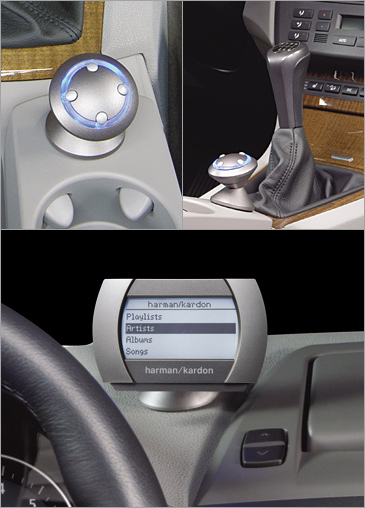
Drive + Play puts the familiar iPod menu on a backlit display right on your car’s dashboard or windshield, where you can read it at a glance. The system is controlled by the most intuitive interface available and is as easy to read as your iPod. Drive + Play, with its included accessories for connecting to your audio system, is compatible with all docking iPods, including NANO and the latest iPod.
Thin, easily concealed wires connect Drive + Play’s brain to the display, the controller and the iPod itself. You can power the brain using the nearest cigarette lighter plug or you can wire it to your car’s audio system. Drive + Play comes with all the cables you need for most installations.
You can connect Drive + Play to your car’s audio system three ways:
One year parts/labor
Mfr. Part No.: DP1US
Note: Products sold through this website that do not bear the Apple Brand name are serviced and supported exclusively by their manufacturers in accordance with terms and conditions packaged with the products. Apple’s Limited Warranty does not apply to products that are not Apple-branded, even if packaged or sold with Apple products. Please contact the manufacturer directly for technical support and customer service.[/SIZE][/FONT][FONT=Times New Roman][SIZE=3] [/SIZE][/FONT]
[FONT=Times New Roman][SIZE=3][/SIZE][/FONT]


Based on 78 reviews

[FONT=helvetica, geneva, arial][SIZE=1]This accessory is compatible with the following iPods: [/SIZE][/FONT]


 [FONT=helvetica, geneva, arial][SIZE=1]iPod nano
1st generation [/SIZE][/FONT][FONT=helvetica, geneva, arial][SIZE=1]iPod nano
2nd generation
(aluminum) [/SIZE][/FONT][FONT=helvetica, geneva, arial][SIZE=1]iPod mini [/SIZE][/FONT][FONT=helvetica, geneva, arial][SIZE=1]iPod 3rd generation [/SIZE][/FONT][FONT=helvetica, geneva, arial][SIZE=1]iPod with click wheel [/SIZE][/FONT][FONT=helvetica, geneva, arial][SIZE=1]iPod with
color display [/SIZE][/FONT][FONT=helvetica, geneva, arial][SIZE=1]iPod with video [/SIZE][/FONT]
Harman Kardon Drive + Play
Drive + Play lets you control all the music browsing capability of your iPod with any car audio system and without taking your eyes off the road.
Price: $99.95
Estimated Ship:
Within 24 hours
Free Shipping
Add a free gift message [FONT=helvetica, geneva, arial][SIZE=2]Your car is a great place to listen to music. And the iPod is a great way to bring your favorite tunes along for the ride. But how can you get at your songs and playlists without taking your eyes off the road? Drive + Play from Harman Kardon offers all the music browsing capability of the iPod itself and can be used with any car audio system. Browse by artist, album, song, genre or composer. Scroll through your playlists. Jump ahead to the next track or play the last one over and over. All from the drivers seat, all without taking your mind off driving.
Drive + Play puts the familiar iPod menu on a backlit display right on your car’s dashboard or windshield, where you can read it at a glance. The system is controlled by the most intuitive interface available and is as easy to read as your iPod. Drive + Play, with its included accessories for connecting to your audio system, is compatible with all docking iPods, including NANO and the latest iPod.
Thin, easily concealed wires connect Drive + Play’s brain to the display, the controller and the iPod itself. You can power the brain using the nearest cigarette lighter plug or you can wire it to your car’s audio system. Drive + Play comes with all the cables you need for most installations.
You can connect Drive + Play to your car’s audio system three ways:
- 3.5 Audio line output
- Wired FM modulator (adaptor sold separately)
- Onboard wireless FM modulator (five preset frequencies, one selectable)
One year parts/labor
Mfr. Part No.: DP1US
Note: Products sold through this website that do not bear the Apple Brand name are serviced and supported exclusively by their manufacturers in accordance with terms and conditions packaged with the products. Apple’s Limited Warranty does not apply to products that are not Apple-branded, even if packaged or sold with Apple products. Please contact the manufacturer directly for technical support and customer service.[/SIZE][/FONT][FONT=Times New Roman][SIZE=3] [/SIZE][/FONT]
[FONT=Times New Roman][SIZE=3][/SIZE][/FONT]
Customer Rating
Based on 78 reviews

[FONT=helvetica, geneva, arial][SIZE=1]This accessory is compatible with the following iPods: [/SIZE][/FONT]
[FONT=helvetica, geneva, arial][SIZE=1]iPod nano1st generation [/SIZE][/FONT][FONT=helvetica, geneva, arial][SIZE=1]iPod nano
2nd generation
(aluminum) [/SIZE][/FONT][FONT=helvetica, geneva, arial][SIZE=1]iPod mini [/SIZE][/FONT][FONT=helvetica, geneva, arial][SIZE=1]iPod 3rd generation [/SIZE][/FONT][FONT=helvetica, geneva, arial][SIZE=1]iPod with click wheel [/SIZE][/FONT][FONT=helvetica, geneva, arial][SIZE=1]iPod with
color display [/SIZE][/FONT][FONT=helvetica, geneva, arial][SIZE=1]iPod with video [/SIZE][/FONT]
3rd Gear
Joined: Mar 2007
Posts: 156
Likes: 0
From: Boston
Interesting idea. Not real sold on the aesthetics though. That display looks like its right off a 1G iPod, kind of a waste to hook up my video iPod or even my nano (both with decent color displays). The display would definitely clash with the rest of the dash and instruments. I also don't like the futuristic looking controller ****. If it had a mount for the iPod and a more subtle control unit that could control the iPod directly I would probably be interested. I'd love to see something that holds the iPod in a holster with subtle steering wheel or driver's side mounted controls (maybe even passenger side controls as well). Little iPod-like click wheels on the armrests of both doors would be great (especially if I could lock the passenger side control so that I could override my passenger's choices in music).

6th Gear
Joined: Feb 2007
Posts: 15,966
Likes: 1
I like it. Agree the display could use some enhancing. But I like the controller. Sure beats my dealer quoted price of $770 for the installed MINI ipod adapter. Now the question is, where do you mount the display? I can't find a decent spot for my 1" x 2" V1 remote.

2nd Gear
Joined: Oct 2006
Posts: 77
Likes: 0
From: Easton, PA
Harman Kardon DP2
I currently have the Harman Kardon Drive + Play unit in my truck, works well......... However for my MCS I am holding out for the second generation(nicer looking with some added features)Its suppose to be out at the end of this month, but you can add your email address to the Harman Kardon notification at the link below.
http://www.harmankardon.com/drive-1/
http://www.harmankardon.com/drive-1/
3rd Gear
Joined: Mar 2007
Posts: 156
Likes: 0
From: Boston
I currently have the Harman Kardon Drive + Play unit in my truck, works well......... However for my MCS I am holding out for the second generation(nicer looking with some added features)Its suppose to be out at the end of this month, but you can add your email address to the Harman Kardon notification at the link below.
http://www.harmankardon.com/drive-1/
http://www.harmankardon.com/drive-1/
1st Gear
Joined: Feb 2007
Posts: 48
Likes: 1
From: Skillman (Princeton), NJ
Here is the solution I decided to go with: Purchaced at the Apple store it's a Griffin TuneFlex AUX. It fits all sizes of ipod from nano to video. My nano is 1st generation and it works just fine. For those of you with a 2nd G nano Griffin makes one specifically for that nano. It has a smaller base that is really sleek and looks great.
Jim
Jim

1st Gear
Joined: Mar 2007
Posts: 36
Likes: 0
I used the same set up for my 04 Cooper, except for the mount, I used a Proclip which is customized for the MINI. It looks great, fits in just the right spot and doesn't take up a cup holder. They don't have one for the R56 yet, but I emailed them and they said they would have one ready by the end of June. www.proclipusa.com. I'm trying to find a solution for my new 07 that will allow me to charge it without using the lighter jack. Something like blitzsafe's
2nd Gear
Joined: Oct 2006
Posts: 77
Likes: 0
From: Easton, PA
Update....Drive+Play2
I currently have the Harman Kardon Drive + Play unit in my truck, works well......... However for my MCS I am holding out for the second generation(nicer looking with some added features)Its suppose to be out at the end of this month, but you can add your email address to the Harman Kardon notification at the link below.
http://www.harmankardon.com/drive-1/
http://www.harmankardon.com/drive-1/

Thread
Thread Starter
Forum
Replies
Last Post
igzekyativ
MINIs & Minis for Sale
34
Jul 16, 2020 12:54 PM
Ambient Thermal Management
Drivetrain (Cooper S)
0
Aug 7, 2015 12:27 PM
PelicanParts.com
Vendor Announcements
0
Aug 4, 2015 02:45 PM