


Navigation & Audio XM Antenna in 2013


Im so happy I didn't get the XM retrofit, as I get almost 600 channels on this, the 2013 Mini with XM only gets 222.
Pink Floyd channel is 311!!

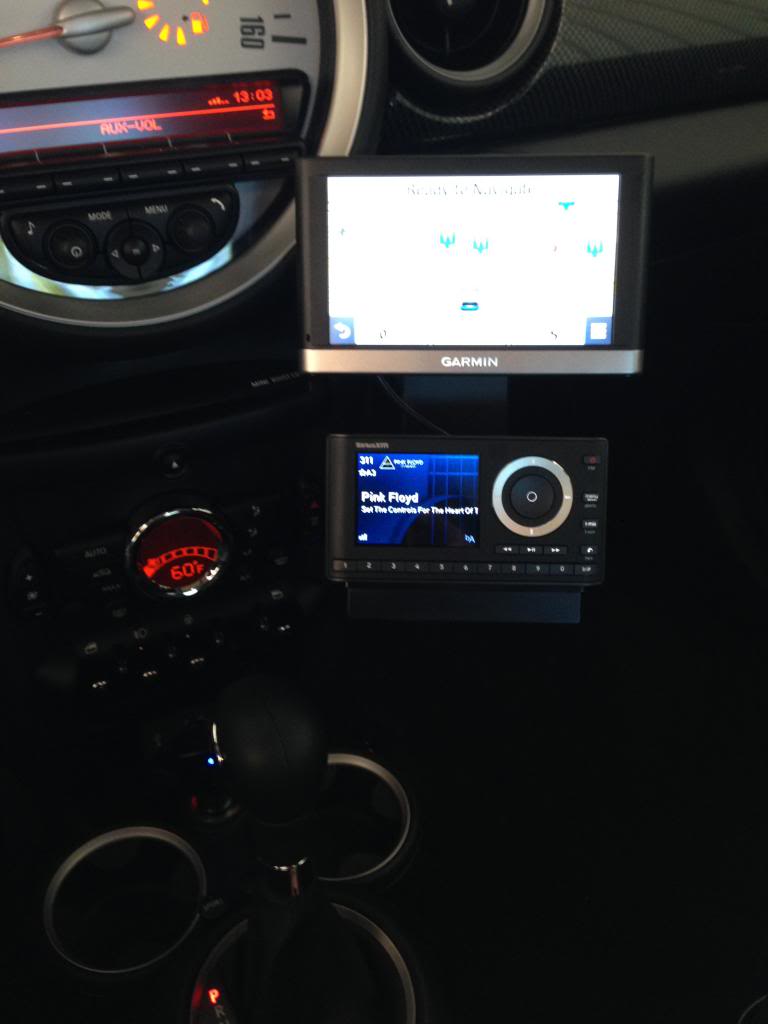
Last edited by TVPostSound; May 14, 2014 at 02:12 PM.

4th Gear
Joined: Feb 2003
Posts: 370
Likes: 0
From: Minneapolis
Now, that looks very professional.
I received my cable yesterday. Haven't had time to get at the car. I'm wondering if removing the access panel on the passenger kick panel will allow access to the the XM cable?
I received my cable yesterday. Haven't had time to get at the car. I'm wondering if removing the access panel on the passenger kick panel will allow access to the the XM cable?
Nope, you need to at least pull the kick panel away as far as the seat.

3rd Gear
Joined: May 2014
Posts: 234
Likes: 0
I'll also add to the confusion.
Everything I've read and searched on says the retrofit works for 9/09 cars and newer.
But.....my 02/09 MCS has S693A listed under Standard equipment when I run my VIN on BMWArchive.org.
So.....does that mean all I need is the code?
There are cheaper ways, I'm finding to do this code. One, which they may be able to do for MINIs is Bimmer-Tech.
http://www.bimmer-tech.net/index.php...ive-retrofits/
In searching on those forums, several members mention doing it even cheaper. Though that may involve buying a diag port cable and software.
I do have an portable setup (I think mine's an onyx) that I could install but I'd prefer to just use the factory setup.
Everything I've read and searched on says the retrofit works for 9/09 cars and newer.
But.....my 02/09 MCS has S693A listed under Standard equipment when I run my VIN on BMWArchive.org.
So.....does that mean all I need is the code?
There are cheaper ways, I'm finding to do this code. One, which they may be able to do for MINIs is Bimmer-Tech.
http://www.bimmer-tech.net/index.php...ive-retrofits/
In searching on those forums, several members mention doing it even cheaper. Though that may involve buying a diag port cable and software.
I do have an portable setup (I think mine's an onyx) that I could install but I'd prefer to just use the factory setup.
Last edited by broncobuddha; May 28, 2014 at 07:52 AM.
4th Gear
Joined: Feb 2003
Posts: 370
Likes: 0
From: Minneapolis
Interesting.
Let me say that I have a '13 Clubman without Satellite, but does have the rooftop antenna and supposedly the radio somewhere. Satellite does not show up as a choice on the screen.
But, after the last time I was at the dealer I received a letter from Sirius saying that I should sign up for Satellite radio AND it even included the number for the Satellite radio!
Sounds interesting. I wonder if anyone has purchased this?
Let me say that I have a '13 Clubman without Satellite, but does have the rooftop antenna and supposedly the radio somewhere. Satellite does not show up as a choice on the screen.
But, after the last time I was at the dealer I received a letter from Sirius saying that I should sign up for Satellite radio AND it even included the number for the Satellite radio!
Sounds interesting. I wonder if anyone has purchased this?
I dont regret not using the factory set up, and Im so OCD!!
3rd Gear
Joined: May 2014
Posts: 234
Likes: 0
TVPost,
Are you still going through the aux jack though? How is the sound quality? I was playing around this morning using the Sirius app on my phone and an aux cable and I wasn't really happy with the sound quality.
Also, you're able to go through the MINI's antenna by tying into the jack in the passenger footwell?
Thanks.
Oh and I called the local MINI dealership and the Service Manager said the best way for them to tell if mine is setup for satellite is for me to bring it in. Of course he'd say that. I'm sure I'd get charged an hour worth of labor just for them to check.
Are you still going through the aux jack though? How is the sound quality? I was playing around this morning using the Sirius app on my phone and an aux cable and I wasn't really happy with the sound quality.
Also, you're able to go through the MINI's antenna by tying into the jack in the passenger footwell?
Thanks.
Oh and I called the local MINI dealership and the Service Manager said the best way for them to tell if mine is setup for satellite is for me to bring it in. Of course he'd say that. I'm sure I'd get charged an hour worth of labor just for them to check.
TVPost,
Are you still going through the aux jack though? How is the sound quality? I was playing around this morning using the Sirius app on my phone and an aux cable and I wasn't really happy with the sound quality.
Also, you're able to go through the MINI's antenna by tying into the jack in the passenger footwell?
Thanks.
Oh and I called the local MINI dealership and the Service Manager said the best way for them to tell if mine is setup for satellite is for me to bring it in. Of course he'd say that. I'm sure I'd get charged an hour worth of labor just for them to check.
Are you still going through the aux jack though? How is the sound quality? I was playing around this morning using the Sirius app on my phone and an aux cable and I wasn't really happy with the sound quality.
Also, you're able to go through the MINI's antenna by tying into the jack in the passenger footwell?
Thanks.
Oh and I called the local MINI dealership and the Service Manager said the best way for them to tell if mine is setup for satellite is for me to bring it in. Of course he'd say that. I'm sure I'd get charged an hour worth of labor just for them to check.
Yes, the passenger footwell on the right, yours might be under the passenger seat.
Sound quality is decent, I would not judge with a phone app, way too much data compression, might also be lower bit rate. Yes, Im using the aux jack.
SiriusXM also uses varying compression and bit rate schemas for their stations.
Albeit, yours (2009) might be under the carpet below the passenger seat.
Aux is better than FM.

Neutral
Joined: Aug 2014
Posts: 6
Likes: 0
From: Shrewsbury Ma
XM in the Paceman
So my wife has the 2014 Paceman and I had the rear plastic trim off the rear hatch & found a Radio /XM/Nav antenna distribution (maybe signal amplifier) box. I also found while in the passenger side kick panel the 3 coax antenna connectors there as mentioned in a previous post. I'm going to try to see if I can locate the actual XM module. This should have the XM ID on it too like all other XM modules. Just need to find put how to get the program selection turned on through the radio. (Mine has nav) Any suggestions besides going to the dealer? I wonder if Greasy's Garage (who is a big Mini mechanic in Worcester) can do this?? Hmmm...??
Any suggestions?
Thanks
Bruce
Any suggestions?
Thanks
Bruce
So my wife has the 2014 Paceman and I had the rear plastic trim off the rear hatch & found a Radio /XM/Nav antenna distribution (maybe signal amplifier) box. I also found while in the passenger side kick panel the 3 coax antenna connectors there as mentioned in a previous post. I'm going to try to see if I can locate the actual XM module. This should have the XM ID on it too like all other XM modules. Just need to find put how to get the program selection turned on through the radio. (Mine has nav) Any suggestions besides going to the dealer? I wonder if Greasy's Garage (who is a big Mini mechanic in Worcester) can do this?? Hmmm...??
Any suggestions?
Thanks
Bruce
Any suggestions?
Thanks
Bruce
Does your radio have the "sat" option next to aux and usb??

So my wife has the 2014 Paceman and I had the rear plastic trim off the rear hatch & found a Radio /XM/Nav antenna distribution (maybe signal amplifier) box. I also found while in the passenger side kick panel the 3 coax antenna connectors there as mentioned in a previous post. I'm going to try to see if I can locate the actual XM module. This should have the XM ID on it too like all other XM modules. Just need to find put how to get the program selection turned on through the radio. (Mine has nav) Any suggestions besides going to the dealer? I wonder if Greasy's Garage (who is a big Mini mechanic in Worcester) can do this?? Hmmm...??
Any suggestions?
Thanks
Bruce
Any suggestions?
Thanks
Bruce
That being said, there are ways to hack around this but it is not trivial.
http://www.shopminiusa.com/PRODUCT/1...IT-ENABLE-CODE
Neutral
Joined: Aug 2014
Posts: 6
Likes: 0
From: Shrewsbury Ma
and yes the pink Sat cable is plugged in to a coax cable that runs towards radio...
Thanks!
Bruce
Neutral
Joined: Aug 2014
Posts: 6
Likes: 0
From: Shrewsbury Ma
You will need to get a FSC enable code from BMW/MINI. According to the MINI website, it has to be done at the dealer.
That being said, there are ways to hack around this but it is not trivial.
http://www.shopminiusa.com/PRODUCT/1...IT-ENABLE-CODE
That being said, there are ways to hack around this but it is not trivial.
http://www.shopminiusa.com/PRODUCT/1...IT-ENABLE-CODE
I think I remember seeing some posts a while back on coding different options, I work at an IT company so I will look back at those post and see if any of my co-workers can offer help who are into that. I'm not going to try it if not 100% comfortable about it...
Bruce

Neutral
Joined: Nov 2014
Posts: 5
Likes: 0
From: Orlando
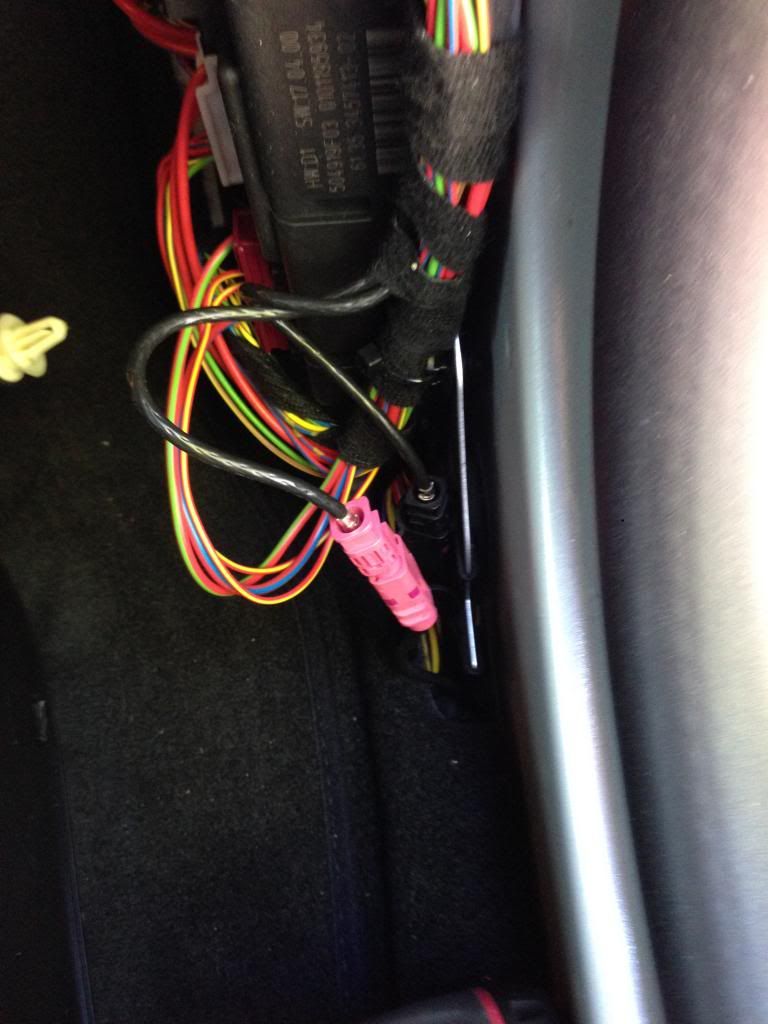
Bruce - Would you mind if I pick your brain...I just got a 2014 Paceman and looked in the Passenger kick panel and did not see the antenna cable. Was yours readily seen? did you have to remove any other trim parts? Was it "fishable" from the kick pannel.
I used to have a wrangler and it was so much easier to mod for audio. Thanks in advance and sorry for the barrage of questions
I used to have a wrangler and it was so much easier to mod for audio. Thanks in advance and sorry for the barrage of questions

2nd Gear
Joined: May 2008
Posts: 124
Likes: 0
From: Easton, PA
So I finally ordered an Onyx Plus and also got the antenna cable and will be getting the pro clip mount. Just curious how you're powering the Onyx Plus since it doesn't look like impure connected to the cigarette lighter?

To the radio fuse in the kick panel fuse box.
Ground to a sheet metal screw above the fuse box, you'll see where!!
2nd Gear
Joined: May 2008
Posts: 124
Likes: 0
From: Easton, PA
So I finally got around to connecting the antenna cable to the factory satellite antenna behind the kick panel..works perfectly! Just curious how to re-attache the kick panel correctly? I see the white clips, but don't see how I could possibly push the clips on the kick panel back onto them. Also, still curious how to power it correctly?
2nd Gear
Joined: May 2008
Posts: 124
Likes: 0
From: Easton, PA
Thanks...I'm good on the power but can't figure out how to get the trim to snap back on securely.

Thread
Thread Starter
Forum
Replies
Last Post