


Navigation & Audio NEW MINI GPS Mount


2nd Gear
Joined: Sep 2007
Posts: 125
Likes: 0
From: St. Louis, MO
Are there connections other than power through the mini USB connector? Is that why they say it can't be installed on cars that have SA-609 Nav.? I'd like to have both. A portable Nav that I can walk and boat with, as well as charge in my car. Most of the time in the car I'd leave it showing engine temp after the Garmin wireless OBD sender is released later this month.

Are there connections other than power through the mini USB connector? Is that why they say it can't be installed on cars that have SA-609 Nav.? I'd like to have both. A portable Nav that I can walk and boat with, as well as charge in my car. Most of the time in the car I'd leave it showing engine temp after the Garmin wireless OBD sender is released later this month.
I have pics and will post here in a little bit.
Install complete. very easy to do.
I have NUVI 660 and I ended up using the USB conection that came with the mount. It plugs in backwards but I'm OK with it and it works for me. YES, the steering wheel blocks a little, but not enough for me to worry about.
There are 5 positions
9 oclock position...a little blocked
11 oclock position... not bad
12 oclock position...right in your face full view.
1 oclock position...same as 11 oclock
3 oclock position...a little blocked
I did drill out the silver pins so the arm swings from one side of the tach to the other. otherwise you have 2 positions. (see pic below)
The mount works really good and seems to NOT block the tach with a widescreen NUVI.
Now, do you get some steering wheel block?...YES. I think you would with the NON widescreen as well.
The swing arm works really well and holds well in each position.

Here is the mount without the GPS


9 oclock

11 Oclock


12 oclock

1 oclock

3 Oclock


I have NUVI 660 and I ended up using the USB conection that came with the mount. It plugs in backwards but I'm OK with it and it works for me. YES, the steering wheel blocks a little, but not enough for me to worry about.
There are 5 positions
9 oclock position...a little blocked
11 oclock position... not bad
12 oclock position...right in your face full view.
1 oclock position...same as 11 oclock
3 oclock position...a little blocked
I did drill out the silver pins so the arm swings from one side of the tach to the other. otherwise you have 2 positions. (see pic below)
The mount works really good and seems to NOT block the tach with a widescreen NUVI.
Now, do you get some steering wheel block?...YES. I think you would with the NON widescreen as well.
The swing arm works really well and holds well in each position.
Here is the mount without the GPS
9 oclock
11 Oclock
12 oclock
1 oclock
3 Oclock

6th Gear
Joined: Feb 2008
Posts: 2,358
Likes: 1
From: Graham, NC
Some block??? Looks like half the screen is covered to me. Maybe just an optical illusion from taking a picture versus looking at it in real life?
2nd Gear
Joined: Sep 2007
Posts: 125
Likes: 0
From: St. Louis, MO
If one uses their own charger, it'll only charge while the ignition is on, right? Will the MINI wiring allow the Nav to turn on/off with the ignition, but charge 24/7?
Last edited by TomLINY; Mar 14, 2010 at 06:21 AM.
it turns on/off with the ignition. It does NOT charge 24/7
If you removed the wiring and threaded your OWN charger which is very easilly doable, you can hard wire your charger cable into the fuse box to power on as you wish.
If you removed the wiring and threaded your OWN charger which is very easilly doable, you can hard wire your charger cable into the fuse box to power on as you wish.

I can see it the best in the 9:00 and 12:00 positions.
It does not charge the Nuvi 24/7, but... Why would someone want/need it to?

It's going to be hooked up to the power when you're driving, right? Do folks use theirs very much on battery power?
Originally Posted by slimjimtell
2nd Gear
Joined: Sep 2007
Posts: 125
Likes: 0
From: St. Louis, MO
I'm very torn about putting a theft target into my car, and for that reason alone will probably stay away from any aftermarket Nav. I've had too many cars broken into, one even had a "hidden" cd changer with a display that I locked in the glove box 99% of the time. When I left the car at the dealer the night before a service, it was broken into with tons of damage. I've seen 5 gps units in one single issues of a nearby community's "police briefs".
I don't want to have to hide a gps everytime I park my car, yet I want GPS to be always available for surprise needs, and to simply monitor my environment. That's why I love the factory Nav.
6th Gear
Joined: Feb 2008
Posts: 2,358
Likes: 1
From: Graham, NC
For most users, you're right. I however, am always the exception to the rule. I have the factory Nav, so I'm looking at the portable for different reasons. Mainly the OBD data display, but also for hiking, boating, preprogramming prior to use, geocaching, etc.
I'm very torn about putting a theft target into my car, and for that reason alone will probably stay away from any aftermarket Nav. I've had too many cars broken into, one even had a "hidden" cd changer with a display that I locked in the glove box 99% of the time. When I left the car at the dealer the night before a service, it was broken into with tons of damage. I've seen 5 gps units in one single issues of a nearby community's "police briefs".
I don't want to have to hide a gps everytime I park my car, yet I want GPS to be always available for surprise needs, and to simply monitor my environment. That's why I love the factory Nav.
I'm very torn about putting a theft target into my car, and for that reason alone will probably stay away from any aftermarket Nav. I've had too many cars broken into, one even had a "hidden" cd changer with a display that I locked in the glove box 99% of the time. When I left the car at the dealer the night before a service, it was broken into with tons of damage. I've seen 5 gps units in one single issues of a nearby community's "police briefs".
I don't want to have to hide a gps everytime I park my car, yet I want GPS to be always available for surprise needs, and to simply monitor my environment. That's why I love the factory Nav.
2nd Gear
Joined: Sep 2007
Posts: 125
Likes: 0
From: St. Louis, MO
For the time that I've had my Nuvi running on battery power (usually when loading routes, but tried it one time in my wife's minivan), the charge runs out very quickly. Probably less than an hour. So using something like a Nuvi that would fit in these brackets would probably be a poor choice for walkable unit. I'd look instead at some of the gps units that are built specifically to be operated while handheld on battery power.
4th Gear
Joined: Jul 2008
Posts: 421
Likes: 0
From: Chesapeake, VA
So has anyone tried this thing out with a TomTom yet? I haven't been able to get my hands on the second adapter, not sure if Xeraux sent it to me yet. But has anyone else taken the plunge to try it?

3rd Gear
Joined: Sep 2008
Posts: 242
Likes: 4
Just ordered a Flexpod mount from CravenSpeed
Although the MINI mount looks nice, I have the wider NUVI and I think it'll mostly be obstructed by the steering wheel.
I opted for the Flexpod mount from CravenSpeed. Pricey at $85, but they do have a Flexpod "Fixie" which is only $55 but has less versatility in positioning. I liked the $85 Flexpod because it can be positioned multiple ways. Fingers crossed! Thanks for the discussion here. As always, I learn a lot from these posts.
I opted for the Flexpod mount from CravenSpeed. Pricey at $85, but they do have a Flexpod "Fixie" which is only $55 but has less versatility in positioning. I liked the $85 Flexpod because it can be positioned multiple ways. Fingers crossed! Thanks for the discussion here. As always, I learn a lot from these posts.

1st Gear
Joined: Aug 2009
Posts: 25
Likes: 0
I purchased the factory Garmin bracket from my local dealership. I installed it myself, its straightforward if you've got some experience with extracting pins out of electrical connectors and reading tech oriented wiring diagrams (as opposed to stuff geared more toward consumers that tend to provide more details and break things down into a step by step process). Its not a job I'd recommend for a novice tho. If your experience is limited to oil changes and basic maintenance, let the dealership do the work. The book time on the installation (and this comes straight off the factory supplied installation sheets) is .5 hr, so don't let them charge you too much.
As far as adapting it for other uses, its not impossible but I'd check out the pin configuration on the USB plug for the device you want to use. Garmin uses a 17.3k ohm resistor on the x pin to ground it to pin 4, which is not a typical configuration for most other USB plugs (which use a 200k ohm resistor) and so I am not 100% convinced it will work on tomtom devices without some help (I don't have one and so I haven't tried it). There is more "magic" going on with the factory Garmin harness than just delivering 5v on pin 1 and ground on pin 4, so proceed with caution, or you might damage both your peripheral device and your car.
Lastly, the bracket itself was a missed opportunity from the factory, imo. It puts the GPS too close to the steering wheel and blocks the view of some of the screen. Its still usable and has a "factory look" to it, but if they had designed it to sit back closer to the dash, you would have had a better and complete view of the screen through the steering wheel and it would have been tucked away nicely so it wasn't terrible obvious from outside the car. I am assuming they designed it the way they did so that you could touch the screen without removing your hands from the steering wheel, but you really shouldn't be doing that when you drive anyway!
I paid $116 for the bracket, if anyone was wondering about the cost. Its overpriced if you were just getting a bracket but the wiring harness/electronics is what makes it worthwhile (assuming you are using a Garmin anyway).
As far as adapting it for other uses, its not impossible but I'd check out the pin configuration on the USB plug for the device you want to use. Garmin uses a 17.3k ohm resistor on the x pin to ground it to pin 4, which is not a typical configuration for most other USB plugs (which use a 200k ohm resistor) and so I am not 100% convinced it will work on tomtom devices without some help (I don't have one and so I haven't tried it). There is more "magic" going on with the factory Garmin harness than just delivering 5v on pin 1 and ground on pin 4, so proceed with caution, or you might damage both your peripheral device and your car.
Lastly, the bracket itself was a missed opportunity from the factory, imo. It puts the GPS too close to the steering wheel and blocks the view of some of the screen. Its still usable and has a "factory look" to it, but if they had designed it to sit back closer to the dash, you would have had a better and complete view of the screen through the steering wheel and it would have been tucked away nicely so it wasn't terrible obvious from outside the car. I am assuming they designed it the way they did so that you could touch the screen without removing your hands from the steering wheel, but you really shouldn't be doing that when you drive anyway!
I paid $116 for the bracket, if anyone was wondering about the cost. Its overpriced if you were just getting a bracket but the wiring harness/electronics is what makes it worthwhile (assuming you are using a Garmin anyway).


Although the MINI mount looks nice, I have the wider NUVI and I think it'll mostly be obstructed by the steering wheel.
I opted for the Flexpod mount from CravenSpeed. Pricey at $85, but they do have a Flexpod "Fixie" which is only $55 but has less versatility in positioning. I liked the $85 Flexpod because it can be positioned multiple ways. Fingers crossed! Thanks for the discussion here. As always, I learn a lot from these posts.
I opted for the Flexpod mount from CravenSpeed. Pricey at $85, but they do have a Flexpod "Fixie" which is only $55 but has less versatility in positioning. I liked the $85 Flexpod because it can be positioned multiple ways. Fingers crossed! Thanks for the discussion here. As always, I learn a lot from these posts.
The Fixie Kit is a great deal at $55.
__________________

3rd Gear
Joined: Sep 2008
Posts: 242
Likes: 4
^ Yes, I saw the hidden socket, kellen. I doubt I'll go that route, but it's nice to know that I can at a later date. The only reason I didn't go with the Fixie is because I wanted more flexibility with the unit's positioning. For the $30 difference, I didn't want to be "locked into" a fixed position either left or right of the steering wheel. I do like the "outside the steering wheel" position, though. Right now I have a really nice cupholder mount which is fine, except I had a friend visiting from out of town and needed the second cupholder. LOL!
 I was just getting the word out. Thanks for your support!
__________________
3rd Gear
Joined: Sep 2008
Posts: 242
Likes: 4
^ Ah! I see. *laughs*
I'll post my impressions of the mount when I receive it but from the photos on the CravenSpeed website, I really like its versatility and "finished" look. I really didn't want anything too obtrusive, as I don't use the GPS every day. There sure are a lot of goodies on that site! How tempting! LOL!
I'll post my impressions of the mount when I receive it but from the photos on the CravenSpeed website, I really like its versatility and "finished" look. I really didn't want anything too obtrusive, as I don't use the GPS every day. There sure are a lot of goodies on that site! How tempting! LOL!

1st Gear
Joined: Jun 2007
Posts: 23
Likes: 0
From: Pittsburgh, PA
I installed the factory Garmin mount a few weeks ago after buying it from the local dealer, and I agree with most of sh944's comments about the mount and the install process.
One thing I will add is that I still prefer the original factory bracket for the R56, even though it was not adjustable. The new bracket places the GPS too far forward for my taste. So if you can still find the old kit, its worth considering.
The value in the factory kit is definitly in the wiring harness, and the fact that it integrates cleanly into the oem wiring. I'm paranoid about solutions like the hidden socket because it looks like it relies on wire splices. I had a very bad experience with a 1982 Citation, wire splices, and a car fire.... But it did make for an exciting evening roasting marshmallows.
One thing I will add is that I still prefer the original factory bracket for the R56, even though it was not adjustable. The new bracket places the GPS too far forward for my taste. So if you can still find the old kit, its worth considering.
The value in the factory kit is definitly in the wiring harness, and the fact that it integrates cleanly into the oem wiring. I'm paranoid about solutions like the hidden socket because it looks like it relies on wire splices. I had a very bad experience with a 1982 Citation, wire splices, and a car fire.... But it did make for an exciting evening roasting marshmallows.

6th Gear

Joined: May 2007
Posts: 3,790
Likes: 10
From: Kansas City
I built my own....I really like the look of the factory MINI mount that people are installing in this thread (thanks for the installed pics, BTW) but after looking at where the unit winds up, and the fact that my new Nuvi is even wider at 5", I decided to do my own fixed mount. This way it's right where I want it and I can see the whole screen - it's also easy for me to enter info or change screens with my left hand, and I felt the right of the wheel mounting blocks my view forward, whereas in the left corner like this it really doesn't.
Here are a couple of pics. I'm still debating whether to paint it or leave it brushed aluminum.
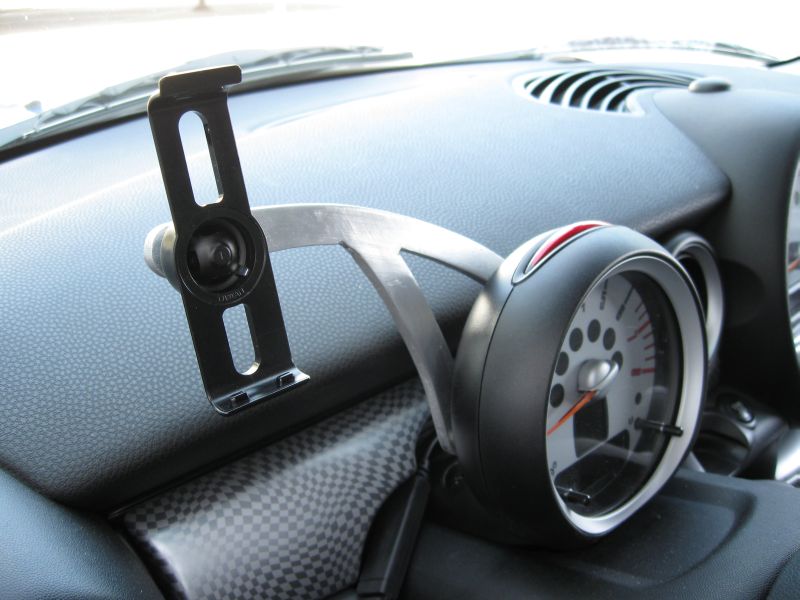
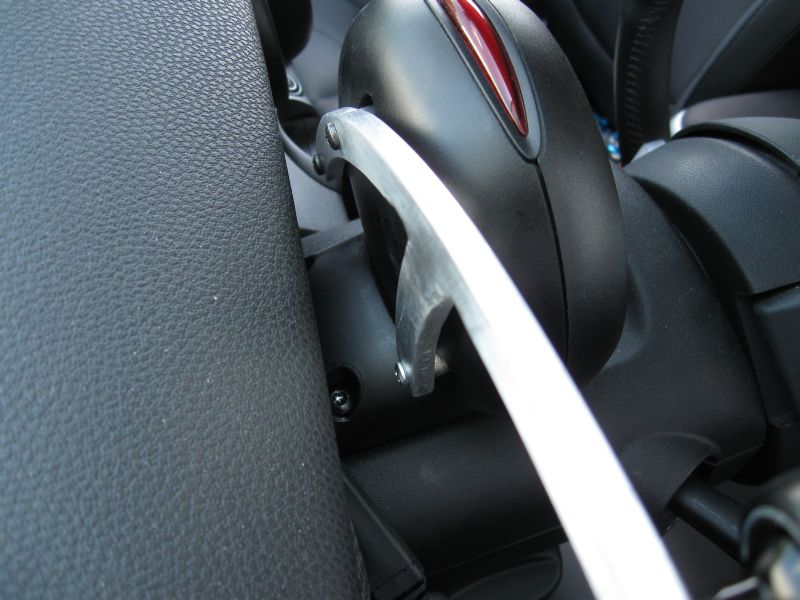
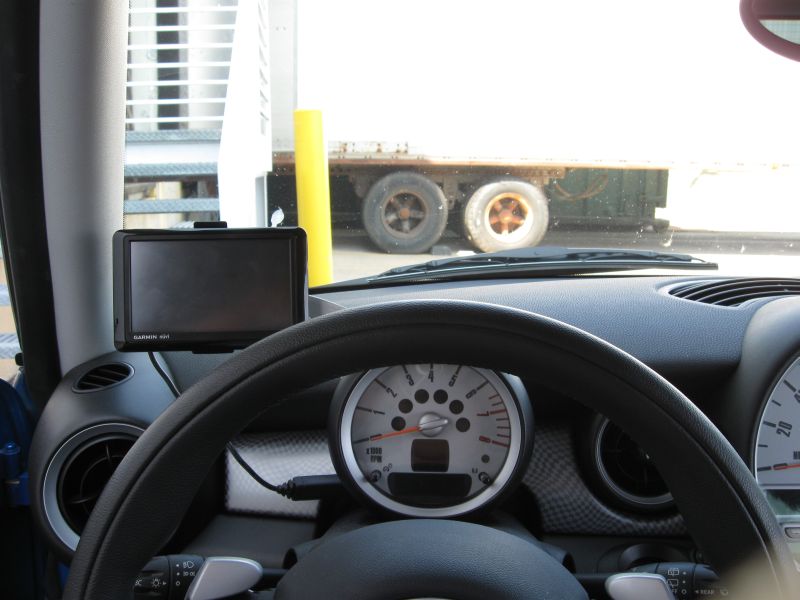
Here are a couple of pics. I'm still debating whether to paint it or leave it brushed aluminum.
3rd Gear
Joined: Sep 2008
Posts: 242
Likes: 4
I installed my CravenSpeed FlexPod mount yesterday. NIIICCE! I like it a lot. Very factory-like, yet unobtrusive. Small and light but stable. I took pix; I'll try to post one, but I've never done it before so here goes!
3rd Gear
Joined: Sep 2008
Posts: 242
Likes: 4
Love My Flexpod!!!!!!!!!!!!!!!!!!!!
Hi again. Here goes my attempt at posting photos.
This is the CravenSpeed FlexPod Garmin Nuvi mount for a 2009 MINI Cooper S. I didn't do anything with hard wiring my Nuvi (I have a Nuvi 880--LOVE IT! It accepts voice commands so you never have to even touch the unit), but the wiring stuff does come with the package. Best of all, I could choose the positioning of the unit, which is the benefit in my opinion of the FlexPod over the Fixie. Some of my pix were taken after dark, as I finished a bit late. Truth be told: I lost a *@&! screw and wasted a lot of time looking for it. Finally I used one that I had, which was silver, and later just touched it with flat black paint to make it blend in. In the below pix, you'll see the screw attaching the mount once in silver and later painted. Also, I like to leave the Nuvi mounting dock in-place and just take the unit with me. The dock removes easily from the ball/socket attachment, though.
This is the CravenSpeed FlexPod Garmin Nuvi mount for a 2009 MINI Cooper S. I didn't do anything with hard wiring my Nuvi (I have a Nuvi 880--LOVE IT! It accepts voice commands so you never have to even touch the unit), but the wiring stuff does come with the package. Best of all, I could choose the positioning of the unit, which is the benefit in my opinion of the FlexPod over the Fixie. Some of my pix were taken after dark, as I finished a bit late. Truth be told: I lost a *@&! screw and wasted a lot of time looking for it. Finally I used one that I had, which was silver, and later just touched it with flat black paint to make it blend in. In the below pix, you'll see the screw attaching the mount once in silver and later painted. Also, I like to leave the Nuvi mounting dock in-place and just take the unit with me. The dock removes easily from the ball/socket attachment, though.
I also have the Flexpod and like it, especially the potential to add a gauge down the road with an extension arm. However, I also want to hard wire the GPS without splicing. Does anyone know if the OEM harness kit is sold separately without the mount?
6th Gear
Joined: Feb 2008
Posts: 2,358
Likes: 1
From: Graham, NC
For those worried about splicing, which part are you worried about? That you have to splice into one of the MINI's wires? Or your GPS cable?
The hardwire itself can be wired into the fusebox using one of the add a fuse things that let's you add an extra fuse socket. So no need to splice an actual MINI wire.
The add a fuse does have to be connected to something - in my case I bought a power cable with bare ends to solder together. That was because I did not want to splice into the Garmin supplied power cord as I occassionally move the unit to a different vehicle.
The hardwire itself can be wired into the fusebox using one of the add a fuse things that let's you add an extra fuse socket. So no need to splice an actual MINI wire.
The add a fuse does have to be connected to something - in my case I bought a power cable with bare ends to solder together. That was because I did not want to splice into the Garmin supplied power cord as I occassionally move the unit to a different vehicle.