


Navigation & Audio GPS Mount


Thread Starter
|
1st Gear
Joined: Oct 2007
Posts: 16
Likes: 0
From: Miami FL
GPS Mount
i was looking around for a GPS mount I have seeb the KUDA and Proclip and don't really like the position. The Kuda looks alright but I wanted to mount it to the left of me steering wheel on the trim has anyone seen a mount that sounds like that. Oh yea BTW I have a tomtom 920t

6th Gear
Joined: Jul 2007
Posts: 2,881
Likes: 6
Kuda makes two mounts, but neither is on the left side. The only mount I've seen on the left are ones attached to the back of the tach. Unless you use a dash mount like the ones Garmin has (sticky pad). I'm not sure how well it would stick to the textured Mini dash though.

I just received a Garmin 340 for my birthday (thank you, Darling Wife!) and I'm trying to determine the best location for it. I really don't want it in my field of view but sticking it to the dash seems a little strange / out of place.
For now I'm mounting it to the windhshield on the far right side. I'll try it out this morning for the first time. If it works for me, I'll post a photo.
For now I'm mounting it to the windhshield on the far right side. I'll try it out this morning for the first time. If it works for me, I'll post a photo.

6th Gear
Joined: Jul 2007
Posts: 1,472
Likes: 0
From: Cincinnati, OH
I just received a Garmin 340 for my birthday (thank you, Darling Wife!) and I'm trying to determine the best location for it. I really don't want it in my field of view but sticking it to the dash seems a little strange / out of place.
For now I'm mounting it to the windhshield on the far right side. I'll try it out this morning for the first time. If it works for me, I'll post a photo.
For now I'm mounting it to the windhshield on the far right side. I'll try it out this morning for the first time. If it works for me, I'll post a photo.

3rd Gear
Joined: Apr 2007
Posts: 215
Likes: 0
After experimentation, I have found that the most convenient way to mount my Nuvi 350 is to stick the suction cup mount on the speedo fact in the NE corner, between the 90 and 120 MPH markers. Since I normally don't drive at these speeds (and there is a digital speed readout on the tach), no important information is obscured. The speedo mount is quite near the driver, so the screen appears large, and inputting data by hand is an easy reach. Power cord runs down to the lighter plug, tucked out of the way. A minimalist, no-hassel solution which works well. Perhaps not as elegant as some alternatives, but easy and effective.
6th Gear
Joined: Jul 2007
Posts: 2,881
Likes: 6
Some others here are doing the same thing. One nice thing about that method is you don't leave a ring on the inside of your window from the suction cup. Announcing to thieves there is a portable GPS or other device in the car.

1st Gear
Joined: Jul 2006
Posts: 23
Likes: 0
From: New York
GPS Mount...
My placement is a little different, suction cup mount on the sunroof for my Mio Walker...but works on the spedometer as well...
Trending Topics

6th Gear
Joined: Mar 2007
Posts: 2,507
Likes: 0
From: Kent, CT
The suggestion of using a suction cup on that part of the speedometer sounds like one of the best and easiest options yet. Thank you! Now, perhaps, someday I may break down and buy a GPS.
Many thanks to all who post here about their various methods, etc. Not being interested in taking apart dash boards or rewiring...this sounds hopeful for someone like me. May I ask - do you just run your wire down the side?
Many thanks to all who post here about their various methods, etc. Not being interested in taking apart dash boards or rewiring...this sounds hopeful for someone like me. May I ask - do you just run your wire down the side?
3rd Gear
Joined: Apr 2007
Posts: 215
Likes: 0
The power wire runs down towards the inside edge of the glove compartment, where the excess length is coiled, wired and hidden. An appropriate length emerges form the glove compartment and runs down to the lighter socket. Minimally intrusive. When not using the GPS, I simply leave the mount/wire on the speedo and keep the GPS in the secret compartment.

1st Gear
Joined: Nov 2007
Posts: 39
Likes: 0
After experimentation, I have found that the most convenient way to mount my Nuvi 350 is to stick the suction cup mount on the speedo fact in the NE corner, between the 90 and 120 MPH markers. Since I normally don't drive at these speeds (and there is a digital speed readout on the tach), no important information is obscured. The speedo mount is quite near the driver, so the screen appears large, and inputting data by hand is an easy reach. Power cord runs down to the lighter plug, tucked out of the way. A minimalist, no-hassel solution which works well. Perhaps not as elegant as some alternatives, but easy and effective.
6th Gear
Joined: Jul 2007
Posts: 2,881
Likes: 6
http://www.arkon.com/
Makes really high quality stuff. They OEM ones that come with the many devices are made by this company.
Makes really high quality stuff. They OEM ones that come with the many devices are made by this company.


5th Gear
Joined: Nov 2007
Posts: 680
Likes: 0
From: Brighton, MI
I just put my Kuda mount in last weekend, and I really like it. It's super convenient to use while moving (carefully!), but my passenger can still mess around with it if he/she wants to or I'm occupied (driving!).
The MINI mount is the only one I saw that goes on the left, but it's something like $175 for the mount and wiring together.
The MINI mount is the only one I saw that goes on the left, but it's something like $175 for the mount and wiring together.
6th Gear
Joined: Jul 2007
Posts: 2,881
Likes: 6
I've used the cup holder mount with my 76CSx. It works just fine in the Mini's cupholders. I don't like cig lighter mounts as all the weight of the mount and device are pressing on the lighter socket. Over time this will wear it out.
6th Gear
Joined: Mar 2007
Posts: 2,507
Likes: 0
From: Kent, CT
Here is a really dumb question is a 12/24 volt adapter cable the same thing as the cigarette lighter adapter? From Amazon's site:
Again, thanks for all your help.
is a 12/24 volt adapter cable the same thing as the cigarette lighter adapter? From Amazon's site:
Again, thanks for all your help.
is a 12/24 volt adapter cable the same thing as the cigarette lighter adapter? From Amazon's site:
What's in the Box
Gamin nüvi 360, Preloaded City Navigator NT North America or Europe (full coverage), vehicle suction cup mount, AC charger, 12/24 volt adapter cable, dashboard disk, USB interface cable, carrying case, owner's manual, and quick reference guide.
Gamin nüvi 360, Preloaded City Navigator NT North America or Europe (full coverage), vehicle suction cup mount, AC charger, 12/24 volt adapter cable, dashboard disk, USB interface cable, carrying case, owner's manual, and quick reference guide.


1st Gear
Joined: May 2008
Posts: 38
Likes: 0
From: r.i.
garmin gps
hi,
i've a garmin gps and what i did was to buy some velcro with the sticky back. stick one side to the bottom of the gps and the other to either the dash or in front of instrument behind steering wheel. when you want to use it, simply attached the gps to the other piece of velcro. works great!
i've a garmin gps and what i did was to buy some velcro with the sticky back. stick one side to the bottom of the gps and the other to either the dash or in front of instrument behind steering wheel. when you want to use it, simply attached the gps to the other piece of velcro. works great!


The arm on my Garmin setup for Tasha moves, so I keep it right over the tach a lot of the time. Except on road trips when my wife wants to see the map too.

Craven has some 'Fixie' mounts too that don't move but are a great deal for Gen 2 MINI drivers.
__________________


6th Gear
Joined: May 2007
Posts: 3,789
Likes: 10
From: Kansas City
I don't understand sticking it down low where you have to take you eyes so far off the road to see it.
To me the best location is like that in the pic above, either left or right of the tach...
Here's where mine sits...I prefer it to the left, as you can see. That way it doesn't block my view forward and it's very easy to reach to key in information or change screens. This is one of the newer Garmin wide screens - a 1490T.
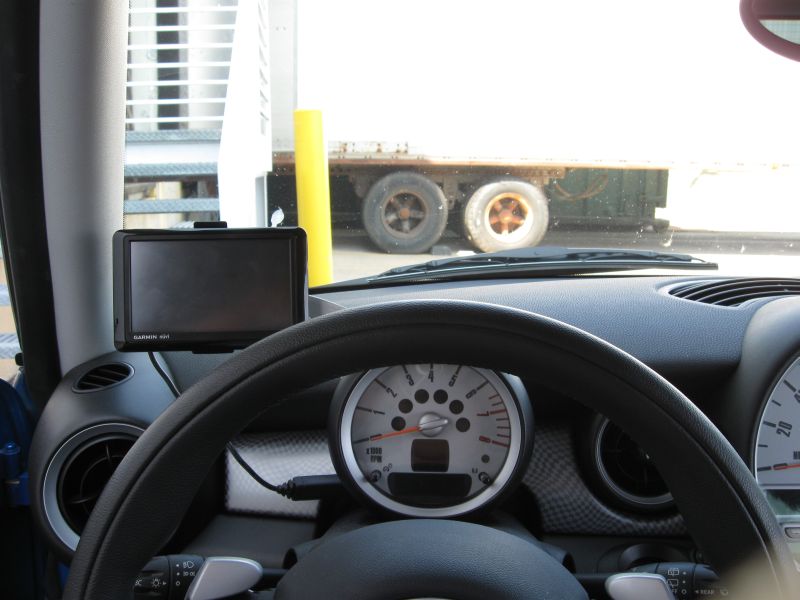
To me the best location is like that in the pic above, either left or right of the tach...
Here's where mine sits...I prefer it to the left, as you can see. That way it doesn't block my view forward and it's very easy to reach to key in information or change screens. This is one of the newer Garmin wide screens - a 1490T.

MINIDave, nice setup. The final location looks like where the Fixie locates the GPS. It can face right or left.
__________________

Thread
Thread Starter
Forum
Replies
Last Post
Navigation & Audio HK Replacement With New Components
Filmy
Navigation & Audio
15
Jun 6, 2023 06:27 AM
elverado
R56 :: Hatch Talk (2007+)
2
Jan 18, 2022 02:51 AM
Mini Mania
Interior/Exterior Products
0
Sep 4, 2015 02:34 PM

