


Electrical Brake wear indicator


Brake wear indicator
Light went on. Replaced rotors, pads and wear indicators. Light still on. Went out the next morning but came on again after a few miles. Does it need reset? I thought they're suppose to go away after replacing indicators. Help!!! It keeps on staring at me.


Is that the thingy were you hold down the odometer **** while turning on the ignition? Ok I did that one five years ago for something else. I thought I can just use a reset tool. Thanks for the info.

Did resetting the OBC work out?
__________________
Your Trusted Source For DIY and Parts
FREE SHIPPING over $99 click here
MINI Parts | DIY Help | Facebook | Twitter | Instagram | YouTube | Promos
888.280.7799 | 6am - 5pm PST

FREE SHIPPING over $99 click here
MINI Parts | DIY Help | Facebook | Twitter | Instagram | YouTube | Promos
888.280.7799 | 6am - 5pm PST
Could not find my copy of the proceedure. Went to minimania and could not find it on their site. Maybe someone will send me the link to it. Thanks for checking on the outcome.
-https://www.northamericanmotoring.com/forums/tires-wheels-and-brakes/125534-resetting-brake-pad-sensor-light-how.html
__________________
Your Trusted Source For DIY and Parts
FREE SHIPPING over $99 click here
MINI Parts | DIY Help | Facebook | Twitter | Instagram | YouTube | Promos
888.280.7799 | 6am - 5pm PST
FREE SHIPPING over $99 click here
MINI Parts | DIY Help | Facebook | Twitter | Instagram | YouTube | Promos
888.280.7799 | 6am - 5pm PST
I did the 30+ wait before start up and the light went out. After a couple of miles it went on again. Tried it again before start up but it did the same. I'm wondering if the lenghty procedure will work permanently. Still looking for that info. =(
Trending Topics

6th Gear
Joined: Sep 2005
Posts: 3,925
Likes: 2
From: Laurel MD
Check your sensors and make sure you didn't nick one. If you did, the light will come back on. There is nothing one the first gen that has to be reset, just what you have done. The above information by Yetti is incorrect.

OVERDRIVE
Joined: Jul 2006
Posts: 7,037
Likes: 283
From: Melbourne, FL
Saying the same thing as daflake.....
It looks to me like you either damaged a sensor - the wires are really really thin - or it is not plugged in correctly. Either way the car is still seeing an "open circuit" just as it would for a worn sensor. Everytime you reset it, it looks and sees "open" aka "worn"
hopefully you did not do front and rear in one session. 'cuz if you did finding the source is gonna be harder. If you just did, say the fronts, then you know the problem is isolated to that sensor. I think the darn things are worthless so I just short them out. Or short them IN maybe!
FIRST - triple check the connector for the replacement sensor . . . make sure it was clean and tight.
If this doesn't work then
I'd try to cut out the sensor, snip the wires going to the sensor (you might get away with reusing the OLD sensor for this, basicaly build a jumper to fool the system for a test)
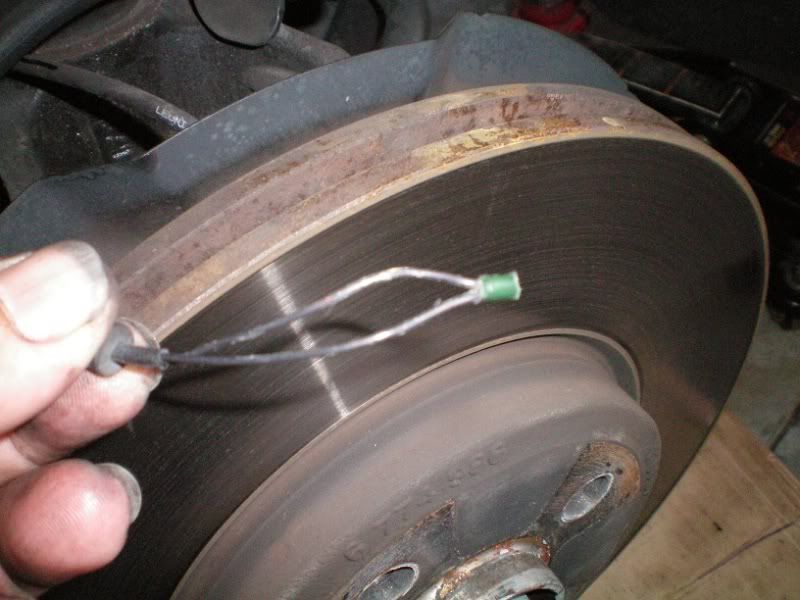
then tie the two ends together and zip-tie the wire someplace safe, then try the reset.
if you did front and back at the same time ... sorry, now you know why I do fronts, then drive for two weeks, then do rear (on the rare occasion I need both ends at the same time)
It looks to me like you either damaged a sensor - the wires are really really thin - or it is not plugged in correctly. Either way the car is still seeing an "open circuit" just as it would for a worn sensor. Everytime you reset it, it looks and sees "open" aka "worn"
hopefully you did not do front and rear in one session. 'cuz if you did finding the source is gonna be harder. If you just did, say the fronts, then you know the problem is isolated to that sensor. I think the darn things are worthless so I just short them out. Or short them IN maybe!
FIRST - triple check the connector for the replacement sensor . . . make sure it was clean and tight.
If this doesn't work then
I'd try to cut out the sensor, snip the wires going to the sensor (you might get away with reusing the OLD sensor for this, basicaly build a jumper to fool the system for a test)
then tie the two ends together and zip-tie the wire someplace safe, then try the reset.
if you did front and back at the same time ... sorry, now you know why I do fronts, then drive for two weeks, then do rear (on the rare occasion I need both ends at the same time)
__________________
Your Trusted Source For DIY and Parts
FREE SHIPPING over $99 click here
MINI Parts | DIY Help | Facebook | Twitter | Instagram | YouTube | Promos
888.280.7799 | 6am - 5pm PST
FREE SHIPPING over $99 click here
MINI Parts | DIY Help | Facebook | Twitter | Instagram | YouTube | Promos
888.280.7799 | 6am - 5pm PST

Thread
Thread Starter
Forum
Replies
Last Post
Interior/Exterior Unboxing Video of Sneed4Speed R53 Brake Cooling Kit
Gremothra
Interior/Exterior
3
Sep 9, 2015 08:42 PM
wildwestrider
R50/R53 :: Hatch Talk (2002-2006)
4
Sep 4, 2015 06:25 AM
squawSkiBum
MINI Parts for Sale
0
Sep 2, 2015 09:56 PM