


Electrical iPhone + Cravenspeed Mount + Rev App + PLX KiWi OBDII WiFi adaptor = Slick


Thread Starter
|
2nd Gear
Joined: Jan 2012
Posts: 87
Likes: 0
iPhone + Cravenspeed Mount + Rev App + PLX KiWi OBDII WiFi adaptor = Slick
I am a new mini cooper owner and this was my first "Mod" and I thought I would post it.
I was in need of a way to reset check engine light codes on my mini because of a misfire when it was really cold out. I wanted to reset it and see if it came back on before making a long trip to a mini dealer or paying a repair place to look at it.
I have my iPhone with me all the time, so I wanted to see if there was something I could use to incorporate it with the code reader/reset tool. That is where I found the App REV and the PLX KiWi OBDII WiFi device. I will post links after pictures.
After looking at what the REV app can do I figured this would be a way I could have a few options like reading boost as well as having a code reader/reset tool and because I wanted a way to mount my iPhone anyways this just all seemed to work well together.
I am happy to say that my CEL has not came back on and I think the REV app is very cool. I plan on hardwiring a power plug for the phone that will run behind the gauge and have a better mounting position for the KiWi adaptor. When it stops snowing and gets over 30 deg I will try to get that done!
Ok here are some pictures!

(I was using my iPhone for the pictures so this is an iPod Touch...)

At night when I had it on the other side.

A picture showing the mount and app in Portrait mode.
Very quick video because it was not very nice out!
Here are the links to what I am using:
Craven Speed Mount
Universal Scissor - http://www.cravenspeed.com/flexpod-individual-modules/
Bracket W - http://www.cravenspeed.com/mini-flexpod-brackets/
PLX KiWi WiFi
http://www.plxkiwi.com/kiwiwifi/ (I bought mine on amazon.com)
REV
iPhone App - http://www.devtoaster.com/products/rev/
I was in need of a way to reset check engine light codes on my mini because of a misfire when it was really cold out. I wanted to reset it and see if it came back on before making a long trip to a mini dealer or paying a repair place to look at it.
I have my iPhone with me all the time, so I wanted to see if there was something I could use to incorporate it with the code reader/reset tool. That is where I found the App REV and the PLX KiWi OBDII WiFi device. I will post links after pictures.
After looking at what the REV app can do I figured this would be a way I could have a few options like reading boost as well as having a code reader/reset tool and because I wanted a way to mount my iPhone anyways this just all seemed to work well together.
I am happy to say that my CEL has not came back on and I think the REV app is very cool. I plan on hardwiring a power plug for the phone that will run behind the gauge and have a better mounting position for the KiWi adaptor. When it stops snowing and gets over 30 deg I will try to get that done!
Ok here are some pictures!
(I was using my iPhone for the pictures so this is an iPod Touch...)
At night when I had it on the other side.
A picture showing the mount and app in Portrait mode.
Very quick video because it was not very nice out!
Here are the links to what I am using:
Craven Speed Mount
Universal Scissor - http://www.cravenspeed.com/flexpod-individual-modules/
Bracket W - http://www.cravenspeed.com/mini-flexpod-brackets/
PLX KiWi WiFi
http://www.plxkiwi.com/kiwiwifi/ (I bought mine on amazon.com)
REV
iPhone App - http://www.devtoaster.com/products/rev/
Last edited by TSur; Jan 24, 2012 at 11:18 AM.

5th Gear
Joined: Apr 2007
Posts: 635
Likes: 0
From: Near Boston, MA
ok, this video is neat -- http://www.youtube.com/watch?v=Anw7Uwx_xRU
Rev looks familiar... feels like I once had that program, version 1? You were supposed to put the phone in a solid holder and it used the accelerometer to do stuff like 0-60? Can you confirm that through the OBD-II the phone can read all this stuff... from the car's DSC or something? Or are they still doing some calculations off of the phones sensors?
Rev looks familiar... feels like I once had that program, version 1? You were supposed to put the phone in a solid holder and it used the accelerometer to do stuff like 0-60? Can you confirm that through the OBD-II the phone can read all this stuff... from the car's DSC or something? Or are they still doing some calculations off of the phones sensors?
Thread Starter
|
2nd Gear
Joined: Jan 2012
Posts: 87
Likes: 0
ok, this video is neat -- http://www.youtube.com/watch?v=Anw7Uwx_xRU
Rev looks familiar... feels like I once had that program, version 1? You were supposed to put the phone in a solid holder and it used the accelerometer to do stuff like 0-60? Can you confirm that through the OBD-II the phone can read all this stuff... from the car's DSC or something? Or are they still doing some calculations off of the phones sensors?
Rev looks familiar... feels like I once had that program, version 1? You were supposed to put the phone in a solid holder and it used the accelerometer to do stuff like 0-60? Can you confirm that through the OBD-II the phone can read all this stuff... from the car's DSC or something? Or are they still doing some calculations off of the phones sensors?
I haven't really gotten to play with it a lot because the weather here has been bad. I got this mostly for checking and resetting CEL codes. The fact that it could do boost using the OBD among other things was icing on the cake for me. I was going to get a boost gauge at some point. I know it reads RPM, Temp, MPH, Throttle and a bunch of others using the OBD.
I know it does use the accelerometer for some things like Fwd Accel and Lat Accel. I don't know about the 0-60. I assume it will just show you your fastest time you accelerated from 0-60 from a data log.
They have a "Lite" version but you will still need the $150 wifi adaptor to view the obc stuff.
Last edited by TSur; Jan 24, 2012 at 11:18 AM.


5th Gear
Joined: Mar 2011
Posts: 638
Likes: 0
From: Drty Jerz
Wow this is really cool how modern technology can be used with our cars ... for someone thats looking to purchase a OBDII do you recommend us just buy one or should we invest into the app ??? most of the OBD II ive looked at arent over 100 dollars ...
Thread Starter
|
2nd Gear
Joined: Jan 2012
Posts: 87
Likes: 0
If you just want to read codes and be able to reset them I would just get the reader and save some money.
5th Gear
Joined: Mar 2011
Posts: 638
Likes: 0
From: Drty Jerz
thanks for the response. going to go with the reader and save some money. But its still cool how these devices work with the car. but I am in sales and work for a wireless company and will incorporate this isnt my pitches for smart phones !! KUDOS !!
Trending Topics

4th Gear
Joined: Jul 2008
Posts: 317
Likes: 1
From: Los Angeles
I was thinking about the android app and Bluetooth obdii thing.
Do you need to unplug the transmitter when leaving the car so it doesn't drain the battery?
I was told that it would still draw power from the obdii port even if the car is off.
Do you need to unplug the transmitter when leaving the car so it doesn't drain the battery?
I was told that it would still draw power from the obdii port even if the car is off.
Thread Starter
|
2nd Gear
Joined: Jan 2012
Posts: 87
Likes: 0
It does draw power when turned off. The wifi adaptor does have an on off switch, but I plan on at some point doing a hardwire type solution. This would be just getting a different cable extension and taking out the power cable and running power from the cig lighter. For now I will be lazy and use the on/off switch.

It does draw power when turned off. The wifi adaptor does have an on off switch, but I plan on at some point doing a hardwire type solution. This would be just getting a different cable extension and taking out the power cable and running power from the cig lighter. For now I will be lazy and use the on/off switch.
Just lost me on this one.

Let me know how it goes setting it up on a switched power source.

I wish they'd make Rev to use something other than WiFi OBD-II connections.
I use this GoPoint cable:
http://www.amazon.com/gp/product/B00...00_i00_details
with my iPhone, which charges my iPhone and *doesn't* need switching off. A different iPhone app, DashCommand, can speak to it, but isn't nearly as slick as Rev. At the moment, I'm just happy to have it since it *does* provide a charger for my iPhone w/o using the 12v lighter outlet, and read OBD-II codes as needed.
Palmer Engineering, makers of DashCommand, provide a skin-making kit to build one's own interface, but I haven't had time/inclination to try that.
The search continues.
I use this GoPoint cable:
http://www.amazon.com/gp/product/B00...00_i00_details
with my iPhone, which charges my iPhone and *doesn't* need switching off. A different iPhone app, DashCommand, can speak to it, but isn't nearly as slick as Rev. At the moment, I'm just happy to have it since it *does* provide a charger for my iPhone w/o using the 12v lighter outlet, and read OBD-II codes as needed.
Palmer Engineering, makers of DashCommand, provide a skin-making kit to build one's own interface, but I haven't had time/inclination to try that.
The search continues.

1st Gear
Joined: Jan 2012
Posts: 35
Likes: 0
From: Washington, DC
Here's my set up. 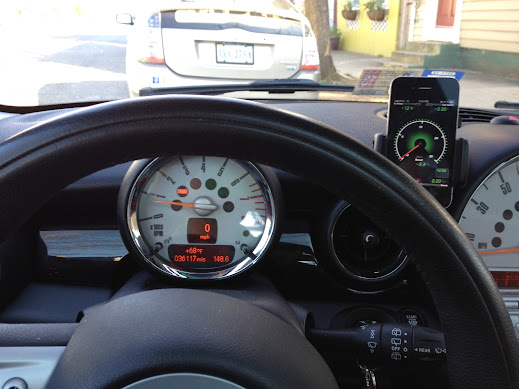
I had my impressions detailed in this thread - https://www.northamericanmotoring.co...es-please.html
Absolutely love it.
I had my impressions detailed in this thread - https://www.northamericanmotoring.co...es-please.html
Absolutely love it.


I don't think Rev does. Some of the various ODBII apps let you define custom PIDs but then the hardware device must also be able to read the additional codes. The Scangauge guys looked to be able to read oil temp just in the last few weeks.


2nd Gear
Joined: Jan 2011
Posts: 71
Likes: 1
Does anybody have experience (good or bad) with the GoPoint BT1A Bluetooth and an iPhone in a Mini?
http://gopointtech.com/products/
Vince
http://gopointtech.com/products/
Vince

Neutral
Joined: Mar 2010
Posts: 8
Likes: 0
I have been wanting to install an good mount to hold my iphone in my 2007 Cooper.
I saw that CarvenSpeed mount comes with a Hidden Wiring kit right? Could anyone please share their experience with me if you did get a chance to install the hidden wiring (hard-wiring) for the iPhone mount?
Craven's instructions for installing their Hidden Wiring kit on their website were very vague. If you have any other suggestions for an iPhone mount with nice hidden wiring setup please let me know.
Any pictures or instructions would be very helpful and greatly appreciated!
Thank you so much for your time and help!
Pree
I saw that CarvenSpeed mount comes with a Hidden Wiring kit right? Could anyone please share their experience with me if you did get a chance to install the hidden wiring (hard-wiring) for the iPhone mount?
Craven's instructions for installing their Hidden Wiring kit on their website were very vague. If you have any other suggestions for an iPhone mount with nice hidden wiring setup please let me know.
Any pictures or instructions would be very helpful and greatly appreciated!
Thank you so much for your time and help!
Pree

2nd Gear
Joined: Apr 2013
Posts: 51
Likes: 0
I wish they'd make Rev to use something other than WiFi OBD-II connections.
I use this GoPoint cable:
http://www.amazon.com/gp/product/B00...00_i00_details
with my iPhone, which charges my iPhone and *doesn't* need switching off. A different iPhone app, DashCommand, can speak to it, but isn't nearly as slick as Rev. At the moment, I'm just happy to have it since it *does* provide a charger for my iPhone w/o using the 12v lighter outlet, and read OBD-II codes as needed.
Palmer Engineering, makers of DashCommand, provide a skin-making kit to build one's own interface, but I haven't had time/inclination to try that.
The search continues.
I use this GoPoint cable:
http://www.amazon.com/gp/product/B00...00_i00_details
with my iPhone, which charges my iPhone and *doesn't* need switching off. A different iPhone app, DashCommand, can speak to it, but isn't nearly as slick as Rev. At the moment, I'm just happy to have it since it *does* provide a charger for my iPhone w/o using the 12v lighter outlet, and read OBD-II codes as needed.
Palmer Engineering, makers of DashCommand, provide a skin-making kit to build one's own interface, but I haven't had time/inclination to try that.
The search continues.
Cool
 So there's an app for that
  But no cable, Amazon is out
 The mounts are nice too. But real expenisve. I looked at something that would let me do 2 devices and it's $150 for 3 plastic pieces. Wish they had group buy or a sale.
Altogether what does this set up run someone. I think $150 for mounting. Maybe $75 for special cable. $50 for app. Plus $25 to wire right. So abotu $300. Is that what most have spent?

Just a quick heads up...because it'll probably be for a limited time only but right now the app for iPhones: DashCommand – OBD-II gauge dashboards, scan tool, and vehicle diagnostics is 'on sale' for just $9.99 vs. $49.99 usually.
iTunes: http://appshopper.com/link/dashcommand
Keep in mind it also needs a way to communicate with the OBD II (wired or via Bluetooth)
iTunes: http://appshopper.com/link/dashcommand
Keep in mind it also needs a way to communicate with the OBD II (wired or via Bluetooth)

Thread
Thread Starter
Forum
Replies
Last Post
wheresaldo
MINI Parts for Sale
5
Oct 23, 2015 10:17 AM
cb_smalls
MINI Parts for Sale
5
Aug 31, 2015 06:13 AM
Bruce/Fl
R56 :: Hatch Talk (2007+)
9
Aug 28, 2015 11:59 AM
